FIELD GUIDESource-led reference

P008 / Video / Connector reference

HDMI Type-A

The familiar full-size HDMI connector is Type-A; Mini and Micro HDMI use different physical forms. [C008A]

A full-size HDMI socket does not prove a particular HDMI feature set.

Claim inspection dates: 2026-10-01, 2026-10-06, 2026-10-08, 2026-10-11, 2026-10-13 · Independent review pending

Recognize full-size HDMI

Look for

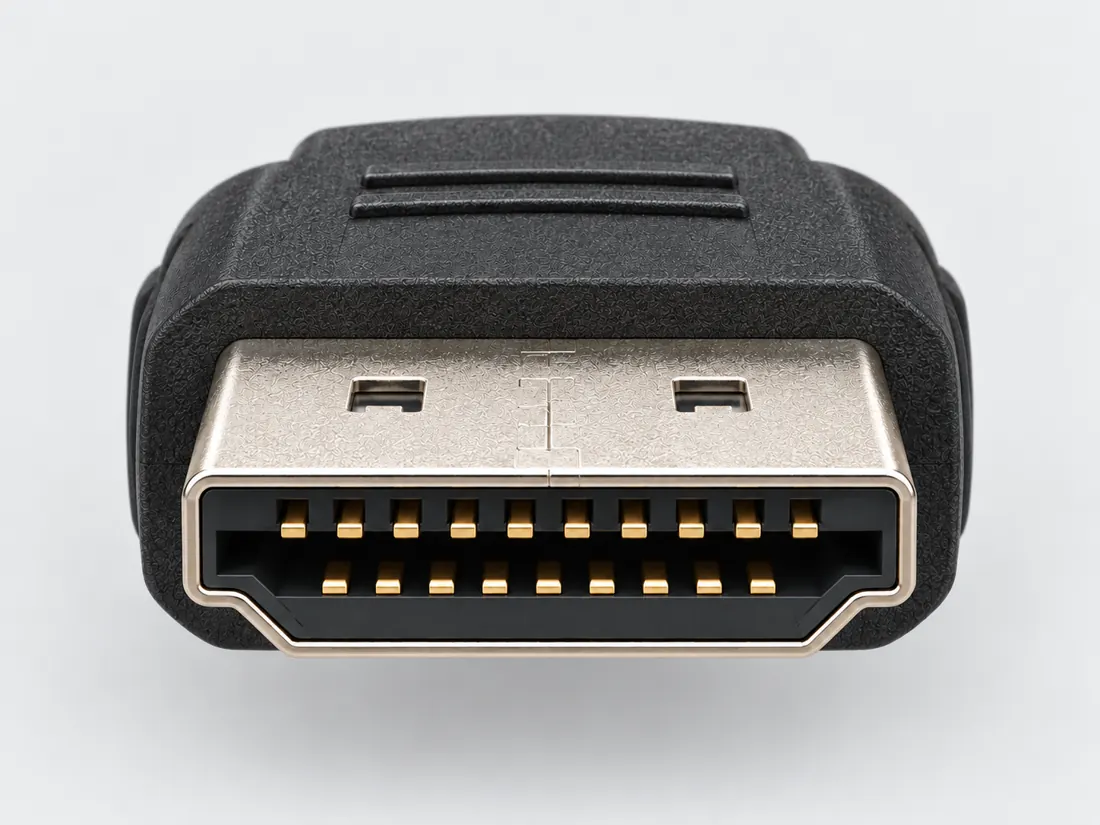
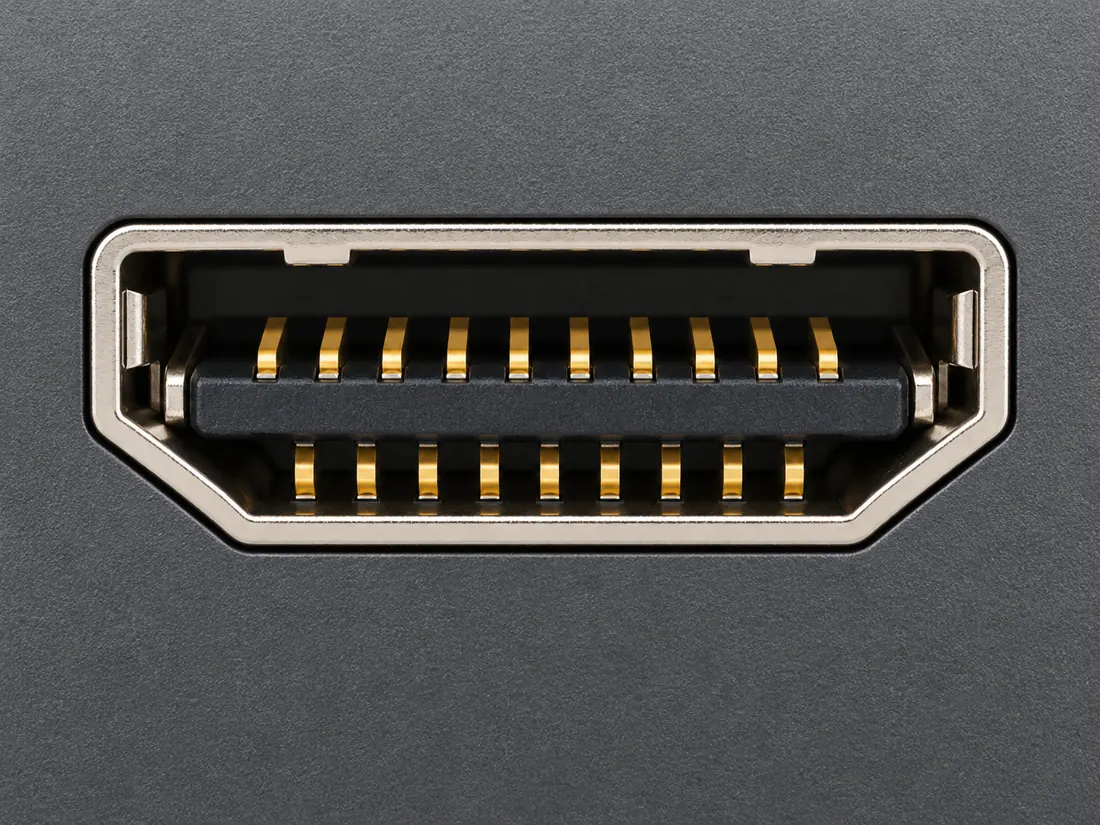
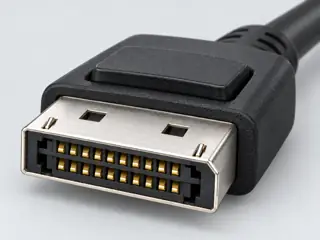
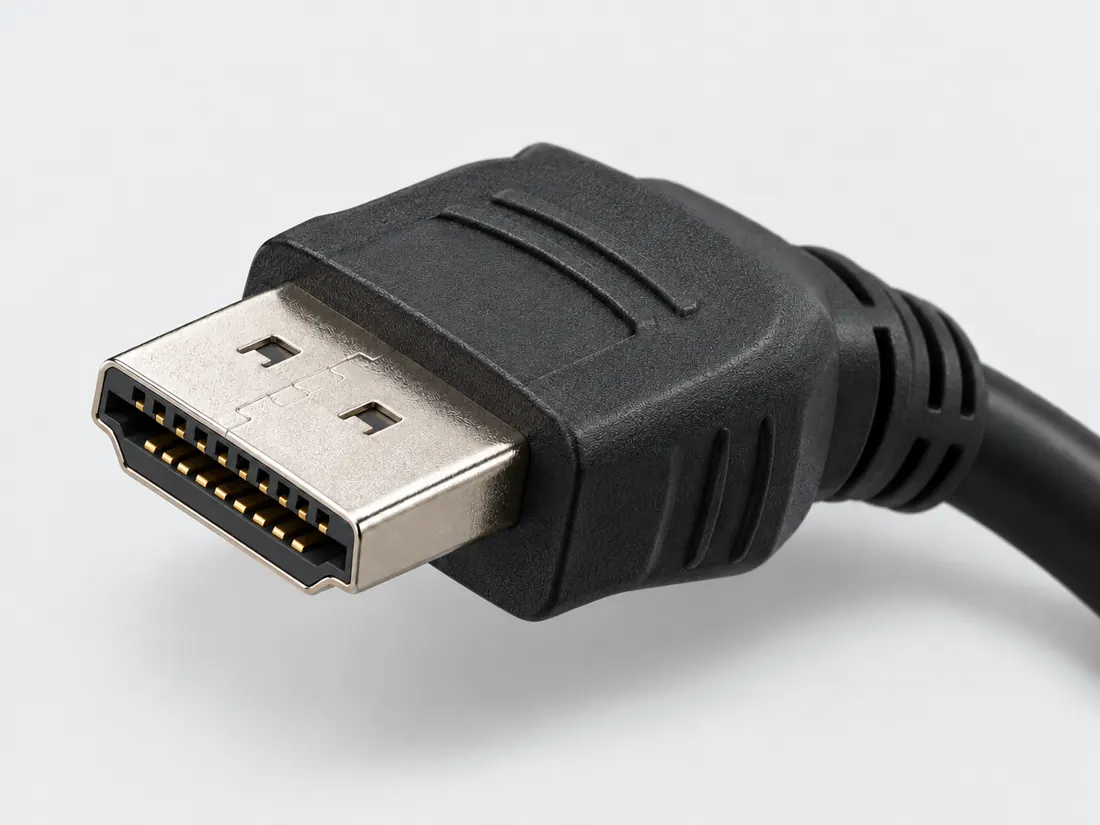
Look for a wide keyed connector with angled lower edges. Distinguish it from DisplayPort, whose silhouette has a different corner treatment.

Identify the documented form

Identify full-size HDMI, then follow the source-to-display path.

  1. Type-A is the full-size HDMI form; Mini Type-C and Micro Type-D are different physical forms. S018
  2. On Elgato 4K X, HDMI input, HDMI passthrough output and USB capture connection are different roles. S450 · S451
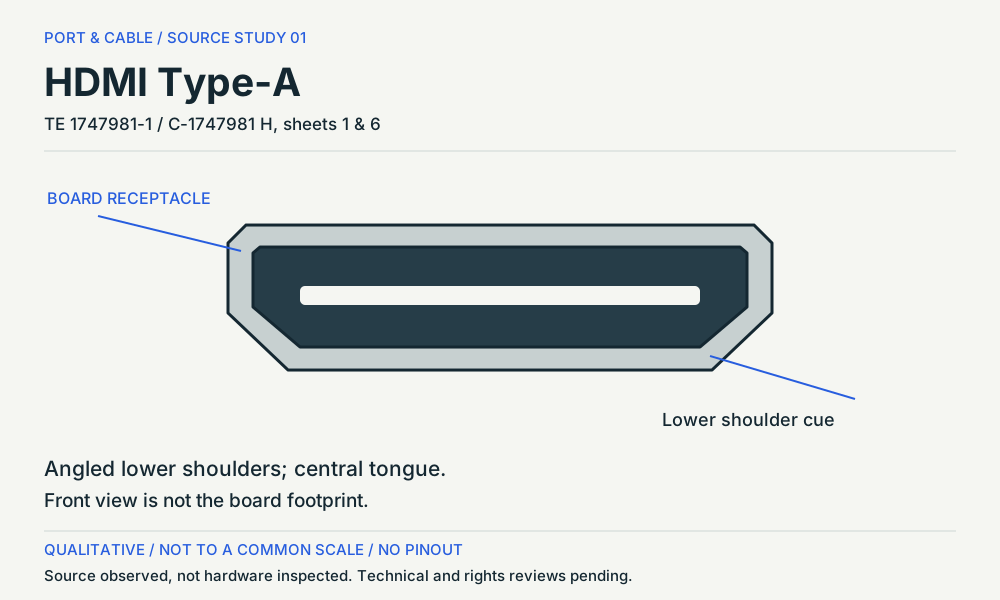
  3. The cited TE board receptacle drawing separates its mating face from the reference PCB layout. Do not read a mounting pattern as the plug face. S606
Documented identity facts; exact part and variant scope remains with each value
Nominal contacts19S018 · S365plug and receptacle interface; nominal engineering count, not automatically positions, population or a device wiring map. plug and receptacle interface
Positions / cavity span19 (Claim C008C)S365Recorded source-scoped values; named examples do not describe every family variant or establish compatibility. Connector-form contact count supported by one manufacturer example; protocol/version capability explicitly excluded.
Populated contactsNot recordedNot recorded in a normalized source-scoped field. Consult the exact part/revision; no value inferred from illustrations.
Connector roleplug; socket; socket (1747981-1)S018 · S365 · S365Separate exact examples; retain each value’s source, role, axis and part scope. plug and receptacle interface Exact named example 1747981-1: HDMI Type-A board receptacle. Exact example only; no universal geometry, electrical compatibility, fabrication approval or wiring instruction. Pitch is TE’s named centerline attribute for this component, not a complete HDMI mating gauge; original count-only source scope needs explicit successor expansion.
Rows, pitch, dimensions, keying and view limits
Additional scoped facts; not a fabrication drawing or a mating approval
Contact rows2 (DellP2222H/P2422H/P2722H connected HDMI signal cable)S666Qualified exact source facts only; counterpart, mounting-acceptance, cable, port, termination and assembly context remains separately labelled in variant_notes. Exact DellP2222H/P2422H/P2722H manual RevA01 HDMI connected-cable face, not PCB/solder-side layout or every HDMI component. Quantity context: Two physical contact rows in source connected-signal-cable face.
Contact pitch1 mm manufacturer-reported centerline or mating-interface pitch (1747981-1)S365Separate exact examples; retain each value’s source, role, axis and part scope. Exact named example 1747981-1: HDMI Type-A board receptacle. Exact example only; no universal geometry, electrical compatibility, fabrication approval or wiring instruction. Pitch is TE’s named centerline attribute for this component, not a complete HDMI mating gauge; original count-only source scope needs explicit successor expansion.
Dimensions / axisNot recordedNot recorded in a normalized source-scoped field. Consult the exact part/revision; no value inferred from illustrations.
Coupling / latchNot recordedNot recorded in a normalized source-scoped field. Consult the exact part/revision; no value inferred from illustrations.
Keying / polarizationNot recordedNot recorded in a normalized source-scoped field. Consult the exact part/revision; no value inferred from illustrations.
View conventionDell manual connected-signal-cable view: odd contact numbers19 through1 run left to right above even18 through2. (Dell P2222H/P2422H/P2722H connected HDMI signal cable)S666Exact source-view examples remain separate from other roles, parts and generated schematics. Dell P2222H/P2422H/P2722H RevA01 manual explicitly labels the19-pin side of the connected signal cable. This source cable-face convention is not a PCB, solder-side or universal HDMI orientation. No assignments added.
Contact gender / arrangementNot recordedNot recorded in a normalized source-scoped field. Consult the exact part/revision; no value inferred from illustrations.
Mountingright-angle top-mount surface-mount (1747981-1)S365Separate exact examples; retain each value’s source, role, axis and part scope. Exact named example 1747981-1: HDMI Type-A board receptacle. Exact example only; no universal geometry, electrical compatibility, fabrication approval or wiring instruction. Pitch is TE’s named centerline attribute for this component, not a complete HDMI mating gauge; original count-only source scope needs explicit successor expansion.
Shell / formNot recordedNot recorded in a normalized source-scoped field. Consult the exact part/revision; no value inferred from illustrations.
ManufacturerTE Connectivity (1747981-1)S606Recorded source-scoped values; named examples do not describe every family variant or establish compatibility. V146: Named drawing family and suffix table only. The drawing does not establish an installed port’s input/output role or HDMI feature set.
SeriesHDMI (1747981-1)S606Recorded source-scoped values; named examples do not describe every family variant or establish compatibility. V146: Named drawing family and suffix table only. The drawing does not establish an installed port’s input/output role or HDMI feature set.
Exact part / implementation1747981-1 (1747981-1)S606Recorded source-scoped values; named examples do not describe every family variant or establish compatibility. V146: Named drawing family and suffix table only. The drawing does not establish an installed port’s input/output role or HDMI feature set.
Recorded markingsNot recordedNot recorded in a normalized source-scoped field. Consult the exact part/revision; no value inferred from illustrations.

Keep this limit: An HDMI version label does not promise every optional feature, and a visible passthrough image does not prove capture support. S012 · S452

Make the next check

Identify the actual input/output labels and check the required video mode in both endpoint manuals.

Existing source inspection and AI review remain distinct from independent technical review. A matching form does not establish a safe connection.

Recorded variant and source limits
  • HDMI version and supported video/audio features are not encoded by the connector silhouette.
  • No universal fabrication dimensions or product-specific signal capability are published in this profile.
  • Dell P2222H/P2422H/P2722H TMDS allocation: Dell's connected-cable mating-face drawing, p. 30: odd contacts 19→1 left to right above; even contacts 18→2 left to right below. This is the source's cable-face convention, not a PCB or solder-side drawing.
  • VLSI VS1010 ARC board HDMI0 connector-symbol allocation: Numbered HDMI0 symbol; use contact numbers. The schematic is not a mating-face drawing; cable-face orientation is cross-referenced to the Dell figure.
  • HDMI fixed-rate link (FRL) role reassignment — unverified: A numbered Type-A FRL mating-face map was not established from the retrieved datasheet.
  • Prior view context (not a source-view value): Contact count only; no numbered mating-face layout or fabrication geometry is reproduced.
Report a correction to this identification or view →

Visual reference / P008

Follow both angled shoulders.

PLUG + PORT

Recognition, not measurement. Each drawing is fitted independently: equal boxes do not mean equal sizes. Contact detail is deliberately omitted.

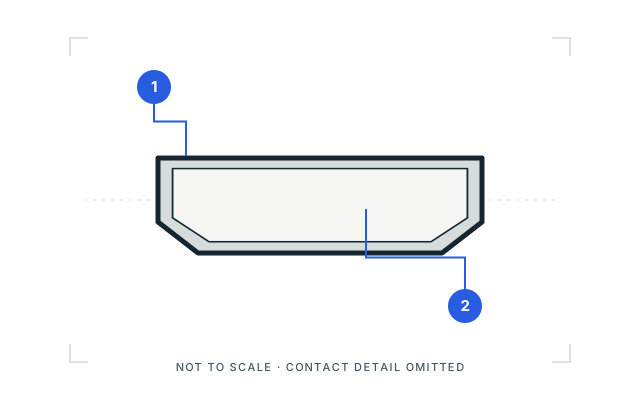
01 / Cable-end plugMating-face outline
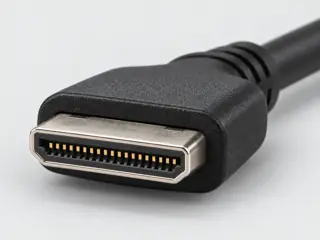
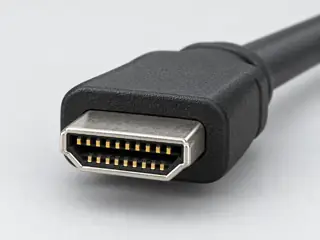
HDMI Type-A: cable-end plug, mating-face outline. Broad plug shell with two angled lower shoulders; interior detail omitted. Not to scale; no pinout.

Looking toward the plug opening; not the wire or solder side.

Qualitative recognition study interpreted from the pictured manufacturer example. Inner contacts, exact dimensions and hidden surfaces are omitted.

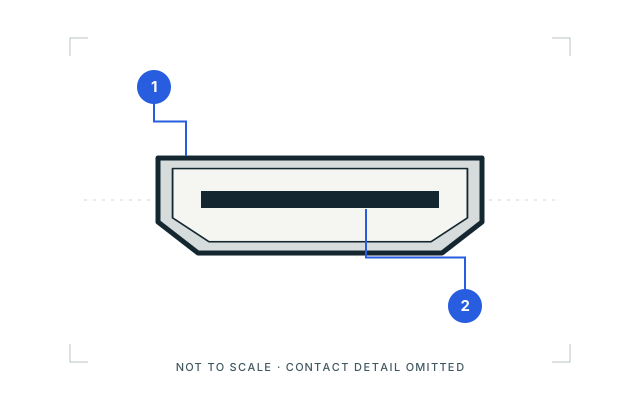
02 / Device receptacleOpening outline
HDMI Type-A: device receptacle, opening outline. Device opening with two angled shoulders and a simplified central insert. Not to scale; no pinout.

Looking into the device opening as pictured; not a rear or board view.

Simplified opening from the cited device-port illustration. Product bezel, contact count and internal construction are not generalized.

Two things to notice

  1. Broad shell with two angled shoulders
  2. Plug opening versus receptacle insert

What the picture cannot tell you

HDMI forms are drawn independently, not at a shared scale. Verify the exact Type A, C or D designation instead of judging screen size.

Sources, drawing scope & rights

Visual references checked 2026-10-09. These are source-scoped recognition studies, not approved mechanical drawings, pinouts or compatibility verdicts. Independent drawing review remains pending.

Original Port & Cable vector study. Third-party reference photographs are linked, not copied or bundled.

C2G / Legrand — Digital video connector guide
HDMI, HDMI Mini, HDMI Micro, DisplayPort and Mini DisplayPort photographs. Identity and exterior of the pictured cable plugs only. Performance and protocol prose was not adopted.

Apple — Identify the ports on your Mac
USB-A; Thunderbolt / USB-C; HDMI; Mini DisplayPort port illustrations. Illustrated receptacle openings only. A common outline does not establish protocol or model support.

This inspection does not refresh any canonical claim, source-review date or publication approval.

Named views, component roles and image sources

Image inspection / P008

See the view. Check its scope.

3 registered views for this reference. Different part examples are not automatically mates; all remain not to scale and independently unapproved.

HDMI Type-A. Mating face / without-flange family. Angled lower shoulders; central tongue. Qualitative source study, not an exact mating drawing or pinout. (private workspace)

P008 / Source-observed physical study

HDMI Type-A

TE 1747981-1 / C-1747981 H, sheets 1 & 6

Mating face / without-flange family · Device receptacle

Not to scale. Technical and rights review pending.

Inspect view & provenance (private workspace)
HDMI Type-A: cable-end plug, mating-face outline. Broad plug shell with two angled lower shoulders; interior detail omitted. Not to scale; no pinout. (private workspace)

P008 / Inherited recognition study

HDMI Type-A

HDMI Type-A / previously depicted manufacturer example

Mating-face outline · Cable plug / cable end

Not to scale. Technical and rights review pending.

Inspect view & provenance (private workspace)
HDMI Type-A: device receptacle, opening outline. Device opening with two angled shoulders and a simplified central insert. Not to scale; no pinout. (private workspace)

P008 / Inherited recognition study

HDMI Type-A

HDMI Type-A / previously depicted manufacturer example

Opening outline · Device receptacle

Not to scale. Technical and rights review pending.

Inspect view & provenance (private workspace)
Single-view schematic and original caption
HDMI Type-A: cable-end plug, mating-face outline. Broad plug shell with two angled lower shoulders; interior detail omitted. Not to scale; no pinout.
View Mating-face outlineDepiction Cable-end plugOriginal recognition study · not to scale · independent review pending
Original recognition schematic · not to scale · drawing review pending

Capabilities, facts and limits

Bounded facts, visible unknowns

Specifications and limits

HDMI Type-A facts and limitations
FamilyHDMI Type-A [C008A] [C008B]
Speed / video maximumPort and cable implementation required [C008A] [C008B]
Exact-device input/output examples4K X distinguishes input, passthrough and USB capture. ATEM Mini Pro ISO lists four HDMI inputs and one HDMI program output, not two HDMI outputs. [C008D] [C008E] [C008F] [C008G]
Source-scoped recognitionThe named TE drawing separates the receptacle mouth from the board footprint. Identify the device output or input in its own manual; the HDMI label alone does not settle optional features. [C008C] [C008I] [C008B]
Mechanical dimensionsNo independently reviewed mechanical drawing in this release; do not use this page for fabrication.
Engineering pinoutSource-checked engineering profile available; independent review pending. Open engineering profile →
Verified device listNot included. Check exact device and accessory documentation.
A boundary, not an omission to guess around.

This record is an identification starting point. It does not provide measured mating tolerances, electrical approval, or a list of verified device models. Use the original device and accessory documentation to resolve the remaining requirements.

Can I connect…

Common connections for this connector

All connection questions →

Pins & wiring

Pinout

Choose the exact wiring. Pin numbers follow its stated view; a schematic does not establish physical positions. Check your exact device before wiring.

What the status labels mean
Confirmed
Recorded research passes agree within this variant; this is not independent human review or hardware validation.
Single source
Only one underlying document, or one pass, supports this assignment.
Device-specific
Supported for the named equipment or wiring only. Check your device’s manual.
Unverified
Missing or conflicting evidence. Do not wire from this row.
Not connected
The source explicitly says NC, no contact or no pin for this wiring.
Wiring variant

Dell P2222H/P2422H/P2722H TMDS allocation

Device-specific wiring. Check your device’s manual before connecting or applying power.

View and evidence limits

Dell's connected-cable mating-face drawing, p. 30: odd contacts 19→1 left to right above; even contacts 18→2 left to right below. This is the source's cable-face convention, not a PCB or solder-side drawing.

  • P008 HDMI Type-A — Agree on all 19 pins — HDMI specification not public; confirmed from device manuals. Pin 14 wording varies (reserved / HEAC).
  • TMDS1204 Figure 8-10 shows D2/D1/D0/CLK paths with FRL role labels, but no numbered HDMI Type-A contact table. A numbered FRL pin map is unverified here. The drawing labels both CLK+ and CLK− destinations FRL_D3p; the negative lane-3 label is not silently corrected.
  • No primary numbered contact table for eARC or every later HDMI feature was retrieved. HEAC labels below do not establish eARC support.
HDMI Type-A engineering referenceDell's connected-cable mating-face drawing, p. 30: odd contacts 19→1 left to right above; even contacts 18→2 left to right below. This is the source's cable-face convention, not a PCB or solder-side drawing.SCHEMATIC · physical positions unconfirmedNot to scale · check the named wiring and device manual1: TMDS DATA 2+ (device_specific)12: TMDS DATA 2 SHIELD (device_specific)23: TMDS DATA 2− (device_specific)34: TMDS DATA 1+ (device_specific)45: TMDS DATA 1 SHIELD (device_specific)56: TMDS DATA 1− (device_specific)67: TMDS DATA 0+ (device_specific)78: TMDS DATA 0 SHIELD (device_specific)89: TMDS DATA 0− (device_specific)910: TMDS CLOCK+ (device_specific)1011: TMDS CLOCK SHIELD (device_specific)1112: TMDS CLOCK− (device_specific)1213: CEC (device_specific)1314: Reserved (N.C. on device) (device_specific)1415: DDC CLOCK (SCL) (device_specific)1516: DDC DATA (SDA) (device_specific)1617: DDC/CEC Ground (device_specific)1718: +5 V POWER (device_specific)1819: HOT PLUG DETECT (device_specific)19powergrounddataConfigshieldNCUnknown
Schematic only · physical contact positions unconfirmed. Original drawing · not to scale. Scroll sideways if needed.
Dell P2222H/P2422H/P2722H TMDS allocation — source-scoped contact map
PinSignalWhat it doesStatus
1TMDS DATA 2+Signal conductor. Pair, polarity and direction follow this named wiring.Device-specific
Sources
2TMDS DATA 2 SHIELDCable screen or shield connection; check the named equipment.Device-specific
Sources
3TMDS DATA 2−Signal conductor. Pair, polarity and direction follow this named wiring.Device-specific
Sources
4TMDS DATA 1+Signal conductor. Pair, polarity and direction follow this named wiring.Device-specific
Sources
5TMDS DATA 1 SHIELDCable screen or shield connection; check the named equipment.Device-specific
Sources
6TMDS DATA 1−Signal conductor. Pair, polarity and direction follow this named wiring.Device-specific
Sources
7TMDS DATA 0+Signal conductor. Pair, polarity and direction follow this named wiring.Device-specific
Sources
8TMDS DATA 0 SHIELDCable screen or shield connection; check the named equipment.Device-specific
Sources
9TMDS DATA 0−Signal conductor. Pair, polarity and direction follow this named wiring.Device-specific
Sources
10TMDS CLOCK+Clock or clock-control connection, as named by this source.Device-specific
Sources
11TMDS CLOCK SHIELDCable screen or shield connection; check the named equipment.Device-specific
Sources
12TMDS CLOCK−Clock or clock-control connection, as named by this source.Device-specific
Sources
13CECControl, detection or configuration connection; check the source and device.Device-specific
Sources
14Reserved (N.C. on device)Reserved; no general-purpose wiring is established.Device-specific
Sources
15DDC CLOCK (SCL)Clock or clock-control connection, as named by this source.Device-specific
Sources
16DDC DATA (SDA)Signal conductor. Pair, polarity and direction follow this named wiring.Device-specific
Sources
17DDC/CEC GroundControl, detection or configuration connection; check the source and device.Device-specific
Sources
18+5 V POWERPower connection (+5 V POWER). Check the specified supply.Device-specific
Sources
19HOT PLUG DETECTControl, detection or configuration connection; check the source and device.Device-specific
Sources
Sources (1)

VLSI VS1010 ARC board HDMI0 connector-symbol allocation

View and evidence limits

Numbered HDMI0 symbol; use contact numbers. The schematic is not a mating-face drawing; cable-face orientation is cross-referenced to the Dell figure.

  • P008 HDMI Type-A — Agree on all 19 pins — HDMI specification not public; confirmed from device manuals. Pin 14 wording varies (reserved / HEAC).
  • HEAC names are verified as symbol assignments. Actual end-to-end feature support and unused nets on the evaluation board are not established by this table.
  • TMDS1204 Figure 8-10 shows D2/D1/D0/CLK paths with FRL role labels, but no numbered HDMI Type-A contact table. A numbered FRL pin map is unverified here. The drawing labels both CLK+ and CLK− destinations FRL_D3p; the negative lane-3 label is not silently corrected.
  • No primary numbered contact table for eARC or every later HDMI feature was retrieved. HEAC labels below do not establish eARC support.
HDMI Type-A engineering referenceNumbered HDMI0 symbol; use contact numbers. The schematic is not a mating-face drawing; cable-face orientation is cross-referenced to the Dell figure.SCHEMATIC · physical positions unconfirmedNot to scale · check the named wiring and device manual1: TMDS DATA 2+ (single_source)12: TMDS DATA 2 SHIELD (single_source)23: TMDS DATA 2− (single_source)34: TMDS DATA 1+ (single_source)45: TMDS DATA 1 SHIELD (single_source)56: TMDS DATA 1− (single_source)67: TMDS DATA 0+ (single_source)78: TMDS DATA 0 SHIELD (single_source)89: TMDS DATA 0− (single_source)910: TMDS CLOCK+ (single_source)1011: TMDS CLOCK SHIELD (single_source)1112: TMDS CLOCK− (single_source)1213: CEC (single_source)1314: HEAC+ (single_source)1415: DDC CLOCK (SCL) (single_source)1516: DDC DATA (SDA) (single_source)1617: DGND (single_source)1718: +5 V POWER (single_source)1819: HEAC−/H_P_D (single_source)19powergrounddataConfigshieldNCUnknown
Schematic only · physical contact positions unconfirmed. Original drawing · not to scale. Scroll sideways if needed.
VLSI VS1010 ARC board HDMI0 connector-symbol allocation — source-scoped contact map
PinSignalWhat it doesStatus
1TMDS DATA 2+Signal conductor. Pair, polarity and direction follow this named wiring.Single source
Sources
2TMDS DATA 2 SHIELDCable screen or shield connection; check the named equipment.Single source
Sources
3TMDS DATA 2−Signal conductor. Pair, polarity and direction follow this named wiring.Single source
Sources
4TMDS DATA 1+Signal conductor. Pair, polarity and direction follow this named wiring.Single source
Sources
5TMDS DATA 1 SHIELDCable screen or shield connection; check the named equipment.Single source
Sources
6TMDS DATA 1−Signal conductor. Pair, polarity and direction follow this named wiring.Single source
Sources
7TMDS DATA 0+Signal conductor. Pair, polarity and direction follow this named wiring.Single source
Sources
8TMDS DATA 0 SHIELDCable screen or shield connection; check the named equipment.Single source
Sources
9TMDS DATA 0−Signal conductor. Pair, polarity and direction follow this named wiring.Single source
Sources
10TMDS CLOCK+Clock or clock-control connection, as named by this source.Single source
Sources
11TMDS CLOCK SHIELDCable screen or shield connection; check the named equipment.Single source
Sources
12TMDS CLOCK−Clock or clock-control connection, as named by this source.Single source
Sources
13CECControl, detection or configuration connection; check the source and device.Single source
Sources
14HEAC+Control, detection or configuration connection; check the source and device.Single source
Sources
15DDC CLOCK (SCL)Clock or clock-control connection, as named by this source.Single source
Sources
16DDC DATA (SDA)Signal conductor. Pair, polarity and direction follow this named wiring.Single source
Sources
17DGNDControl, detection or configuration connection; check the source and device.Single source
Sources
18+5 V POWERPower connection (+5 V POWER). Check the specified supply.Single source
Sources
19HEAC−/H_P_DControl, detection or configuration connection; check the source and device.Single source
Sources
Sources (2)

HDMI fixed-rate link (FRL) role reassignment — unverified

View and evidence limits

A numbered Type-A FRL mating-face map was not established from the retrieved datasheet.

  • P008 HDMI Type-A — Agree on all 19 pins — HDMI specification not public; confirmed from device manuals. Pin 14 wording varies (reserved / HEAC).
  • No pin rows are supplied for this unresolved overlay. See unverified[] for the exact source limitation and lane-3 labeling conflict; do not copy the TMDS clock function into FRL operation.
  • TMDS1204 Figure 8-10 shows D2/D1/D0/CLK paths with FRL role labels, but no numbered HDMI Type-A contact table. A numbered FRL pin map is unverified here. The drawing labels both CLK+ and CLK− destinations FRL_D3p; the negative lane-3 label is not silently corrected.
  • No primary numbered contact table for eARC or every later HDMI feature was retrieved. HEAC labels below do not establish eARC support.
HDMI Type-A engineering referenceA numbered Type-A FRL mating-face map was not established from the retrieved datasheet.SCHEMATIC · physical positions unconfirmedNot to scale · check the named wiring and device manualNumbered contacts are not yet confirmed.powergrounddataConfigshieldNCUnknown
Schematic only · physical contact positions unconfirmed. Original drawing · not to scale. Scroll sideways if needed.

Not yet independently confirmed. No settled pin table is available for this wiring.

Sources (1)

A board socket is not a signal direction.

The named TE drawing separates the receptacle mouth from the board footprint. Identify the device output or input in its own manual; the HDMI label alone does not settle optional features.

DISPLAY RECOGNITION / FORM → PATH → INPUT

Match the form. Follow the signal.

Compare source-scoped studies, distinguish the component role and work through the remaining display requirements.

Open the display recognition reference →

The useful distinction

Documented observations

HDMI version labeling alone does not identify every optional feature implemented by a product. [C008B]

Elgato 4K X has one HDMI input for an unencrypted video source and one HDMI passthrough output to a display; captured video reaches a computer through a separate USB-C connection. [C008D]

Elgato separates supported 4K X HDMI passthrough signals from capture formats. Its detailed guidance says DSC video cannot be captured even when a passthrough image is visible. [C008E]

The ATEM Mini Pro ISO specifies four HDMI Type A inputs and one HDMI program output; the separately listed total of two outputs is not a count of HDMI output sockets. [C008F]

The ATEM Mini Pro ISO Standards table lists no Ultra HD video standards. Its description of finishing in Ultra HD via relinked media does not establish an Ultra HD HDMI input or output mode. [C008G]

HDMI Cable Power requires support from both the active cable and the HDMI source. HDMI LA specifies source/sink direction for active cables and a separate power connector for sources without Cable Power support. [C008H]

TE's cited Standard HDMI receptacle is a 19-position connector example, supporting a 19-contact engineering count for the full-size HDMI form without implying HDMI version or video capability. [C008C]

TE drawing C-1747981 H maps 1747981-1 to a without-flange HDMI board-receptacle form and presents its mating face separately from the reference PCB layout. [C008I]

Cable classes, ratings and conditions

CAPABILITY NOTES / SOURCE REVIEW 11 OCTOBER 2026

Read the capability, not just the name.

Published scope, conditions and what remains unknown. Figures are not measured end-to-end performance.

HDMI Cable Power

Published scope
Power for active cable electronics
Conditions
Both source and cable support the feature, or use the cable’s specified auxiliary power.
Do not infer
Not power delivery to a monitor and not a universal adapter supply.
Authority
S518 · HDMI Licensing AdministratorChecked 2026-10-11

Active HDMI cable direction

Published scope
Source-labelled end → sink-labelled end
Conditions
Use the cable’s prescribed orientation and supply.
Do not infer
An identical plug shape does not make an active cable bidirectional.
Authority
S518 · HDMI Licensing AdministratorChecked 2026-10-11

These are source-qualified distinctions. No complete device pairing, physical fit or operating result is certified here.

Inspect the canonical evidence and scope
C008H

HDMI Cable Power requires support from both the active cable and the HDMI source. HDMI LA specifies source/sink direction for active cables and a separate power connector for sources without Cable Power support.

HDMI Cable Power feature scope; follow the exact cable’s instructions. Not monitor power or a universal converter-power rule.

S518 · HDMI Licensing Administrator

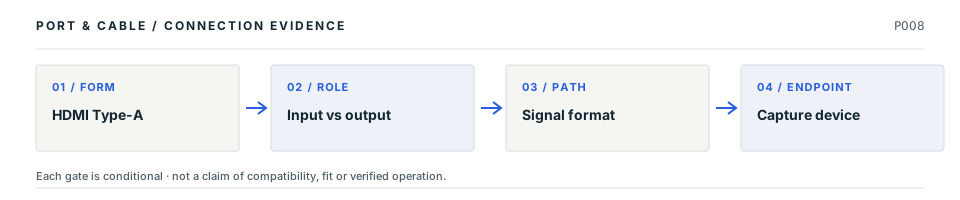
Follow the HDMI signal path

Flagship atlas DISPLAY / ROLE

HDMI: signal, passthrough and capture

A full-size HDMI socket only identifies Type-A geometry. Even when a monitor shows the source through a capture device, the separately negotiated capture mode might be unavailable.

LP01 P008
Conceptual four-stage decision path: HDMI Type-A; then Input vs output; then Signal format; then Capture device. Every stage requires independent verification; this is not a drawing of connector contact geometry.
Decision map, not a plug drawing or electrical wiring diagram. The original connector specimen remains above; this sequence shows what needs proof after shape identification.

Four facts to keep separate

01
Form

The common full-size connector is HDMI Type-A; Mini and Micro variants are different physical ends. Evidence: C008A

02
Specification

HDMI revision claims do not declare that every optional feature is implemented in every device. Evidence: C008B

03
Signal path

Elgato 4K X has distinct HDMI input, passthrough output and USB-C host connection roles. Evidence: C008D

04
Actual capture

Elgato documents signal cases where DSC passthrough produces a picture while capture does not support that format. Evidence: C008E

Common wrong conclusion

Seeing video on the passthrough screen does not mean the capture application has a compatible video format.

What to check next

  1. Draw the direction from video source to HDMI input, passthrough display and recording host.
  2. Compare exact capture and passthrough tables separately at the intended format and refresh rate.
  3. Confirm the HDMI cable class and USB host mode as distinct requirements.
Why these statements are qualified · claim and source context

This is an original editorial decision study tied to existing source-checked claims. The following source inspections have not been renewed by this new page presentation, and none is independent engineering or model-by-model qualification.

  • S018 · C2G / LegrandHD15, HDMI, HDMI Mini, HDMI Micro, DVI-D and RCA sections · source reviewed 2026-10-01 · Narrow physical identifiers only, not historical speed or video capability descriptions.
  • S012 · HDMI Licensing AdministratorFAQ about HDMI 2.1 supporting TMDS without FRL · source reviewed 2026-10-01 · A version number alone does not identify implemented features.
  • S450 · ElgatoTechnical Specifications → Interface · source reviewed 2026-10-08 · USB 3.2 Gen 2 Type-C host link; HDMI input and passthrough output.
  • S451 · ElgatoInputs and Outputs; Required Items · source reviewed 2026-10-08 · One HDMI input, one HDMI output and one USB-C host output; signal direction and reduced capture on USB Gen 1.
  • S452 · ElgatoInput/Passthrough versus Capture definitions; Detailed Capture Codec Specifications; DSC · source reviewed 2026-10-08 · Passthrough/capture distinction, USB/codec/software conditions and no capture of DSC video.

Unresolved: Actual device fit, required physical tolerances, pinouts, negotiations, electrical safety and hardware interoperability still require the identified manufacturer's documentation and any necessary independent review.

Input, passthrough and capture

Practical reference

Practical answers for HDMI Type-A

Start with the answer. Follow the real distinction, then the source-scoped next check. All evidence dates and publication blockers remain unchanged.

V102Q02 Practical reference

Why does HDMI passthrough work when a capture app cannot record that signal?

Short answer Passthrough and capture are not the same operation. Elgato documents different passthrough and capture limits for its 4K X; a DSC signal may pass through while remaining unsupported for capture.

Which distinction matters?
What you are checkingWhat the cited evidence establishes
HDMI input and outputThe 4K X takes a source signal and sends passthrough to a separate display
USB-C host connectionCaptured video reaches the computer over a separately specified host path
DSC signalElgato documents a capture limitation even when passthrough produces a picture
Next checks, in order
  1. Verify the exact capture-card model and its input, passthrough and capture tables.
  2. Record the source format, resolution, refresh rate and compression setting separately.
  3. Check the separately documented USB host mode and capture-software requirements.

Still unresolved: The presence of a picture on the passthrough display is not evidence that an arbitrary capture mode is supported.

Claim-level evidence, source locators and limits

Existing evidence claims: C008A · C008D · C008E. These are editorial field answers over inherited source records, not newly approved specifications.

  • S018 · C2G / Legrand — HD15, HDMI, HDMI Mini, HDMI Micro, DVI-D and RCA sections. Recorded inspection 2026-10-01; The old DisplayPort technology/speed description on this page is not relied on.
  • S450 · Elgato — Technical Specifications → Interface. Recorded inspection 2026-10-08; Page displays September 3, 2024 update. Do not flatten abbreviated maximum capture/HDR bullets into an all-mode promise; use the detailed mode article. Not 4K Pro, 4K S or HD60 X.
  • S451 · Elgato — Inputs and Outputs; Required Items. Recorded inspection 2026-10-08; Page displays June 1, 2026 update. Setup example is not certification of an arbitrary console, cable, host or mode. Selected inventory excludes analog line input.
  • S452 · Elgato — Input/Passthrough versus Capture definitions; Detailed Capture Codec Specifications; DSC. Recorded inspection 2026-10-08; Page displays May 21, 2026 update. No complete matrix copied, no fixed universal capture ceiling, no device firmware or software installation inspected.

Neither the source inspection dates nor the evidence dataset has been refreshed. No physical tests, exact-device compatibility approval, pinout or fabrication geometry is implied.

Before you connect

Before you connect

What to check

  1. Read the features of the exact input and output ports.
  2. Check the cable category and the requested resolution, refresh rate and color settings.
  3. For conversion, identify the signal direction and converter requirements.
Trace a supported connection class →

Your next step

Move from the form to the requirement.

Use this reference

From identity to the right next question

Put this field note to work.

Add to discovery trayRecord an unsaved candidate (private workspace)

Candidate selection does not confirm the identity or capabilities of your physical item.

Related guides, comparisons and worksheets

Common questions

Questions this record can help resolve

Display connection desk

Trace the display path beyond the socket

Shared output resources, host native limits and software-rendered paths remain distinct.

Evidence behind this reference

The source trail

Evidence for this page

AI-assisted inspection is not independent engineering review. Source scope and access limitations are disclosed below. Procedural checklists are editorial requirements, not hardware measurements.

Back to first citation ↑
C008ASource checked · pending review

The familiar full-size HDMI connector is Type-A; Mini and Micro HDMI use different physical forms.

C2G / Legrand · Video connector guide ↗

Locator: HD15, HDMI, HDMI Mini, HDMI Micro, DVI-D and RCA sections
Access: public page. The old DisplayPort technology/speed description on this page is not relied on.

S018: full source recordInspect review dependencies → (private workspace)

Claim scope: Consumer identification / documented standard or product class only. Next review due 2026-12-30.

Back to first citation ↑
C008BSource checked · pending review

HDMI version labeling alone does not identify every optional feature implemented by a product.

HDMI Licensing Administrator · HDMI 2.1 feature implementation FAQ ↗

Locator: FAQ about HDMI 2.1 supporting TMDS without FRL
Access: public page.

S012: full source recordInspect review dependencies → (private workspace)

Claim scope: Narrowly stated supporting distinction; not an end-to-end device guarantee. Next review due 2026-12-30.

Back to first citation ↑
C008DSource checked · pending review

Elgato 4K X has one HDMI input for an unencrypted video source and one HDMI passthrough output to a display; captured video reaches a computer through a separate USB-C connection.

Elgato · Elgato Game Capture 4K X — Technical Specifications ↗

Locator: Technical Specifications → Interface
Access: public page. Page displays September 3, 2024 update. Do not flatten abbreviated maximum capture/HDR bullets into an all-mode promise; use the detailed mode article. Not 4K Pro, 4K S or HD60 X.

S450: full source recordElgato · Elgato Game Capture 4K X — Xbox Series X|S Setup ↗

Locator: Inputs and Outputs; Required Items
Access: public page. Page displays June 1, 2026 update. Setup example is not certification of an arbitrary console, cable, host or mode. Selected inventory excludes analog line input.

S451: full source recordInspect review dependencies → (private workspace)

Claim scope: 4K X only; input/output direction must not be exchanged and the selected profile is not a full connector inventory.. Next review due 2027-01-06.

Back to first citation ↑
C008ESource checked · pending review

Elgato separates supported 4K X HDMI passthrough signals from capture formats. Its detailed guidance says DSC video cannot be captured even when a passthrough image is visible.

Elgato · Elgato Game Capture 4K X — Supported Resolutions and Frame Rates ↗

Locator: Input/Passthrough versus Capture definitions; Detailed Capture Codec Specifications; DSC
Access: public page. Page displays May 21, 2026 update. No complete matrix copied, no fixed universal capture ceiling, no device firmware or software installation inspected.

S452: full source recordInspect review dependencies → (private workspace)

Claim scope: DSC limitation and mode-selection boundary, not a diagnosis of every black capture frame or a universal HDMI limit.. Next review due 2027-01-06.

Back to first citation ↑
C008FSource checked · pending review

The ATEM Mini Pro ISO specifies four HDMI Type A inputs and one HDMI program output; the separately listed total of two outputs is not a count of HDMI output sockets.

Blackmagic Design · Blackmagic ATEM Mini Pro ISO — Product Technical Specifications ↗

Locator: Model-specific PDF pages 1–2: Connections, labeled panel diagram, Standards
Access: public pdf text. Exact ATEM Mini Pro ISO, not Pro, Extreme, G2 or sibling products on the combined website. Total outputs is not HDMI-output count. USB mode list alone does not establish simultaneous webcam and external recording.

S453: full source recordInspect review dependencies → (private workspace)

Claim scope: Exact Pro ISO Connections table and labeled panel diagram; not a sibling model’s connection count.. Next review due 2027-01-06.

Back to first citation ↑
C008GSource checked · pending review

The ATEM Mini Pro ISO Standards table lists no Ultra HD video standards. Its description of finishing in Ultra HD via relinked media does not establish an Ultra HD HDMI input or output mode.

Blackmagic Design · Blackmagic ATEM Mini Pro ISO — Product Technical Specifications ↗

Locator: Model-specific PDF pages 1–2: Connections, labeled panel diagram, Standards
Access: public pdf text. Exact ATEM Mini Pro ISO, not Pro, Extreme, G2 or sibling products on the combined website. Total outputs is not HDMI-output count. USB mode list alone does not establish simultaneous webcam and external recording.

S453: full source recordInspect review dependencies → (private workspace)

Claim scope: Pro ISO live video-interface standards versus post-production description; no new conversion or capture capability inferred.. Next review due 2027-01-06.

Back to first citation ↑
C008HSource checked · pending review

HDMI Cable Power requires support from both the active cable and the HDMI source. HDMI LA specifies source/sink direction for active cables and a separate power connector for sources without Cable Power support.

HDMI Licensing Administrator · HDMI LA — Active cable power and direction ↗

Locator: HDMI Cable Power requirements, direction paragraph and separate power connector
Access: public page. Feature-scoped active HDMI cable behavior. Not a universal prescription for all active converters. Retrieval locators and observations retained; raw acquisition is recorded separately.

S518: full source recordInspect review dependencies → (private workspace)

Claim scope: HDMI Cable Power feature scope; follow the exact cable’s instructions. Not monitor power or a universal converter-power rule.. Next review due 2027-01-09.

Back to first citation ↑
C008CSource checked · pending review

TE's cited Standard HDMI receptacle is a 19-position connector example, supporting a 19-contact engineering count for the full-size HDMI form without implying HDMI version or video capability.

TE Connectivity · TE 1747981-1 Standard HDMI connector ↗

Locator: Configuration features: Standard HDMI connector; 19 positions; receptacle
Access: public page. A manufacturer component example supports connector-form contact count only; it does not establish HDMI version, video mode, cable capability or universal fabrication dimensions.

S365: full source recordInspect review dependencies → (private workspace)

Claim scope: Connector-form contact count supported by one manufacturer example; protocol/version capability explicitly excluded.. Next review due 2027-01-04.

Back to first citation ↑
C008ISource checked · pending review

TE drawing C-1747981 H maps 1747981-1 to a without-flange HDMI board-receptacle form and presents its mating face separately from the reference PCB layout.

TE Connectivity · TE C-1747981 HDMI receptacle customer drawing ↗

Locator: Rev H, 1 September 2022; sheet 1 variant table and sheet 6 without-flange form visually inspected.
Access: public pdf text. Not a hardware inspection, certification, pinout, dimensional mating check or blanket product-compatibility statement.

S606: full source recordInspect review dependencies → (private workspace)

Claim scope: V146: Named drawing family and suffix table only. The drawing does not establish an installed port’s input/output role or HDMI feature set.. Next review due 2027-01-11.

Suggest a correction to this field note →
Source scope and review status

Inspect source authority, access limits and review holds

Evidence behind this page

Scope first. Source second. Approval separate.

9 linked sources · 9 scoped claims · 0 sources with inspection/access flags.

Page scope: consumer_pilot

Assessment 2026-10-22 · earliest scheduled source review 2026-12-30. This is a recorded-date assessment, not a live source check. Page-level independent review is not established by this panel.

Inspect 9 source scopes, access limits and dates

S012 · HDMI 2.1 feature implementation FAQ

HDMI Licensing Administrator · Standards-organization domain · inspected 2026-10-01 · due 2026-12-30

Within inspection window

Scoped support: A version number alone does not identify implemented features.

Not established / limitations:

Locator: FAQ about HDMI 2.1 supporting TMDS without FRL

S018 · Video connector guide

C2G / Legrand · Manufacturer / product-owner domain · inspected 2026-10-01 · due 2026-12-30

Within inspection window

Scoped support: Narrow physical identifiers only, not historical speed or video capability descriptions.

Not established / limitations: The old DisplayPort technology/speed description on this page is not relied on.

Locator: HD15, HDMI, HDMI Mini, HDMI Micro, DVI-D and RCA sections

S365 · TE 1747981-1 Standard HDMI connector

TE Connectivity · Manufacturer / product-owner domain · inspected 2026-10-06 · due 2027-01-04

Within inspection window

Scoped support: Manufacturer example supporting the 19-position contact count for the standard/full-size HDMI connector form.

Not established / limitations: A manufacturer component example supports connector-form contact count only; it does not establish HDMI version, video mode, cable capability or universal fabrication dimensions.

Locator: Configuration features: Standard HDMI connector; 19 positions; receptacle

S450 · Elgato Game Capture 4K X — Technical Specifications

Elgato · Manufacturer / product-owner domain · inspected 2026-10-08 · due 2027-01-06

Within inspection window

Scoped support: USB 3.2 Gen 2 Type-C host link; HDMI input and passthrough output.

Not established / limitations: Page displays September 3, 2024 update. Do not flatten abbreviated maximum capture/HDR bullets into an all-mode promise; use the detailed mode article. Not 4K Pro, 4K S or HD60 X.

Locator: Technical Specifications → Interface

S451 · Elgato Game Capture 4K X — Xbox Series X|S Setup

Elgato · Manufacturer / product-owner domain · inspected 2026-10-08 · due 2027-01-06

Within inspection window

Scoped support: One HDMI input, one HDMI output and one USB-C host output; signal direction and reduced capture on USB Gen 1.

Not established / limitations: Page displays June 1, 2026 update. Setup example is not certification of an arbitrary console, cable, host or mode. Selected inventory excludes analog line input.

Locator: Inputs and Outputs; Required Items

S452 · Elgato Game Capture 4K X — Supported Resolutions and Frame Rates

Elgato · Manufacturer / product-owner domain · inspected 2026-10-08 · due 2027-01-06

Within inspection window

Scoped support: Passthrough/capture distinction, USB/codec/software conditions and no capture of DSC video.

Not established / limitations: Page displays May 21, 2026 update. No complete matrix copied, no fixed universal capture ceiling, no device firmware or software installation inspected.

Locator: Input/Passthrough versus Capture definitions; Detailed Capture Codec Specifications; DSC

S453 · Blackmagic ATEM Mini Pro ISO — Product Technical Specifications

Blackmagic Design · Unclassified publisher domain · inspected 2026-10-08 · due 2027-01-06

Within inspection window

Scoped support: Four HDMI Type A inputs, one HDMI program output, one USB-C interface; no Ultra HD video standards.

Not established / limitations: Exact ATEM Mini Pro ISO, not Pro, Extreme, G2 or sibling products on the combined website. Total outputs is not HDMI-output count. USB mode list alone does not establish simultaneous webcam and external recording.

Locator: Model-specific PDF pages 1–2: Connections, labeled panel diagram, Standards

S518 · HDMI LA — Active cable power and direction

HDMI Licensing Administrator · Standards-organization domain · inspected 2026-10-11 · due 2027-01-09

Within inspection window

Scoped support: Feature-scoped active HDMI cable behavior. Not a universal prescription for all active converters.

Not established / limitations: Feature-scoped active HDMI cable behavior. Not a universal prescription for all active converters. Retrieval locators and observations retained; raw acquisition is recorded separately.

Locator: HDMI Cable Power requirements, direction paragraph and separate power connector

S606 · TE C-1747981 HDMI receptacle customer drawing

TE Connectivity · Manufacturer / product-owner domain · inspected 2026-10-13 · due 2027-01-11

Within inspection window

Scoped support: 1747981-1 is linked by the sheet 1 table to the without-flange family view. Mouth, mounting features and PCB footprint are different views; no exact installed-device identity.

Not established / limitations: Not a hardware inspection, certification, pinout, dimensional mating check or blanket product-compatibility statement.

Locator: Rev H, 1 September 2022; sheet 1 variant table and sheet 6 without-flange form visually inspected.

Trace 9 claims to their source records

C008A · P008

The familiar full-size HDMI connector is Type-A; Mini and Micro HDMI use different physical forms.

Claim scope: Consumer identification / documented standard or product class only

Source links: S018 · Evidence trail → (private workspace)

C008B · P008

HDMI version labeling alone does not identify every optional feature implemented by a product.

Claim scope: Narrowly stated supporting distinction; not an end-to-end device guarantee

Source links: S012 · Evidence trail → (private workspace)

C008C · P008

TE's cited Standard HDMI receptacle is a 19-position connector example, supporting a 19-contact engineering count for the full-size HDMI form without implying HDMI version or video capability.

Claim scope: Connector-form contact count supported by one manufacturer example; protocol/version capability explicitly excluded.

Source links: S365 · Evidence trail → (private workspace)

C008D · P008

Elgato 4K X has one HDMI input for an unencrypted video source and one HDMI passthrough output to a display; captured video reaches a computer through a separate USB-C connection.

Claim scope: 4K X only; input/output direction must not be exchanged and the selected profile is not a full connector inventory.

Source links: S450 · S451 · Evidence trail → (private workspace)

C008E · P008

Elgato separates supported 4K X HDMI passthrough signals from capture formats. Its detailed guidance says DSC video cannot be captured even when a passthrough image is visible.

Claim scope: DSC limitation and mode-selection boundary, not a diagnosis of every black capture frame or a universal HDMI limit.

Source links: S452 · Evidence trail → (private workspace)

C008F · P008

The ATEM Mini Pro ISO specifies four HDMI Type A inputs and one HDMI program output; the separately listed total of two outputs is not a count of HDMI output sockets.

Claim scope: Exact Pro ISO Connections table and labeled panel diagram; not a sibling model’s connection count.

Source links: S453 · Evidence trail → (private workspace)

C008G · P008

The ATEM Mini Pro ISO Standards table lists no Ultra HD video standards. Its description of finishing in Ultra HD via relinked media does not establish an Ultra HD HDMI input or output mode.

Claim scope: Pro ISO live video-interface standards versus post-production description; no new conversion or capture capability inferred.

Source links: S453 · Evidence trail → (private workspace)

C008H · P008

HDMI Cable Power requires support from both the active cable and the HDMI source. HDMI LA specifies source/sink direction for active cables and a separate power connector for sources without Cable Power support.

Claim scope: HDMI Cable Power feature scope; follow the exact cable’s instructions. Not monitor power or a universal converter-power rule.

Source links: S518 · Evidence trail → (private workspace)

C008I · P008

TE drawing C-1747981 H maps 1747981-1 to a without-flange HDMI board-receptacle form and presents its mating face separately from the reference PCB layout.

Claim scope: V146: Named drawing family and suffix table only. The drawing does not establish an installed port’s input/output role or HDMI feature set.

Source links: S606 · Evidence trail → (private workspace)

Prepare this page for review → (private workspace)Read the evidence method →

Recorded evidence only. An inspection date, publisher label, source link or generated packet is not independent technical review, hardware testing, fabrication approval or a compatibility verdict.