FIELD GUIDESource-led reference

P011 / Video / Connector reference

DisplayPort connector

DisplayPort provides a video interface with product-specific features and link rates. [C011A]

DisplayPort 2.1 on a label does not promise the highest UHBR rate.

Claim inspection dates: 2026-10-01, 2026-10-06, 2026-10-11, 2026-10-15, 2026-10-22 · Independent review pending

Recognize DisplayPort

Look for

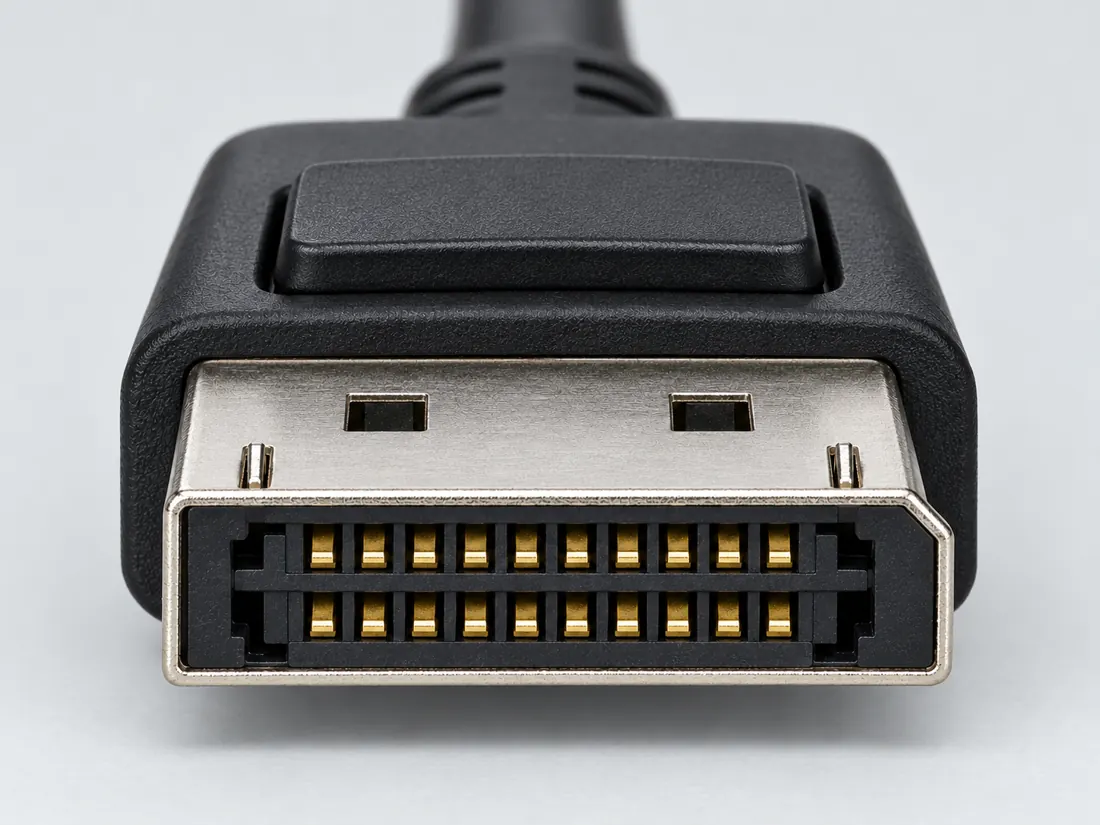
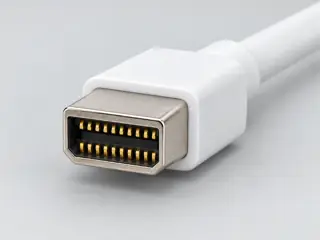
Use the chamfered-corner outline as a clue and inspect for any latch release on the actual cable. The drawing is a broad visual identifier, not an engineering outline.

Identify the documented form

Identify DisplayPort, then determine the direction and conversion class.

  1. Use the DisplayPort family designation and source-scoped form facts as recognition clues; the physical form does not identify the implemented link rate. S015 · S368
  2. A passive DisplayPort-to-HDMI path requires documented DP++ source capability; a DisplayPort-shaped source alone is insufficient. S644
Documented identity facts; exact part and variant scope remains with each value
Nominal contacts20S015 · S368plug and receptacle interface; nominal engineering count, not automatically positions, population or a device wiring map. plug and receptacle interface
Positions / cavity span20 (Claim C011B)S368Recorded source-scoped values; named examples do not describe every family variant or establish compatibility. Connector-form contact count supported by one manufacturer example; protocol/version capability explicitly excluded.
Populated contactsNot recordedNot recorded in a normalized source-scoped field. Consult the exact part/revision; no value inferred from illustrations.
Connector roleplug; socket; socket (2040210-1)S015 · S368 · S368Separate exact examples; retain each value’s source, role, axis and part scope. plug and receptacle interface Exact named example 2040210-1: DisplayPort PCB receptacle. Exact example only; no universal geometry, electrical compatibility, fabrication approval or wiring instruction. Manufacturer marks part obsolete; page displays1mm centerline beside.06in, so pitch is withheld pending exact drawing reconciliation.
Rows, pitch, dimensions, keying and view limits
Additional scoped facts; not a fabrication drawing or a mating approval
Contact rows2 (Molex 472720001)S976Current primary-source scoped values; named examples remain separate and unknowns are not inferred from illustrations. Exact Molex 472720001, female right-angle DisplayPort receptacle; manufacturer mating-interface/row fields only, not a universal family value. Quantity context: Manufacturer Number of Rows property.
Contact pitch1 mm Manufacturer Pitch - Mating Interface; internal gap order and physical projection not further dimensioned (Molex 472720001)S976Current primary-source scoped values; named examples remain separate and unknowns are not inferred from illustrations. Exact Molex 472720001, female right-angle DisplayPort receptacle; manufacturer mating-interface/row fields only, not a universal family value.
Dimensions / axis2.6 mm termination post and tail length (2040210-1)S368Separate exact examples; retain each value’s source, role, axis and part scope. Exact named example 2040210-1: DisplayPort PCB receptacle. Exact example only; no universal geometry, electrical compatibility, fabrication approval or wiring instruction. Manufacturer marks part obsolete; page displays1mm centerline beside.06in, so pitch is withheld pending exact drawing reconciliation.
Coupling / latchNot recordedNot recorded in a normalized source-scoped field. Consult the exact part/revision; no value inferred from illustrations.
Keying / polarizationNot recordedNot recorded in a normalized source-scoped field. Consult the exact part/revision; no value inferred from illustrations.
View conventionSYS-427X manual receptacle-opening view: bevel at lower left; upper row labelled 19 through1 and lower row20 through2 from left to right. (WINSYSTEMS SYS-427X J18/J19)S652Exact source-view examples remain separate from other roles, parts and generated schematics. Exact WINSYSTEMS SYS-427X J18/J19 DisplayPort receptacle example. Manual names Molex47272 series but no complete component part number. Source view is separate from cable rear/PCB views and other DisplayPort products.
Contact gender / arrangementNot recordedNot recorded in a normalized source-scoped field. Consult the exact part/revision; no value inferred from illustrations.
Mountingright-angle top-mount board connector with screw flange (2040210-1)S368Separate exact examples; retain each value’s source, role, axis and part scope. Exact named example 2040210-1: DisplayPort PCB receptacle. Exact example only; no universal geometry, electrical compatibility, fabrication approval or wiring instruction. Manufacturer marks part obsolete; page displays1mm centerline beside.06in, so pitch is withheld pending exact drawing reconciliation.
Shell / formNot recordedNot recorded in a normalized source-scoped field. Consult the exact part/revision; no value inferred from illustrations.
ManufacturerTE Connectivity (2040210-1)S368Separate exact examples; retain each value’s source, role, axis and part scope. Exact named example 2040210-1: DisplayPort PCB receptacle. Exact example only; no universal geometry, electrical compatibility, fabrication approval or wiring instruction. Manufacturer marks part obsolete; page displays1mm centerline beside.06in, so pitch is withheld pending exact drawing reconciliation.
SeriesDisplayPort (2040210-1)S368Separate exact examples; retain each value’s source, role, axis and part scope. Exact named example 2040210-1: DisplayPort PCB receptacle. Exact example only; no universal geometry, electrical compatibility, fabrication approval or wiring instruction. Manufacturer marks part obsolete; page displays1mm centerline beside.06in, so pitch is withheld pending exact drawing reconciliation.
Exact part / implementation2040210-1 (2040210-1)S368Separate exact examples; retain each value’s source, role, axis and part scope. Exact named example 2040210-1: DisplayPort PCB receptacle. Exact example only; no universal geometry, electrical compatibility, fabrication approval or wiring instruction. Manufacturer marks part obsolete; page displays1mm centerline beside.06in, so pitch is withheld pending exact drawing reconciliation.
Recorded markingsNot recordedNot recorded in a normalized source-scoped field. Consult the exact part/revision; no value inferred from illustrations.

Keep this limit: Cable certification classes and the source’s implemented features remain separate from connector identity. S520

Make the next check

Check the source manual for DP++ and the adapter’s documented direction, resolution and feature limits.

Existing source inspection and AI review remain distinct from independent technical review. A matching form does not establish a safe connection.

Recorded variant and source limits
  • DisplayPort revision, link rate and feature support are not established by the 20-position form.
  • No universal fabrication dimensions or signal map are published in V54.
  • WINSYSTEMS SYS-427X source receptacles J18/J19: Source receptacle mating face, keyed corner at lower left in the drawing; upper row 19→1, lower 20→2 left to right.
  • Dell P2222H/P2422H/P2722H connected-cable / monitor-side allocation: The manufacturer's connected-cable mating-face figure, p. 29: upper row 19→1 and lower row 20→2 left to right. This is not a PCB footprint.
  • Prior view context (not a source-view value): Contact count only; no numbered mating-face layout or fabrication geometry is reproduced.
Report a correction to this identification or view →

Visual reference / P011

Find the single clipped corner.

PLUG + PORT

Recognition, not measurement. Each drawing is fitted independently: equal boxes do not mean equal sizes. Contact detail is deliberately omitted.

01 / Cable-end plugMating-face outline
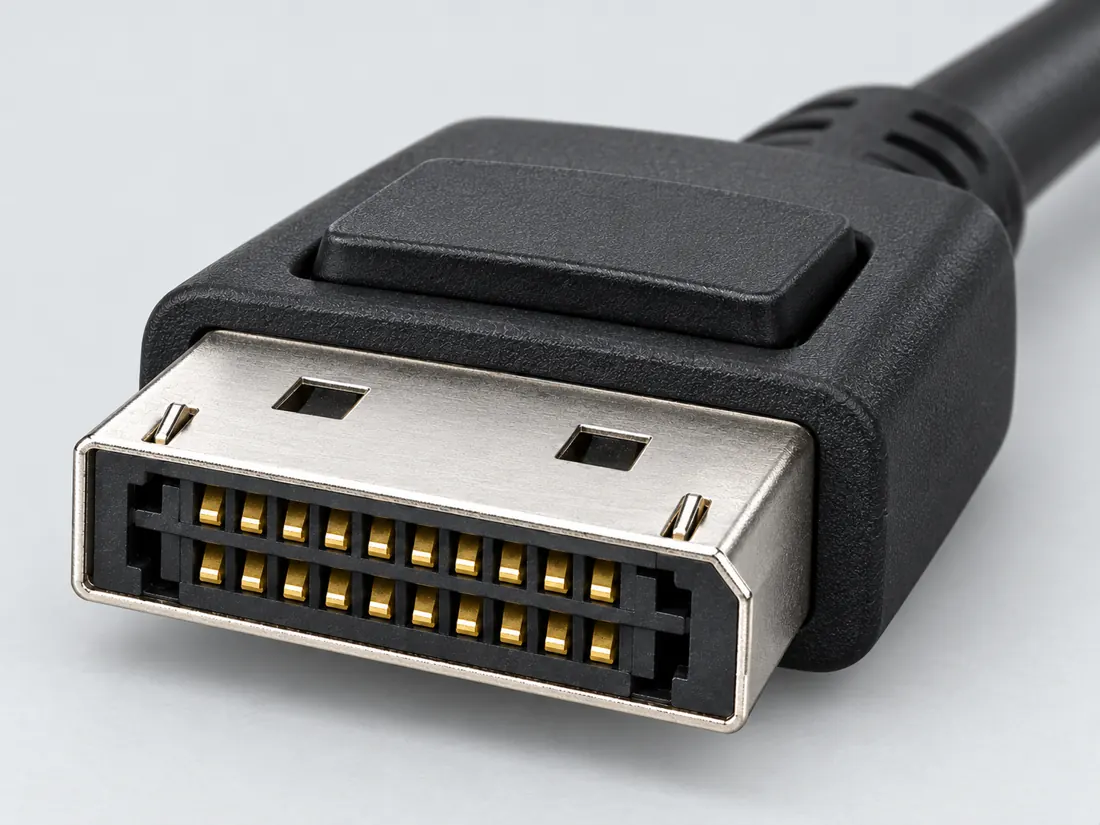
DisplayPort connector: cable-end plug, mating-face outline. Plug shell with a single clipped corner; internal detail omitted. Not to scale; no pinout.

Looking toward the plug opening; not the wire or solder side.

Qualitative recognition study interpreted from the pictured manufacturer example. Inner contacts, exact dimensions and hidden surfaces are omitted.

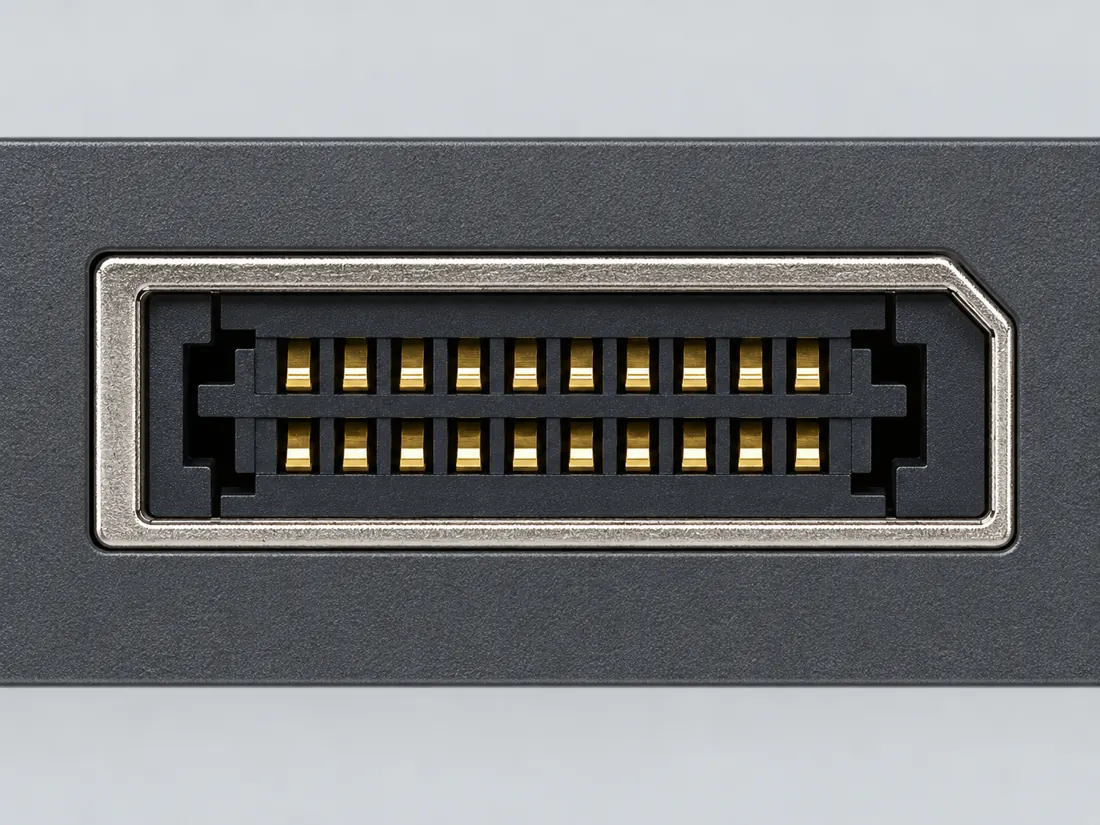
02 / Device receptacleOpening outline
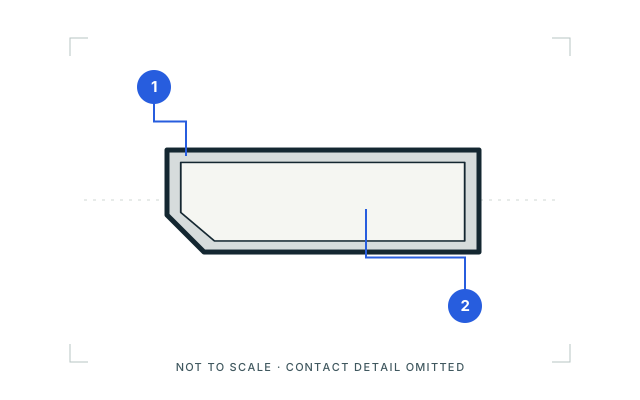
DisplayPort connector: device receptacle, opening outline. Device opening with a single clipped corner; internal detail omitted. Not to scale; no pinout.

Looking into the device opening as pictured; not a rear or board view.

Simplified opening from the cited device-port illustration. Product bezel, contact count and internal construction are not generalized.

Two things to notice

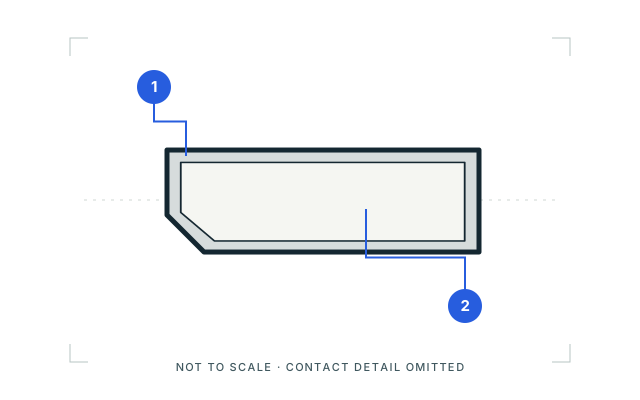
  1. One angled corner of the shell
  2. Plug outline versus receptacle opening

What the picture cannot tell you

The pictured facing direction is stated for each view. A latch is product-dependent and is not a requirement or a capability label.

Sources, drawing scope & rights

Visual references checked 2026-10-09. These are source-scoped recognition studies, not approved mechanical drawings, pinouts or compatibility verdicts. Independent drawing review remains pending.

Original Port & Cable vector study. Third-party reference photographs are linked, not copied or bundled.

C2G / Legrand — Digital video connector guide
HDMI, HDMI Mini, HDMI Micro, DisplayPort and Mini DisplayPort photographs. Identity and exterior of the pictured cable plugs only. Performance and protocol prose was not adopted.

Dell — Video cables and their capabilities
DisplayPort illustration, including receptacle opening. Illustrated one-corner-clipped receptacle outline only; no performance assertions were transferred.

This inspection does not refresh any canonical claim, source-review date or publication approval.

Named views, component roles and image sources

Image inspection / P011

See the view. Check its scope.

2 registered views for this reference. Different part examples are not automatically mates; all remain not to scale and independently unapproved.

DisplayPort connector: cable-end plug, mating-face outline. Plug shell with a single clipped corner; internal detail omitted. Not to scale; no pinout. (private workspace)

P011 / Inherited recognition study

DisplayPort connector

DisplayPort connector / previously depicted manufacturer example

Mating-face outline · Cable plug / cable end

Not to scale. Technical and rights review pending.

Inspect view & provenance (private workspace)
DisplayPort connector: device receptacle, opening outline. Device opening with a single clipped corner; internal detail omitted. Not to scale; no pinout. (private workspace)

P011 / Inherited recognition study

DisplayPort connector

DisplayPort connector / previously depicted manufacturer example

Opening outline · Device receptacle

Not to scale. Technical and rights review pending.

Inspect view & provenance (private workspace)
Single-view schematic and original caption
DisplayPort connector: cable-end plug, mating-face outline. Plug shell with a single clipped corner; internal detail omitted. Not to scale; no pinout.
View Mating-face outlineDepiction Cable-end plugOriginal recognition study · not to scale · independent review pending
Original recognition schematic · not to scale · drawing review pending

Capabilities, facts and limits

Bounded facts, visible unknowns

Specifications and limits

DisplayPort connector facts and limitations
Physical formFull-size DisplayPort [C011A]
Maximum modeRequires device and cable evidence [C011A]
Source-scoped recognitionTE 2040210-1 remains a named receptacle example. A new front-face study is deferred because the fetched customer view model exposed a side/rear view only. Device features and cable qualifications remain separate. [C011A] [C011B] [C011C]
Passive adapter sourcePassive DP→HDMI requires DP++ at the video source, not just a DP-shaped socket. [C011D]
Mechanical dimensionsNo independently reviewed mechanical drawing in this release; do not use this page for fabrication.
Engineering pinoutSource-checked engineering profile available; independent review pending. Open engineering profile →
Verified device listNot included. Check exact device and accessory documentation.
A boundary, not an omission to guess around.

This record is an identification starting point. It does not provide measured mating tolerances, electrical approval, or a list of verified device models. Use the original device and accessory documentation to resolve the remaining requirements.

Can I connect…

Common connections for this connector

All connection questions →

Pins & wiring

Pinout

Choose the exact wiring. Pin numbers follow its stated view; a schematic does not establish physical positions. Check your exact device before wiring.

What the status labels mean
Confirmed
Recorded research passes agree within this variant; this is not independent human review or hardware validation.
Single source
Only one underlying document, or one pass, supports this assignment.
Device-specific
Supported for the named equipment or wiring only. Check your device’s manual.
Unverified
Missing or conflicting evidence. Do not wire from this row.
Not connected
The source explicitly says NC, no contact or no pin for this wiring.
Wiring variant

WINSYSTEMS SYS-427X source receptacles J18/J19

View and evidence limits

Source receptacle mating face, keyed corner at lower left in the drawing; upper row 19→1, lower 20→2 left to right.

  • P011 DisplayPort — Agree on all 20 pins — One Claude source calls the main lanes "LVDS"; use VESA naming "Main Link Lane".
  • The source table names CONFIG1/CONFIG2 without the configuration truth table. Their precise logic and the VESA cable continuity rules (including pin 20) have not been verified from the actual standard in this pass.
  • DP++ HDMI/DVI reassignment, Mini DisplayPort numbering, UHBR-era requirements and proprietary uses are unverified here; the two full-size device maps do not establish them.
DisplayPort engineering referenceSource receptacle mating face, keyed corner at lower left in the drawing; upper row 19→1, lower 20→2 left to right.SCHEMATIC · physical positions unconfirmedNot to scale · check the named wiring and device manual1: ML_Lane 0 (p) (single_source)12: GND (single_source)23: ML_Lane 0 (n) (single_source)34: ML_Lane 1 (p) (single_source)45: GND (single_source)56: ML_Lane 1 (n) (single_source)67: ML_Lane 2 (p) (single_source)78: GND (single_source)89: ML_Lane 2 (n) (single_source)910: ML_Lane 3 (p) (single_source)1011: GND (single_source)1112: ML_Lane 3 (n) (single_source)1213: CONFIG1 (single_source)1314: CONFIG2 (single_source)1415: AUX CH (p) (single_source)1516: GND (single_source)1617: AUX CH (n) (single_source)1718: Hot Plug (single_source)1819: Return (single_source)1920: DP_PWR (single_source)20powergrounddataConfigshieldNCUnknown
Schematic only · physical contact positions unconfirmed. Original drawing · not to scale. Scroll sideways if needed.
WINSYSTEMS SYS-427X source receptacles J18/J19 — source-scoped contact map
PinSignalWhat it doesStatus
1ML_Lane 0 (p)Signal conductor. Pair, polarity and direction follow this named wiring.Single source
Sources
2GNDGround reference and return.Single source
Sources
3ML_Lane 0 (n)Signal conductor. Pair, polarity and direction follow this named wiring.Single source
Sources
4ML_Lane 1 (p)Signal conductor. Pair, polarity and direction follow this named wiring.Single source
Sources
5GNDGround reference and return.Single source
Sources
6ML_Lane 1 (n)Signal conductor. Pair, polarity and direction follow this named wiring.Single source
Sources
7ML_Lane 2 (p)Signal conductor. Pair, polarity and direction follow this named wiring.Single source
Sources
8GNDGround reference and return.Single source
Sources
9ML_Lane 2 (n)Signal conductor. Pair, polarity and direction follow this named wiring.Single source
Sources
10ML_Lane 3 (p)Signal conductor. Pair, polarity and direction follow this named wiring.Single source
Sources
11GNDGround reference and return.Single source
Sources
12ML_Lane 3 (n)Signal conductor. Pair, polarity and direction follow this named wiring.Single source
Sources
13CONFIG1Control, detection or configuration connection; check the source and device.Single source
Sources
14CONFIG2Control, detection or configuration connection; check the source and device.Single source
Sources
15AUX CH (p)Control, detection or configuration connection; check the source and device.Single source
Sources
16GNDGround reference and return.Single source
Sources
17AUX CH (n)Control, detection or configuration connection; check the source and device.Single source
Sources
18Hot PlugControl, detection or configuration connection; check the source and device.Single source
Sources
19ReturnControl, detection or configuration connection; check the source and device.Single source
Sources
20DP_PWRControl, detection or configuration connection; check the source and device.Single source
Sources
Sources (1)

Dell P2222H/P2422H/P2722H connected-cable / monitor-side allocation

Device-specific wiring. Check your device’s manual before connecting or applying power.

View and evidence limits

The manufacturer's connected-cable mating-face figure, p. 29: upper row 19→1 and lower row 20→2 left to right. This is not a PCB footprint.

  • P011 DisplayPort — Agree on all 20 pins — One Claude source calls the main lanes "LVDS"; use VESA naming "Main Link Lane".
  • The source table names CONFIG1/CONFIG2 without the configuration truth table. Their precise logic and the VESA cable continuity rules (including pin 20) have not been verified from the actual standard in this pass.
  • DP++ HDMI/DVI reassignment, Mini DisplayPort numbering, UHBR-era requirements and proprietary uses are unverified here; the two full-size device maps do not establish them.
DisplayPort engineering referenceThe manufacturer's connected-cable mating-face figure, p. 29: upper row 19→1 and lower row 20→2 left to right. This is not a PCB footprint.SCHEMATIC · physical positions unconfirmedNot to scale · check the named wiring and device manual1: ML3 (n) (device_specific)12: GND (device_specific)23: ML3 (p) (device_specific)34: ML2 (n) (device_specific)45: GND (device_specific)56: ML2 (p) (device_specific)67: ML1 (n) (device_specific)78: GND (device_specific)89: ML1 (p) (device_specific)910: ML0 (n) (device_specific)1011: GND (device_specific)1112: ML0 (p) (device_specific)1213: GND (device_specific)1314: GND (device_specific)1415: AUX (p) (device_specific)1516: GND (device_specific)1617: AUX (n) (device_specific)1718: Hot Plug Detect (device_specific)1819: Re-PWR (device_specific)1920: +3.3 V DP_PWR (device_specific)20powergrounddataConfigshieldNCUnknown
Schematic only · physical contact positions unconfirmed. Original drawing · not to scale. Scroll sideways if needed.
Dell P2222H/P2422H/P2722H connected-cable / monitor-side allocation — source-scoped contact map
PinSignalWhat it doesStatus
1ML3 (n)Control, detection or configuration connection; check the source and device.Device-specific
Sources
2GNDGround reference and return.Device-specific
Sources
3ML3 (p)Control, detection or configuration connection; check the source and device.Device-specific
Sources
4ML2 (n)Control, detection or configuration connection; check the source and device.Device-specific
Sources
5GNDGround reference and return.Device-specific
Sources
6ML2 (p)Control, detection or configuration connection; check the source and device.Device-specific
Sources
7ML1 (n)Control, detection or configuration connection; check the source and device.Device-specific
Sources
8GNDGround reference and return.Device-specific
Sources
9ML1 (p)Control, detection or configuration connection; check the source and device.Device-specific
Sources
10ML0 (n)Control, detection or configuration connection; check the source and device.Device-specific
Sources
11GNDGround reference and return.Device-specific
Sources
12ML0 (p)Control, detection or configuration connection; check the source and device.Device-specific
Sources
13GNDGround reference and return.Device-specific
Sources
14GNDGround reference and return.Device-specific
Sources
15AUX (p)Control, detection or configuration connection; check the source and device.Device-specific
Sources
16GNDGround reference and return.Device-specific
Sources
17AUX (n)Control, detection or configuration connection; check the source and device.Device-specific
Sources
18Hot Plug DetectControl, detection or configuration connection; check the source and device.Device-specific
Sources
19Re-PWRControl, detection or configuration connection; check the source and device.Device-specific
Sources
20+3.3 V DP_PWRPower connection (+3.3 V DP_PWR). Check the specified supply.Device-specific
Sources
Sources (1)

Name the link rate, not just the version.

VESA permits DP 2.1b certification without UHBR under its stated requirements. Read the product’s supported rate and display modes separately. A new front-face study remains deferred: the fetched TE model showed only a side/rear view.

DISPLAY RECOGNITION / FORM → PATH → INPUT

Match the form. Follow the signal.

Compare source-scoped studies, distinguish the component role and work through the remaining display requirements.

Open the display recognition reference →

The useful distinction

Documented observations

VESA describes DP80 for four-lane UHBR20 operation and says original DP40-certified cables are validated for the DP54 performance rating. [C011C]

TE's cited standard DisplayPort receptacle is a 20-position connector example, supporting a 20-contact engineering count while leaving DisplayPort revision, lane rate and device features unresolved. [C011B]

VESA identifies DP++ support on the DisplayPort source as a prerequisite for passive DisplayPort-to-HDMI or DisplayPort-to-DVI signal adaptation. A DisplayPort-shaped output alone is not evidence that its source provides dual-mode signaling. [C011D]

Molex specifies 472720001 as a DisplayPort receptacle, 20 loaded circuits and 2 row(s), with mating-interface pitch 1.00mm. [C011W]

Cable classes, ratings and conditions

CAPABILITY NOTES / SOURCE REVIEW 11 OCTOBER 2026

Read the capability, not just the name.

Published scope, conditions and what remains unknown. Figures are not measured end-to-end performance.

DP54 / original DP40 certified cable

Published scope
DP54 performance class; original DP40 validation acknowledged by VESA
Conditions
Check the exact cable’s certification and both endpoint rates.
Do not infer
Do not apply certification claims to merely advertised DP40 cables.
Authority
S520 · VESAChecked 2026-10-11

DP80 cable

Published scope
Four-lane UHBR20 / 80Gbps class
Conditions
UHBR20-capable source and sink plus the qualified cable.
Do not infer
Not 80Gbps available video payload or a resolution guarantee.
Authority
S520 · VESAChecked 2026-10-11

DP80LL active cable

Published scope
Up to 80Gbps; up to three meters
Conditions
Documented low-loss active cable and suitable endpoints.
Do not infer
Not a blanket approval of all cables at this length.
Authority
S520 · VESAChecked 2026-10-11

These are source-qualified distinctions. No complete device pairing, physical fit or operating result is certified here.

Inspect the canonical evidence and scope
C011C

VESA describes DP80 for four-lane UHBR20 operation and says original DP40-certified cables are validated for the DP54 performance rating.

Cable-class observations; device lane/rate support and exact certification remain separate.

S520 · VESA

C039D

VESA describes DP80LL low-loss active cables for four-lane UHBR20 support, up to 80Gbps over lengths up to three meters.

Certification family envelope, not an approval of an arbitrary three-meter cable or device.

S520 · VESA

Separate the two conversion directions

Flagship atlas DISPLAY / DIRECTION

DisplayPort: source direction matters

When a DisplayPort source meets an HDMI display, converter direction and the source’s DP++ capability can determine which adapter class works. Reversing the cable does not reverse its conversion.

LP01 P011
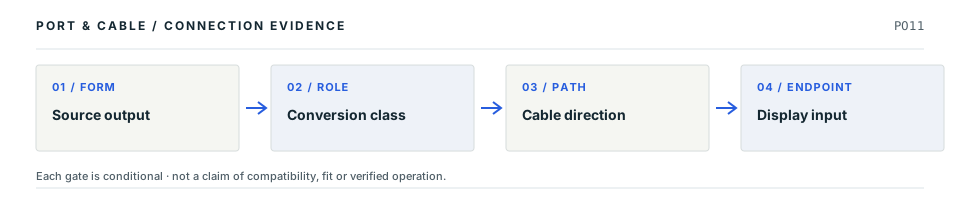
Conceptual four-stage decision path: Source output; then Conversion class; then Cable direction; then Display input. Every stage requires independent verification; this is not a drawing of connector contact geometry.
Decision map, not a plug drawing or electrical wiring diagram. The original connector specimen remains above; this sequence shows what needs proof after shape identification.

Four facts to keep separate

01
Physical ports

Record the actual DisplayPort source/output and HDMI sink/input before choosing anything. Evidence: C011A

02
Passive route

A passive DP-to-HDMI candidate depends on documented dual-mode DP++ support at the source. Evidence: C044A

03
Active route

An active DP-to-HDMI product is a distinct adapter category with its own supported modes. Evidence: C043A

04
Reverse conversion

HDMI-to-DisplayPort is another direction-specific adapter category, not an assumed reverse of DP-to-HDMI. Evidence: C045A

Common wrong conclusion

A plug with DisplayPort on one end and HDMI on the other does not establish bidirectional conversion.

What to check next

  1. Name the graphics source/output and display input in writing.
  2. Verify documented DP++ source support, or specify an appropriately powered active converter.
  3. Check the exact converter limits, direction and requested resolution/refresh mode.
Why these statements are qualified · claim and source context

This is an original editorial decision study tied to existing source-checked claims. The following source inspections have not been renewed by this new page presentation, and none is independent engineering or model-by-model qualification.

  • S015 · VESADP 2.1b requirements; how to know device features; DisplayPort over USB-C · source reviewed 2026-10-01 · Version labels do not require the maximum UHBR rate. Check documented device capabilities.
  • S846 · StarTech.comPage1 passive adapter/DP++ requirement paragraph; page2 Special Notes/Requirements; page3 Hardware Active or Passive Adapter. · source reviewed 2026-10-21 · DP2HDMI2 is explicitly passive and requires DP++ at the video source. The claim is narrowed to the cited passive-adapter class.
  • S035 · StarTech.comPDF pp. 1–2: DP-source to HDMI-display description; p. 3: Hardware table, visually inspected. · source reviewed 2026-10-07 · Scoped active DP-source to HDMI-display example.
  • S036 · StarTech.comPDF p. 1: USB-A power lead; p. 2: explicit one-way HDMI-source to DisplayPort-display conversion and Hardware table, visually inspected. · source reviewed 2026-10-07 · Scoped active HDMI-source to DisplayPort-display example.

Unresolved: Actual device fit, required physical tolerances, pinouts, negotiations, electrical safety and hardware interoperability still require the identified manufacturer's documentation and any necessary independent review.

Choose the adapter direction

Practical reference

Practical answers for DisplayPort connector

Start with the answer. Follow the real distinction, then the source-scoped next check. All evidence dates and publication blockers remain unchanged.

V102Q03 Practical reference

Will a DisplayPort-to-HDMI adapter also work from HDMI to DisplayPort?

Short answer Not on shape alone. The two source-to-display directions are different converter classes, and a passive DP-to-HDMI candidate needs an explicitly dual-mode (DP++) source.

Which distinction matters?
What you are checkingWhat the cited evidence establishes
DisplayPort source → HDMI displayPassive candidate only when DP++ is documented; otherwise investigate a suitable active converter
HDMI source → DisplayPort displayRequires a device specified for that direction
Either routeThe actual display mode, power conditions and exact product limits remain separate
Next checks, in order
  1. Write down the output port on the actual video source and the input port on the target display.
  2. Verify source DP++ support before considering a passive DP→HDMI cable.
  3. Check the exact adapter’s declared direction and supported video mode; do not reverse the arrow.

Still unresolved: A DisplayPort connector, adapter shell or standard label does not establish reverse conversion or a working resolution.

Claim-level evidence, source locators and limits

Existing evidence claims: C011A · C043A · C044A · C045A. These are editorial field answers over inherited source records, not newly approved specifications.

  • S015 · VESA — DP 2.1b requirements; how to know device features; DisplayPort over USB-C. Recorded inspection 2026-10-01;
  • S846 · StarTech.com — Page1 passive adapter/DP++ requirement paragraph; page2 Special Notes/Requirements; page3 Hardware Active or Passive Adapter.. Recorded inspection 2026-10-21; Named product and source direction only; no reverse conversion, universal resolution/audio promise, hardware test or adapter recommendation. All4pages read as text; only pages1and2 visually inspected. VESA's31January2013 dual-mode release announcement was also read as context, not as current universal performance evidence.
  • S035 · StarTech.com — PDF pp. 1–2: DP-source to HDMI-display description; p. 3: Hardware table, visually inspected.. Recorded inspection 2026-10-07; Exact DP2HD4KS active converter example. Performance, cable length and broad marketing compatibility statements are not generalized. Inspection repairs access for the existing direction/conversion scope, not a hardware or independent review.
  • S036 · StarTech.com — PDF p. 1: USB-A power lead; p. 2: explicit one-way HDMI-source to DisplayPort-display conversion and Hardware table, visually inspected.. Recorded inspection 2026-10-07; Exact 128-HDMI-DISPLAYPORT example only. The attached USB lead is for converter power in the scoped description; no USB data path is inferred. Power and supported modes remain product-specific, without a universal compatibility verdict.

Neither the source inspection dates nor the evidence dataset has been refreshed. No physical tests, exact-device compatibility approval, pinout or fabrication geometry is implied.

Before you connect

Before you connect

What to check

  1. Confirm input versus output on the exact device.
  2. Check the supported link rate and display mode, not only the version label.
  3. For passive HDMI conversion, verify DP++ at the source.
Trace a supported connection class →

Your next step

Move from the form to the requirement.

Use this reference

From identity to the right next question

Put this field note to work.

Add to discovery trayRecord an unsaved candidate (private workspace)

Candidate selection does not confirm the identity or capabilities of your physical item.

Related guides, comparisons and worksheets

Common questions

Questions this record can help resolve

Display connection desk

Trace the display path beyond the socket

Shared output resources, host native limits and software-rendered paths remain distinct.

Evidence behind this reference

The source trail

Evidence for this page

AI-assisted inspection is not independent engineering review. Source scope and access limitations are disclosed below. Procedural checklists are editorial requirements, not hardware measurements.

Back to first citation ↑
C011ASource checked · pending review

DisplayPort provides a video interface with product-specific features and link rates.

VESA · DisplayPort FAQ ↗

Locator: DP 2.1b requirements; how to know device features; DisplayPort over USB-C
Access: public page.

S015: full source recordInspect review dependencies → (private workspace)

Claim scope: Consumer identification / documented standard or product class only. Next review due 2026-12-30.

Back to first citation ↑
C011CSource checked · pending review

VESA describes DP80 for four-lane UHBR20 operation and says original DP40-certified cables are validated for the DP54 performance rating.

VESA · VESA — DisplayPort cable overview ↗

Locator: How will you use the performance of DisplayPort? DP80, DP80LL and DP40-to-DP54 statements
Access: public page. Cable classes and four-lane rates; verify an exact cable in the official database. Homepage retains older forthcoming wording; release timing is not inferred. Retrieval locators and observations retained; raw acquisition is recorded separately.

S520: full source recordInspect review dependencies → (private workspace)

Claim scope: Cable-class observations; device lane/rate support and exact certification remain separate.. Next review due 2027-01-09.

Back to first citation ↑
C011BSource checked · pending review

TE's cited standard DisplayPort receptacle is a 20-position connector example, supporting a 20-contact engineering count while leaving DisplayPort revision, lane rate and device features unresolved.

TE Connectivity · TE 2040210-1 DisplayPort connector ↗

Locator: Configuration features: DisplayPort receptacle; 20 positions
Access: public page. A manufacturer component example supports connector-form contact count only; it does not establish DisplayPort revision, link rate, lane use, MST, USB-C Alt Mode or universal fabrication dimensions.

S368: full source recordInspect review dependencies → (private workspace)

Claim scope: Connector-form contact count supported by one manufacturer example; protocol/version capability explicitly excluded.. Next review due 2027-01-04.

Back to first citation ↑
C011DSource checked · pending review

VESA identifies DP++ support on the DisplayPort source as a prerequisite for passive DisplayPort-to-HDMI or DisplayPort-to-DVI signal adaptation. A DisplayPort-shaped output alone is not evidence that its source provides dual-mode signaling.

VESA / DisplayPort · Get Connected: DisplayPort dual-mode adapter boundary ↗

Locator: Get Connected, footnote below How It Works illustration
Access: public page. Source states a conditional adapter capability; not a blanket promise of resolution or interoperability.

S644: full source recordInspect review dependencies → (private workspace)

Claim scope: VESA Get Connected conversion footnote; source role / DP++ only; no specific display mode. Next review due 2027-01-13.

Back to first citation ↑
C011WSource checked · pending review

Molex specifies 472720001 as a DisplayPort receptacle, 20 loaded circuits and 2 row(s), with mating-interface pitch 1.00mm.

Molex · Molex 47272 series chart, exact 472720001 DisplayPort receptacle ↗

Locator: Full Export Spreadsheet table, exact 472720001 row: Web Description, Gender, Circuits Loaded, Number of Rows, Pitch - Mating Interface and separate Pitch - Termination Interface columns. Full official chart read; no PDF drawing pixels acquired.
Access: public page. Exact suffix0001 only. Same chart suffix0029 lists0.50mm while0001/0024 list1.00mm. Manufacturer discrepancy is retained, not resolved into a universal pitch or an unstated within-row/projection convention. Product detail page says Limited Information Available; chart fields retained without measured/toleranced drawing.

S976: full source recordInspect review dependencies → (private workspace)

Claim scope: Exact Molex 472720001, female right-angle DisplayPort receptacle; manufacturer mating-interface/row fields only, not a universal family value.. Next review due 2027-01-20.

Suggest a correction to this field note →
Source scope and review status

Inspect source authority, access limits and review holds

Evidence behind this page

Scope first. Source second. Approval separate.

5 linked sources · 5 scoped claims · 0 sources with inspection/access flags.

Page scope: consumer_pilot

Assessment 2026-10-22 · earliest scheduled source review 2026-12-30. This is a recorded-date assessment, not a live source check. Page-level independent review is not established by this panel.

Inspect 5 source scopes, access limits and dates

S015 · DisplayPort FAQ

VESA · Standards-organization domain · inspected 2026-10-01 · due 2026-12-30

Within inspection window

Scoped support: Version labels do not require the maximum UHBR rate. Check documented device capabilities.

Not established / limitations:

Locator: DP 2.1b requirements; how to know device features; DisplayPort over USB-C

S368 · TE 2040210-1 DisplayPort connector

TE Connectivity · Manufacturer / product-owner domain · inspected 2026-10-06 · due 2027-01-04

Within inspection window

Scoped support: Manufacturer example supporting the 20-position contact count for the standard DisplayPort connector form.

Not established / limitations: A manufacturer component example supports connector-form contact count only; it does not establish DisplayPort revision, link rate, lane use, MST, USB-C Alt Mode or universal fabrication dimensions.

Locator: Configuration features: DisplayPort receptacle; 20 positions

S520 · VESA — DisplayPort cable overview

VESA · Standards-organization domain · inspected 2026-10-11 · due 2027-01-09

Within inspection window

Scoped support: Cable classes and four-lane rates; verify an exact cable in the official database. Homepage retains older forthcoming wording; release timing is not inferred.

Not established / limitations: Cable classes and four-lane rates; verify an exact cable in the official database. Homepage retains older forthcoming wording; release timing is not inferred. Retrieval locators and observations retained; raw acquisition is recorded separately.

Locator: How will you use the performance of DisplayPort? DP80, DP80LL and DP40-to-DP54 statements

S644 · Get Connected: DisplayPort dual-mode adapter boundary

VESA / DisplayPort · Standards-organization domain · inspected 2026-10-15 · due 2027-01-13

Within inspection window

Scoped support: Passive conversion to HDMI/DVI requires DP++ at source; not a statement that a particular device implements it

Not established / limitations: Source states a conditional adapter capability; not a blanket promise of resolution or interoperability.

Locator: Get Connected, footnote below How It Works illustration

S976 · Molex 47272 series chart, exact 472720001 DisplayPort receptacle

Molex · Manufacturer / product-owner domain · inspected 2026-10-22 · due 2027-01-20

Within inspection window

Scoped support: Exact 472720001 specification row only.

Not established / limitations: Exact suffix0001 only. Same chart suffix0029 lists0.50mm while0001/0024 list1.00mm. Manufacturer discrepancy is retained, not resolved into a universal pitch or an unstated within-row/projection convention. Product detail page says Limited Information Available; chart fields retained without measured/toleranced drawing.

Locator: Full Export Spreadsheet table, exact 472720001 row: Web Description, Gender, Circuits Loaded, Number of Rows, Pitch - Mating Interface and separate Pitch - Termination Interface columns. Full official chart read; no PDF drawing pixels acquired.

Trace 5 claims to their source records

C011A · P011

DisplayPort provides a video interface with product-specific features and link rates.

Claim scope: Consumer identification / documented standard or product class only

Source links: S015 · Evidence trail → (private workspace)

C011B · P011

TE's cited standard DisplayPort receptacle is a 20-position connector example, supporting a 20-contact engineering count while leaving DisplayPort revision, lane rate and device features unresolved.

Claim scope: Connector-form contact count supported by one manufacturer example; protocol/version capability explicitly excluded.

Source links: S368 · Evidence trail → (private workspace)

C011C · P011

VESA describes DP80 for four-lane UHBR20 operation and says original DP40-certified cables are validated for the DP54 performance rating.

Claim scope: Cable-class observations; device lane/rate support and exact certification remain separate.

Source links: S520 · Evidence trail → (private workspace)

C011D · P011

VESA identifies DP++ support on the DisplayPort source as a prerequisite for passive DisplayPort-to-HDMI or DisplayPort-to-DVI signal adaptation. A DisplayPort-shaped output alone is not evidence that its source provides dual-mode signaling.

Claim scope: VESA Get Connected conversion footnote; source role / DP++ only; no specific display mode

Source links: S644 · Evidence trail → (private workspace)

C011W · P011

Molex specifies 472720001 as a DisplayPort receptacle, 20 loaded circuits and 2 row(s), with mating-interface pitch 1.00mm.

Claim scope: Exact Molex 472720001, female right-angle DisplayPort receptacle; manufacturer mating-interface/row fields only, not a universal family value.

Source links: S976 · Evidence trail → (private workspace)

Prepare this page for review → (private workspace)Read the evidence method →

Recorded evidence only. An inspection date, publisher label, source link or generated packet is not independent technical review, hardware testing, fabrication approval or a compatibility verdict.

Source-qualified next step · P011

Can I use a passive adapter from DisplayPort to HDMI?

What the evidence saysOnly if the video source explicitly supports DisplayPort dual-mode (DP++), with a suitable directional adapter.

What is still unknown

A DisplayPort plug or a VESA statement about the class is not proof that this computer supports DP++, or that a specific adapter meets a resolution or refresh-rate goal.

Check before proceeding

  1. Identify the computer or dock output and confirm its DP++ support.
  2. Read the exact adapter’s input/output direction and supported modes.
  3. If DP++ is absent or unknown, consult a suitably specified active adapter rather than guessing.
Inspect 1 source-checked claim (independent review pending)
  1. C011D / source-linked claim: VESA identifies DP++ support on the DisplayPort source as a prerequisite for passive DisplayPort-to-HDMI or DisplayPort-to-DVI signal adaptation. A DisplayPort-shaped output alone is not evidence that its source provides dual-mode signaling.

    S644 · VESA / DisplayPort

    VESA Get Connected conversion footnote; source role / DP++ only; no specific display mode · Checked 2026-10-15 · No independent approval

Original reader guidance · Not a hardware test, certified connection, independent technical review, or publication approval.