FIELD GUIDESource-led reference
← Field sheets / USB, video & adapters4 of 4Letter PDF (legacy download held for current evidence review). Current focused printable referencesA4 PDF (legacy download held for current evidence review). Current focused printable references

PORT & CABLE / FIELD GUIDES / 06 / VIDEO CABLES AND CONVERTERS

Follow the signal in one direction.

Four direction-sensitive paths distinguish active conversion, passive adaptation and source-labelled cabling. Reverse operation needs its own evidence.

4 source-qualified rows2-page Letter / A4Revision 125.0.0 · original review edition

Each PDF includes two pages: the chart, then source notes and a reused visual. Downloads work in the native site and full offline preview. Evidence dates remain unchanged.

01 / KEEP THE LIMIT BESIDE THE ANSWER

The side-by-side reference.

Documented reading and required next check. No universal fit, wiring or compatibility result.
Label / exact scopeWhat the evidence establishesWhat to check next
DVI-D source → VGA displayStarTech DVI2VGAE

Active, video-only conversion; USB power support is described for low-powered DVI ports.

Do not infer: Reverse VGA-to-DVI operation and audio are not established.

Read the exact input/output, power and supported timing requirements.

S493
Scope and dates ↓

DVI-I source → VGA displayStarTech DVIVGAMF

Passive adapter for a DVI-I output and VGA display.

Do not infer: The passive model is not a DVI-D digital-to-analog converter.

Verify analog output support on the actual source.

S494
Scope and dates ↓

HDMI source → HDMI displayHDMI LA active-cable class

Distinct source and sink ends; Cable Power needs support from source and cable.

Do not infer: The active-cable direction rule does not establish direction for every passive cable.

Read both end labels and the exact cable power instructions.

S518
Scope and dates ↓

USB-C video source → HDMI displayVESA Alt Mode converter class

USB-C-to-HDMI accessories are described as DisplayPort Alt Mode protocol converters.

Do not infer: A USB-C connector alone does not establish video support or reverse conversion.

Verify source Alt Mode and the named converter direction, power and display timing.

S519
Scope and dates ↓

DVI-D source → VGA display

StarTech DVI2VGAE

Documented reading
Active, video-only conversion; USB power support is described for low-powered DVI ports.
Do not infer
Reverse VGA-to-DVI operation and audio are not established.
Next check
Read the exact input/output, power and supported timing requirements.

S493 · Scope and dates ↓

DVI-I source → VGA display

StarTech DVIVGAMF

Documented reading
Passive adapter for a DVI-I output and VGA display.
Do not infer
The passive model is not a DVI-D digital-to-analog converter.
Next check
Verify analog output support on the actual source.

S494 · Scope and dates ↓

HDMI source → HDMI display

HDMI LA active-cable class

Documented reading
Distinct source and sink ends; Cable Power needs support from source and cable.
Do not infer
The active-cable direction rule does not establish direction for every passive cable.
Next check
Read both end labels and the exact cable power instructions.

S518 · Scope and dates ↓

USB-C video source → HDMI display

VESA Alt Mode converter class

Documented reading
USB-C-to-HDMI accessories are described as DisplayPort Alt Mode protocol converters.
Do not infer
A USB-C connector alone does not establish video support or reverse conversion.
Next check
Verify source Alt Mode and the named converter direction, power and display timing.

S519 · Scope and dates ↓

02 / SEE THE DISTINCTION

A visual aid, not a fit gauge.

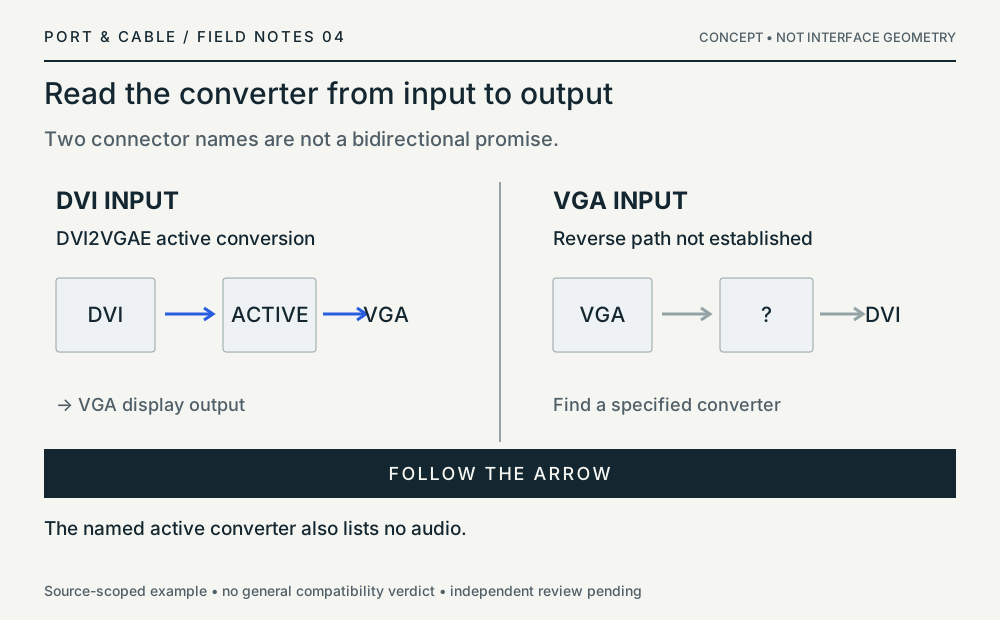
Named DVI-to-VGA active conversion is direction-specific and does not establish audio.
Reused concept diagram, unchanged. Not a physical specimen, not to scale. Technical and rights reviews remain pending.

No registered source-observed physical view is selected for this chart. A concept has not been substituted or counted as a specimen.

03 / THE EVIDENCE STAYS ATTACHED

Read the scope behind each row.

Compiled 2026-10-11 from inherited observations. A compilation date is not a new source inspection. Expand a row for its original claims, dates and source locators.

DVI-D source → VGA display C014E · C016F

Example scope: StarTech DVI2VGAE

C014E / P014

StarTech DVI2VGAE is an active adapter with DVI-D input and VGA output; the hardware table lists no audio.

Named direction and video-only conversion. The pictured DVI connector is a dual-link form; pin loading is not a resolution guarantee.

Original claim verification: 2026-10-11. Status: source_checked. No independent hardware approval.

C016F / P016

The DVI2VGAE instructions describe a DVI source feeding a VGA monitor or projector and include USB power support for low-powered DVI ports.

Named conversion direction. VGA-source-to-DVI-display operation and audio carriage are not established.

Original claim verification: 2026-10-11. Status: source_checked. No independent hardware approval.

S493 · StarTech.com — DVI2VGAE active DVI-D to VGA datasheet
PDF pages 1–2: direction, low-powered-port note, Hardware / AV Input / AV Output / Audio; page 2 visually inspected. · Source record checked 2026-10-11

DVI-I source → VGA display C015E

Example scope: StarTech DVIVGAMF

C015E / P015

StarTech DVIVGAMF is a passive DVI-I-to-VGA adapter; its instructions refer DVI-D users to a separate converter.

Named adapter for a DVI-I output and VGA display. The source does not approve arbitrary DVI-I devices, modes or mechanical pairings.

Original claim verification: 2026-10-11. Status: source_checked. No independent hardware approval.

S494 · StarTech.com — DVIVGAMF passive DVI-I to VGA datasheet
PDF pages 1–2: DVI-I use note, DVI-D referral, passive classification and pictured adapter. Visually inspected. · Source record checked 2026-10-11

HDMI source → HDMI display C008H

Example scope: HDMI LA active-cable class

C008H / P008

HDMI Cable Power requires support from both the active cable and the HDMI source. HDMI LA specifies source/sink direction for active cables and a separate power connector for sources without Cable Power support.

HDMI Cable Power feature scope; follow the exact cable’s instructions. Not monitor power or a universal converter-power rule.

Original claim verification: 2026-10-11. Status: source_checked. No independent hardware approval.

S518 · HDMI Licensing Administrator — HDMI LA — Active cable power and direction
HDMI Cable Power requirements, direction paragraph and separate power connector · Source record checked 2026-10-11

USB-C video source → HDMI display C041B · C042B

Example scope: VESA Alt Mode converter class

C041B / P041

VESA describes USB-C to HDMI accessories as DisplayPort Alt Mode protocol converters, with the USB-C end attached to the video source.

Described converter class and direction; do not assume passive rewiring, reverse operation or HDMI Alt Mode.

Original claim verification: 2026-10-11. Status: source_checked. No independent hardware approval.

C042B / P042

VESA states that an Alt Mode display receives no image when connected to a USB-C port that does not support DisplayPort over USB-C.

Native DisplayPort Alt Mode path only; USB graphics devices are a different technology.

Original claim verification: 2026-10-11. Status: source_checked. No independent hardware approval.

S519 · VESA — VESA — DisplayPort FAQ
DisplayPort 2.1b certification minimum, DP over USB-C, no-video case, direction and DSC sections · Source record checked 2026-10-11

Port & Cable · Know what connects. Compiled 11 October 2026 · Revision 125.0.0. Inherited evidence, not independent approval. Historical review-edition label; not a statement of this page’s current publication status.