
FIELD REFERENCE 28 / DISPLAY & MOBILE
Match the form.
Follow the signal.
Recognize what is in front of you. Then check what it is meant to carry, in which direction, and under which conditions.
01 / THE READING ORDER
Start at the output. End at the input.
Source
Identify the actual device output and its documented display modes.
Record the model and port label.
Path
Check cable or converter direction, supported transport and stated limits.
Do not reverse an adapter by assumption.
Display
Check the receiving input, selected mode, audio and content requirements.
Keep unknown requirements unresolved.
“Plug” and “receptacle” describe a component. “Output” and “input” describe an equipment role. These are separate questions. The diagrams below are qualitative, not to a common scale, and are not wiring or insertion instructions.
Read the evidence and its limits
TE drawing C-1747981 H maps 1747981-1 to a without-flange HDMI board-receptacle form and presents its mating face separately from the reference PCB layout. C008I
V146: Named drawing family and suffix table only. The drawing does not establish an installed port’s input/output role or HDMI feature set.
An active DisplayPort-to-HDMI converter translates a DisplayPort source for an HDMI display; direction is product-specific. C043A
Consumer identification / documented standard or product class only
Apple notes that an app may not support its display adapter and that protected movies, shows or certain streaming apps require an HDCP-compatible connection. C017C
V146: Matching the Lightning connector is only one requirement. This does not establish support for a named app, device or display.
02 / THE SIX FORMS
Read the opening—and the source scope.
Manufacturer drawings can distinguish a mating face from a board footprint. They do not identify every feature of the finished device. These studies supplement the original references; they do not silently replace them.
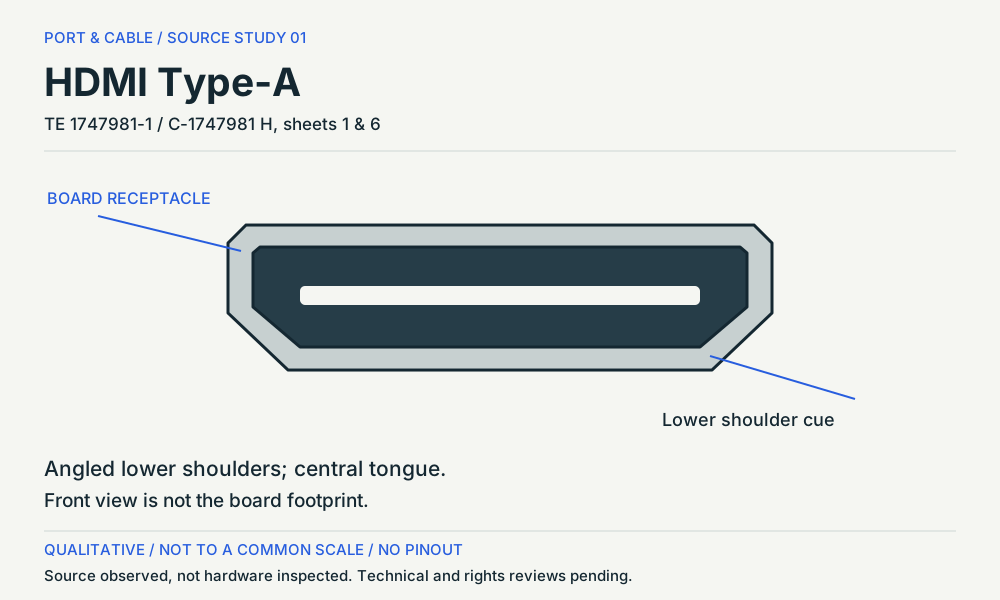
P008 / HDMI Type-A
A board socket is not a signal direction.
View observation, orientation and omissions (private workspace)
The named TE drawing separates the receptacle mouth from the board footprint. Identify the device output or input in its own manual; the HDMI label alone does not settle optional features.
Read the evidence and its limits
TE's cited Standard HDMI receptacle is a 19-position connector example, supporting a 19-contact engineering count for the full-size HDMI form without implying HDMI version or video capability. C008C
Connector-form contact count supported by one manufacturer example; protocol/version capability explicitly excluded.
TE drawing C-1747981 H maps 1747981-1 to a without-flange HDMI board-receptacle form and presents its mating face separately from the reference PCB layout. C008I
V146: Named drawing family and suffix table only. The drawing does not establish an installed port’s input/output role or HDMI feature set.
HDMI version labeling alone does not identify every optional feature implemented by a product. C008B
Narrowly stated supporting distinction; not an end-to-end device guarantee
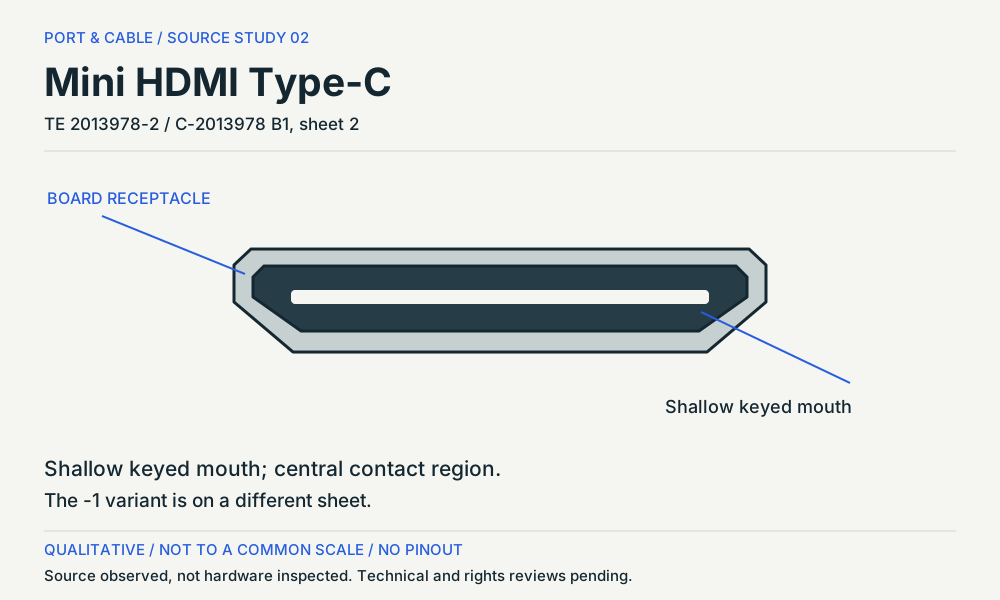
P009 / Mini HDMI Type-C
Mini HDMI is Type-C, not USB-C.
View observation, orientation and omissions (private workspace)
The study follows the -2 receptacle on sheet 2, not the -1 variant on sheet 1. Keep the family name and the component role together when comparing a cable with a board socket.
Read the evidence and its limits
Mini HDMI is HDMI Type-C; it is physically different from Micro HDMI Type-D. C009A
Consumer identification / documented standard or product class only
TE's cited Mini HDMI Type-C receptacle is a 19-position connector example, supporting a 19-contact engineering count for the Mini HDMI form without implying HDMI version or video capability. C009B
Connector-form contact count supported by one manufacturer example; protocol/version capability explicitly excluded.
Sheet 2 of TE drawing C-2013978 B1 identifies the 2013978-2 Mini HDMI board receptacle; its front view and reference PCB layout describe different sides of the component. C009C
V146: Exact -2 drawing selection; not the -1 form on sheet 1. No USB Type-C equivalence, cable counterpart or dimensional mating approval.
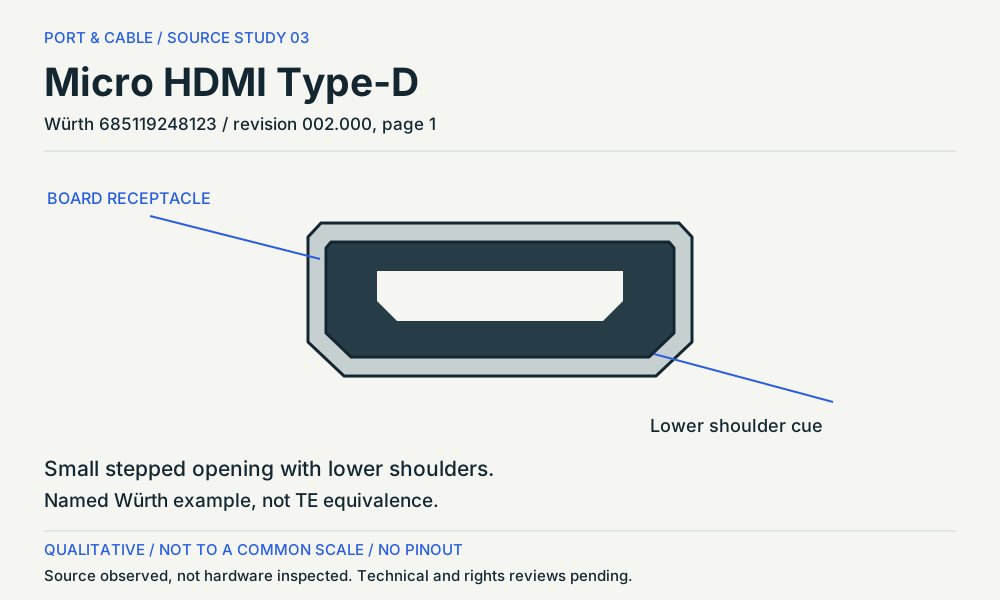
P010 / Micro HDMI Type-D
Micro HDMI is a separate Type-D form.
View observation, orientation and omissions (private workspace)
This Würth component is a second, named example. It does not replace the existing TE entry or establish exact interchangeability. A land pattern is the board side, not a socket opening.
Read the evidence and its limits
Micro HDMI is HDMI Type-D, distinct from both Mini HDMI and Micro-USB. C010A
Consumer identification / documented standard or product class only
TE's cited Micro HDMI Type-D receptacle is a 19-position connector example, supporting a 19-contact engineering count for the Micro HDMI form without implying HDMI version or video capability. C010B
Connector-form contact count supported by one manufacturer example; protocol/version capability explicitly excluded.
Würth’s 685119248123 datasheet identifies a Micro HDMI Type-D horizontal SMT component and separates its connector drawing from the recommended land pattern. C010C
V146: Named Würth component; not a replacement or equivalent for the TE example in C010B. No HDMI bandwidth or live-device conclusion.
P011 / DisplayPort connector
Name the link rate, not just the version.
Observation gap retained
A rear view is
not a front view.
The fetched TE model did not show enough of the mating face for a new study. Existing reference artwork is retained, not upgraded by assumption.
VESA permits DP 2.1b certification without UHBR under its stated requirements. Read the product’s supported rate and display modes separately. A new front-face study remains deferred: the fetched TE model showed only a side/rear view.
Read the evidence and its limits
DisplayPort provides a video interface with product-specific features and link rates. C011A
Consumer identification / documented standard or product class only
TE's cited standard DisplayPort receptacle is a 20-position connector example, supporting a 20-contact engineering count while leaving DisplayPort revision, lane rate and device features unresolved. C011B
Connector-form contact count supported by one manufacturer example; protocol/version capability explicitly excluded.
VESA permits DisplayPort 2.1b device certification without UHBR support, subject to its specified minimum and feature requirements. The version label therefore does not establish UHBR20 capability. C039C
Version-versus-rate distinction; no detailed compliance certification performed here.
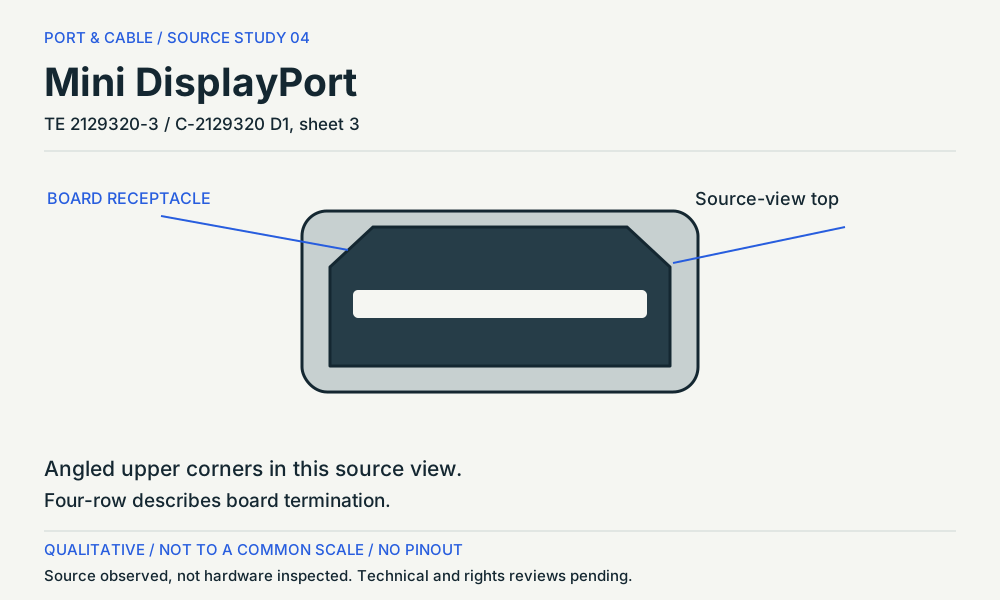
P012 / Mini DisplayPort connector
Same outline does not mean the same adapter.
View observation, orientation and omissions (private workspace)
The source’s four-row description concerns PCB termination. Separately, Apple excludes Mini DisplayPort displays from its named Thunderbolt 3-to-2 adapter path despite the similar connector shape.
Read the evidence and its limits
TE's cited Mini DisplayPort receptacle is a 20-position connector example; the same physical form can appear in contexts whose protocol capability must be established from the exact device rather than shape alone. C012B
Mini DisplayPort connector-form contact count only; DisplayPort revision and Thunderbolt capability are not inferred.
TE drawing C-2129320 D1 shows 2129320-3 as a reversed-offset Mini DisplayPort receptacle with four-row through-hole board termination; the mounting-side PCB layout is distinct from the mating face. C012D
V146: Four-row refers to board termination, not four rows inside the opening. Source orientation only; no Thunderbolt capability or universal device up direction.
Apple’s Thunderbolt 3 to Thunderbolt 2 Adapter supports the documented Thunderbolt display path but excludes DisplayPort/Mini DisplayPort displays such as Apple LED Cinema Display, despite similar connector shape. C012C
Named Apple adapter and specified Thunderbolt Mac path only; not a statement about all Mini DisplayPort adapters.
P017 / Lightning connector
An exposed tab, then a separate display path.
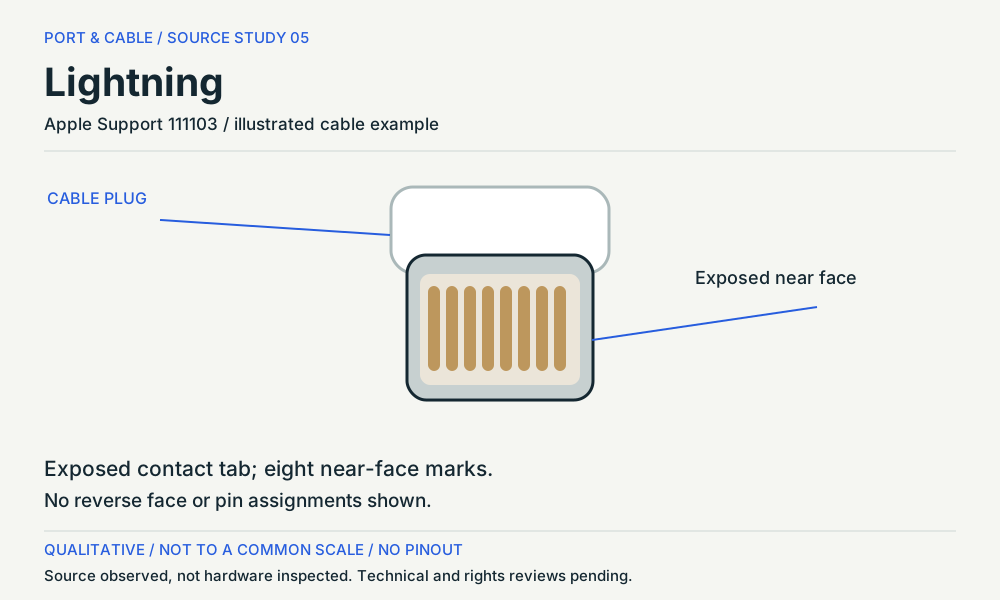
View observation, orientation and omissions (private workspace)
The study shows one visible face of Apple’s illustrated Lightning cable example. For a display connection, check the correct adapter, its audio path, the app and any content-protection requirement.
Read the evidence and its limits
Apple’s Lightning connector uses an exposed contact-tab form, unlike the hollow USB-C plug. C017A
Consumer identification / documented standard or product class only
Apple’s adapter guidance distinguishes HDMI-equipped Digital AV adapters from VGA adapters: the VGA adapter does not carry audio. C017B
V146: Apple’s described device-to-display adapter path. Not a claim that every app or third-party HDMI adapter provides audio.
Apple notes that an app may not support its display adapter and that protected movies, shows or certain streaming apps require an HDCP-compatible connection. C017C
V146: Matching the Lightning connector is only one requirement. This does not establish support for a named app, device or display.
03 / RESOLVE THE QUESTION
Six checks before a compatibility conclusion.
CHECK 01
Am I looking at a plug, a socket or a board footprint?
Read the component role and viewing side first. The named drawings distinguish the mating opening from solder or through-hole termination. The source’s drawing orientation is not an instruction to rotate or insert your cable.
Read the evidence and its limits
TE drawing C-1747981 H maps 1747981-1 to a without-flange HDMI board-receptacle form and presents its mating face separately from the reference PCB layout. C008I
V146: Named drawing family and suffix table only. The drawing does not establish an installed port’s input/output role or HDMI feature set.
Sheet 2 of TE drawing C-2013978 B1 identifies the 2013978-2 Mini HDMI board receptacle; its front view and reference PCB layout describe different sides of the component. C009C
V146: Exact -2 drawing selection; not the -1 form on sheet 1. No USB Type-C equivalence, cable counterpart or dimensional mating approval.
Würth’s 685119248123 datasheet identifies a Micro HDMI Type-D horizontal SMT component and separates its connector drawing from the recommended land pattern. C010C
V146: Named Würth component; not a replacement or equivalent for the TE example in C010B. No HDMI bandwidth or live-device conclusion.
TE drawing C-2129320 D1 shows 2129320-3 as a reversed-offset Mini DisplayPort receptacle with four-row through-hole board termination; the mounting-side PCB layout is distinct from the mating face. C012D
V146: Four-row refers to board termination, not four rows inside the opening. Source orientation only; no Thunderbolt capability or universal device up direction.
CHECK 02
Which way does the adapter carry the picture?
Write the source output first and the display input last. An active DisplayPort-to-HDMI converter describes that path; do not assume it works backwards. The inherited adapter reference retains its product-specific limits.
Read the evidence and its limits
An active DisplayPort-to-HDMI converter translates a DisplayPort source for an HDMI display; direction is product-specific. C043A
Consumer identification / documented standard or product class only
CHECK 03
Are Mini HDMI, Micro HDMI and USB-C the same?
Keep the complete family and type together: Mini HDMI Type-C, Micro HDMI Type-D and USB Type-C are different names. Compare documented forms, not just “mini” or a photograph’s apparent size.
Read the evidence and its limits
CHECK 04
Does a version number guarantee the top display mode?
No. Reuse the existing HDMI feature and VESA link-rate references. Record the actual output, cable or converter limits and display input capabilities; a connector drawing does not add those missing specifications.
Read the evidence and its limits
HDMI version labeling alone does not identify every optional feature implemented by a product. C008B
Narrowly stated supporting distinction; not an end-to-end device guarantee
VESA permits DisplayPort 2.1b device certification without UHBR support, subject to its specified minimum and feature requirements. The version label therefore does not establish UHBR20 capability. C039C
Version-versus-rate distinction; no detailed compliance certification performed here.
CHECK 05
Why can a Mini DisplayPort-shaped adapter still fail?
Apple’s named Thunderbolt 3-to-2 adapter excludes Mini DisplayPort displays. That scoped example is enough to show why the same-shaped connector must not be treated as an adapter compatibility result.
Read the evidence and its limits
Apple’s Thunderbolt 3 to Thunderbolt 2 Adapter supports the documented Thunderbolt display path but excludes DisplayPort/Mini DisplayPort displays such as Apple LED Cinema Display, despite similar connector shape. C012C
Named Apple adapter and specified Thunderbolt Mac path only; not a statement about all Mini DisplayPort adapters.
CHECK 06
The Lightning adapter fits. Why is sound or video missing?
Apple separates the HDMI/Digital AV audio path from VGA, and separately warns about app and HDCP requirements. Diagnose the documented adapter and content path rather than treating physical fit as a complete test.
Read the evidence and its limits
Apple’s adapter guidance distinguishes HDMI-equipped Digital AV adapters from VGA adapters: the VGA adapter does not carry audio. C017B
V146: Apple’s described device-to-display adapter path. Not a claim that every app or third-party HDMI adapter provides audio.
Apple notes that an app may not support its display adapter and that protected movies, shows or certain streaming apps require an HDCP-compatible connection. C017C
V146: Matching the Lightning connector is only one requirement. This does not establish support for a named app, device or display.
A REFERENCE TO KEEP BESIDE THE DEVICE
Three pages. Separate questions.
Letter PDF (legacy download held for current evidence review). Current focused printable references · A4 PDF (legacy download held for current evidence review). Current focused printable references
Original qualitative studies, source ledger and open checks. Private review edition; not a connection approval.