
60W cable marking
- Published scope
- Cable power class, not delivered power
- Conditions
- Match charger output, device input and cable.
- Do not infer
- No data/video rate follows from wattage.
- Authority
- S511 · USB-IF · S513 · USB-IF
Checked 2026-10-11
Capability library / power
Cable wattage is a limit to verify, not a command to the charger or device.
01 / READ THE QUALIFICATION
| Name or mark | Supported reading and conditions | Do not infer | Authority |
|---|---|---|---|
| 60W cable marking | Cable power class, not delivered powerMatch charger output, device input and cable. | No data/video rate follows from wattage. | S511 · USB-IF · S513 · USB-IFChecked 2026-10-11 |
| 240W cable marking | Cable power class; USB PD ceiling up to 240WEquipment must support and negotiate the required power. | A cable cannot create a charger voltage or increase a device limit. | S511 · USB-IF · S513 · USB-IFChecked 2026-10-11 |
| Power direction | Separate from data-host and video-source rolesDocument which equipment supplies power. | A laptop sending video need not supply the power. | S513 · USB-IFChecked 2026-10-11 |
| HDMI Cable Power | Power for active cable electronicsBoth source and cable support the feature, or use the cable’s specified auxiliary power. | Not power delivery to a monitor and not a universal adapter supply. | S518 · HDMI Licensing AdministratorChecked 2026-10-11 |
02 / FOLLOW THE ACTUAL PATH
Supported under stated conditions, excluded within a stated scope, or not established. Only 3 cases belong to this desk; none is a universal compatibility approval.
Not established · not hardware tested
The cable rating alone cannot establish the negotiated charge power.
Still unknown. Both endpoint power profiles are missing.
Next check. Read charger and laptop specifications before choosing the target power.
Basis: source-scoped interpretation. This classifies only the stated proposition, not an entire equipment pairing.
USB-IF’s January 2026 cable guidance separates data performance from 60W/240W power markings. USB 2.0 Type-C cables can use power-only logos without a displayed data rate.
USB-IF compliance-program markings; not independent authentication or video qualification.
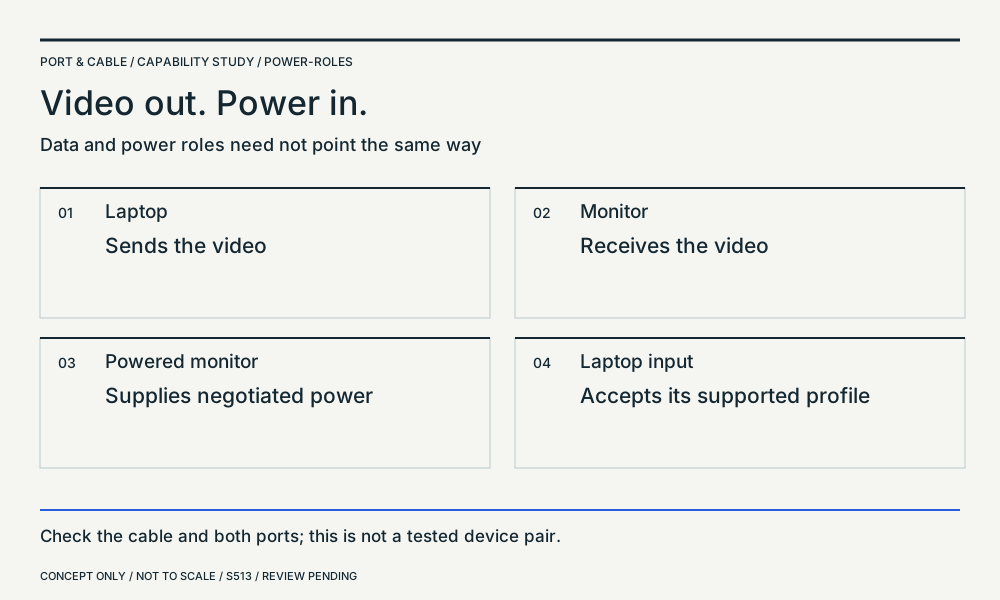
USB Power Delivery permits power flow independently of the data-host role and a supported system envelope up to 240W. A powered monitor can charge a laptop while receiving its video.
Negotiated power with suitable equipment and cable, not mandatory power from every port.
Supported under stated conditions · not hardware tested
USB-IF documents this division of power and video roles.
Still unknown. The exact monitor output profile and laptop requirement remain unverified.
Next check. Check video-input and PD-output specifications separately.
Basis: source-scoped interpretation. This classifies only the stated proposition, not an entire equipment pairing.
USB Power Delivery permits power flow independently of the data-host role and a supported system envelope up to 240W. A powered monitor can charge a laptop while receiving its video.
Negotiated power with suitable equipment and cable, not mandatory power from every port.
Not established · not hardware tested
The active cable and source must both support that feature.
Still unknown. Source support is not established by an HDMI version label.
Next check. Check the source manual and cable instructions before relying on connector power.
Basis: source-scoped interpretation. This classifies only the stated proposition, not an entire equipment pairing.
HDMI Cable Power requires support from both the active cable and the HDMI source. HDMI LA specifies source/sink direction for active cables and a separate power connector for sources without Cable Power support.
HDMI Cable Power feature scope; follow the exact cable’s instructions. Not monitor power or a universal converter-power rule.
Earlier capability-library bookmarks remain available below; the table and cases above use the newer source-scoped observations.
USB-C full-featured cable: capabilities to verify →
No. Record the published USB data rate and the cable’s power rating independently, then check support for the required display path and cable length. USB-IF cable labeling distinguishes performance and power; charging-only behavior should not be mistaken for a defective data port.
Do not assume. Buying a charge-rated cable for a high-bandwidth monitor or dock without checking its data/video qualification.
S040 · USB-IF · S006 · USB-IF · S007 · USB-IF
Original study retained, not newly reinspected or independently approved. Its source-record dates and limits are unchanged.