Supported under stated conditions, excluded within a stated scope, or not established. Only 6 cases belong to this desk; none is a universal compatibility approval.
Not established · not hardware tested
Does an Ultra96 feature label prove a 96Gbps port?
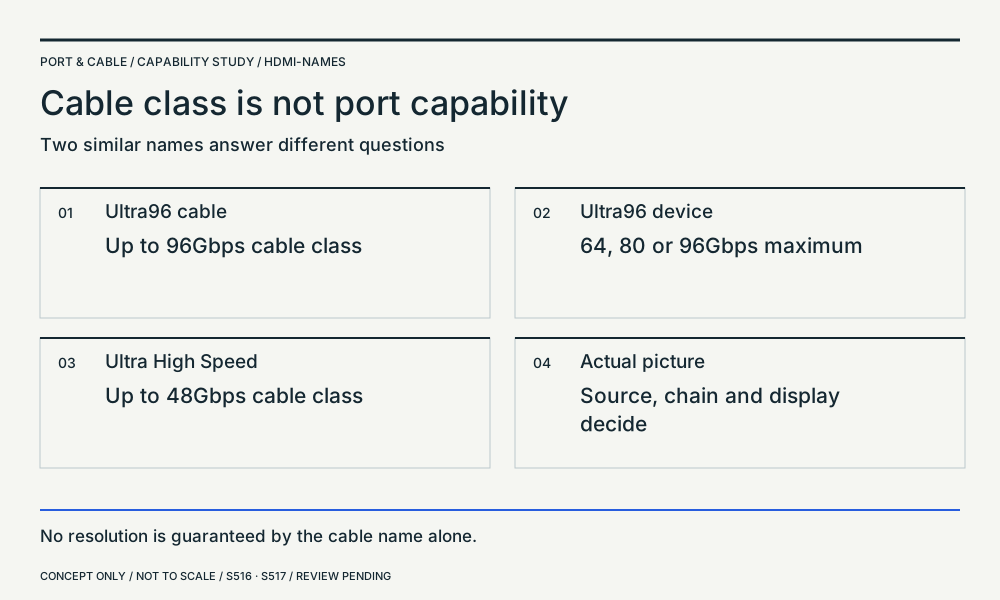
No exact rate follows: the official feature name covers three stated maxima.
Still unknown. The two port implementations and selected timing remain missing.
Next check. Look up the exact rate rather than using the feature name as a number.
Host, cable, destination, power and evidence
- Host / source
- Read the source port’s actual maximum.
- Cable / intermediary
- Use the appropriate certified cable for the documented path.
- Destination / sink
- Read the display port’s actual maximum.
- Power direction / supply
- Any active cable supply is a separate requirement.
Basis: source-scoped interpretation. This classifies only the stated proposition, not an entire equipment pairing.
C038B
HDMI LA’s Ultra96 device feature name can indicate a maximum of 64Gbps, 80Gbps or 96Gbps; the feature name alone does not identify which maximum the device implements.
Device feature naming, not the separate Ultra96 HDMI cable certification class.
S517 · HDMI Licensing Administrator
C074B
HDMI LA identifies Ultra96 HDMI cables as supporting up to 96Gbps; verification information identifies the cable brand, model and length.
Exact cable-class and certification scope, separate from device implementation.
S516 · HDMI Licensing Administrator
S516 · HDMI Licensing Administrator · S517 · HDMI Licensing Administrator
Not established · not hardware tested
Will a newer HDMI cable unlock a display mode?
A certified cable establishes a cable class, not a new endpoint feature.
Still unknown. Resolution, refresh rate, chroma, bit depth and compression are unspecified.
Next check. Check the complete timing at each stage; do not promise a mode from cable branding.
Host, cable, destination, power and evidence
- Host / source
- Source must produce the chosen timing and format.
- Cable / intermediary
- Verify exact cable class, model and length.
- Destination / sink
- Display and any receiver must accept the chosen format.
- Power direction / supply
- Supply active elements as their manuals require.
Basis: source-scoped interpretation. This classifies only the stated proposition, not an entire equipment pairing.
C073B
HDMI LA identifies Ultra High Speed HDMI cables for system configurations up to 48Gbps and requires cable certification labels.
Cable-class evidence, not proof of a source or display’s selected video timing.
S516 · HDMI Licensing Administrator
C074B
HDMI LA identifies Ultra96 HDMI cables as supporting up to 96Gbps; verification information identifies the cable brand, model and length.
Exact cable-class and certification scope, separate from device implementation.
S516 · HDMI Licensing Administrator
S516 · HDMI Licensing Administrator
Not established · not hardware tested
Does DisplayPort 2.1b on both devices establish UHBR20?
No. VESA allows certification without UHBR under its specified feature conditions.
Still unknown. The endpoints’ rate capabilities have not been supplied.
Next check. Look for UHBR20 explicitly on the exact port specifications.
Host, cable, destination, power and evidence
- Host / source
- Exact implemented rate and lane count needed.
- Cable / intermediary
- Certified cable qualified for the required link rate.
- Destination / sink
- Exact implemented rate and lane count needed.
- Power direction / supply
- Account for any active cable or intermediate electronics.
Basis: source-scoped interpretation. This classifies only the stated proposition, not an entire equipment pairing.
C039C
VESA permits DisplayPort 2.1b device certification without UHBR support, subject to its specified minimum and feature requirements. The version label therefore does not establish UHBR20 capability.
Version-versus-rate distinction; no detailed compliance certification performed here.
S519 · VESA
C011C
VESA describes DP80 for four-lane UHBR20 operation and says original DP40-certified cables are validated for the DP54 performance rating.
Cable-class observations; device lane/rate support and exact certification remain separate.
S520 · VESA
S519 · VESA · S520 · VESA
Excluded in stated scope · not hardware tested
Will a native DP Alt Mode display work from a USB-only port?
VESA says no image is received when the port lacks DisplayPort over USB-C.
Still unknown. USB graphics adapters and their drivers are a separate solution class.
Next check. Find a documented video-capable output or a separately qualified graphics solution.
Host, cable, destination, power and evidence
- Host / source
- Port explicitly lacks DP Alt Mode.
- Cable / intermediary
- Native USB-C to DisplayPort Alt Mode cable.
- Destination / sink
- DisplayPort input, not a USB graphics device.
- Power direction / supply
- Charging does not create the missing video mode.
Basis: explicit source exclusion within stated native path. This classifies only the stated proposition, not an entire equipment pairing.
C042B
VESA states that an Alt Mode display receives no image when connected to a USB-C port that does not support DisplayPort over USB-C.
Native DisplayPort Alt Mode path only; USB graphics devices are a different technology.
S519 · VESA
S519 · VESA
Excluded in stated scope · not hardware tested
Can an active HDMI cable simply be turned around?
HDMI LA states that reversing the source/sink ends of its described active-cable path does not work.
Still unknown. This is not a claim about passive cable direction or all converter types.
Next check. Read both end labels before installing a long cable run.
Host, cable, destination, power and evidence
- Host / source
- HDMI source must attach to the source-labelled end.
- Cable / intermediary
- Active HDMI cable with distinct end roles.
- Destination / sink
- HDMI display must attach to the sink-labelled end.
- Power direction / supply
- Follow the exact cable’s power instructions.
Basis: explicit source exclusion within stated cable class. This classifies only the stated proposition, not an entire equipment pairing.
C008H
HDMI Cable Power requires support from both the active cable and the HDMI source. HDMI LA specifies source/sink direction for active cables and a separate power connector for sources without Cable Power support.
HDMI Cable Power feature scope; follow the exact cable’s instructions. Not monitor power or a universal converter-power rule.
S518 · HDMI Licensing Administrator
S518 · HDMI Licensing Administrator
Not established · not hardware tested
Can a USB-C-to-HDMI converter run from HDMI to USB-C?
The described adapter class has a USB-C video source and HDMI destination; reverse operation is not established.
Still unknown. A reverse converter’s model, timing and power evidence is missing.
Next check. Find a converter explicitly documented for HDMI source → USB-C display.
Host, cable, destination, power and evidence
- Host / source
- Would-be HDMI source is outside the described input role.
- Cable / intermediary
- Exact converter model and direction required.
- Destination / sink
- USB-C display input needs its own documented protocol.
- Power direction / supply
- Check converter power and destination supply independently.
Basis: direction-limited inference; not blanket product exclusion. This classifies only the stated proposition, not an entire equipment pairing.
C041B
VESA describes USB-C to HDMI accessories as DisplayPort Alt Mode protocol converters, with the USB-C end attached to the video source.
Described converter class and direction; do not assume passive rewiring, reverse operation or HDMI Alt Mode.
S519 · VESA
S519 · VESA