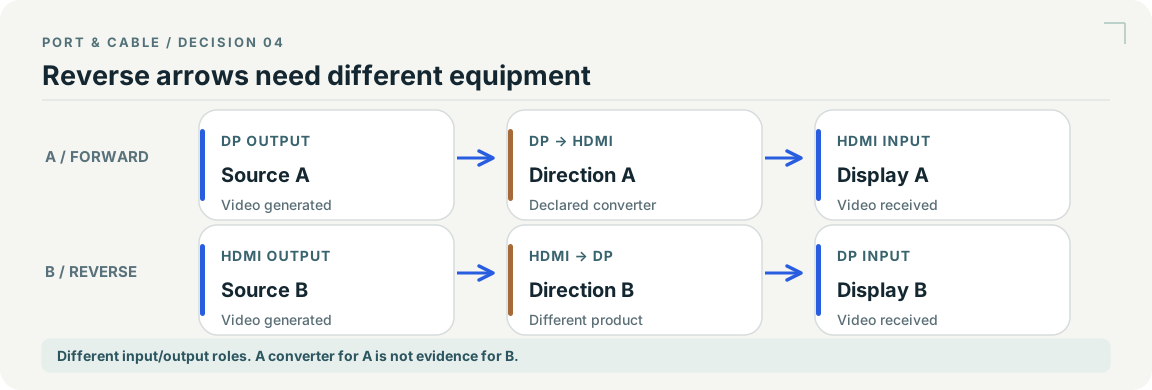
Start at the device generating the video, then follow each cable and conversion stage to the display input. A converter’s connector names are not enough: inspect its declared input, output and any power connection.
Existing evidence:C043A · C045A · C055A/ source records S035 · S036. See each source record for its inspection date and scope; graphic interpretation remains pending independent technical and publication review.
The useful distinction
Understand the requirement.
A converter designed for HDMI input and DisplayPort output is a different class from a DisplayPort-to-HDMI converter. [C055A]
Bounded facts, visible unknowns
Specifications and limits
Why the direction of an adapter matters facts and limitations
Minimum evidence
Input, output, direction and power requirements [C055A]
Verified device list
Not included. Check exact device and accessory documentation.
A boundary, not an omission to guess around.
This is a scoped requirements guide, not an interoperability certification. It does not test hardware, calculate an arbitrary display timing, or replace the exact product documentation. A missing capability stays unknown.
Before you connect
What to check
Write source → converter → display.
Read exact input and output labels in the manufacturer’s specification.
Treat bidirectionality as an explicit feature requiring evidence.
Check power requirements separately from video direction.
AI-assisted inspection is not independent engineering review. Source scope and access limitations are disclosed below. Procedural checklists are editorial requirements, not hardware measurements.
C055ASource checked · pending review
A converter designed for HDMI input and DisplayPort output is a different class from a DisplayPort-to-HDMI converter.
Locator: PDF p. 1: USB-A power lead; p. 2: explicit one-way HDMI-source to DisplayPort-display conversion and Hardware table, visually inspected. Access: public pdf text. Exact 128-HDMI-DISPLAYPORT example only. The attached USB lead is for converter power in the scoped description; no USB data path is inferred. Power and supported modes remain product-specific, without a universal compatibility verdict.
Assessment 2026-10-22 · earliest scheduled source review 2027-01-05. This is a recorded-date assessment, not a live source check. Page-level independent review is not established by this panel.
Scoped support: Scoped active HDMI-source to DisplayPort-display example.
Not established / limitations: Exact 128-HDMI-DISPLAYPORT example only. The attached USB lead is for converter power in the scoped description; no USB data path is inferred. Power and supported modes remain product-specific, without a universal compatibility verdict.
Locator: PDF p. 1: USB-A power lead; p. 2: explicit one-way HDMI-source to DisplayPort-display conversion and Hardware table, visually inspected.
Trace 1 claims to their source records
C055A · P055
A converter designed for HDMI input and DisplayPort output is a different class from a DisplayPort-to-HDMI converter.
Claim scope: Consumer identification / documented standard or product class only
Recorded evidence only. An inspection date, publisher label, source link or generated packet is not independent technical review, hardware testing, fabrication approval or a compatibility verdict.