FIELD GUIDESource-led reference

P030 / Storage / Connector reference

M.2 card edge interface

M.2 physical fit and keying do not establish whether a host supports a particular SATA, PCIe or NVMe device. [C030A]

M.2 is a form-factor family; NVMe describes a different layer.

Claim inspection dates: 2026-10-01, 2026-10-08, 2026-10-11, 2026-10-13, 2026-10-15 · Independent review pending

Distinguish the module from the socket

Look for

Record the module length, key arrangement and exact host-slot specification. The schematic is illustrative: neither its length nor contact spacing is an engineering measurement.

Identify the documented form

Identify the module and socket separately, then check the host’s wired interface.

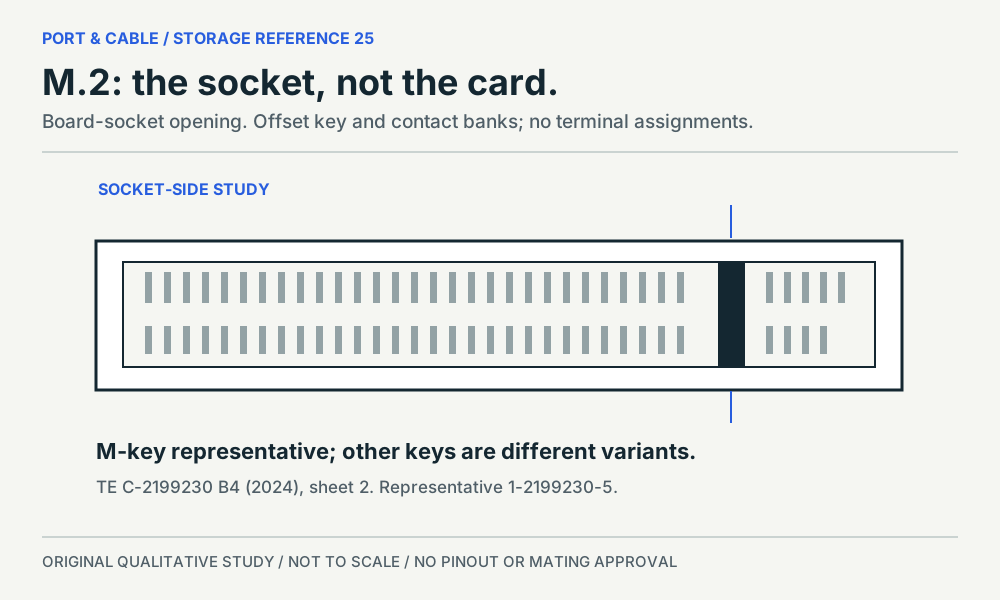
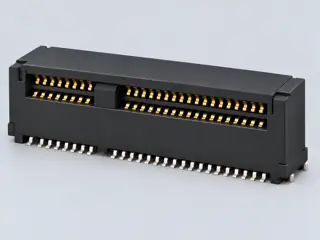
  1. The cited TE item is an M-key board socket; the card edge is its counterpart, not the depicted component. S594
  2. A key label does not establish SATA, PCIe or boot support; exact host wiring and firmware remain separate. S427 · S427 · S033
  3. Nominal module size, mounting position and component clearance must be checked independently. S426 · S427
Documented identity facts; exact part and variant scope remains with each value
Nominal contactsNot recordedNot recorded in a normalized source-scoped field. Consult the exact part/revision; no value inferred from illustrations.
Positions / cavity span67 (TE C-2199230 representative M-key socket)S594Recorded source-scoped values; named examples do not describe every family variant or establish compatibility. V143: the named drawing/revision or exact product page only. Recognition and document-role evidence; not a pinout, adapter verdict, dimensioned mating gauge, electrical approval or current installed-device claim.
Populated contactsNot recordedNot recorded in a normalized source-scoped field. Consult the exact part/revision; no value inferred from illustrations.
Connector rolecard-edgeS033 · S426 · S427 · S427 · S427 · S429 · S429Recorded source-scoped values; named examples do not describe every family variant or establish compatibility. Keyed module card-edge interface family
Rows, pitch, dimensions, keying and view limits
Additional scoped facts; not a fabrication drawing or a mating approval
Contact rows2 (1-2199230-5)S872Separate exact examples; retain each value’s source, role, axis and part scope. Exact named example 1-2199230-5: M-key M.2 board connector. Exact example only; no universal geometry, electrical compatibility, fabrication approval or wiring instruction. Connector envelope is distinct from existing22x42/80mm card dimensions; no NVMe/SATA capability guarantee.
Contact pitch0.5 mm manufacturer-reported centerline or mating-interface pitch (1-2199230-5)S872Separate exact examples; retain each value’s source, role, axis and part scope. Exact named example 1-2199230-5: M-key M.2 board connector. Exact example only; no universal geometry, electrical compatibility, fabrication approval or wiring instruction. Connector envelope is distinct from existing22x42/80mm card dimensions; no NVMe/SATA capability guarantee.
Dimensions / axis22 mm Module format width (2242 module format); 42 mm Module format length (2242 module format); 22 mm Module format width (2280 module format); 80 mm Module format length (2280 module format); 21.9 mm connector length (1-2199230-5); 8.7 mm connector width (1-2199230-5); 4.2 mm connector height (1-2199230-5)S426 · S872Separate exact examples; retain each value’s source, role, axis and part scope. Article 000144170 version 12, Figure 1 examples (b)–(d); no tolerance, connector geometry or clearance inferred. Exact named example 1-2199230-5: M-key M.2 board connector. Exact example only; no universal geometry, electrical compatibility, fabrication approval or wiring instruction. Connector envelope is distinct from existing22x42/80mm card dimensions; no NVMe/SATA capability guarantee.
Coupling / latchNot recordedNot recorded in a normalized source-scoped field. Consult the exact part/revision; no value inferred from illustrations.
Keying / polarizationA-key (TE C-2199230 B4 part table); B-key (TE C-2199230 B4 part table); E-key (TE C-2199230 B4 part table); M-key (TE C-2199230 B4 part table)S594Recorded source-scoped values; named examples do not describe every family variant or establish compatibility. V143: the named drawing/revision or exact product page only. Recognition and document-role evidence; not a pinout, adapter verdict, dimensioned mating gauge, electrical approval or current installed-device claim.
View conventionNot recordedNot recorded in a normalized source-scoped field. Consult the exact part/revision; no value inferred from illustrations.
Contact gender / arrangementNot recordedNot recorded in a normalized source-scoped field. Consult the exact part/revision; no value inferred from illustrations.
Mountingright-angle surface-mount board connector (1-2199230-5)S872Separate exact examples; retain each value’s source, role, axis and part scope. Exact named example 1-2199230-5: M-key M.2 board connector. Exact example only; no universal geometry, electrical compatibility, fabrication approval or wiring instruction. Connector envelope is distinct from existing22x42/80mm card dimensions; no NVMe/SATA capability guarantee.
Shell / formNot recordedNot recorded in a normalized source-scoped field. Consult the exact part/revision; no value inferred from illustrations.
ManufacturerTE Connectivity (1-2199230-5)S594Recorded source-scoped values; named examples do not describe every family variant or establish compatibility. V143: the named drawing/revision or exact product page only. Recognition and document-role evidence; not a pinout, adapter verdict, dimensioned mating gauge, electrical approval or current installed-device claim.
SeriesM.2 (1-2199230-5)S594Recorded source-scoped values; named examples do not describe every family variant or establish compatibility. V143: the named drawing/revision or exact product page only. Recognition and document-role evidence; not a pinout, adapter verdict, dimensioned mating gauge, electrical approval or current installed-device claim.
Exact part / implementation1-2199230-5 (1-2199230-5)S594Recorded source-scoped values; named examples do not describe every family variant or establish compatibility. V143: the named drawing/revision or exact product page only. Recognition and document-role evidence; not a pinout, adapter verdict, dimensioned mating gauge, electrical approval or current installed-device claim.
Recorded markingsNot recordedNot recorded in a normalized source-scoped field. Consult the exact part/revision; no value inferred from illustrations.

Keep this limit: The named multi-key TE drawing is not one universal socket or universal contact count for the whole family. S594 · S594

Make the next check

Read the exact system/board manual for the slot interface, module length, clearance, CPU/firmware and shared resources.

Existing source inspection and AI review remain distinct from independent technical review. A matching form does not establish a safe connection.

Recorded variant and source limits
  • No independently reviewed M.2 mechanical standard, contact count or assignment is published here.
  • Nominal module labels are not mating dimensions, tolerances, component-clearance measurements or a cutout drawing.
  • The exact host’s wired interface, CPU, firmware, module clearance and shared resources still require checking.
  • A passive-looking adapter or a matching key does not establish SATA conversion, lane availability or boot support.
  • EKF S82-P6 NVMe PCIe x4 M-Key socket: EKF pp.17-18 numbered M-Key table, socket on S82-P6; odd/even spatial orientation is not independently established.
  • Transcend MTS400 B+M-key SATA SSD: MTS400 p.6 contact-number table and p.5 mechanical card form. Mechanical B/M gaps are not contacts; odd/even spatial orientation is not independently established.
  • Kontron KWS 3000-ADL M-key NVMe socket (PCIe x4): Table 24 socket diagram and numbered contacts; key M positions 59-66 have no pins. The manual does not establish a card-back mirror.
  • Apacer SV250-M242 B+M SATA module: Figure 3-1 TOP VIEW: contacts at bottom, mounting hole at top, M notch left, B notch right, pin 1 at far right. Do not transfer this top view to the back of the card.
Report a correction to this identification or view →
M.2 card edge interface — module-face schematic; card/module illustration; original, not-to-scale identification schematic; drawing review pending
View Module-face schematicDepiction Card/module illustrationNot to scale · independent drawing review pending
Original recognition schematic · not to scale · drawing review pending
Inspect the illustrationModule-face schematic · larger view & look-alikes
M.2 card edge interface — module-face schematic; card/module illustration; original, not-to-scale identification schematic; drawing review pending
View Module-face schematicDepiction Card/module illustrationNot to scale · independent drawing review pending

Read the view

Board outline with mounting hole at the left and contact edge at the right

The mounting hole and contact edge orient this illustration only; no underside, socket opening or approved installation direction is shown.

About the marks: The simplified edge fingers and gap are not a verified key pattern.

What it cannot establish: Do not assign B, M or B+M keying, a module size or NVMe support from this generic board.

Enlargement changes display size only. It does not reveal measured geometry, a pin assignment or an approved mating combination.

Compare a likely look-alike

Read the underlying references: S033 · S426 · S427. Artwork interpretation remains review-pending.

How to read connector illustrations →
Named views, component roles and image sources

Image inspection / P030

See the view. Check its scope.

1 registered view for this reference. Different part examples are not automatically mates; all remain not to scale and independently unapproved.

An offset key interrupts the socket opening. Board socket; an original source-observed qualitative study, not a pinout or safe-mating guide. (private workspace)

P030 / Source-observed physical study

M.2 socket

TE C-2199230 B4; M-key representative 1-2199230-5

Socket-side source drawing orientation · Device receptacle

Not to scale. Technical and rights review pending.

Inspect view & provenance (private workspace)

Capabilities, facts and limits

Bounded facts, visible unknowns

Specifications and limits

M.2 card edge interface facts and limitations
Physical checksKeying, length, mounting and clearance [C030A]
Protocol supportRequires host and module evidence [C030A]
Nominal format, not mating dimensions2242 and 2280 examples label nominal module width and length; check the exact slot and standoff. [C030B] [C030D]
Key, interface and firmwareA matching B/M/B+M key is not a SATA, PCIe, NVMe, lane-count or boot guarantee. [C030C] [C030E]
Exact-host examplePRIME B550-PLUS AC-HES M.2_1 and M.2_2 have documented CPU/slot-dependent modes. [C030F] [C030G]
Source-scoped role and recognitionRead the component role before the key name. An offset key interrupts the socket opening. [C030J] [C030K] [C030L]
M.2 protocol mismatchHost socket and SSD must support the same SATA or PCIe storage transport, beyond physical fit. [C030M]
Mechanical dimensionsNo independently reviewed mechanical drawing in this release; do not use this page for fabrication.
Engineering pinoutSource-checked engineering profile available; independent review pending. Open engineering profile →
Verified device listNot included. Check exact device and accessory documentation.
A boundary, not an omission to guess around.

This record is an identification starting point. It does not provide measured mating tolerances, electrical approval, or a list of verified device models. Use the original device and accessory documentation to resolve the remaining requirements.

INTERNAL SYSTEMS / EXPANSION

M.2 is a form factor; SATA, PCIe and NVMe are different layers

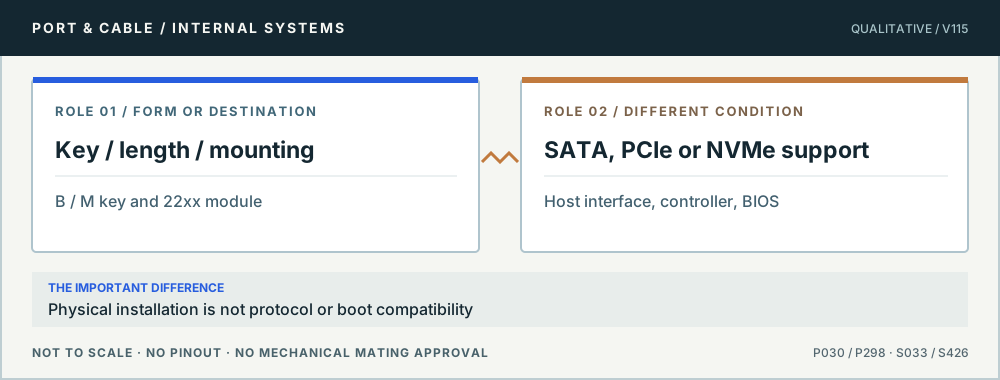
No. M.2 keys and module dimensions address physical fit; host wiring determines SATA versus PCIe availability, and NVMe is the storage command/transport stack. Kingston and the preserved Dell and ASUS references explicitly warn that M.2 key or shape alone cannot prove a shared protocol or host support.

Conceptual role comparison: Key / length / mounting versus SATA, PCIe or NVMe support. Physical installation is not protocol or boot compatibility. Not to scale, no pinout or mechanical mating dimensions.
An M.2 connection has three layers. Original qualitative role diagram; not mechanical artwork, not to scale or a wiring map. Source context S033 · S426.

Three checks before proceeding

  1. Identify the exact slot key, allowed 22xx lengths and available mechanical space.
  2. Compare motherboard/BIOS manual against the actual drive model and SATA/PCIe protocol.
  3. Check slot-sharing, bifurcation or disabled SATA ports on the specific installed platform.

One mistake to avoid

Assuming all M.2 slots accept any NVMe or SATA SSD just because the edge notch lines up.

Full technical reading, sources and related identities →

Claim-specific evidence remains in the canonical record. Concept diagrams do not show any safe wiring or mechanical mating geometry.

Pins & wiring

Pinout

Choose the exact wiring. Pin numbers follow its stated view; a schematic does not establish physical positions. Check your exact device before wiring.

What the status labels mean
Confirmed
Recorded research passes agree within this variant; this is not independent human review or hardware validation.
Single source
Only one underlying document, or one pass, supports this assignment.
Device-specific
Supported for the named equipment or wiring only. Check your device’s manual.
Unverified
Missing or conflicting evidence. Do not wire from this row.
Not connected
The source explicitly says NC, no contact or no pin for this wiring.
Wiring variant

EKF S82-P6 NVMe PCIe x4 M-Key socket

View and evidence limits

EKF pp.17-18 numbered M-Key table, socket on S82-P6; odd/even spatial orientation is not independently established.

  • P030 M.2 — **Partial**, with separate M-key and B+M variants — A: EKF M-key host and Transcend MTS400 B+M SATA module. B: Kontron M-key host and Apacer SV250-M242 B+M SATA module. Both represent 67 M-key contacts and 59 B+M contacts, omitting the mechanical gaps. Lane/pair positions and polarities align, but TX/RX wording uses source perspectives and optional sidebands differ: EKF implements SMBus/alert, wake/detect and suspend-clock assignments absent or reserved on Kontron. B+M configuration, supply, ground, activity and SATA pair positions align; manufacturing/reserved functions are product-specific. Apacer's introductory key-count sentence contradicts its explicit removed-position rows; B preserves the discrepancy and three uncertain functions. Different manufacturers/documents; no universal B-key or B+M PCIe map is asserted.
  • 67 physical contacts. Positions 59-66 are the M-key gap and excluded from pin rows.
  • Other B-key WWAN/USB/PCIe, A/E-key, B+M PCIe x2 modules, newer revisions and device-specific option wiring are not established.
M.2 keys, module format and host-interface referenceEKF pp.17-18 numbered M-Key table, socket on S82-P6; odd/even spatial orientation is not independently established.SCHEMATIC · physical positions unconfirmedNot to scale · check the named wiring and device manual1: GND (single_source)12: +3.3V (single_source)23: GND (single_source)34: +3.3V (single_source)45: PETN3 (single_source)56: NC (not_connected)67: PETP3 (single_source)78: NC (not_connected)89: GND (single_source)910: LED1# (single_source)1011: PERN3 (single_source)1112: +3.3V (single_source)1213: PERP3 (single_source)1314: +3.3V (single_source)1415: GND (single_source)1516: +3.3V (single_source)1617: PETN2 (single_source)1718: +3.3V (single_source)1819: PETP2 (single_source)1920: NC (not_connected)2021: GND (single_source)2122: NC (not_connected)2223: PERN2 (single_source)2324: NC (not_connected)2425: PERP2 (single_source)2526: NC (not_connected)2627: GND (single_source)2728: NC (not_connected)2829: PETN1 (single_source)2930: NC (not_connected)3031: PETP1 (single_source)3132: NC (not_connected)3233: GND (single_source)3334: NC (not_connected)3435: PERN1 (single_source)3536: NC (not_connected)3637: PERP1 (single_source)3738: NC (not_connected)3839: GND (single_source)3940: SMB_CLK (single_source)4041: PETN0 (single_source)4142: SMB_DATA (single_source)4243: PETP0 (single_source)4344: ALERT (single_source)4445: GND (single_source)4546: NC (not_connected)4647: PERN0 (single_source)4748: NC (not_connected)4849: PERP0 (single_source)4950: PERST# (single_source)5051: GND (single_source)5152: CLKREQ# (single_source)5253: REFCLKN (single_source)5354: PEWAKE# (single_source)5455: REFCLKP (single_source)5556: RSV (single_source)5657: GND (single_source)5758: RSV (single_source)5867: NC (not_connected)6768: SUSCLK (single_source)6869: PEDET (single_source)6970: +3.3V (single_source)7071: GND (single_source)7172: +3.3V (single_source)7273: GND (single_source)7374: +3.3V (single_source)7475: GND (single_source)75powergrounddataConfigshieldNCUnknown
Schematic only · physical contact positions unconfirmed. Original drawing · not to scale. Scroll sideways if needed.
EKF S82-P6 NVMe PCIe x4 M-Key socket — source-scoped contact map
PinSignalWhat it doesStatus
1GNDGround reference and return.Single source
Sources
2+3.3VPower connection (+3.3V). Check the specified supply.Single source
Sources
3GNDGround reference and return.Single source
Sources
4+3.3VPower connection (+3.3V). Check the specified supply.Single source
Sources
5PETN3Signal conductor. Pair, polarity and direction follow this named wiring.Single source
Sources
6NCNot connected or absent in this named wiring.Not connected
Sources
7PETP3Signal conductor. Pair, polarity and direction follow this named wiring.Single source
Sources
8NCNot connected or absent in this named wiring.Not connected
Sources
9GNDGround reference and return.Single source
Sources
10LED1#Control, detection or configuration connection; check the source and device.Single source
Sources
11PERN3Signal conductor. Pair, polarity and direction follow this named wiring.Single source
Sources
12+3.3VPower connection (+3.3V). Check the specified supply.Single source
Sources
13PERP3Signal conductor. Pair, polarity and direction follow this named wiring.Single source
Sources
14+3.3VPower connection (+3.3V). Check the specified supply.Single source
Sources
15GNDGround reference and return.Single source
Sources
16+3.3VPower connection (+3.3V). Check the specified supply.Single source
Sources
17PETN2Signal conductor. Pair, polarity and direction follow this named wiring.Single source
Sources
18+3.3VPower connection (+3.3V). Check the specified supply.Single source
Sources
19PETP2Signal conductor. Pair, polarity and direction follow this named wiring.Single source
Sources
20NCNot connected or absent in this named wiring.Not connected
Sources
21GNDGround reference and return.Single source
Sources
22NCNot connected or absent in this named wiring.Not connected
Sources
23PERN2Signal conductor. Pair, polarity and direction follow this named wiring.Single source
Sources
24NCNot connected or absent in this named wiring.Not connected
Sources
25PERP2Signal conductor. Pair, polarity and direction follow this named wiring.Single source
Sources
26NCNot connected or absent in this named wiring.Not connected
Sources
27GNDGround reference and return.Single source
Sources
28NCNot connected or absent in this named wiring.Not connected
Sources
29PETN1Signal conductor. Pair, polarity and direction follow this named wiring.Single source
Sources
30NCNot connected or absent in this named wiring.Not connected
Sources
31PETP1Signal conductor. Pair, polarity and direction follow this named wiring.Single source
Sources
32NCNot connected or absent in this named wiring.Not connected
Sources
33GNDGround reference and return.Single source
Sources
34NCNot connected or absent in this named wiring.Not connected
Sources
35PERN1Signal conductor. Pair, polarity and direction follow this named wiring.Single source
Sources
36NCNot connected or absent in this named wiring.Not connected
Sources
37PERP1Signal conductor. Pair, polarity and direction follow this named wiring.Single source
Sources
38NCNot connected or absent in this named wiring.Not connected
Sources
39GNDGround reference and return.Single source
Sources
40SMB_CLKClock or clock-control connection, as named by this source.Single source
Sources
41PETN0Signal conductor. Pair, polarity and direction follow this named wiring.Single source
Sources
42SMB_DATASignal conductor. Pair, polarity and direction follow this named wiring.Single source
Sources
43PETP0Signal conductor. Pair, polarity and direction follow this named wiring.Single source
Sources
44ALERTControl, detection or configuration connection; check the source and device.Single source
Sources
45GNDGround reference and return.Single source
Sources
46NCNot connected or absent in this named wiring.Not connected
Sources
47PERN0Signal conductor. Pair, polarity and direction follow this named wiring.Single source
Sources
48NCNot connected or absent in this named wiring.Not connected
Sources
49PERP0Signal conductor. Pair, polarity and direction follow this named wiring.Single source
Sources
50PERST#Reset control; check active level and the named device.Single source
Sources
51GNDGround reference and return.Single source
Sources
52CLKREQ#Clock or clock-control connection, as named by this source.Single source
Sources
53REFCLKNClock or clock-control connection, as named by this source.Single source
Sources
54PEWAKE#Control, detection or configuration connection; check the source and device.Single source
Sources
55REFCLKPClock or clock-control connection, as named by this source.Single source
Sources
56RSVReserved; no general-purpose wiring is established.Single source
Sources
57GNDGround reference and return.Single source
Sources
58RSVReserved; no general-purpose wiring is established.Single source
Sources
67NCNot connected or absent in this named wiring.Not connected
Sources
68SUSCLKClock or clock-control connection, as named by this source.Single source
Sources
69PEDETControl, detection or configuration connection; check the source and device.Single source
Sources
70+3.3VPower connection (+3.3V). Check the specified supply.Single source
Sources
71GNDGround reference and return.Single source
Sources
72+3.3VPower connection (+3.3V). Check the specified supply.Single source
Sources
73GNDGround reference and return.Single source
Sources
74+3.3VPower connection (+3.3V). Check the specified supply.Single source
Sources
75GNDGround reference and return.Single source
Sources
Sources (1)

Transcend MTS400 B+M-key SATA SSD

Device-specific wiring. Check your device’s manual before connecting or applying power.

View and evidence limits

MTS400 p.6 contact-number table and p.5 mechanical card form. Mechanical B/M gaps are not contacts; odd/even spatial orientation is not independently established.

  • P030 M.2 — **Partial**, with separate M-key and B+M variants — A: EKF M-key host and Transcend MTS400 B+M SATA module. B: Kontron M-key host and Apacer SV250-M242 B+M SATA module. Both represent 67 M-key contacts and 59 B+M contacts, omitting the mechanical gaps. Lane/pair positions and polarities align, but TX/RX wording uses source perspectives and optional sidebands differ: EKF implements SMBus/alert, wake/detect and suspend-clock assignments absent or reserved on Kontron. B+M configuration, supply, ground, activity and SATA pair positions align; manufacturing/reserved functions are product-specific. Apacer's introductory key-count sentence contradicts its explicit removed-position rows; B preserves the discrepancy and three uncertain functions. Different manufacturers/documents; no universal B-key or B+M PCIe map is asserted.
  • 59 physical contacts. B-key gap 12-19 and M-key gap 59-66 are excluded.
  • Other B-key WWAN/USB/PCIe, A/E-key, B+M PCIe x2 modules, newer revisions and device-specific option wiring are not established.
M.2 keys, module format and host-interface referenceMTS400 p.6 contact-number table and p.5 mechanical card form. Mechanical B/M gaps are not contacts; odd/even spatial orientation is not independently established.SCHEMATIC · physical positions unconfirmedNot to scale · check the named wiring and device manual1: CONFIG_3 (device_specific)12: 3.3V (device_specific)23: GND (device_specific)34: 3.3V (device_specific)45: NC (not_connected)56: NC (not_connected)67: NC (not_connected)78: NC (not_connected)89: NC (not_connected)910: DAS/DSS (device_specific)1011: NC (not_connected)1120: NC (not_connected)2021: CONFIG_0 (device_specific)2122: NC (not_connected)2223: NC (not_connected)2324: NC (not_connected)2425: NC (not_connected)2526: NC (not_connected)2627: GND (device_specific)2728: NC (not_connected)2829: NC (not_connected)2930: NC (not_connected)3031: NC (not_connected)3132: NC (not_connected)3233: GND (device_specific)3334: NC (not_connected)3435: NC (not_connected)3536: NC (not_connected)3637: NC (not_connected)3738: DEVSLP (device_specific)3839: GND (device_specific)3940: NC (not_connected)4041: TX+ (device_specific)4142: NC (not_connected)4243: TX- (device_specific)4344: NC (not_connected)4445: GND (device_specific)4546: NC (not_connected)4647: RX- (device_specific)4748: NC (not_connected)4849: RX+ (device_specific)4950: NC (not_connected)5051: GND (device_specific)5152: NC (not_connected)5253: NC (not_connected)5354: NC (not_connected)5455: NC (not_connected)5556: MFG1 (device_specific)5657: GND (device_specific)5758: MFG2 (device_specific)5867: NC (not_connected)6768: NC (not_connected)6869: CONFIG_1 (device_specific)6970: 3.3V (device_specific)7071: GND (device_specific)7172: 3.3V (device_specific)7273: GND (device_specific)7374: 3.3V (device_specific)7475: CONFIG_2 (device_specific)75powergrounddataConfigshieldNCUnknown
Schematic only · physical contact positions unconfirmed. Original drawing · not to scale. Scroll sideways if needed.
Transcend MTS400 B+M-key SATA SSD — source-scoped contact map
PinSignalWhat it doesStatus
1CONFIG_3Control, detection or configuration connection; check the source and device.Device-specific
Sources
23.3VPower connection (3.3V). Check the specified supply.Device-specific
Sources
3GNDGround reference and return.Device-specific
Sources
43.3VPower connection (3.3V). Check the specified supply.Device-specific
Sources
5NCNot connected or absent in this named wiring.Not connected
Sources
6NCNot connected or absent in this named wiring.Not connected
Sources
7NCNot connected or absent in this named wiring.Not connected
Sources
8NCNot connected or absent in this named wiring.Not connected
Sources
9NCNot connected or absent in this named wiring.Not connected
Sources
10DAS/DSSControl, detection or configuration connection; check the source and device.Device-specific
Sources
11NCNot connected or absent in this named wiring.Not connected
Sources
20NCNot connected or absent in this named wiring.Not connected
Sources
21CONFIG_0Control, detection or configuration connection; check the source and device.Device-specific
Sources
22NCNot connected or absent in this named wiring.Not connected
Sources
23NCNot connected or absent in this named wiring.Not connected
Sources
24NCNot connected or absent in this named wiring.Not connected
Sources
25NCNot connected or absent in this named wiring.Not connected
Sources
26NCNot connected or absent in this named wiring.Not connected
Sources
27GNDGround reference and return.Device-specific
Sources
28NCNot connected or absent in this named wiring.Not connected
Sources
29NCNot connected or absent in this named wiring.Not connected
Sources
30NCNot connected or absent in this named wiring.Not connected
Sources
31NCNot connected or absent in this named wiring.Not connected
Sources
32NCNot connected or absent in this named wiring.Not connected
Sources
33GNDGround reference and return.Device-specific
Sources
34NCNot connected or absent in this named wiring.Not connected
Sources
35NCNot connected or absent in this named wiring.Not connected
Sources
36NCNot connected or absent in this named wiring.Not connected
Sources
37NCNot connected or absent in this named wiring.Not connected
Sources
38DEVSLPControl, detection or configuration connection; check the source and device.Device-specific
Sources
39GNDGround reference and return.Device-specific
Sources
40NCNot connected or absent in this named wiring.Not connected
Sources
41TX+Signal conductor. Pair, polarity and direction follow this named wiring.Device-specific
Sources
42NCNot connected or absent in this named wiring.Not connected
Sources
43TX-Signal conductor. Pair, polarity and direction follow this named wiring.Device-specific
Sources
44NCNot connected or absent in this named wiring.Not connected
Sources
45GNDGround reference and return.Device-specific
Sources
46NCNot connected or absent in this named wiring.Not connected
Sources
47RX-Signal conductor. Pair, polarity and direction follow this named wiring.Device-specific
Sources
48NCNot connected or absent in this named wiring.Not connected
Sources
49RX+Signal conductor. Pair, polarity and direction follow this named wiring.Device-specific
Sources
50NCNot connected or absent in this named wiring.Not connected
Sources
51GNDGround reference and return.Device-specific
Sources
52NCNot connected or absent in this named wiring.Not connected
Sources
53NCNot connected or absent in this named wiring.Not connected
Sources
54NCNot connected or absent in this named wiring.Not connected
Sources
55NCNot connected or absent in this named wiring.Not connected
Sources
56MFG1Control, detection or configuration connection; check the source and device.Device-specific
Sources
57GNDGround reference and return.Device-specific
Sources
58MFG2Control, detection or configuration connection; check the source and device.Device-specific
Sources
67NCNot connected or absent in this named wiring.Not connected
Sources
68NCNot connected or absent in this named wiring.Not connected
Sources
69CONFIG_1Control, detection or configuration connection; check the source and device.Device-specific
Sources
703.3VPower connection (3.3V). Check the specified supply.Device-specific
Sources
71GNDGround reference and return.Device-specific
Sources
723.3VPower connection (3.3V). Check the specified supply.Device-specific
Sources
73GNDGround reference and return.Device-specific
Sources
743.3VPower connection (3.3V). Check the specified supply.Device-specific
Sources
75CONFIG_2Control, detection or configuration connection; check the source and device.Device-specific
Sources
Sources (1)

Kontron KWS 3000-ADL M-key NVMe socket (PCIe x4)

Device-specific wiring. Check your device’s manual before connecting or applying power.

View and evidence limits

Table 24 socket diagram and numbered contacts; key M positions 59-66 have no pins. The manual does not establish a card-back mirror.

  • P030 M.2 — **Partial**, with separate M-key and B+M variants — A: EKF M-key host and Transcend MTS400 B+M SATA module. B: Kontron M-key host and Apacer SV250-M242 B+M SATA module. Both represent 67 M-key contacts and 59 B+M contacts, omitting the mechanical gaps. Lane/pair positions and polarities align, but TX/RX wording uses source perspectives and optional sidebands differ: EKF implements SMBus/alert, wake/detect and suspend-clock assignments absent or reserved on Kontron. B+M configuration, supply, ground, activity and SATA pair positions align; manufacturing/reserved functions are product-specific. Apacer's introductory key-count sentence contradicts its explicit removed-position rows; B preserves the discrepancy and three uncertain functions. Different manufacturers/documents; no universal B-key or B+M PCIe map is asserted.
  • Source explicitly excludes SATA mode on this socket.
  • Apacer section 3 says 12 locations are used for mechanical keys, but Table 3-1 explicitly removes 12-19 and 59-66 (16 numbered positions). This pass follows the explicit rows: 59 electrical contacts. It does not silently correct the introductory sentence.
  • A generic B-key socket, B+M PCIe module, M-key SATA module, power limits, and all protocol support beyond the two named implementations were not established.
M.2 keys, module format and host-interface referenceTable 24 socket diagram and numbered contacts; key M positions 59-66 have no pins. The manual does not establish a card-back mirror.SCHEMATIC · physical positions unconfirmedNot to scale · check the named wiring and device manual1: GND (device_specific)12: +3.3V (device_specific)23: GND (device_specific)34: +3.3V (device_specific)45: PCIe RX 3- (device_specific)56: NC (not_connected)67: PCIe RX 3+ (device_specific)78: NC (not_connected)89: GND (device_specific)910: LED SSD (device_specific)1011: PCIe TX 3- (device_specific)1112: +3.3V (device_specific)1213: PCIe TX 3+ (device_specific)1314: +3.3V (device_specific)1415: GND (device_specific)1516: +3.3V (device_specific)1617: PCIe RX 2- (device_specific)1718: +3.3V (device_specific)1819: PCIe RX 2+ (device_specific)1920: NC (not_connected)2021: GND (device_specific)2122: NC (not_connected)2223: PCIe TX 2- (device_specific)2324: NC (not_connected)2425: PCIe TX 2+ (device_specific)2526: NC (not_connected)2627: GND (device_specific)2728: NC (not_connected)2829: PCIe RX 1- (device_specific)2930: NC (not_connected)3031: PCIe RX 1+ (device_specific)3132: NC (not_connected)3233: GND (device_specific)3334: NC (not_connected)3435: PCIe TX 1- (device_specific)3536: NC (not_connected)3637: PCIe TX 1+ (device_specific)3738: NC (not_connected)3839: GND (device_specific)3940: NC (not_connected)4041: PCIe RX 0- (device_specific)4142: NC (not_connected)4243: PCIe RX 0+ (device_specific)4344: NC (not_connected)4445: GND (device_specific)4546: NC (not_connected)4647: PCIe TX 0- (device_specific)4748: NC (not_connected)4849: PCIe TX 0+ (device_specific)4950: PERST# (device_specific)5051: GND (device_specific)5152: CLKREQ# (device_specific)5253: REFCLK- (device_specific)5354: Reserved (device_specific)5455: REFCLK+ (device_specific)5556: NC (not_connected)5657: GND (device_specific)5758: NC (not_connected)5867: NC (not_connected)6768: NC (not_connected)6869: NC (not_connected)6970: +3.3V (device_specific)7071: GND (device_specific)7172: +3.3V (device_specific)7273: GND (device_specific)7374: +3.3V (device_specific)7475: GND (device_specific)75powergrounddataConfigshieldNCUnknown
Schematic only · physical contact positions unconfirmed. Original drawing · not to scale. Scroll sideways if needed.
Kontron KWS 3000-ADL M-key NVMe socket (PCIe x4) — source-scoped contact map
PinSignalWhat it doesStatus
1GNDGround reference and return.Device-specific
Sources
2+3.3VPower connection (+3.3V). Check the specified supply.Device-specific
Sources
3GNDGround reference and return.Device-specific
Sources
4+3.3VPower connection (+3.3V). Check the specified supply.Device-specific
Sources
5PCIe RX 3-Signal conductor. Pair, polarity and direction follow this named wiring.Device-specific
Sources
6NCNot connected or absent in this named wiring.Not connected
Sources
7PCIe RX 3+Signal conductor. Pair, polarity and direction follow this named wiring.Device-specific
Sources
8NCNot connected or absent in this named wiring.Not connected
Sources
9GNDGround reference and return.Device-specific
Sources
10LED SSDControl, detection or configuration connection; check the source and device.Device-specific
Sources
11PCIe TX 3-Signal conductor. Pair, polarity and direction follow this named wiring.Device-specific
Sources
12+3.3VPower connection (+3.3V). Check the specified supply.Device-specific
Sources
13PCIe TX 3+Signal conductor. Pair, polarity and direction follow this named wiring.Device-specific
Sources
14+3.3VPower connection (+3.3V). Check the specified supply.Device-specific
Sources
15GNDGround reference and return.Device-specific
Sources
16+3.3VPower connection (+3.3V). Check the specified supply.Device-specific
Sources
17PCIe RX 2-Signal conductor. Pair, polarity and direction follow this named wiring.Device-specific
Sources
18+3.3VPower connection (+3.3V). Check the specified supply.Device-specific
Sources
19PCIe RX 2+Signal conductor. Pair, polarity and direction follow this named wiring.Device-specific
Sources
20NCNot connected or absent in this named wiring.Not connected
Sources
21GNDGround reference and return.Device-specific
Sources
22NCNot connected or absent in this named wiring.Not connected
Sources
23PCIe TX 2-Signal conductor. Pair, polarity and direction follow this named wiring.Device-specific
Sources
24NCNot connected or absent in this named wiring.Not connected
Sources
25PCIe TX 2+Signal conductor. Pair, polarity and direction follow this named wiring.Device-specific
Sources
26NCNot connected or absent in this named wiring.Not connected
Sources
27GNDGround reference and return.Device-specific
Sources
28NCNot connected or absent in this named wiring.Not connected
Sources
29PCIe RX 1-Signal conductor. Pair, polarity and direction follow this named wiring.Device-specific
Sources
30NCNot connected or absent in this named wiring.Not connected
Sources
31PCIe RX 1+Signal conductor. Pair, polarity and direction follow this named wiring.Device-specific
Sources
32NCNot connected or absent in this named wiring.Not connected
Sources
33GNDGround reference and return.Device-specific
Sources
34NCNot connected or absent in this named wiring.Not connected
Sources
35PCIe TX 1-Signal conductor. Pair, polarity and direction follow this named wiring.Device-specific
Sources
36NCNot connected or absent in this named wiring.Not connected
Sources
37PCIe TX 1+Signal conductor. Pair, polarity and direction follow this named wiring.Device-specific
Sources
38NCNot connected or absent in this named wiring.Not connected
Sources
39GNDGround reference and return.Device-specific
Sources
40NCNot connected or absent in this named wiring.Not connected
Sources
41PCIe RX 0-Signal conductor. Pair, polarity and direction follow this named wiring.Device-specific
Sources
42NCNot connected or absent in this named wiring.Not connected
Sources
43PCIe RX 0+Signal conductor. Pair, polarity and direction follow this named wiring.Device-specific
Sources
44NCNot connected or absent in this named wiring.Not connected
Sources
45GNDGround reference and return.Device-specific
Sources
46NCNot connected or absent in this named wiring.Not connected
Sources
47PCIe TX 0-Signal conductor. Pair, polarity and direction follow this named wiring.Device-specific
Sources
48NCNot connected or absent in this named wiring.Not connected
Sources
49PCIe TX 0+Signal conductor. Pair, polarity and direction follow this named wiring.Device-specific
Sources
50PERST#Reset control; check active level and the named device.Device-specific
Sources
51GNDGround reference and return.Device-specific
Sources
52CLKREQ#Clock or clock-control connection, as named by this source.Device-specific
Sources
53REFCLK-Clock or clock-control connection, as named by this source.Device-specific
Sources
54ReservedReserved; no general-purpose wiring is established.Device-specific
Sources
55REFCLK+Clock or clock-control connection, as named by this source.Device-specific
Sources
56NCNot connected or absent in this named wiring.Not connected
Sources
57GNDGround reference and return.Device-specific
Sources
58NCNot connected or absent in this named wiring.Not connected
Sources
67NCNot connected or absent in this named wiring.Not connected
Sources
68NCNot connected or absent in this named wiring.Not connected
Sources
69NCNot connected or absent in this named wiring.Not connected
Sources
70+3.3VPower connection (+3.3V). Check the specified supply.Device-specific
Sources
71GNDGround reference and return.Device-specific
Sources
72+3.3VPower connection (+3.3V). Check the specified supply.Device-specific
Sources
73GNDGround reference and return.Device-specific
Sources
74+3.3VPower connection (+3.3V). Check the specified supply.Device-specific
Sources
75GNDGround reference and return.Device-specific
Sources
Sources (1)

Apacer SV250-M242 B+M SATA module

Device-specific wiring. Check your device’s manual before connecting or applying power.

View and evidence limits

Figure 3-1 TOP VIEW: contacts at bottom, mounting hole at top, M notch left, B notch right, pin 1 at far right. Do not transfer this top view to the back of the card.

  • P030 M.2 — **Partial**, with separate M-key and B+M variants — A: EKF M-key host and Transcend MTS400 B+M SATA module. B: Kontron M-key host and Apacer SV250-M242 B+M SATA module. Both represent 67 M-key contacts and 59 B+M contacts, omitting the mechanical gaps. Lane/pair positions and polarities align, but TX/RX wording uses source perspectives and optional sidebands differ: EKF implements SMBus/alert, wake/detect and suspend-clock assignments absent or reserved on Kontron. B+M configuration, supply, ground, activity and SATA pair positions align; manufacturing/reserved functions are product-specific. Apacer's introductory key-count sentence contradicts its explicit removed-position rows; B preserves the discrepancy and three uncertain functions. Different manufacturers/documents; no universal B-key or B+M PCIe map is asserted.
  • Only contacts outside 12-19 and 59-66 are included; the removed key positions are listed separately in notes.
  • Apacer section 3 says 12 locations are used for mechanical keys, but Table 3-1 explicitly removes 12-19 and 59-66 (16 numbered positions). This pass follows the explicit rows: 59 electrical contacts. It does not silently correct the introductory sentence.
  • A generic B-key socket, B+M PCIe module, M-key SATA module, power limits, and all protocol support beyond the two named implementations were not established.
M.2 keys, module format and host-interface referenceFigure 3-1 TOP VIEW: contacts at bottom, mounting hole at top, M notch left, B notch right, pin 1 at far right. Do not transfer this top view to the back of the card.SCHEMATIC · physical positions unconfirmedNot to scale · check the named wiring and device manual1: CONFIG_3 (device_specific)12: 3.3V (device_specific)23: GND (device_specific)34: 3.3V (device_specific)45: No connect / Not available (not_connected)56: No connect / Not available (not_connected)67: No connect / Not available (not_connected)78: Not confirmed (unverified)89: No connect / Not available (not_connected)910: DAS/DSS (device_specific)1011: No connect / Not available (not_connected)1120: No connect / Not available (not_connected)2021: CONFIG_0 (device_specific)2122: No connect / Not available (not_connected)2223: No connect / Not available (not_connected)2324: No connect / Not available (not_connected)2425: No connect / Not available (not_connected)2526: No connect / Not available (not_connected)2627: GND (device_specific)2728: No connect / Not available (not_connected)2829: PERn1 (not_connected)2930: No connect / Not available (not_connected)3031: PERp1 (not_connected)3132: No connect / Not available (not_connected)3233: GND (device_specific)3334: No connect / Not available (not_connected)3435: PETn1 (not_connected)3536: No connect / Not available (not_connected)3637: PETp1 (not_connected)3738: DEVSLP (device_specific)3839: GND (device_specific)3940: No connect / Not available (not_connected)4041: SATA-Rx+ (device_specific)4142: No connect / Not available (not_connected)4243: SATA-Rx- (device_specific)4344: No connect / Not available (not_connected)4445: GND (device_specific)4546: No connect / Not available (not_connected)4647: SATA-Tx- (device_specific)4748: No connect / Not available (not_connected)4849: SATA-Tx+ (device_specific)4950: PERST# (not_connected)5051: GND (device_specific)5152: CLKREQ# (not_connected)5253: REFCLKN (not_connected)5354: PEWAKE# (not_connected)5455: REFCLKP (not_connected)5556: Not confirmed (unverified)5657: GND (device_specific)5758: Not confirmed (unverified)5867: No connect / Not available (not_connected)6768: SUSCLK (not_connected)6869: CONFIG_1 (device_specific)6970: 3.3V (device_specific)7071: GND (device_specific)7172: 3.3V (device_specific)7273: GND (device_specific)7374: 3.3V (device_specific)7475: CONFIG_2 (device_specific)75powergrounddataConfigshieldNCUnknown
Schematic only · physical contact positions unconfirmed. Original drawing · not to scale. Scroll sideways if needed.
Apacer SV250-M242 B+M SATA module — source-scoped contact map
PinSignalWhat it doesStatus
1CONFIG_3Control, detection or configuration connection; check the source and device.Device-specific
Sources
23.3VPower connection (3.3V). Check the specified supply.Device-specific
Sources
3GNDGround reference and return.Device-specific
Sources
43.3VPower connection (3.3V). Check the specified supply.Device-specific
Sources
5No connect / Not availableNot connected or absent in this named wiring.Not connected
Sources
6No connect / Not availableNot connected or absent in this named wiring.Not connected
Sources
7No connect / Not availableNot connected or absent in this named wiring.Not connected
Sources
8Not confirmedNo settled assignment. Do not wire from this row.Unverified
Sources
9No connect / Not availableNot connected or absent in this named wiring.Not connected
Sources
10DAS/DSSControl, detection or configuration connection; check the source and device.Device-specific
Sources
11No connect / Not availableNot connected or absent in this named wiring.Not connected
Sources
20No connect / Not availableNot connected or absent in this named wiring.Not connected
Sources
21CONFIG_0Control, detection or configuration connection; check the source and device.Device-specific
Sources
22No connect / Not availableNot connected or absent in this named wiring.Not connected
Sources
23No connect / Not availableNot connected or absent in this named wiring.Not connected
Sources
24No connect / Not availableNot connected or absent in this named wiring.Not connected
Sources
25No connect / Not availableNot connected or absent in this named wiring.Not connected
Sources
26No connect / Not availableNot connected or absent in this named wiring.Not connected
Sources
27GNDGround reference and return.Device-specific
Sources
28No connect / Not availableNot connected or absent in this named wiring.Not connected
Sources
29PERn1Not connected or absent in this named wiring.Not connected
Sources
30No connect / Not availableNot connected or absent in this named wiring.Not connected
Sources
31PERp1Not connected or absent in this named wiring.Not connected
Sources
32No connect / Not availableNot connected or absent in this named wiring.Not connected
Sources
33GNDGround reference and return.Device-specific
Sources
34No connect / Not availableNot connected or absent in this named wiring.Not connected
Sources
35PETn1Not connected or absent in this named wiring.Not connected
Sources
36No connect / Not availableNot connected or absent in this named wiring.Not connected
Sources
37PETp1Not connected or absent in this named wiring.Not connected
Sources
38DEVSLPControl, detection or configuration connection; check the source and device.Device-specific
Sources
39GNDGround reference and return.Device-specific
Sources
40No connect / Not availableNot connected or absent in this named wiring.Not connected
Sources
41SATA-Rx+Signal conductor. Pair, polarity and direction follow this named wiring.Device-specific
Sources
42No connect / Not availableNot connected or absent in this named wiring.Not connected
Sources
43SATA-Rx-Signal conductor. Pair, polarity and direction follow this named wiring.Device-specific
Sources
44No connect / Not availableNot connected or absent in this named wiring.Not connected
Sources
45GNDGround reference and return.Device-specific
Sources
46No connect / Not availableNot connected or absent in this named wiring.Not connected
Sources
47SATA-Tx-Signal conductor. Pair, polarity and direction follow this named wiring.Device-specific
Sources
48No connect / Not availableNot connected or absent in this named wiring.Not connected
Sources
49SATA-Tx+Signal conductor. Pair, polarity and direction follow this named wiring.Device-specific
Sources
50PERST#Not connected or absent in this named wiring.Not connected
Sources
51GNDGround reference and return.Device-specific
Sources
52CLKREQ#Not connected or absent in this named wiring.Not connected
Sources
53REFCLKNNot connected or absent in this named wiring.Not connected
Sources
54PEWAKE#Not connected or absent in this named wiring.Not connected
Sources
55REFCLKPNot connected or absent in this named wiring.Not connected
Sources
56Not confirmedNo settled assignment. Do not wire from this row.Unverified
Sources
57GNDGround reference and return.Device-specific
Sources
58Not confirmedNo settled assignment. Do not wire from this row.Unverified
Sources
67No connect / Not availableNot connected or absent in this named wiring.Not connected
Sources
68SUSCLKNot connected or absent in this named wiring.Not connected
Sources
69CONFIG_1Control, detection or configuration connection; check the source and device.Device-specific
Sources
703.3VPower connection (3.3V). Check the specified supply.Device-specific
Sources
71GNDGround reference and return.Device-specific
Sources
723.3VPower connection (3.3V). Check the specified supply.Device-specific
Sources
73GNDGround reference and return.Device-specific
Sources
743.3VPower connection (3.3V). Check the specified supply.Device-specific
Sources
75CONFIG_2Control, detection or configuration connection; check the source and device.Device-specific
Sources
Sources (1)
  • S714 · Apacer Technology Inc. · Industrial SV250-M242 BiCS5 Product Specifications

    Version 1.7, November 24, 2025 · printed p. 5 (PDF p. 6), Table 3-1 Pin Assignments, row 1; printed p. 5 (PDF p. 6), Table 3-1 Pin Assignments, row 2; printed p. 5 (PDF p. 6), Table 3-1 Pin Assignments, row 3; printed p. 5 (PDF p. 6), Table 3-1 Pin Assignments, row 4; printed p. 5 (PDF p. 6), Table 3-1 Pin Assignments, row 5; printed p. 5 (PDF p. 6), Table 3-1 Pin Assignments, row 6; printed p. 5 (PDF p. 6), Table 3-1 Pin Assignments, row 7; printed p. 5 (PDF p. 6), Table 3-1 Pin Assignments, row 8; note 1 on printed p. 7; printed p. 5 (PDF p. 6), Table 3-1 Pin Assignments, row 9; printed p. 5 (PDF p. 6), Table 3-1 Pin Assignments, row 10; printed p. 5 (PDF p. 6), Table 3-1 Pin Assignments, row 11; printed p. 5 (PDF p. 6), Table 3-1 Pin Assignments, row 20; printed p. 5 (PDF p. 6), Table 3-1 Pin Assignments, row 21; printed p. 5 (PDF p. 6), Table 3-1 Pin Assignments, row 22; printed p. 6 (PDF p. 7), Table 3-1 Pin Assignments, row 23; printed p. 6 (PDF p. 7), Table 3-1 Pin Assignments, row 24; printed p. 6 (PDF p. 7), Table 3-1 Pin Assignments, row 25; printed p. 6 (PDF p. 7), Table 3-1 Pin Assignments, row 26; printed p. 6 (PDF p. 7), Table 3-1 Pin Assignments, row 27; printed p. 6 (PDF p. 7), Table 3-1 Pin Assignments, row 28; printed p. 6 (PDF p. 7), Table 3-1 Pin Assignments, row 29; printed p. 6 (PDF p. 7), Table 3-1 Pin Assignments, row 30; printed p. 6 (PDF p. 7), Table 3-1 Pin Assignments, row 31; printed p. 6 (PDF p. 7), Table 3-1 Pin Assignments, row 32; printed p. 6 (PDF p. 7), Table 3-1 Pin Assignments, row 33; printed p. 6 (PDF p. 7), Table 3-1 Pin Assignments, row 34; printed p. 6 (PDF p. 7), Table 3-1 Pin Assignments, row 35; printed p. 6 (PDF p. 7), Table 3-1 Pin Assignments, row 36; printed p. 6 (PDF p. 7), Table 3-1 Pin Assignments, row 37; printed p. 6 (PDF p. 7), Table 3-1 Pin Assignments, row 38; printed p. 6 (PDF p. 7), Table 3-1 Pin Assignments, row 39; printed p. 6 (PDF p. 7), Table 3-1 Pin Assignments, row 40; printed p. 6 (PDF p. 7), Table 3-1 Pin Assignments, row 41; printed p. 6 (PDF p. 7), Table 3-1 Pin Assignments, row 42; printed p. 6 (PDF p. 7), Table 3-1 Pin Assignments, row 43; printed p. 6 (PDF p. 7), Table 3-1 Pin Assignments, row 44; printed p. 6 (PDF p. 7), Table 3-1 Pin Assignments, row 45; printed p. 6 (PDF p. 7), Table 3-1 Pin Assignments, row 46; printed p. 6 (PDF p. 7), Table 3-1 Pin Assignments, row 47; printed p. 6 (PDF p. 7), Table 3-1 Pin Assignments, row 48; printed p. 6 (PDF p. 7), Table 3-1 Pin Assignments, row 49; printed p. 6 (PDF p. 7), Table 3-1 Pin Assignments, row 50; printed p. 6 (PDF p. 7), Table 3-1 Pin Assignments, row 51; printed p. 6 (PDF p. 7), Table 3-1 Pin Assignments, row 52; printed p. 6 (PDF p. 7), Table 3-1 Pin Assignments, row 53; printed p. 6 (PDF p. 7), Table 3-1 Pin Assignments, row 54; printed p. 6 (PDF p. 7), Table 3-1 Pin Assignments, row 55; printed p. 6 (PDF p. 7), Table 3-1 Pin Assignments, row 56; note 1 on printed p. 7; printed p. 6 (PDF p. 7), Table 3-1 Pin Assignments, row 57; printed p. 6 (PDF p. 7), Table 3-1 Pin Assignments, row 58; note 1 on printed p. 7; printed p. 7 (PDF p. 8), Table 3-1 Pin Assignments, row 67; printed p. 7 (PDF p. 8), Table 3-1 Pin Assignments, row 68; printed p. 7 (PDF p. 8), Table 3-1 Pin Assignments, row 69; printed p. 7 (PDF p. 8), Table 3-1 Pin Assignments, row 70; printed p. 7 (PDF p. 8), Table 3-1 Pin Assignments, row 71; printed p. 7 (PDF p. 8), Table 3-1 Pin Assignments, row 72; printed p. 7 (PDF p. 8), Table 3-1 Pin Assignments, row 73; printed p. 7 (PDF p. 8), Table 3-1 Pin Assignments, row 74; printed p. 7 (PDF p. 8), Table 3-1 Pin Assignments, row 75

Five separate checks

Identify the physical format, keying and mounting; then verify the wired electrical interface, the storage protocol and the exact host’s CPU/firmware/resource conditions. The linked M.2 engineering reference and question guides keep these layers separate. No M.2 contact assignments or measured mating drawing are published.

Storage recognition: next evidence check

Read the exact host slot specification and module label; confirm interface, key, length, thickness and retention independently. No universal M.2 speed, SATA/NVMe verdict, card-side mirror view or exact part equivalence is established. Sources: C030J, C030K, C030L. Original qualitative study; independent technical and rights review pending.

The useful distinction

Documented observations

Dell’s version-12 article illustrates 2242 as a nominal 22 × 42 mm module and 2280 as a nominal 22 × 80 mm module. These are module-format examples, not socket mating dimensions. [C030B]

ATP distinguishes M.2 keying from the interface actually wired to a socket: a mechanically matching key alone does not establish SATA or PCIe support. [C030C]

ATP calls for checking module length, mounting position and vertical/component clearance, including single- versus double-sided construction, separately from keying. [C030D]

ATP separates firmware support for NVMe boot from mechanical fit and advises against treating ordinary M.2 installation as hot-plugging. Follow the exact equipment’s power-off and service instructions. [C030E]

The ASUS PRIME B550-PLUS AC-HES manual lists M.2_1 with SATA and PCIe x4 modes: PCIe 4.0 for the named Ryzen 5000/3000 desktop families, and PCIe 3.0 for the named 5000 G-Series/4000 G-Series families. [C030F]

On the same AC-HES board, the chipset-connected M.2_2 is specified for PCIe 3.0 x4 and SATA; both M.2 slot entries list 2242, 2260, 2280 and 22110 modules. [C030G]

StarTech SM2NGFFMBU33 explicitly excludes M.2 NVMe and AHCI PCI-Express SSDs. [C030H]

The SM2NGFFMBU33 sheet lists SATA B-key and SATA B+M-key M.2 drive types. [C030I]

In TE drawing C-2199230 revision B4, the representative shown as 1-2199230-5 is an M-key board socket; the card edge is its counterpart, not the illustrated component. [C030J]

The C-2199230 part table separates A, B, E and M key variants, and the M-key block includes several part suffixes rather than one universal socket. [C030K]

The C-2199230 drawing specifies 67 contact positions with a key interruption; its two solder-tail rows have different counts, so a single visible row is not the total contact inventory. [C030L]

Kingston states that a PCIe M.2 SSD in a SATA-only host socket—or a SATA M.2 SSD in a PCIe-only socket—does not gain the missing protocol merely from physical fit. Consult the system manual for the exact slot interface and any shared-lane restrictions. [C030M]

Check the layers behind the notch

Flagship atlas STORAGE / HOST SUPPORT

M.2: key ≠ lanes ≠ boot

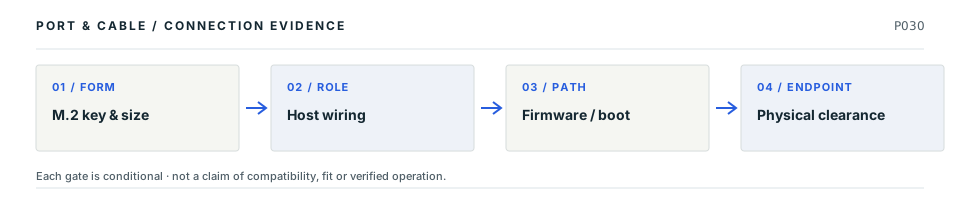
An M.2 module can match the socket key and length yet be unsupported. The host decides whether SATA or PCIe is wired, whether NVMe boots, and what module height and mounting positions fit.

LP01 P030
Conceptual four-stage decision path: M.2 key & size; then Host wiring; then Firmware / boot; then Physical clearance. Every stage requires independent verification; this is not a drawing of connector contact geometry.
Decision map, not a plug drawing or electrical wiring diagram. The original connector specimen remains above; this sequence shows what needs proof after shape identification.

Four facts to keep separate

01
Module envelope

2242 and 2280 are documented nominal module-size classes, not universal board clearances. Evidence: C030B

02
Key / transport

Matching key shape alone does not establish whether the socket supports SATA or PCIe. Evidence: C030C

03
Mechanical clearance

Check the installed standoff, component-side clearance and single/double-sided construction. Evidence: C030D

04
Board-specific modes

The cited ASUS motherboard gives different PCIe mode descriptions for M.2_1 by CPU family. Evidence: C030F

Common wrong conclusion

“M-key NVMe 2280” on a product listing is not sufficient to guarantee the host slot, controller or firmware accepts it.

What to check next

  1. Use the exact motherboard or laptop manual to match slot key and supported 22xx lengths.
  2. Check SATA versus PCIe wiring, PCIe generation/lane limits, and NVMe boot support.
  3. Check mounting clearance, resource sharing and safe power-off installation steps.
Why these statements are qualified · claim and source context

This is an original editorial decision study tied to existing source-checked claims. The following source inspections have not been renewed by this new page presentation, and none is independent engineering or model-by-model qualification.

  • S426 · DellArticle 000144170, version 12; last modified 30 September 2026. M.2 Cards section, Figure 1 examples (b), (c) and (d). · source reviewed 2026-10-08 · Nominal module-format examples 2242 and 2280; not connector mating dimensions.
  • S427 · ATP ElectronicsPublished 22 June 2026; sections on keying versus wiring, compatibility checklist, mechanical clearance and firmware. No numbered revision stated. · source reviewed 2026-10-08 · Separating mechanical key/format, wired interface, lane implementation, clearance and firmware requirements.
  • S429 · ASUSE18712, First Edition, July 2021; specification summary printed vi–vii and layout 1-2. PDF pages 2, 6, 7 and 12 visually inspected. · source reviewed 2026-10-08 · Selected storage and PCIe slot roles for PRIME B550-PLUS AC-HES only, with CPU, slot population and SATA-sharing conditions.

Unresolved: Actual device fit, required physical tolerances, pinouts, negotiations, electrical safety and hardware interoperability still require the identified manufacturer's documentation and any necessary independent review.

Decision field guide 07 Key / interface / protocol

Three checks behind an M.2 notch

A mechanically fitting M.2 module may still be unusable. Slot wiring and storage protocol must be confirmed separately.

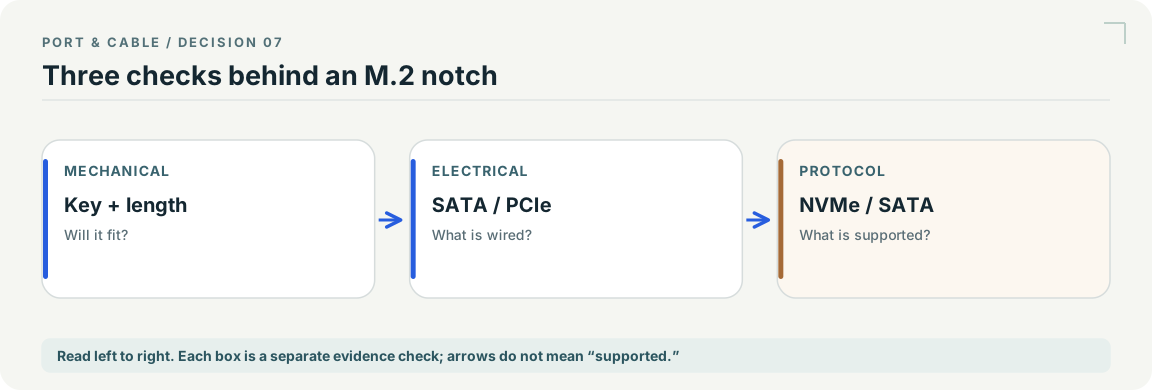
Conceptual key / interface / protocol decision path; steps and conditions appear in the text equivalent alongside. Illustration not to scale or a compatibility finding.
Original explanatory schematic · not to scale · read the exact source scope. Scroll horizontally on small screens.

Read the decision

  1. Match the physical key, length and mounting arrangement to the actual host slot.
  2. Confirm the slot’s implemented electrical interface rather than inferring it from keying.
  3. Verify controller/protocol support and the device’s model-specific requirements.

Still unknown: The chart does not turn a key shape, “M.2” label or expansion adapter into an approved SSD combination.

Read M.2 versus NVMe

Existing evidence: C030A · C030C · C057B source records S033 · S427 · S428. See each source record for its inspection date and scope; graphic interpretation remains pending independent technical and publication review.

Fit, interface and boot support

Practical reference

Practical answers for M.2 card edge interface

Start with the answer. Follow the real distinction, then the source-scoped next check. All evidence dates and publication blockers remain unchanged.

V102Q07 Practical reference

An M.2 SSD fits the slot and has the right length. Why might it still not work or boot?

Short answer Mechanical key and module size are only the first gates. The slot’s SATA or PCIe wiring, supported controller/protocol, firmware boot support and mounting clearance must all be checked for the actual host.

Which distinction matters?
What you are checkingWhat the cited evidence establishes
Module format, for example 2280Nominal outline/length designation, not proof of host support
Key shapePhysical mating cue, not a promise of SATA or PCIe wiring
Host / firmwareMust document supported storage interface and any boot restrictions
Next checks, in order
  1. Check the host manual’s exact socket label, module lengths and mechanical clearance.
  2. Check whether that socket supports the drive’s SATA or PCIe/NVMe interface.
  3. Check firmware/boot support and power-off installation guidance before touching components.

Still unresolved: No universal B-key or M-key compatibility, mechanical tolerance, thermal clearance or NVMe boot guarantee is established.

Claim-level evidence, source locators and limits

Existing evidence claims: C030A · C030B · C030C · C030D · C030E. These are editorial field answers over inherited source records, not newly approved specifications.

  • S033 · Kingston — M.2 physical sizes, B/M keys, host compatibility and hot-plug questions. Recorded inspection 2026-10-01; Historical throughput examples and broad product marketing are not used.
  • S426 · Dell — Article 000144170, version 12; last modified 30 September 2026. M.2 Cards section, Figure 1 examples (b), (c) and (d).. Recorded inspection 2026-10-08; The general key/capability table is not adopted as a universal host rule. No Dell artwork, measured geometry, tolerance, contact assignment or exact-host approval is supplied.
  • S427 · ATP Electronics — Published 22 June 2026; sections on keying versus wiring, compatibility checklist, mechanical clearance and firmware. No numbered revision stated.. Recorded inspection 2026-10-08; Manufacturer explanatory guide, not an inspected PCI-SIG M.2 standard. Numeric notch/contact positions, marketing throughput, capacity and universal key-to-protocol rules are not adopted. No third-party illustrations are copied.

Neither the source inspection dates nor the evidence dataset has been refreshed. No physical tests, exact-device compatibility approval, pinout or fabrication geometry is implied.

Application notes / Storage / P030

Why does an M.2 drive fit but remain unsupported?

FIELD NOTES 04

The card format and the supported storage interface are separate checks. SM2NGFFMBU33 is a concrete SATA-only enclosure that excludes NVMe and AHCI PCIe drives.

Identify first

Read the part and the device.

Read the drive model, key and length, then the enclosure’s protocol list.

Still unresolved

Keep this requirement open.

Mounting clearance, firmware support and any model-specific length restriction still need confirmation.

Explicit source exclusion · named example only

Use an M.2 NVMe SSD in SM2NGFFMBU33?

No: the manufacturer explicitly excludes NVMe and AHCI PCIe SSDs.

Boundary. This is the named enclosure’s interface limit, not a universal M.2 limit.

Next check. Choose an enclosure whose documented interface matches the drive.

S491 · C030H (private workspace)

Not established · named example only

Can its shape alone establish mSATA SSD support?

Unknown: a component outline does not identify the interface wired by the host.

Boundary. No unverified laptop model has been assigned an SSD capability.

Next check. Read the laptop’s exact socket specification.

S339 · S033 · C298A (private workspace) · C298C (private workspace)

Before choosing an adapter or reader

  1. Find the drive’s SATA or PCIe/NVMe designation.
  2. Check the exact socket or enclosure manual.
  3. Verify length and clearance without assuming every printed compatibility list agrees.
Read the evidence and its scope · 4 observations

C030A (private workspace) — M.2 physical fit and keying do not establish whether a host supports a particular SATA, PCIe or NVMe device.

Consumer identification / documented standard or product class only

S033

C030D (private workspace) — ATP calls for checking module length, mounting position and vertical/component clearance, including single- versus double-sided construction, separately from keying.

Physical fit checklist only; no invented height, tolerance, heat-spreader or fabrication dimensions.

S427

C030H (private workspace) — StarTech SM2NGFFMBU33 explicitly excludes M.2 NVMe and AHCI PCI-Express SSDs.

Named SATA-only USB enclosure; the M.2 label or an apparently matching key cannot override this exclusion.

S491

C030I (private workspace) — The SM2NGFFMBU33 sheet lists SATA B-key and SATA B+M-key M.2 drive types.

Named enclosure drive-type list only. Its inconsistent module-length lists are held open, not treated as confirmed 2230 support.

S491

Source interpretation is not independent engineering review, hardware testing, wiring advice or a public-release approval.

PC internals · a documented check

My M.2 drive fits. Why might it still not work?

Fit is only one check. Keying, the interface wired to the host slot and firmware support for boot are separate. A B+M notch is not proof of SATA or PCIe support, and an mSATA module is not an M.2 module. C030A · C030C · C030E · C298C

What the documentation establishes—and what still needs checking
CheckDocumented distinctionBoundary
Module and socketCheck key, length, mounting and component clearance separately. C030D · C030JA drawing of a board socket is not a measurement of the card edge.
InterfaceThe module and the particular host slot must support the same interface. C030CDo not decide SATA versus PCIe from the notch alone.
BootFirmware support for NVMe boot is a separate requirement. C030EA physically installed module is not a boot-support verdict.
mSATA look-alikemSATA uses SATA; M.2 includes SATA and PCIe options and uses a different connector. C298C · C298DA Mini PCIe/mSATA socket outline does not establish its host wiring.

Check these next

  1. Find the exact module model and its interface, then the named motherboard slot—not just the board family.
  2. Compare the supported lengths, interface and boot requirements in those two manuals.
  3. Read the slot-sharing note before treating a missing drive as a connector fault.

Keep this limit: Use the equipment maker’s power-off and handling instructions. This is not a hot-plug procedure. C030E

Before installation

Before you connect

What to check

  1. Check the device manual for supported interfaces and module sizes.
  2. Verify mounting clearance and the actual slot capabilities.
  3. Follow the manufacturer’s power-off and handling instructions before installation.
Trace a supported connection class →

Your next step

Move from the form to the requirement.

Use this reference

From identity to the right next question

Put this field note to work.

Add to discovery trayRecord an unsaved candidate (private workspace)

Compare look-alikes: Mini PCI Express/mSATA versus M.2

Candidate selection does not confirm the identity or capabilities of your physical item.

Related guides, comparisons and worksheets

Common questions

Questions this record can help resolve

Focused explainers

Questions this record helps answer

All focused explainers →

Evidence behind this reference

The source trail

Evidence for this page

AI-assisted inspection is not independent engineering review. Source scope and access limitations are disclosed below. Procedural checklists are editorial requirements, not hardware measurements.

Back to first citation ↑
C030ASource checked · pending review

M.2 physical fit and keying do not establish whether a host supports a particular SATA, PCIe or NVMe device.

Kingston · SSD FAQ ↗

Locator: M.2 physical sizes, B/M keys, host compatibility and hot-plug questions
Access: public page. Historical throughput examples and broad product marketing are not used.

S033: full source recordInspect review dependencies → (private workspace)

Claim scope: Consumer identification / documented standard or product class only. Next review due 2026-12-30.

Back to first citation ↑
C030BSource checked · pending review

Dell’s version-12 article illustrates 2242 as a nominal 22 × 42 mm module and 2280 as a nominal 22 × 80 mm module. These are module-format examples, not socket mating dimensions.

Dell · Differences Between M.2 Cards: M.2 Slots, Keys, Sizes and Types ↗

Locator: Article 000144170, version 12; last modified 30 September 2026. M.2 Cards section, Figure 1 examples (b), (c) and (d).
Access: public page. The general key/capability table is not adopted as a universal host rule. No Dell artwork, measured geometry, tolerance, contact assignment or exact-host approval is supplied.

S426: full source recordInspect review dependencies → (private workspace)

Claim scope: Article 000144170 version 12, Figure 1 examples (b)–(d); no tolerance, connector geometry or clearance inferred.. Next review due 2027-01-06.

Back to first citation ↑
C030CSource checked · pending review

ATP distinguishes M.2 keying from the interface actually wired to a socket: a mechanically matching key alone does not establish SATA or PCIe support.

ATP Electronics · What is M.2? Keys and Sockets Explained ↗

Locator: Published 22 June 2026; sections on keying versus wiring, compatibility checklist, mechanical clearance and firmware. No numbered revision stated.
Access: public page. Manufacturer explanatory guide, not an inspected PCI-SIG M.2 standard. Numeric notch/contact positions, marketing throughput, capacity and universal key-to-protocol rules are not adopted. No third-party illustrations are copied.

S427: full source recordInspect review dependencies → (private workspace)

Claim scope: Manufacturer compatibility checklist; no universal B, M or B+M key-to-protocol mapping or numeric contact positions.. Next review due 2027-01-06.

Back to first citation ↑
C030DSource checked · pending review

ATP calls for checking module length, mounting position and vertical/component clearance, including single- versus double-sided construction, separately from keying.

ATP Electronics · What is M.2? Keys and Sockets Explained ↗

Locator: Published 22 June 2026; sections on keying versus wiring, compatibility checklist, mechanical clearance and firmware. No numbered revision stated.
Access: public page. Manufacturer explanatory guide, not an inspected PCI-SIG M.2 standard. Numeric notch/contact positions, marketing throughput, capacity and universal key-to-protocol rules are not adopted. No third-party illustrations are copied.

S427: full source recordInspect review dependencies → (private workspace)

Claim scope: Physical fit checklist only; no invented height, tolerance, heat-spreader or fabrication dimensions.. Next review due 2027-01-06.

Back to first citation ↑
C030ESource checked · pending review

ATP separates firmware support for NVMe boot from mechanical fit and advises against treating ordinary M.2 installation as hot-plugging. Follow the exact equipment’s power-off and service instructions.

ATP Electronics · What is M.2? Keys and Sockets Explained ↗

Locator: Published 22 June 2026; sections on keying versus wiring, compatibility checklist, mechanical clearance and firmware. No numbered revision stated.
Access: public page. Manufacturer explanatory guide, not an inspected PCI-SIG M.2 standard. Numeric notch/contact positions, marketing throughput, capacity and universal key-to-protocol rules are not adopted. No third-party illustrations are copied.

S427: full source recordInspect review dependencies → (private workspace)

Claim scope: No claim that every NVMe-capable host can boot every drive; external USB removal is a different operation.. Next review due 2027-01-06.

Back to first citation ↑
C030FSource checked · pending review

The ASUS PRIME B550-PLUS AC-HES manual lists M.2_1 with SATA and PCIe x4 modes: PCIe 4.0 for the named Ryzen 5000/3000 desktop families, and PCIe 3.0 for the named 5000 G-Series/4000 G-Series families.

ASUS · PRIME B550-PLUS AC-HES User’s Manual ↗

Locator: E18712, First Edition, July 2021; specification summary printed vi–vii and layout 1-2. PDF pages 2, 6, 7 and 12 visually inspected.
Access: public pdf text. Not the ordinary PRIME B550-PLUS or every B550 motherboard. Selected internal groups only; no current BIOS verification, boot qualification, entire port inventory or hardware test. Manual conditions must not be generalized.

S429: full source recordInspect review dependencies → (private workspace)

Claim scope: E18712 First Edition, printed vii. Only the manual’s named processor families and M.2_1 slot; actual CPU and firmware still require verification.. Next review due 2027-01-06.

Back to first citation ↑
C030GSource checked · pending review

On the same AC-HES board, the chipset-connected M.2_2 is specified for PCIe 3.0 x4 and SATA; both M.2 slot entries list 2242, 2260, 2280 and 22110 modules.

ASUS · PRIME B550-PLUS AC-HES User’s Manual ↗

Locator: E18712, First Edition, July 2021; specification summary printed vi–vii and layout 1-2. PDF pages 2, 6, 7 and 12 visually inspected.
Access: public pdf text. Not the ordinary PRIME B550-PLUS or every B550 motherboard. Selected internal groups only; no current BIOS verification, boot qualification, entire port inventory or hardware test. Manual conditions must not be generalized.

S429: full source recordInspect review dependencies → (private workspace)

Claim scope: E18712 printed vii, exact board and slot labels; supported nominal lengths do not establish component clearance or boot qualification.. Next review due 2027-01-06.

Back to first citation ↑
C030HSource checked · pending review

StarTech SM2NGFFMBU33 explicitly excludes M.2 NVMe and AHCI PCI-Express SSDs.

StarTech.com · SM2NGFFMBU33 SATA M.2 enclosure datasheet ↗

Locator: PDF pages 2–3: Features, Compatible Drive Types and General Specifications. Visually inspected.
Access: public pdf text. Named example only. No universal compatibility or publication approval. Raw-byte acquisition status is recorded separately.

S491: full source recordInspect review dependencies → (private workspace)

Claim scope: Named SATA-only USB enclosure; the M.2 label or an apparently matching key cannot override this exclusion.. Next review due 2027-01-09.

Back to first citation ↑
C030ISource checked · pending review

The SM2NGFFMBU33 sheet lists SATA B-key and SATA B+M-key M.2 drive types.

StarTech.com · SM2NGFFMBU33 SATA M.2 enclosure datasheet ↗

Locator: PDF pages 2–3: Features, Compatible Drive Types and General Specifications. Visually inspected.
Access: public pdf text. Named example only. No universal compatibility or publication approval. Raw-byte acquisition status is recorded separately.

S491: full source recordInspect review dependencies → (private workspace)

Claim scope: Named enclosure drive-type list only. Its inconsistent module-length lists are held open, not treated as confirmed 2230 support.. Next review due 2027-01-09.

Back to first citation ↑
C030JSource checked · pending review

In TE drawing C-2199230 revision B4, the representative shown as 1-2199230-5 is an M-key board socket; the card edge is its counterpart, not the illustrated component.

TE Connectivity · TE C-2199230 M.2 socket customer drawing, revision B4 ↗

Locator: Sheets 1–3 of 4 visually inspected. Sheet 1 revision B4 dated 05 NOV 2024; sheet 2 shows 1-2199230-5 and the key/part table; sheet 3 is a PCB footprint, not a mating view.
Access: public pdf text. PDF metadata says B3, but inspected drawing title blocks say B4; drawing content governs this observation. No claim this is the latest released revision.

S594: full source recordInspect review dependencies → (private workspace)

Claim scope: V143: the named drawing/revision or exact product page only. Recognition and document-role evidence; not a pinout, adapter verdict, dimensioned mating gauge, electrical approval or current installed-device claim.. Next review due 2027-01-11.

Back to first citation ↑
C030KSource checked · pending review

The C-2199230 part table separates A, B, E and M key variants, and the M-key block includes several part suffixes rather than one universal socket.

TE Connectivity · TE C-2199230 M.2 socket customer drawing, revision B4 ↗

Locator: Sheets 1–3 of 4 visually inspected. Sheet 1 revision B4 dated 05 NOV 2024; sheet 2 shows 1-2199230-5 and the key/part table; sheet 3 is a PCB footprint, not a mating view.
Access: public pdf text. PDF metadata says B3, but inspected drawing title blocks say B4; drawing content governs this observation. No claim this is the latest released revision.

S594: full source recordInspect review dependencies → (private workspace)

Claim scope: V143: the named drawing/revision or exact product page only. Recognition and document-role evidence; not a pinout, adapter verdict, dimensioned mating gauge, electrical approval or current installed-device claim.. Next review due 2027-01-11.

Back to first citation ↑
C030LSource checked · pending review

The C-2199230 drawing specifies 67 contact positions with a key interruption; its two solder-tail rows have different counts, so a single visible row is not the total contact inventory.

TE Connectivity · TE C-2199230 M.2 socket customer drawing, revision B4 ↗

Locator: Sheets 1–3 of 4 visually inspected. Sheet 1 revision B4 dated 05 NOV 2024; sheet 2 shows 1-2199230-5 and the key/part table; sheet 3 is a PCB footprint, not a mating view.
Access: public pdf text. PDF metadata says B3, but inspected drawing title blocks say B4; drawing content governs this observation. No claim this is the latest released revision.

S594: full source recordInspect review dependencies → (private workspace)

Claim scope: V143: the named drawing/revision or exact product page only. Recognition and document-role evidence; not a pinout, adapter verdict, dimensioned mating gauge, electrical approval or current installed-device claim.. Next review due 2027-01-11.

Back to first citation ↑
C030MSource checked · pending review

Kingston states that a PCIe M.2 SSD in a SATA-only host socket—or a SATA M.2 SSD in a PCIe-only socket—does not gain the missing protocol merely from physical fit. Consult the system manual for the exact slot interface and any shared-lane restrictions.

Kingston · SSD FAQ ↗

Locator: M.2 physical sizes, B/M keys, host compatibility and hot-plug questions
Access: public page. Historical throughput examples and broad product marketing are not used.

S033: full source recordInspect review dependencies → (private workspace)

Claim scope: Storage SSD interface only; not a claim about every M.2 socket or PCIe adapter. Next review due 2027-01-13.

Suggest a correction to this field note →
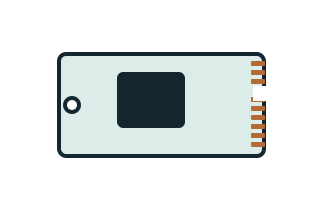
Source scope and review status

Inspect source authority, access limits and review holds

Evidence behind this page

Scope first. Source second. Approval separate.

6 linked sources · 13 scoped claims · 0 sources with inspection/access flags.

Page scope: consumer_pilot

Assessment 2026-10-22 · earliest scheduled source review 2026-12-30. This is a recorded-date assessment, not a live source check. Page-level independent review is not established by this panel.

Inspect 6 source scopes, access limits and dates

S033 · SSD FAQ

Kingston · Manufacturer / product-owner domain · inspected 2026-10-01 · due 2026-12-30

Within inspection window

Scoped support: M.2 physical fit does not establish SATA / PCIe / NVMe support.

Not established / limitations: Historical throughput examples and broad product marketing are not used.

Locator: M.2 physical sizes, B/M keys, host compatibility and hot-plug questions

S426 · Differences Between M.2 Cards: M.2 Slots, Keys, Sizes and Types

Dell · Manufacturer / product-owner domain · inspected 2026-10-08 · due 2027-01-06

Within inspection window

Scoped support: Nominal module-format examples 2242 and 2280; not connector mating dimensions.

Not established / limitations: The general key/capability table is not adopted as a universal host rule. No Dell artwork, measured geometry, tolerance, contact assignment or exact-host approval is supplied.

Locator: Article 000144170, version 12; last modified 30 September 2026. M.2 Cards section, Figure 1 examples (b), (c) and (d).

S427 · What is M.2? Keys and Sockets Explained

ATP Electronics · Unclassified publisher domain · inspected 2026-10-08 · due 2027-01-06

Within inspection window

Scoped support: Separating mechanical key/format, wired interface, lane implementation, clearance and firmware requirements.

Not established / limitations: Manufacturer explanatory guide, not an inspected PCI-SIG M.2 standard. Numeric notch/contact positions, marketing throughput, capacity and universal key-to-protocol rules are not adopted. No third-party illustrations are copied.

Locator: Published 22 June 2026; sections on keying versus wiring, compatibility checklist, mechanical clearance and firmware. No numbered revision stated.

S429 · PRIME B550-PLUS AC-HES User’s Manual

ASUS · Manufacturer / product-owner domain · inspected 2026-10-08 · due 2027-01-06

Within inspection window

Scoped support: Selected storage and PCIe slot roles for PRIME B550-PLUS AC-HES only, with CPU, slot population and SATA-sharing conditions.

Not established / limitations: Not the ordinary PRIME B550-PLUS or every B550 motherboard. Selected internal groups only; no current BIOS verification, boot qualification, entire port inventory or hardware test. Manual conditions must not be generalized.

Locator: E18712, First Edition, July 2021; specification summary printed vi–vii and layout 1-2. PDF pages 2, 6, 7 and 12 visually inspected.

S491 · SM2NGFFMBU33 SATA M.2 enclosure datasheet

StarTech.com · Manufacturer / product-owner domain · inspected 2026-10-11 · due 2027-01-09

Within inspection window

Scoped support: SATA B/B+M M.2 support and explicit NVMe/AHCI PCIe exclusion. Conflicting module-length lists are not normalized into a claim.

Not established / limitations: Named example only. No universal compatibility or publication approval. Raw-byte acquisition status is recorded separately.

Locator: PDF pages 2–3: Features, Compatible Drive Types and General Specifications. Visually inspected.

S594 · TE C-2199230 M.2 socket customer drawing, revision B4

TE Connectivity · Manufacturer / product-owner domain · inspected 2026-10-13 · due 2027-01-11

Within inspection window

Scoped support: M.2 socket family; source-observed M-key representative and key/part variants.

Not established / limitations: PDF metadata says B3, but inspected drawing title blocks say B4; drawing content governs this observation. No claim this is the latest released revision.

Locator: Sheets 1–3 of 4 visually inspected. Sheet 1 revision B4 dated 05 NOV 2024; sheet 2 shows 1-2199230-5 and the key/part table; sheet 3 is a PCB footprint, not a mating view.

Trace 13 claims to their source records

C030A · P030

M.2 physical fit and keying do not establish whether a host supports a particular SATA, PCIe or NVMe device.

Claim scope: Consumer identification / documented standard or product class only

Source links: S033 · Evidence trail → (private workspace)

C030B · P030

Dell’s version-12 article illustrates 2242 as a nominal 22 × 42 mm module and 2280 as a nominal 22 × 80 mm module. These are module-format examples, not socket mating dimensions.

Claim scope: Article 000144170 version 12, Figure 1 examples (b)–(d); no tolerance, connector geometry or clearance inferred.

Source links: S426 · Evidence trail → (private workspace)

C030C · P030

ATP distinguishes M.2 keying from the interface actually wired to a socket: a mechanically matching key alone does not establish SATA or PCIe support.

Claim scope: Manufacturer compatibility checklist; no universal B, M or B+M key-to-protocol mapping or numeric contact positions.

Source links: S427 · Evidence trail → (private workspace)

C030D · P030

ATP calls for checking module length, mounting position and vertical/component clearance, including single- versus double-sided construction, separately from keying.

Claim scope: Physical fit checklist only; no invented height, tolerance, heat-spreader or fabrication dimensions.

Source links: S427 · Evidence trail → (private workspace)

C030E · P030

ATP separates firmware support for NVMe boot from mechanical fit and advises against treating ordinary M.2 installation as hot-plugging. Follow the exact equipment’s power-off and service instructions.

Claim scope: No claim that every NVMe-capable host can boot every drive; external USB removal is a different operation.

Source links: S427 · Evidence trail → (private workspace)

C030F · P030

The ASUS PRIME B550-PLUS AC-HES manual lists M.2_1 with SATA and PCIe x4 modes: PCIe 4.0 for the named Ryzen 5000/3000 desktop families, and PCIe 3.0 for the named 5000 G-Series/4000 G-Series families.

Claim scope: E18712 First Edition, printed vii. Only the manual’s named processor families and M.2_1 slot; actual CPU and firmware still require verification.

Source links: S429 · Evidence trail → (private workspace)

C030G · P030

On the same AC-HES board, the chipset-connected M.2_2 is specified for PCIe 3.0 x4 and SATA; both M.2 slot entries list 2242, 2260, 2280 and 22110 modules.

Claim scope: E18712 printed vii, exact board and slot labels; supported nominal lengths do not establish component clearance or boot qualification.

Source links: S429 · Evidence trail → (private workspace)

C030H · P030

StarTech SM2NGFFMBU33 explicitly excludes M.2 NVMe and AHCI PCI-Express SSDs.

Claim scope: Named SATA-only USB enclosure; the M.2 label or an apparently matching key cannot override this exclusion.

Source links: S491 · Evidence trail → (private workspace)

C030I · P030

The SM2NGFFMBU33 sheet lists SATA B-key and SATA B+M-key M.2 drive types.

Claim scope: Named enclosure drive-type list only. Its inconsistent module-length lists are held open, not treated as confirmed 2230 support.

Source links: S491 · Evidence trail → (private workspace)

C030J · P030

In TE drawing C-2199230 revision B4, the representative shown as 1-2199230-5 is an M-key board socket; the card edge is its counterpart, not the illustrated component.

Claim scope: V143: the named drawing/revision or exact product page only. Recognition and document-role evidence; not a pinout, adapter verdict, dimensioned mating gauge, electrical approval or current installed-device claim.

Source links: S594 · Evidence trail → (private workspace)

C030K · P030

The C-2199230 part table separates A, B, E and M key variants, and the M-key block includes several part suffixes rather than one universal socket.

Claim scope: V143: the named drawing/revision or exact product page only. Recognition and document-role evidence; not a pinout, adapter verdict, dimensioned mating gauge, electrical approval or current installed-device claim.

Source links: S594 · Evidence trail → (private workspace)

C030L · P030

The C-2199230 drawing specifies 67 contact positions with a key interruption; its two solder-tail rows have different counts, so a single visible row is not the total contact inventory.

Claim scope: V143: the named drawing/revision or exact product page only. Recognition and document-role evidence; not a pinout, adapter verdict, dimensioned mating gauge, electrical approval or current installed-device claim.

Source links: S594 · Evidence trail → (private workspace)

C030M · P030

Kingston states that a PCIe M.2 SSD in a SATA-only host socket—or a SATA M.2 SSD in a PCIe-only socket—does not gain the missing protocol merely from physical fit. Consult the system manual for the exact slot interface and any shared-lane restrictions.

Claim scope: Storage SSD interface only; not a claim about every M.2 socket or PCIe adapter

Source links: S033 · Evidence trail → (private workspace)

Prepare this page for review → (private workspace)Read the evidence method →

Recorded evidence only. An inspection date, publisher label, source link or generated packet is not independent technical review, hardware testing, fabrication approval or a compatibility verdict.

Source-qualified next step · P030

An M.2 SSD fits its slot. Why is the drive not detected?

What the evidence saysM.2 physical shape does not mean the socket and drive share SATA or PCIe storage protocols.

What is still unknown

A general Kingston FAQ does not diagnose an exact computer, BIOS setting, disabled shared lane or damaged drive.

Check before proceeding

  1. Read the exact motherboard or laptop M.2 socket interface and supported drive lengths.
  2. Check whether the module is SATA or PCIe/NVMe and the slot supports the same interface.
  3. Follow manufacturer power-off procedures; check shared-port and BIOS conditions before diagnosing a failed drive.
Inspect 1 source-checked claim (independent review pending)
  1. C030M / source-linked claim: Kingston states that a PCIe M.2 SSD in a SATA-only host socket—or a SATA M.2 SSD in a PCIe-only socket—does not gain the missing protocol merely from physical fit. Consult the system manual for the exact slot interface and any shared-lane restrictions.

    S033 · Kingston

    Storage SSD interface only; not a claim about every M.2 socket or PCIe adapter · Checked 2026-10-15 · No independent approval

Original reader guidance · Not a hardware test, certified connection, independent technical review, or publication approval.