FIELD GUIDESource-led reference

P058 / General / Guide

How to identify a cable without relying on color

Use shape to narrow the candidates, then use documentation to establish function.

The useful distinction

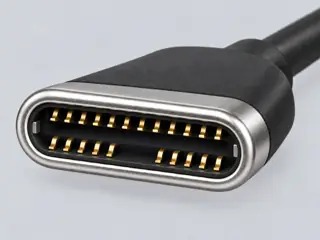
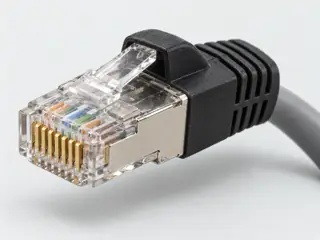
Inspect the disconnected connector from a consistent angle. Record its outline, latch, keyed corners and visible contact arrangement. Compare multiple candidates in the atlas and then check the device manual. This tool does not classify uploaded photos or inspect hardware.

Claim inspection dates: 2026-10-01 · Independent review pending

Guide note · not an individual product specification

The useful distinction

Understand the requirement.

Similar connector forms can be used for different functions; RJ45-style serial console and Ethernet connections are one example. [C058A]

Bounded facts, visible unknowns

Specifications and limits

How to identify a cable without relying on color facts and limitations
Identification methodVisual filters plus model-specific documentation [C058A]
Not availableAutomatic photo recognition [C058A]
Verified device listNot included. Check exact device and accessory documentation.
A boundary, not an omission to guess around.

This is a scoped requirements guide, not an interoperability certification. It does not test hardware, calculate an arbitrary display timing, or replace the exact product documentation. A missing capability stays unknown.

Before you connect

What to check

  1. Do not insert an unknown plug simply because it looks close.
  2. Record any printed model or part number.
  3. Treat color and icons as clues, not complete specifications.
  4. Confirm exact device function before connecting or buying.
Trace a supported connection class →

Your next step

Move from the form to the requirement.

The source trail

Evidence for this page

AI-assisted inspection is not independent engineering review. Source scope and access limitations are disclosed below. Procedural checklists are editorial requirements, not hardware measurements.

C058ASource checked · pending review

Similar connector forms can be used for different functions; RJ45-style serial console and Ethernet connections are one example.

Cable Matters · USB to RJ45 FTDI console cable ↗

Locator: Console cable description
Access: public page.

S021: full source recordInspect review dependencies → (private workspace)

Claim scope: Consumer identification / documented standard or product class only. Next review due 2026-12-30.

Suggest a correction to this field note →

Evidence behind this page

Scope first. Source second. Approval separate.

1 linked sources · 1 scoped claims · 0 sources with inspection/access flags.

Page scope: consumer_pilot

Assessment 2026-10-22 · earliest scheduled source review 2026-12-30. This is a recorded-date assessment, not a live source check. Page-level independent review is not established by this panel.

Inspect 1 source scopes, access limits and dates

S021 · USB to RJ45 FTDI console cable

Cable Matters · Manufacturer / product-owner domain · inspected 2026-10-01 · due 2026-12-30

Within inspection window

Scoped support: Scoped counterexample: an RJ45-shaped connection can be serial console rather than Ethernet.

Not established / limitations:

Locator: Console cable description

Trace 1 claims to their source records

C058A · P058

Similar connector forms can be used for different functions; RJ45-style serial console and Ethernet connections are one example.

Claim scope: Consumer identification / documented standard or product class only

Source links: S021 · Evidence trail → (private workspace)

Prepare this page for review → (private workspace)Read the evidence method →

Recorded evidence only. An inspection date, publisher label, source link or generated packet is not independent technical review, hardware testing, fabrication approval or a compatibility verdict.