FIELD GUIDESource-led reference

P298 / Storage / Connector

Mini PCI Express / mSATA 52-position socket

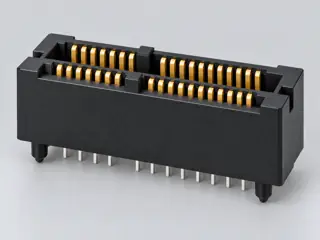
TE Connectivity documents a 52-position, 0.8 mm centerline connector for Mini PCI Express and mSATA applications.

Also called Mini PCIe Mini PCI Express mSATA socket 52-position mini card

The shared 52-position socket family does not make Mini PCIe and mSATA electrically interchangeable; host implementation still controls supported signals.

Look for

Confirm the 52-position Mini PCI Express/mSATA socket family and read the host documentation before assuming whether the slot carries PCIe, SATA or both.

Claim inspection dates: 2026-10-06, 2026-10-08, 2026-10-13 · Independent review pending

Image inspection / P298

See the view. Check its scope.

1 registered view for this reference. Different part examples are not automatically mates; all remain not to scale and independently unapproved.

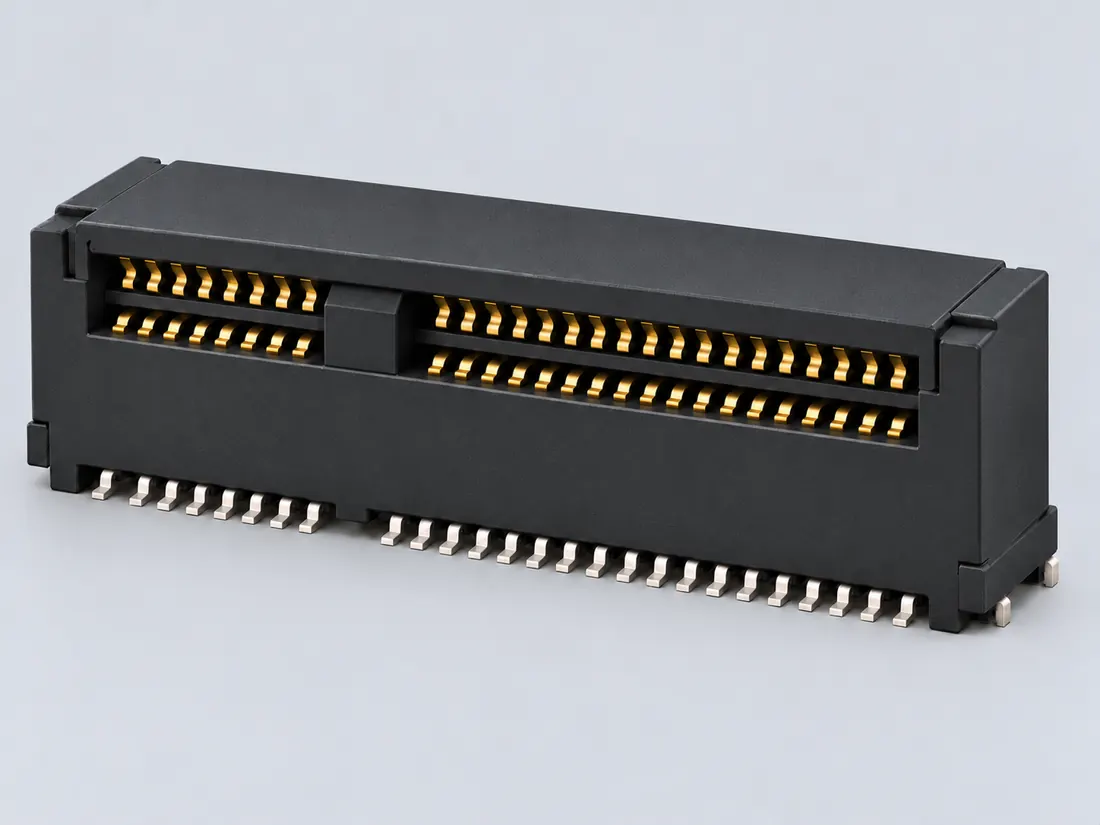
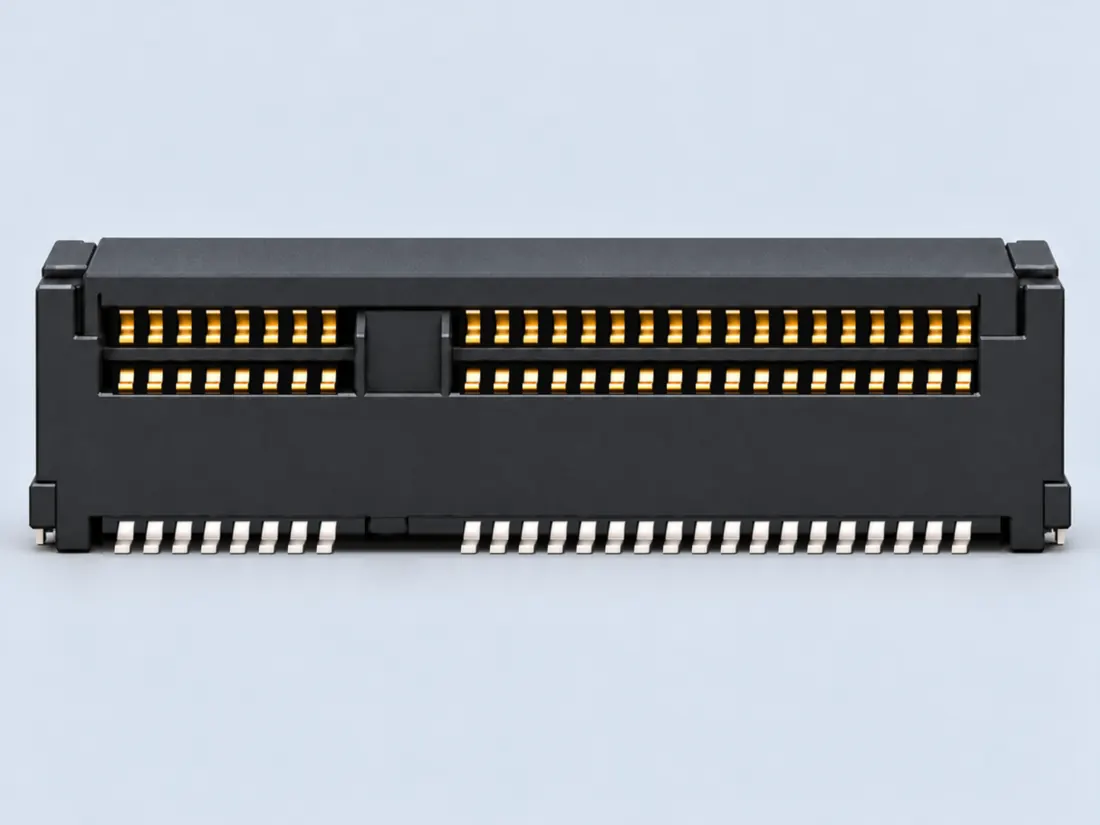
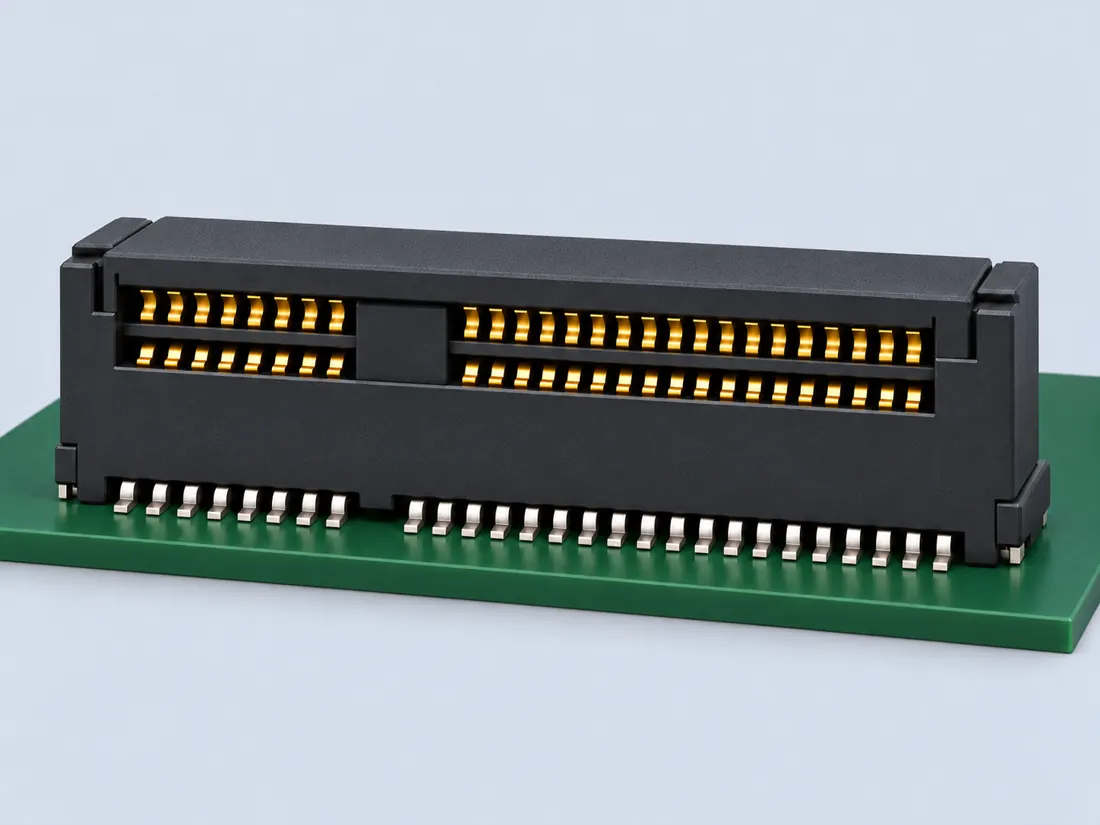
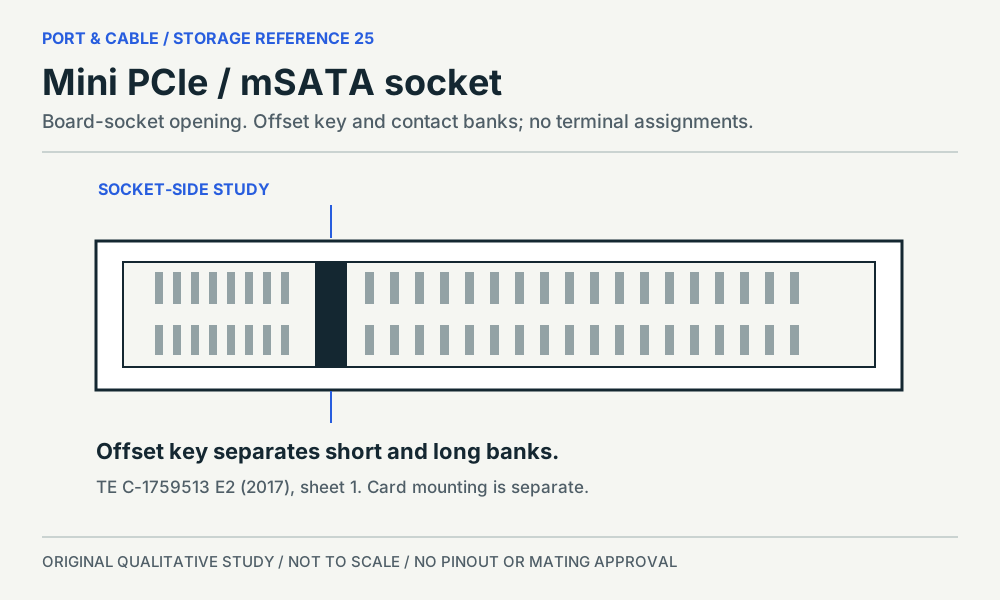
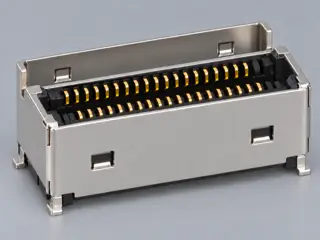
The split contact banks belong to a socket shared across distinct assignments. Board socket; an original source-observed qualitative study, not a pinout or safe-mating guide. (private workspace)

P298 / Source-observed physical study

Mini PCIe / mSATA socket

TE C-1759513 E2; 1759513-1 family

Socket-side source drawing orientation · Device receptacle

Not to scale. Technical and rights review pending.

Inspect view & provenance (private workspace)

Application notes / Storage / P298

Does a Mini PCIe-shaped socket accept an SSD?

FIELD NOTES 04

A shared socket description is not a host-interface verdict. Kingston distinguishes SATA-only mSATA from M.2, while TE describes a particular socket for Mini PCI Express and mSATA.

Identify first

Read the part and the device.

Identify the card and motherboard socket by their exact documentation.

Still unresolved

Keep this requirement open.

The host’s wired interface is unknown until its manual identifies the supported function.

Not established · named example only

Can its shape alone establish mSATA SSD support?

Unknown: a component outline does not identify the interface wired by the host.

Boundary. No unverified laptop model has been assigned an SSD capability.

Next check. Read the laptop’s exact socket specification.

S339 · S033 · C298A (private workspace) · C298C (private workspace)

Before choosing an adapter or reader

  1. Identify the motherboard and socket label.
  2. Check whether that socket supports mSATA storage.
  3. Do not infer SSD support from a Wi-Fi-card-sized opening.
Read the evidence and its scope · 2 observations

C298A (private workspace) — TE Connectivity product 1759513-1 is described as a 52-position, 0.8 mm centerline board-to-board connector for Mini PCI Express and mSATA.

V50 identification fact only; no wiring, protocol compatibility, installation or fabrication approval is inferred.

S339

C298C (private workspace) — Kingston distinguishes M.2 from mSATA: mSATA uses SATA, while M.2 includes SATA and PCIe options and does not use the same physical connector. A shared Mini PCIe/mSATA socket outline still does not establish the host’s wired interface.

Kingston SSD FAQ reinspection on 8 October 2026 plus the existing TE 52-position socket example; inherited source dates unchanged. Not a universal Mini PCIe/mSATA host compatibility result.

S033 · S339

Source interpretation is not independent engineering review, hardware testing, wiring advice or a public-release approval.

INTERNAL SYSTEMS / EXPANSION

Mini PCIe-size and mSATA are not synonyms

Not from the socket outline alone. Manufacturer component data records a 52-position mini-card interface, while Kingston’s M.2/SSD guidance warns that physically related small-card connector systems can differ in host wiring and supported protocols. A labeled mini PCIe slot does not independently establish mSATA signaling or storage boot support.

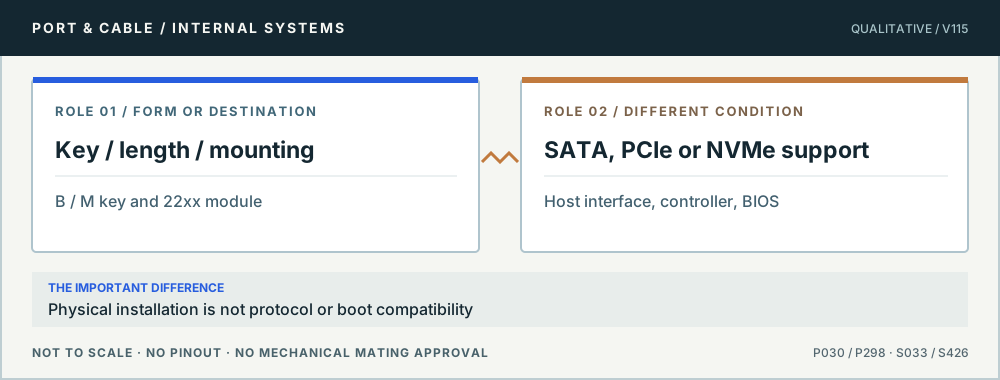
Conceptual role comparison: Key / length / mounting versus SATA, PCIe or NVMe support. Physical installation is not protocol or boot compatibility. Not to scale, no pinout or mechanical mating dimensions.
An M.2 connection has three layers. Original qualitative role diagram; not mechanical artwork, not to scale or a wiring map. Source context S033 · S426.

Three checks before proceeding

  1. Find the original laptop/board manual for the exact slot designation.
  2. Confirm whether mSATA is expressly supported in that slot, not just a similar edge.
  3. Check physical length, standoff and storage boot support.

One mistake to avoid

Using a passive adapter or buying an mSATA SSD on the premise that matching pins imply matching signals.

Full technical reading, sources and related identities →

Claim-specific evidence remains in the canonical record. Concept diagrams do not show any safe wiring or mechanical mating geometry.

Inspect the illustrationGeneric card-edge symbol · larger view & look-alikes
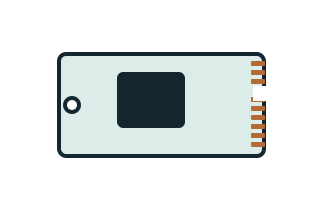
Mini PCI Express / mSATA 52-position socket — generic card-edge symbol; role not specified; label-led symbol, not interface geometry; original, not-to-scale identification schematic; drawing review pending
View Generic card-edge symbolDepiction Role not specifiedSymbol only — not interface geometryNot to scale · independent drawing review pending

Read the view

Read Mini PCI Express / mSATA in the written reference

No actual socket face, keyed module view or board footprint is depicted.

Label-led symbol — not interface geometry. Read the exact designation and written reference; do not identify a physical connector by this generic shape.

About the marks: The projections are not the documented fifty-two positions.

What it cannot establish: This generic symbol does not establish a Mini PCIe or mSATA signal implementation and is not an M.2 drawing.

Enlargement changes display size only. It does not reveal measured geometry, a pin assignment or an approved mating combination.

Compare a likely look-alike

Read the underlying references: S339 · S033. Artwork interpretation remains review-pending.

How to read connector illustrations →

The useful distinction

Recognize it. Then verify it.

TE Connectivity documents a 52-position, 0.8 mm centerline connector for Mini PCI Express and mSATA applications. [C298A]

Kingston distinguishes M.2 from mSATA: mSATA uses SATA, while M.2 includes SATA and PCIe options and does not use the same physical connector. A shared Mini PCIe/mSATA socket outline still does not establish the host’s wired interface. [C298C]

TE drawing C-1759513 revision E2 supplies separate Mini PCI Express and mSATA signal-assignment tables for the socket family; one housing does not imply one interface assignment. [C298D]

The socket views in C-1759513 show two contact rows interrupted by an offset key, with short and long contact banks; the study is of the board socket, not a miniature M.2 module. [C298E]

C-1759513 sheet 2 separates half-size and full-size card mounting keepouts, so the socket alone does not describe the complete module-retention arrangement. [C298F]

Molex’s cited Mini PCI Express connector drawing identifies 52 circuits at 0.8 mm pitch and shows odd-numbered positions on one card side and even-numbered positions on the other. [C298B]

Source-scoped identification facts

Each value retains its exact example, role and measurement axis. Facts from different parts must not be combined into an invented component.

Documented examples; not a mating drawing or compatibility approval
Nominal contacts52S339Source-backed nominal position/contact count for identification: 52. Not a pinout or manufacturing drawing.
Positions / cavity span52 (Claim C298A); 52 (Claim C298B)S339 · S358Recorded source-scoped values; named examples do not describe every family variant or establish compatibility. V50 identification fact only; no wiring, protocol compatibility, installation or fabrication approval is inferred. Numbering/orientation context for the cited connector example only; no Mini PCIe or mSATA signal assignment is normalized.
Contact pitch0.8 mm Contact pitch (Recorded example component); 0.8 mm Source-described pitch / centerline (Claim C298A); 0.8 mm Source-described pitch / centerline (Claim C298B); 0.8 mm centerline (1759513-1)S358 · S339 · S339Named source examples retain separate role, part, view and axis limits; values are not a universal family specification. example_component; 52-position Mini PCI Express connector example V50 identification fact only; no wiring, protocol compatibility, installation or fabrication approval is inferred. Numbering/orientation context for the cited connector example only; no Mini PCIe or mSATA signal assignment is normalized. 1759513-1. Documented role: socket. 52position Mini PCI Express board-to-board connector; shared shape does not establishmSATA electrical routing.
Dimensions / axis9 mm stack height (1759513-1)S339Named source examples retain separate role, part, view and axis limits; values are not a universal family specification. 1759513-1. Documented role: socket. 52position Mini PCI Express board-to-board connector; shared shape does not establishmSATA electrical routing.
Connector rolesocket (1759513-1)S339Named source examples retain separate role, part, view and axis limits; values are not a universal family specification. 1759513-1. Documented role: socket. 52position Mini PCI Express board-to-board connector; shared shape does not establishmSATA electrical routing.
ManufacturerTE Connectivity (1759513-1)S339Named source examples retain separate role, part, view and axis limits; values are not a universal family specification. 1759513-1. Documented role: socket. 52position Mini PCI Express board-to-board connector; shared shape does not establishmSATA electrical routing.
Exact part / implementation1759513-1 (1759513-1)S339Named source examples retain separate role, part, view and axis limits; values are not a universal family specification. 1759513-1. Documented role: socket. 52position Mini PCI Express board-to-board connector; shared shape does not establishmSATA electrical routing.

Not recorded: Populated contacts, Contact rows, Contact gender / arrangement, Mounting, Coupling / latch, Keying / polarization, Shell / form, Series, Recorded markings, View convention. Unknown fields stay unknown; illustrations supply no measurements or pin assignments.

Recorded variant and source limits
  • A shared 52-position form does not make Mini PCI Express and mSATA electrically interchangeable; host implementation controls supported signals.
  • Numbering orientation and pitch are not a logical signal map, fabrication drawing or connector-compliance gauge.
  • Advantech TPC-XX51T/H-E MINIPCIE socket: Appendix A.4.3 52-pin host socket; PCI1.1/PCI1.2 power conditions retained in descriptions. Spatial mating/solder view is unverified.
  • Transcend MSA370 mSATA SSD: PDF p.6 Pin Assignments table; retain source card contact numbers. Spatial mating/solder view is not independently established.
  • Kontron JRexplus-DC J18 Mini PCI Express + USB: Host J18 connector numbers as printed p. 31; small header drawing locates contact 1 but does not establish every spatial/mirror convention.
  • Transcend MSA370 mSATA module: Pin Layout on PDF p. 6 shows two opposite card faces: one locates 1 and 51, the other 2 and 52. Use those explicit numbers; do not infer a socket mirror.
Report a correction to these facts →

Bounded facts, visible unknowns

Specifications and limits

Mini PCI Express / mSATA 52-position socket facts and limitations
Documented identificationTE Connectivity product 1759513-1 is described as a 52-position, 0.8 mm centerline board-to-board connector for Mini PCI Express and mSATA. [C298A]
mSATA versus M.2mSATA uses SATA; M.2 may use SATA or PCIe and is not the same physical connector. [C298C]
Source-scoped role and recognitionA shared housing does not select the interface. The split contact banks belong to a socket shared across distinct assignments. [C298D] [C298E] [C298F]
Mechanical dimensionsNo independently reviewed mechanical drawing in V50; do not use this page for fabrication, fit testing or tolerance work.
Engineering pinoutSource-checked engineering profile available; independent review pending. Open engineering profile →
Verified device listNot included. Check exact device and accessory documentation.
A boundary, not an omission to guess around.

Use only the source-backed family, role or position count for identification. Resolve electrical ratings, protocol generation, lane wiring, signal assignment, cable construction and exact device support from the relevant equipment and component documentation.

Before you connect

What to check

  1. Identify the exact connector family and variant from the equipment or component documentation.
  2. Keep physical form, contact count, protocol, electrical rating and device support as separate facts.
  3. Do not force, rewire, adapt or install from this recognition record; resolve the remaining requirements first.
Trace a supported connection class →

Pins & wiring

Pinout

Choose the exact wiring. Pin numbers follow its stated view; a schematic does not establish physical positions. Check your exact device before wiring.

What the status labels mean
Confirmed
Recorded research passes agree within this variant; this is not independent human review or hardware validation.
Single source
Only one underlying document, or one pass, supports this assignment.
Device-specific
Supported for the named equipment or wiring only. Check your device’s manual.
Unverified
Missing or conflicting evidence. Do not wire from this row.
Not connected
The source explicitly says NC, no contact or no pin for this wiring.
Wiring variant

Advantech TPC-XX51T/H-E MINIPCIE socket

Device-specific wiring. Check your device’s manual before connecting or applying power.

View and evidence limits

Appendix A.4.3 52-pin host socket; PCI1.1/PCI1.2 power conditions retained in descriptions. Spatial mating/solder view is unverified.

  • P298 Mini PCIe / mSATA — **Agree** on common Mini PCIe groups and all MSA370 contacts; **device-specific options** — A: Advantech Mini PCIe; B: Kontron Mini PCIe. PCIe/USB/clock/reset/wake/SMBus groups align; Kontron implements LED outputs on 42/44/46, while Advantech makes them NC and uses 43 for power selection. Different supply/standby qualifications remain explicit. Both use **the same Transcend MSA370 V1.3 PDF and hash** for mSATA, so that agreement is not independent authority. Mini PCIe and mSATA are separate protocols despite the shared 52-position form.
  • Device-specific power selection/NC contacts; not universal Mini PCIe NC assignments.
  • Other full/half Mini PCIe modules, UIM/USIM, LEDs and mSATA revision options are not generalized from these products.
Mini PCI Express / mSATA 52-position engineering boundaryAppendix A.4.3 52-pin host socket; PCI1.1/PCI1.2 power conditions retained in descriptions. Spatial mating/solder view is unverified.SCHEMATIC · physical positions unconfirmedNot to scale · check the named wiring and device manual1: WAKE# (device_specific)12: +3.3Vaux / +3.3V (device_specific)23: NC (not_connected)34: GND (device_specific)45: NC (not_connected)56: 1.5V (device_specific)67: CLKREQ# (device_specific)78: NC (not_connected)89: GND (device_specific)910: NC (not_connected)1011: REFCLK- (device_specific)1112: NC (not_connected)1213: REFCLK+ (device_specific)1314: NC (not_connected)1415: GND (device_specific)1516: NC (not_connected)1617: Reserved (not_connected)1718: GND (device_specific)1819: Reserved (not_connected)1920: W_DISABLE# (device_specific)2021: GND (device_specific)2122: PERST# (device_specific)2223: PERn0 (device_specific)2324: +3.3Vaux (device_specific)2425: PERp0 (device_specific)2526: GND (device_specific)2627: GND (device_specific)2728: +1.5V (device_specific)2829: GND (device_specific)2930: SMB_CLK (device_specific)3031: PETn0 (device_specific)3132: SMB_DATA (device_specific)3233: PETp0 (device_specific)3334: GND (device_specific)3435: GND (device_specific)3536: USB_D- (device_specific)3637: GND (device_specific)3738: USB_D+ (device_specific)3839: +3.3Vaux (device_specific)3940: GND (device_specific)4041: +3.3Vaux (device_specific)4142: NC (not_connected)4243: PIN43_MPCIE_PWRSEL (device_specific)4344: NC (not_connected)4445: Reserved (not_connected)4546: NC (not_connected)4647: Reserved (not_connected)4748: +1.5V (device_specific)4849: Reserved (not_connected)4950: GND (device_specific)5051: Reserved (not_connected)5152: +3.3Vaux / +3.3V (device_specific)52powergrounddataConfigshieldNCUnknown
Schematic only · physical contact positions unconfirmed. Original drawing · not to scale. Scroll sideways if needed.
Advantech TPC-XX51T/H-E MINIPCIE socket — source-scoped contact map
PinSignalWhat it doesStatus
1WAKE#Control, detection or configuration connection; check the source and device.Device-specific
Sources
2+3.3Vaux / +3.3VPower connection (+3.3Vaux / +3.3V). Check the specified supply.Device-specific
Sources
3NCNot connected or absent in this named wiring.Not connected
Sources
4GNDGround reference and return.Device-specific
Sources
5NCNot connected or absent in this named wiring.Not connected
Sources
61.5VPower connection (1.5V). Check the specified supply.Device-specific
Sources
7CLKREQ#Clock or clock-control connection, as named by this source.Device-specific
Sources
8NCNot connected or absent in this named wiring.Not connected
Sources
9GNDGround reference and return.Device-specific
Sources
10NCNot connected or absent in this named wiring.Not connected
Sources
11REFCLK-Clock or clock-control connection, as named by this source.Device-specific
Sources
12NCNot connected or absent in this named wiring.Not connected
Sources
13REFCLK+Clock or clock-control connection, as named by this source.Device-specific
Sources
14NCNot connected or absent in this named wiring.Not connected
Sources
15GNDGround reference and return.Device-specific
Sources
16NCNot connected or absent in this named wiring.Not connected
Sources
17ReservedNot connected or absent in this named wiring.Not connected
Sources
18GNDGround reference and return.Device-specific
Sources
19ReservedNot connected or absent in this named wiring.Not connected
Sources
20W_DISABLE#Control, detection or configuration connection; check the source and device.Device-specific
Sources
21GNDGround reference and return.Device-specific
Sources
22PERST#Reset control; check active level and the named device.Device-specific
Sources
23PERn0Signal conductor. Pair, polarity and direction follow this named wiring.Device-specific
Sources
24+3.3VauxPower connection (+3.3Vaux). Check the specified supply.Device-specific
Sources
25PERp0Signal conductor. Pair, polarity and direction follow this named wiring.Device-specific
Sources
26GNDGround reference and return.Device-specific
Sources
27GNDGround reference and return.Device-specific
Sources
28+1.5VPower connection (+1.5V). Check the specified supply.Device-specific
Sources
29GNDGround reference and return.Device-specific
Sources
30SMB_CLKClock or clock-control connection, as named by this source.Device-specific
Sources
31PETn0Signal conductor. Pair, polarity and direction follow this named wiring.Device-specific
Sources
32SMB_DATASignal conductor. Pair, polarity and direction follow this named wiring.Device-specific
Sources
33PETp0Signal conductor. Pair, polarity and direction follow this named wiring.Device-specific
Sources
34GNDGround reference and return.Device-specific
Sources
35GNDGround reference and return.Device-specific
Sources
36USB_D-Signal conductor. Pair, polarity and direction follow this named wiring.Device-specific
Sources
37GNDGround reference and return.Device-specific
Sources
38USB_D+Signal conductor. Pair, polarity and direction follow this named wiring.Device-specific
Sources
39+3.3VauxPower connection (+3.3Vaux). Check the specified supply.Device-specific
Sources
40GNDGround reference and return.Device-specific
Sources
41+3.3VauxPower connection (+3.3Vaux). Check the specified supply.Device-specific
Sources
42NCNot connected or absent in this named wiring.Not connected
Sources
43PIN43_MPCIE_PWRSELControl, detection or configuration connection; check the source and device.Device-specific
Sources
44NCNot connected or absent in this named wiring.Not connected
Sources
45ReservedNot connected or absent in this named wiring.Not connected
Sources
46NCNot connected or absent in this named wiring.Not connected
Sources
47ReservedNot connected or absent in this named wiring.Not connected
Sources
48+1.5VPower connection (+1.5V). Check the specified supply.Device-specific
Sources
49ReservedNot connected or absent in this named wiring.Not connected
Sources
50GNDGround reference and return.Device-specific
Sources
51ReservedNot connected or absent in this named wiring.Not connected
Sources
52+3.3Vaux / +3.3VPower connection (+3.3Vaux / +3.3V). Check the specified supply.Device-specific
Sources
Sources (1)

Transcend MSA370 mSATA SSD

Device-specific wiring. Check your device’s manual before connecting or applying power.

View and evidence limits

PDF p.6 Pin Assignments table; retain source card contact numbers. Spatial mating/solder view is not independently established.

  • P298 Mini PCIe / mSATA — **Agree** on common Mini PCIe groups and all MSA370 contacts; **device-specific options** — A: Advantech Mini PCIe; B: Kontron Mini PCIe. PCIe/USB/clock/reset/wake/SMBus groups align; Kontron implements LED outputs on 42/44/46, while Advantech makes them NC and uses 43 for power selection. Different supply/standby qualifications remain explicit. Both use **the same Transcend MSA370 V1.3 PDF and hash** for mSATA, so that agreement is not independent authority. Mini PCIe and mSATA are separate protocols despite the shared 52-position form.
  • 23/25 are TX+/TX-; 31/33 RX-/RX+ exactly as printed. Do not substitute Mini PCIe PER/PET names.
  • Other full/half Mini PCIe modules, UIM/USIM, LEDs and mSATA revision options are not generalized from these products.
Mini PCI Express / mSATA 52-position engineering boundaryPDF p.6 Pin Assignments table; retain source card contact numbers. Spatial mating/solder view is not independently established.SCHEMATIC · physical positions unconfirmedNot to scale · check the named wiring and device manual1: NC (not_connected)12: 3.3V (device_specific)23: NC (not_connected)34: GND (device_specific)45: NC (not_connected)56: NC (not_connected)67: NC (not_connected)78: NC (not_connected)89: GND (device_specific)910: NC (not_connected)1011: NC (not_connected)1112: NC (not_connected)1213: NC (not_connected)1314: NC (not_connected)1415: GND (device_specific)1516: NC (not_connected)1617: NC (not_connected)1718: GND (device_specific)1819: NC (not_connected)1920: NC (not_connected)2021: GND (device_specific)2122: NC (not_connected)2223: TX+ (device_specific)2324: 3.3V (device_specific)2425: TX- (device_specific)2526: GND (device_specific)2627: GND (device_specific)2728: NC (not_connected)2829: GND (device_specific)2930: NC (not_connected)3031: RX- (device_specific)3132: NC (not_connected)3233: RX+ (device_specific)3334: GND (device_specific)3435: GND (device_specific)3536: NC (not_connected)3637: GND (device_specific)3738: NC (not_connected)3839: 3.3V (device_specific)3940: GND (device_specific)4041: 3.3V (device_specific)4142: NC (not_connected)4243: NC (not_connected)4344: DEVSLP (device_specific)4445: NC (not_connected)4546: NC (not_connected)4647: NC (not_connected)4748: NC (not_connected)4849: DAS/DSS (device_specific)4950: GND (device_specific)5051: Presence Detection (device_specific)5152: 3.3V (device_specific)52powergrounddataConfigshieldNCUnknown
Schematic only · physical contact positions unconfirmed. Original drawing · not to scale. Scroll sideways if needed.
Transcend MSA370 mSATA SSD — source-scoped contact map
PinSignalWhat it doesStatus
1NCNot connected or absent in this named wiring.Not connected
Sources
23.3VPower connection (3.3V). Check the specified supply.Device-specific
Sources
3NCNot connected or absent in this named wiring.Not connected
Sources
4GNDGround reference and return.Device-specific
Sources
5NCNot connected or absent in this named wiring.Not connected
Sources
6NCNot connected or absent in this named wiring.Not connected
Sources
7NCNot connected or absent in this named wiring.Not connected
Sources
8NCNot connected or absent in this named wiring.Not connected
Sources
9GNDGround reference and return.Device-specific
Sources
10NCNot connected or absent in this named wiring.Not connected
Sources
11NCNot connected or absent in this named wiring.Not connected
Sources
12NCNot connected or absent in this named wiring.Not connected
Sources
13NCNot connected or absent in this named wiring.Not connected
Sources
14NCNot connected or absent in this named wiring.Not connected
Sources
15GNDGround reference and return.Device-specific
Sources
16NCNot connected or absent in this named wiring.Not connected
Sources
17NCNot connected or absent in this named wiring.Not connected
Sources
18GNDGround reference and return.Device-specific
Sources
19NCNot connected or absent in this named wiring.Not connected
Sources
20NCNot connected or absent in this named wiring.Not connected
Sources
21GNDGround reference and return.Device-specific
Sources
22NCNot connected or absent in this named wiring.Not connected
Sources
23TX+Signal conductor. Pair, polarity and direction follow this named wiring.Device-specific
Sources
243.3VPower connection (3.3V). Check the specified supply.Device-specific
Sources
25TX-Signal conductor. Pair, polarity and direction follow this named wiring.Device-specific
Sources
26GNDGround reference and return.Device-specific
Sources
27GNDGround reference and return.Device-specific
Sources
28NCNot connected or absent in this named wiring.Not connected
Sources
29GNDGround reference and return.Device-specific
Sources
30NCNot connected or absent in this named wiring.Not connected
Sources
31RX-Signal conductor. Pair, polarity and direction follow this named wiring.Device-specific
Sources
32NCNot connected or absent in this named wiring.Not connected
Sources
33RX+Signal conductor. Pair, polarity and direction follow this named wiring.Device-specific
Sources
34GNDGround reference and return.Device-specific
Sources
35GNDGround reference and return.Device-specific
Sources
36NCNot connected or absent in this named wiring.Not connected
Sources
37GNDGround reference and return.Device-specific
Sources
38NCNot connected or absent in this named wiring.Not connected
Sources
393.3VPower connection (3.3V). Check the specified supply.Device-specific
Sources
40GNDGround reference and return.Device-specific
Sources
413.3VPower connection (3.3V). Check the specified supply.Device-specific
Sources
42NCNot connected or absent in this named wiring.Not connected
Sources
43NCNot connected or absent in this named wiring.Not connected
Sources
44DEVSLPControl, detection or configuration connection; check the source and device.Device-specific
Sources
45NCNot connected or absent in this named wiring.Not connected
Sources
46NCNot connected or absent in this named wiring.Not connected
Sources
47NCNot connected or absent in this named wiring.Not connected
Sources
48NCNot connected or absent in this named wiring.Not connected
Sources
49DAS/DSSControl, detection or configuration connection; check the source and device.Device-specific
Sources
50GNDGround reference and return.Device-specific
Sources
51Presence DetectionControl, detection or configuration connection; check the source and device.Device-specific
Sources
523.3VPower connection (3.3V). Check the specified supply.Device-specific
Sources
Sources (1)

Kontron JRexplus-DC J18 Mini PCI Express + USB

Device-specific wiring. Check your device’s manual before connecting or applying power.

View and evidence limits

Host J18 connector numbers as printed p. 31; small header drawing locates contact 1 but does not establish every spatial/mirror convention.

  • P298 Mini PCIe / mSATA — **Agree** on common Mini PCIe groups and all MSA370 contacts; **device-specific options** — A: Advantech Mini PCIe; B: Kontron Mini PCIe. PCIe/USB/clock/reset/wake/SMBus groups align; Kontron implements LED outputs on 42/44/46, while Advantech makes them NC and uses 43 for power selection. Different supply/standby qualifications remain explicit. Both use **the same Transcend MSA370 V1.3 PDF and hash** for mSATA, so that agreement is not independent authority. Mini PCIe and mSATA are separate protocols despite the shared 52-position form.
  • This does not establish every revision of the PCIe Mini Card standard, SIM/UIM signals on other products, shared-mode automatic detection, or a universal slot substitution. SATA pairs and Mini PCIe pairs are not a protocol-conversion guarantee.
Mini PCI Express / mSATA 52-position engineering boundaryHost J18 connector numbers as printed p. 31; small header drawing locates contact 1 but does not establish every spatial/mirror convention.SCHEMATIC · physical positions unconfirmedNot to scale · check the named wiring and device manual1: /WAKE (device_specific)12: VCC3 (device_specific)23: N.C. (not_connected)34: GND (device_specific)45: N.C. (not_connected)56: VCC1 (device_specific)67: /CLKREQ (device_specific)78: N.C. (not_connected)89: GND (device_specific)910: N.C. (not_connected)1011: REFCLK- (device_specific)1112: N.C. (not_connected)1213: REFCLK+ (device_specific)1314: N.C. (not_connected)1415: GND (device_specific)1516: N.C. (not_connected)1617: N.C. (not_connected)1718: GND (device_specific)1819: N.C. (not_connected)1920: /W_DISABLE (device_specific)2021: GND (device_specific)2122: /PERST (device_specific)2223: PERn0 (device_specific)2324: VCC3AUX (device_specific)2425: PERp0 (device_specific)2526: GND (device_specific)2627: GND (device_specific)2728: VCC1 (device_specific)2829: GND (device_specific)2930: SMB_CLK (device_specific)3031: PETn0 (device_specific)3132: SMB_DATA (device_specific)3233: PETp0 (device_specific)3334: GND (device_specific)3435: GND (device_specific)3536: USB- (device_specific)3637: GND (device_specific)3738: USB+ (device_specific)3839: VCC3 (device_specific)3940: GND (device_specific)4041: VCC3 (device_specific)4142: /LED_WWAN (device_specific)4243: GND (device_specific)4344: /LED_WLAN (device_specific)4445: N.C. (not_connected)4546: /LED_WPAN (device_specific)4647: N.C. (not_connected)4748: VCC1 (device_specific)4849: N.C. (not_connected)4950: GND (device_specific)5051: N.C. (not_connected)5152: VCC3 (device_specific)52powergrounddataConfigshieldNCUnknown
Schematic only · physical contact positions unconfirmed. Original drawing · not to scale. Scroll sideways if needed.
Kontron JRexplus-DC J18 Mini PCI Express + USB — source-scoped contact map
PinSignalWhat it doesStatus
1/WAKEControl, detection or configuration connection; check the source and device.Device-specific
Sources
2VCC3Power connection (VCC3). Check the specified supply.Device-specific
Sources
3N.C.Not connected or absent in this named wiring.Not connected
Sources
4GNDGround reference and return.Device-specific
Sources
5N.C.Not connected or absent in this named wiring.Not connected
Sources
6VCC1Power connection (VCC1). Check the specified supply.Device-specific
Sources
7/CLKREQClock or clock-control connection, as named by this source.Device-specific
Sources
8N.C.Not connected or absent in this named wiring.Not connected
Sources
9GNDGround reference and return.Device-specific
Sources
10N.C.Not connected or absent in this named wiring.Not connected
Sources
11REFCLK-Clock or clock-control connection, as named by this source.Device-specific
Sources
12N.C.Not connected or absent in this named wiring.Not connected
Sources
13REFCLK+Clock or clock-control connection, as named by this source.Device-specific
Sources
14N.C.Not connected or absent in this named wiring.Not connected
Sources
15GNDGround reference and return.Device-specific
Sources
16N.C.Not connected or absent in this named wiring.Not connected
Sources
17N.C.Not connected or absent in this named wiring.Not connected
Sources
18GNDGround reference and return.Device-specific
Sources
19N.C.Not connected or absent in this named wiring.Not connected
Sources
20/W_DISABLEControl, detection or configuration connection; check the source and device.Device-specific
Sources
21GNDGround reference and return.Device-specific
Sources
22/PERSTReset control; check active level and the named device.Device-specific
Sources
23PERn0Signal conductor. Pair, polarity and direction follow this named wiring.Device-specific
Sources
24VCC3AUXPower connection (VCC3AUX). Check the specified supply.Device-specific
Sources
25PERp0Signal conductor. Pair, polarity and direction follow this named wiring.Device-specific
Sources
26GNDGround reference and return.Device-specific
Sources
27GNDGround reference and return.Device-specific
Sources
28VCC1Power connection (VCC1). Check the specified supply.Device-specific
Sources
29GNDGround reference and return.Device-specific
Sources
30SMB_CLKClock or clock-control connection, as named by this source.Device-specific
Sources
31PETn0Signal conductor. Pair, polarity and direction follow this named wiring.Device-specific
Sources
32SMB_DATASignal conductor. Pair, polarity and direction follow this named wiring.Device-specific
Sources
33PETp0Signal conductor. Pair, polarity and direction follow this named wiring.Device-specific
Sources
34GNDGround reference and return.Device-specific
Sources
35GNDGround reference and return.Device-specific
Sources
36USB-Control, detection or configuration connection; check the source and device.Device-specific
Sources
37GNDGround reference and return.Device-specific
Sources
38USB+Control, detection or configuration connection; check the source and device.Device-specific
Sources
39VCC3Power connection (VCC3). Check the specified supply.Device-specific
Sources
40GNDGround reference and return.Device-specific
Sources
41VCC3Power connection (VCC3). Check the specified supply.Device-specific
Sources
42/LED_WWANControl, detection or configuration connection; check the source and device.Device-specific
Sources
43GNDGround reference and return.Device-specific
Sources
44/LED_WLANControl, detection or configuration connection; check the source and device.Device-specific
Sources
45N.C.Not connected or absent in this named wiring.Not connected
Sources
46/LED_WPANControl, detection or configuration connection; check the source and device.Device-specific
Sources
47N.C.Not connected or absent in this named wiring.Not connected
Sources
48VCC1Power connection (VCC1). Check the specified supply.Device-specific
Sources
49N.C.Not connected or absent in this named wiring.Not connected
Sources
50GNDGround reference and return.Device-specific
Sources
51N.C.Not connected or absent in this named wiring.Not connected
Sources
52VCC3Power connection (VCC3). Check the specified supply.Device-specific
Sources
Sources (1)

Transcend MSA370 mSATA module

Device-specific wiring. Check your device’s manual before connecting or applying power.

View and evidence limits

Pin Layout on PDF p. 6 shows two opposite card faces: one locates 1 and 51, the other 2 and 52. Use those explicit numbers; do not infer a socket mirror.

  • P298 Mini PCIe / mSATA — **Agree** on common Mini PCIe groups and all MSA370 contacts; **device-specific options** — A: Advantech Mini PCIe; B: Kontron Mini PCIe. PCIe/USB/clock/reset/wake/SMBus groups align; Kontron implements LED outputs on 42/44/46, while Advantech makes them NC and uses 43 for power selection. Different supply/standby qualifications remain explicit. Both use **the same Transcend MSA370 V1.3 PDF and hash** for mSATA, so that agreement is not independent authority. Mini PCIe and mSATA are separate protocols despite the shared 52-position form.
  • This does not establish every revision of the PCIe Mini Card standard, SIM/UIM signals on other products, shared-mode automatic detection, or a universal slot substitution. SATA pairs and Mini PCIe pairs are not a protocol-conversion guarantee.
Mini PCI Express / mSATA 52-position engineering boundaryPin Layout on PDF p. 6 shows two opposite card faces: one locates 1 and 51, the other 2 and 52. Use those explicit numbers; do not infer a socket mirror.SCHEMATIC · physical positions unconfirmedNot to scale · check the named wiring and device manual1: NC (not_connected)12: 3.3V (device_specific)23: NC (not_connected)34: GND (device_specific)45: NC (not_connected)56: NC (not_connected)67: NC (not_connected)78: NC (not_connected)89: GND (device_specific)910: NC (not_connected)1011: NC (not_connected)1112: NC (not_connected)1213: NC (not_connected)1314: NC (not_connected)1415: GND (device_specific)1516: NC (not_connected)1617: NC (not_connected)1718: GND (device_specific)1819: NC (not_connected)1920: NC (not_connected)2021: GND (device_specific)2122: NC (not_connected)2223: TX+ (device_specific)2324: 3.3V (device_specific)2425: TX- (device_specific)2526: GND (device_specific)2627: GND (device_specific)2728: NC (not_connected)2829: GND (device_specific)2930: NC (not_connected)3031: RX- (device_specific)3132: NC (not_connected)3233: RX+ (device_specific)3334: GND (device_specific)3435: GND (device_specific)3536: NC (not_connected)3637: GND (device_specific)3738: NC (not_connected)3839: 3.3V (device_specific)3940: GND (device_specific)4041: 3.3V (device_specific)4142: NC (not_connected)4243: NC (not_connected)4344: DEVSLP (device_specific)4445: NC (not_connected)4546: NC (not_connected)4647: NC (not_connected)4748: NC (not_connected)4849: DAS/DSS (device_specific)4950: GND (device_specific)5051: Presence Detection (device_specific)5152: 3.3V (device_specific)52powergrounddataConfigshieldNCUnknown
Schematic only · physical contact positions unconfirmed. Original drawing · not to scale. Scroll sideways if needed.
Transcend MSA370 mSATA module — source-scoped contact map
PinSignalWhat it doesStatus
1NCNot connected or absent in this named wiring.Not connected
Sources
23.3VPower connection (3.3V). Check the specified supply.Device-specific
Sources
3NCNot connected or absent in this named wiring.Not connected
Sources
4GNDGround reference and return.Device-specific
Sources
5NCNot connected or absent in this named wiring.Not connected
Sources
6NCNot connected or absent in this named wiring.Not connected
Sources
7NCNot connected or absent in this named wiring.Not connected
Sources
8NCNot connected or absent in this named wiring.Not connected
Sources
9GNDGround reference and return.Device-specific
Sources
10NCNot connected or absent in this named wiring.Not connected
Sources
11NCNot connected or absent in this named wiring.Not connected
Sources
12NCNot connected or absent in this named wiring.Not connected
Sources
13NCNot connected or absent in this named wiring.Not connected
Sources
14NCNot connected or absent in this named wiring.Not connected
Sources
15GNDGround reference and return.Device-specific
Sources
16NCNot connected or absent in this named wiring.Not connected
Sources
17NCNot connected or absent in this named wiring.Not connected
Sources
18GNDGround reference and return.Device-specific
Sources
19NCNot connected or absent in this named wiring.Not connected
Sources
20NCNot connected or absent in this named wiring.Not connected
Sources
21GNDGround reference and return.Device-specific
Sources
22NCNot connected or absent in this named wiring.Not connected
Sources
23TX+Signal conductor. Pair, polarity and direction follow this named wiring.Device-specific
Sources
243.3VPower connection (3.3V). Check the specified supply.Device-specific
Sources
25TX-Signal conductor. Pair, polarity and direction follow this named wiring.Device-specific
Sources
26GNDGround reference and return.Device-specific
Sources
27GNDGround reference and return.Device-specific
Sources
28NCNot connected or absent in this named wiring.Not connected
Sources
29GNDGround reference and return.Device-specific
Sources
30NCNot connected or absent in this named wiring.Not connected
Sources
31RX-Signal conductor. Pair, polarity and direction follow this named wiring.Device-specific
Sources
32NCNot connected or absent in this named wiring.Not connected
Sources
33RX+Signal conductor. Pair, polarity and direction follow this named wiring.Device-specific
Sources
34GNDGround reference and return.Device-specific
Sources
35GNDGround reference and return.Device-specific
Sources
36NCNot connected or absent in this named wiring.Not connected
Sources
37GNDGround reference and return.Device-specific
Sources
38NCNot connected or absent in this named wiring.Not connected
Sources
393.3VPower connection (3.3V). Check the specified supply.Device-specific
Sources
40GNDGround reference and return.Device-specific
Sources
413.3VPower connection (3.3V). Check the specified supply.Device-specific
Sources
42NCNot connected or absent in this named wiring.Not connected
Sources
43NCNot connected or absent in this named wiring.Not connected
Sources
44DEVSLPControl, detection or configuration connection; check the source and device.Device-specific
Sources
45NCNot connected or absent in this named wiring.Not connected
Sources
46NCNot connected or absent in this named wiring.Not connected
Sources
47NCNot connected or absent in this named wiring.Not connected
Sources
48NCNot connected or absent in this named wiring.Not connected
Sources
49DAS/DSSControl, detection or configuration connection; check the source and device.Device-specific
Sources
50GNDGround reference and return.Device-specific
Sources
51Presence DetectionControl, detection or configuration connection; check the source and device.Device-specific
Sources
523.3VPower connection (3.3V). Check the specified supply.Device-specific
Sources
Sources (1)

What is not established

This field note does not approve a connection, adapter, cable assembly, rewiring scheme, energized-work procedure or fabricated part. It intentionally omits unsupported pin assignments and mechanical tolerances.

Do not collapse three storage labels

Mini PCIe, mSATA and M.2 are not interchangeable names. Start with the documented physical socket and then inspect the host’s actual signals. The shared 52-position example is not permission to try an unidentified module.

Storage recognition: next evidence check

Check whether the exact host routes PCIe, SATA or another documented interface, then confirm card size and retention. No passive-adapter approval, host signal map, boot support or current mounting specification is established. Sources: C298D, C298E, C298F. Original qualitative study; independent technical and rights review pending.

Your next step

Move from the form to the requirement.

The source trail

Evidence for this page

AI-assisted inspection is not independent engineering review. Source scope and access limitations are disclosed below. Procedural checklists are editorial requirements, not hardware measurements.

Back to first citation ↑
C298ASource checked · pending review

TE Connectivity product 1759513-1 is described as a 52-position, 0.8 mm centerline board-to-board connector for Mini PCI Express and mSATA.

TE Connectivity · TE 1759513-1 Mini PCI Express & mSATA connector ↗

Locator: Product summary and features: bus type, number of positions and centerline
Access: public page. Source-backed identification does not establish universal wiring, protocol generation, device compatibility, safe installation or fabrication approval.

S339: full source recordInspect review dependencies → (private workspace)

Claim scope: V50 identification fact only; no wiring, protocol compatibility, installation or fabrication approval is inferred.. Next review due 2027-01-04.

Back to first citation ↑
C298CSource checked · pending review

Kingston distinguishes M.2 from mSATA: mSATA uses SATA, while M.2 includes SATA and PCIe options and does not use the same physical connector. A shared Mini PCIe/mSATA socket outline still does not establish the host’s wired interface.

Kingston · SSD FAQ ↗

Locator: M.2 physical sizes, B/M keys, host compatibility and hot-plug questions
Access: public page. Historical throughput examples and broad product marketing are not used.

S033: full source recordTE Connectivity · TE 1759513-1 Mini PCI Express & mSATA connector ↗

Locator: Product summary and features: bus type, number of positions and centerline
Access: public page. Source-backed identification does not establish universal wiring, protocol generation, device compatibility, safe installation or fabrication approval.

S339: full source recordInspect review dependencies → (private workspace)

Claim scope: Kingston SSD FAQ reinspection on 8 October 2026 plus the existing TE 52-position socket example; inherited source dates unchanged. Not a universal Mini PCIe/mSATA host compatibility result.. Next review due 2027-01-06.

Back to first citation ↑
C298DSource checked · pending review

TE drawing C-1759513 revision E2 supplies separate Mini PCI Express and mSATA signal-assignment tables for the socket family; one housing does not imply one interface assignment.

TE Connectivity · TE C-1759513 Mini PCIe/mSATA socket customer drawing, revision E2 ↗

Locator: Sheets 1–2 of 5 visually inspected. Sheet 1 revision E2, 05 JUN 2017: socket views and separate interface-assignment tables. Sheet 2: half/full-size card mounting keepouts.
Access: public pdf text. Historical E2 drawing, not current-device certification. Signal assignments, dimensions and keepout templates are not reproduced.

S595: full source recordInspect review dependencies → (private workspace)

Claim scope: V143: the named drawing/revision or exact product page only. Recognition and document-role evidence; not a pinout, adapter verdict, dimensioned mating gauge, electrical approval or current installed-device claim.. Next review due 2027-01-11.

Back to first citation ↑
C298ESource checked · pending review

The socket views in C-1759513 show two contact rows interrupted by an offset key, with short and long contact banks; the study is of the board socket, not a miniature M.2 module.

TE Connectivity · TE C-1759513 Mini PCIe/mSATA socket customer drawing, revision E2 ↗

Locator: Sheets 1–2 of 5 visually inspected. Sheet 1 revision E2, 05 JUN 2017: socket views and separate interface-assignment tables. Sheet 2: half/full-size card mounting keepouts.
Access: public pdf text. Historical E2 drawing, not current-device certification. Signal assignments, dimensions and keepout templates are not reproduced.

S595: full source recordInspect review dependencies → (private workspace)

Claim scope: V143: the named drawing/revision or exact product page only. Recognition and document-role evidence; not a pinout, adapter verdict, dimensioned mating gauge, electrical approval or current installed-device claim.. Next review due 2027-01-11.

Back to first citation ↑
C298FSource checked · pending review

C-1759513 sheet 2 separates half-size and full-size card mounting keepouts, so the socket alone does not describe the complete module-retention arrangement.

TE Connectivity · TE C-1759513 Mini PCIe/mSATA socket customer drawing, revision E2 ↗

Locator: Sheets 1–2 of 5 visually inspected. Sheet 1 revision E2, 05 JUN 2017: socket views and separate interface-assignment tables. Sheet 2: half/full-size card mounting keepouts.
Access: public pdf text. Historical E2 drawing, not current-device certification. Signal assignments, dimensions and keepout templates are not reproduced.

S595: full source recordInspect review dependencies → (private workspace)

Claim scope: V143: the named drawing/revision or exact product page only. Recognition and document-role evidence; not a pinout, adapter verdict, dimensioned mating gauge, electrical approval or current installed-device claim.. Next review due 2027-01-11.

Back to first citation ↑
C298BSource checked · pending review

Molex’s cited Mini PCI Express connector drawing identifies 52 circuits at 0.8 mm pitch and shows odd-numbered positions on one card side and even-numbered positions on the other.

Molex · Molex 67910-5700 Mini PCI Express 52-circuit connector sales drawing ↗

Locator: Sales drawing: 0.8 mm pitch, 52 circuits and odd/even card-side numbering reference
Access: public pdf text. Product drawing is an example component, not a universal mSATA/Mini PCIe signal map or fabrication approval for another connector.

S358: full source recordInspect review dependencies → (private workspace)

Claim scope: Numbering/orientation context for the cited connector example only; no Mini PCIe or mSATA signal assignment is normalized.. Next review due 2027-01-04.

Suggest a correction to this field note →

Common questions

Questions this record can help resolve

Discovery Quality III

Questions this record helps answer

All focused explainers →

Put this field note to work.

Add to discovery trayRecord an unsaved candidate (private workspace)

Compare look-alikes: Mini PCI Express/mSATA versus M.2

Candidate selection does not confirm the identity or capabilities of your physical item.

Use this reference

From identity to the right next question

Evidence behind this page

Scope first. Source second. Approval separate.

4 linked sources · 6 scoped claims · 0 sources with inspection/access flags.

Page scope: catalogue_expansion_v50

Assessment 2026-10-22 · earliest scheduled source review 2026-12-30. This is a recorded-date assessment, not a live source check. Page-level independent review is not established by this panel.

Inspect 4 source scopes, access limits and dates

S033 · SSD FAQ

Kingston · Manufacturer / product-owner domain · inspected 2026-10-01 · due 2026-12-30

Within inspection window

Scoped support: M.2 physical fit does not establish SATA / PCIe / NVMe support.

Not established / limitations: Historical throughput examples and broad product marketing are not used.

Locator: M.2 physical sizes, B/M keys, host compatibility and hot-plug questions

S339 · TE 1759513-1 Mini PCI Express & mSATA connector

TE Connectivity · Manufacturer / product-owner domain · inspected 2026-10-06 · due 2027-01-04

Within inspection window

Scoped support: Product-specific recognition reference for the shared 52-position Mini PCI Express/mSATA connector family; no host protocol support is inferred.

Not established / limitations: Source-backed identification does not establish universal wiring, protocol generation, device compatibility, safe installation or fabrication approval.

Locator: Product summary and features: bus type, number of positions and centerline

S358 · Molex 67910-5700 Mini PCI Express 52-circuit connector sales drawing

Molex · Manufacturer / product-owner domain · inspected 2026-10-06 · due 2027-01-04

Within inspection window

Scoped support: Manufacturer-example numbering/orientation and pitch context for a 52-position Mini PCI Express connector; no logical signal assignment is normalized.

Not established / limitations: Product drawing is an example component, not a universal mSATA/Mini PCIe signal map or fabrication approval for another connector.

Locator: Sales drawing: 0.8 mm pitch, 52 circuits and odd/even card-side numbering reference

S595 · TE C-1759513 Mini PCIe/mSATA socket customer drawing, revision E2

TE Connectivity · Manufacturer / product-owner domain · inspected 2026-10-13 · due 2027-01-11

Within inspection window

Scoped support: 52-position socket; board-socket role, split contact banks, separate interface assignments and mounting context.

Not established / limitations: Historical E2 drawing, not current-device certification. Signal assignments, dimensions and keepout templates are not reproduced.

Locator: Sheets 1–2 of 5 visually inspected. Sheet 1 revision E2, 05 JUN 2017: socket views and separate interface-assignment tables. Sheet 2: half/full-size card mounting keepouts.

Trace 6 claims to their source records

C298A · P298

TE Connectivity product 1759513-1 is described as a 52-position, 0.8 mm centerline board-to-board connector for Mini PCI Express and mSATA.

Claim scope: V50 identification fact only; no wiring, protocol compatibility, installation or fabrication approval is inferred.

Source links: S339 · Evidence trail → (private workspace)

C298B · P298

Molex’s cited Mini PCI Express connector drawing identifies 52 circuits at 0.8 mm pitch and shows odd-numbered positions on one card side and even-numbered positions on the other.

Claim scope: Numbering/orientation context for the cited connector example only; no Mini PCIe or mSATA signal assignment is normalized.

Source links: S358 · Evidence trail → (private workspace)

C298C · P298

Kingston distinguishes M.2 from mSATA: mSATA uses SATA, while M.2 includes SATA and PCIe options and does not use the same physical connector. A shared Mini PCIe/mSATA socket outline still does not establish the host’s wired interface.

Claim scope: Kingston SSD FAQ reinspection on 8 October 2026 plus the existing TE 52-position socket example; inherited source dates unchanged. Not a universal Mini PCIe/mSATA host compatibility result.

Source links: S033 · S339 · Evidence trail → (private workspace)

C298D · P298

TE drawing C-1759513 revision E2 supplies separate Mini PCI Express and mSATA signal-assignment tables for the socket family; one housing does not imply one interface assignment.

Claim scope: V143: the named drawing/revision or exact product page only. Recognition and document-role evidence; not a pinout, adapter verdict, dimensioned mating gauge, electrical approval or current installed-device claim.

Source links: S595 · Evidence trail → (private workspace)

C298E · P298

The socket views in C-1759513 show two contact rows interrupted by an offset key, with short and long contact banks; the study is of the board socket, not a miniature M.2 module.

Claim scope: V143: the named drawing/revision or exact product page only. Recognition and document-role evidence; not a pinout, adapter verdict, dimensioned mating gauge, electrical approval or current installed-device claim.

Source links: S595 · Evidence trail → (private workspace)

C298F · P298

C-1759513 sheet 2 separates half-size and full-size card mounting keepouts, so the socket alone does not describe the complete module-retention arrangement.

Claim scope: V143: the named drawing/revision or exact product page only. Recognition and document-role evidence; not a pinout, adapter verdict, dimensioned mating gauge, electrical approval or current installed-device claim.

Source links: S595 · Evidence trail → (private workspace)

Prepare this page for review → (private workspace)Read the evidence method →

Recorded evidence only. An inspection date, publisher label, source link or generated packet is not independent technical review, hardware testing, fabrication approval or a compatibility verdict.