The useful distinction
Understand the requirement.
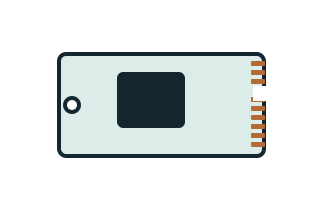
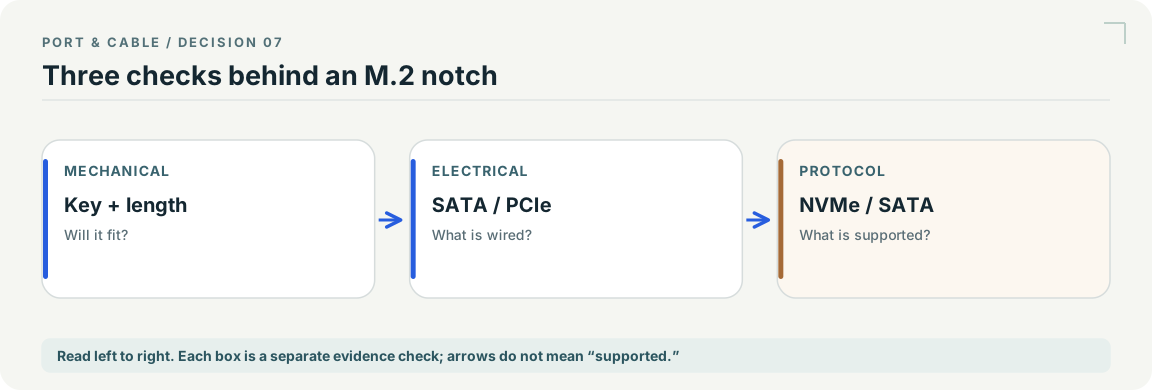
M.2 describes physical form; a compatible shape does not establish SATA, PCIe or NVMe support. [C057A]
NVM Express’s NVMe over PCIe Transport Specification distinguishes the NVMe host interface from its mapping onto PCIe. Neither the protocol nor the transport name identifies an M.2 mechanical connector. [C057B]
StarTech’s PEX4M2E1 guide requires a PCIe M.2 SSD and an x4-or-larger PCIe expansion slot. Its adapter-driver note does not remove the separate requirement to check the drive’s operating-system compatibility. [C057C]
StarTech’s M2-USB-C-NVME-SATA guide lists M.2 PCIe NVMe and M.2 SATA SSD requirements, M-Key/B+M-Key wording and 30/42/60/80 mm lengths for one SSD; the enclosure connects to the host through USB. [C057D]
Bounded facts, visible unknowns
Specifications and limits
| Physical questions | Length, keying and mounting [C057A] |
|---|---|
| Functional questions | Host interface and module protocol [C057A] |
| Protocol versus transport | NVMe’s PCIe transport mapping is distinct from the M.2 mechanical form. [C057B] |
| Adapter versus enclosure | Read exact drive-side and host-side requirements; one product’s supported interfaces are not universal. [C057C] [C057D] |
| Verified device list | Not included. Check exact device and accessory documentation. |
This is a scoped requirements guide, not an interoperability certification. It does not test hardware, calculate an arbitrary display timing, or replace the exact product documentation. A missing capability stays unknown.
Before you connect
What to check
- Read the host manual’s supported storage interfaces.
- Match the module’s interface as well as its physical dimensions.
- Do not assume B, M or B+M keying alone proves protocol support.
- Follow the manufacturer’s shutdown and handling guidance; do not hot-plug based on this atlas.
An adapter name is not a compatibility result
Compare the exact drive-side and host-side requirements. PEX4M2E1 documents a PCIe M.2 drive and a PCIe host slot; M2-USB-C-NVME-SATA documents a different, USB-host enclosure. Neither example qualifies every key, every drive, achieved speed or system boot.
Your next step
Move from the form to the requirement.
The source trail
Evidence for this page
AI-assisted inspection is not independent engineering review. Source scope and access limitations are disclosed below. Procedural checklists are editorial requirements, not hardware measurements.
M.2 describes physical form; a compatible shape does not establish SATA, PCIe or NVMe support.
Kingston · SSD FAQ ↗S033: full source recordInspect review dependencies → (private workspace)NVM Express’s NVMe over PCIe Transport Specification distinguishes the NVMe host interface from its mapping onto PCIe. Neither the protocol nor the transport name identifies an M.2 mechanical connector.
NVM Express · NVM Express NVMe over PCIe Transport Specification, Revision 1.4 ↗S428: full source recordInspect review dependencies → (private workspace)StarTech’s PEX4M2E1 guide requires a PCIe M.2 SSD and an x4-or-larger PCIe expansion slot. Its adapter-driver note does not remove the separate requirement to check the drive’s operating-system compatibility.
StarTech.com · x4 PCIe Expansion Card to M.2 PCIe SSD Adapter — PEX4M2E1 Quick start guide ↗S430: full source recordInspect review dependencies → (private workspace)StarTech’s M2-USB-C-NVME-SATA guide lists M.2 PCIe NVMe and M.2 SATA SSD requirements, M-Key/B+M-Key wording and 30/42/60/80 mm lengths for one SSD; the enclosure connects to the host through USB.
StarTech.com · M.2 SATA/NVMe SSD Enclosure — M2-USB-C-NVME-SATA Quick start guide ↗S431: full source recordInspect review dependencies → (private workspace)