FIELD GUIDESource-led reference

P012 / Video / Connector

Mini DisplayPort connector

Mini DisplayPort shares its connector shape with Thunderbolt 1 and 2, but their functions are not identical.

Also called Mini DP mDP Mini DisplayPort Thunderbolt 1 port Thunderbolt 2 port

The same opening can hide different technologies.

Look for

Check both the small rectangular port shape and its documentation. An icon can be a useful clue, but the exact device specification remains the authority.

Claim inspection dates: 2026-10-01, 2026-10-06, 2026-10-11, 2026-10-13 · Independent review pending

Image inspection / P012

See the view. Check its scope.

3 registered views for this reference. Different part examples are not automatically mates; all remain not to scale and independently unapproved.

T04 · Document the actual path

Mini DisplayPort versus Thunderbolt

Mini DisplayPort shape alone cannot distinguish a Mini DisplayPort display path from Thunderbolt 1/2. Identify the exact port protocol and display type before choosing an adapter.

Read three exact-equipment examples →

What does the exact equipment documentation establish?

Unknown is a useful answer. Yes means you have the relevant model/port/product statement; it does not mean this site verified your equipment.

Read the model’s port table; record Mini DisplayPort or Thunderbolt instead of inferring protocol from shape.

Read the display model and input designation. A Thunderbolt display and a Mini DisplayPort display are different scopes.

Check the compatibility list. Apple’s cited Thunderbolt 3-to-2 adapter excludes DisplayPort/Mini DisplayPort displays despite the familiar shape.

Keep the adapter model’s operating-system/device support and display mode limits with the port evidence.

The next step is a specific documentation check.

  • Read the model’s port table; record Mini DisplayPort or Thunderbolt instead of inferring protocol from shape.
  • Read the display model and input designation. A Thunderbolt display and a Mini DisplayPort display are different scopes.
  • Check the compatibility list. Apple’s cited Thunderbolt 3-to-2 adapter excludes DisplayPort/Mini DisplayPort displays despite the familiar shape.
  • Keep the adapter model’s operating-system/device support and display mode limits with the port evidence.

Documentation declarations only; no physical test, negotiated mode, delivered power, safe mating, pinout or compatibility approval. 4 missing prerequisites; 0 recorded conflicts.

Display requirements desk →

Use exact model/protocol evidence in the existing desk; a Mini DisplayPort form selection does not declare Thunderbolt support.

Source scope and original inspection information
  • S016 · Identify the ports on your Mac

    Mini DisplayPort and Thunderbolt / Thunderbolt 2 sections · Revision not recorded · Recorded source inspection 2026-10-01. No independent hardware or human approval implied.

  • S521 · Apple — Thunderbolt 3 to Thunderbolt 2 Adapter support

    Opening support scope and Video section · Revision not recorded · Recorded source inspection 2026-10-11. Named Apple adapter and documented Mac/Thunderbolt cases only. No extension to arbitrary PCs, USB-C ports or later Thunderbolt generations. Retrieval locators and observations retained; raw acquisition is recorded separately.

Check the actual cable’s certification information
  • USB-IF Product Search

    Search the exact product. The public list defaults to the last two years; use its date filter when appropriate. Absence is a manufacturer enquiry, not a declaration that a product is unsafe or unsupported.

  • VESA Certified DisplayPort Products — Cables & Adaptors

    Look up the exact cable/adapter manufacturer and model in the VESA certified product database. This link or a similar drawing does not certify your cable.

  • HDMI Ultra Cable certification label guidance

    Use the official cable name and certification label for the exact model; the current HDMI guidance describes standard QR-app verification. A connector picture or generic HDMI version is not product authentication.

A generic illustration and these lookup links do not certify any particular cable.

Three exact-equipment examples

These are source-backed documentation cases. They do not select your equipment, fill the form above, or report a hardware test.

T04-S1 · Supported within the stated documentation scope

A Thunderbolt Display behind Apple’s Thunderbolt adapter

Identify a documented Thunderbolt display path.

Thunderbolt 3 host
MacBook Air (M1, 2020) M05-12
Thunderbolt display with captive lead
Apple Thunderbolt Display (27-inch) M05-14
Thunderbolt transport conversion
Apple Thunderbolt 3 (USB-C) to Thunderbolt 2 Adapter M05-13
Keep these conditions
  • The display is the Apple Thunderbolt Display, not the similarly sized LED Cinema Display.
  • Display AC power and the Mac’s own charging arrangement remain separate; the adapter is not a charger.
  • The M1 Air documents Thunderbolt3; Apple explicitly lists its Thunderbolt Display as a video use for this adapter. M05-12 · M05-13
  • The Thunderbolt Display has a captive Thunderbolt cable and requires a Thunderbolt-enabled Mac. M05-14

Supported within the stated documentation scope: The manufacturer documentation supports this protocol direction for the named display. This is a documentation example rather than a new hardware observation.

Next check: Verify both exact product labels and the actual Thunderbolt lead; retain Apple’s adapter power limitations.

Documentation scope only. This is not a hardware test, detected device state, pinout, electrical replacement approval or guarantee for another product/revision.

Exact source scopes and inspection dates
  • M05-12 · MacBook Air (M1, 2020) specifications

    Charging and Expansion; Display Support: Thunderbolt / USB4 with native DisplayPort over USB-C · No document revision shown on inspected page · Inspected 2026-10-22. Selected exact-model documentation only; no hardware test or broader family approval.

  • M05-14 · Apple Thunderbolt Display specifications

    System Requirements; Peripheral connections: Thunderbolt upstream cable and port · No document revision shown on inspected page · Inspected 2026-10-22. Selected exact-model documentation only; no hardware test or broader family approval.

  • M05-13 · About the Thunderbolt 3 (USB-C) to Thunderbolt 2 Adapter

    Video: Thunderbolt Display supported; Mini DisplayPort/LED Cinema Display explicitly excluded. Bidirectional data-transfer power/OS conditions are separate. · Published 2026-06-05 · Inspected 2026-10-22. Selected exact-model documentation only; no hardware test or broader family approval.

Report a correction to this example →

T04-S2 · The proposed path disagrees with the documentation

LED Cinema Display is explicitly excluded by the same adapter

Use Apple’s Thunderbolt3-to2 adapter with the 27-inch LED Cinema Display.

Thunderbolt 3 host
MacBook Air (M1, 2020) M05-12
Mini DisplayPort display
Apple LED Cinema Display (27-inch) M05-15
Thunderbolt transport conversion
Apple Thunderbolt 3 (USB-C) to Thunderbolt 2 Adapter M05-13
Keep these conditions
  • The display is the Mini DisplayPort LED Cinema model, not Thunderbolt Display.
  • Apple explicitly excludes Mini DisplayPort displays including LED Cinema Display from this adapter; the monitor specification identifies its Mini DisplayPort lead. M05-13 · M05-15

The proposed path disagrees with the documentation: The named adapter documentation rejects this display transport. The shared small connector outline does not make the protocols interchangeable.

Next check: Find documentation for a Mini DisplayPort display path appropriate to the Mac’s actual output, preserving audio/USB and charging as separate requirements.

Documentation scope only. This is not a hardware test, detected device state, pinout, electrical replacement approval or guarantee for another product/revision.

Exact source scopes and inspection dates
  • M05-12 · MacBook Air (M1, 2020) specifications

    Charging and Expansion; Display Support: Thunderbolt / USB4 with native DisplayPort over USB-C · No document revision shown on inspected page · Inspected 2026-10-22. Selected exact-model documentation only; no hardware test or broader family approval.

  • M05-15 · LED Cinema Display (27-inch) specifications

    System Requirements; Audio and video; Peripherals and cables: Mini DisplayPort, USB and MagSafe leads · No document revision shown on inspected page · Inspected 2026-10-22. Selected exact-model documentation only; no hardware test or broader family approval.

  • M05-13 · About the Thunderbolt 3 (USB-C) to Thunderbolt 2 Adapter

    Video: Thunderbolt Display supported; Mini DisplayPort/LED Cinema Display explicitly excluded. Bidirectional data-transfer power/OS conditions are separate. · Published 2026-06-05 · Inspected 2026-10-22. Selected exact-model documentation only; no hardware test or broader family approval.

Report a correction to this example →

T04-S3 · Specific information is still missing

The Mac and display are known; the small adapter is not

Determine whether an unmarked USB-C-to-small-display adapter carries Thunderbolt.

Thunderbolt 3 host
MacBook Air (M1, 2020) M05-12
Thunderbolt display with captive lead
Apple Thunderbolt Display (27-inch) M05-14
Keep these conditions
  • Only its visible connector outline is available; its product model and protocol are unknown.
  • The Mac supports Thunderbolt3 and the named display requires Thunderbolt. Apple distinguishes Thunderbolt from Mini DisplayPort even when connector shapes match. M05-12 · M05-14 · M05-13

Specific information is still missing: The endpoints do not identify the unmarked adapter. Its protocol and power limitations remain unknown.

Still needed:

  • Exact adapter product/model
  • Documented Thunderbolt transport and power limits

Next check: Record the adapter maker/model and locate its explicit Thunderbolt transport statement before choosing a path.

Documentation scope only. This is not a hardware test, detected device state, pinout, electrical replacement approval or guarantee for another product/revision.

Exact source scopes and inspection dates
  • M05-12 · MacBook Air (M1, 2020) specifications

    Charging and Expansion; Display Support: Thunderbolt / USB4 with native DisplayPort over USB-C · No document revision shown on inspected page · Inspected 2026-10-22. Selected exact-model documentation only; no hardware test or broader family approval.

  • M05-14 · Apple Thunderbolt Display specifications

    System Requirements; Peripheral connections: Thunderbolt upstream cable and port · No document revision shown on inspected page · Inspected 2026-10-22. Selected exact-model documentation only; no hardware test or broader family approval.

  • M05-13 · About the Thunderbolt 3 (USB-C) to Thunderbolt 2 Adapter

    Video: Thunderbolt Display supported; Mini DisplayPort/LED Cinema Display explicitly excluded. Bidirectional data-transfer power/OS conditions are separate. · Published 2026-06-05 · Inspected 2026-10-22. Selected exact-model documentation only; no hardware test or broader family approval.

Report a correction to this example →
Report a correction to this task →
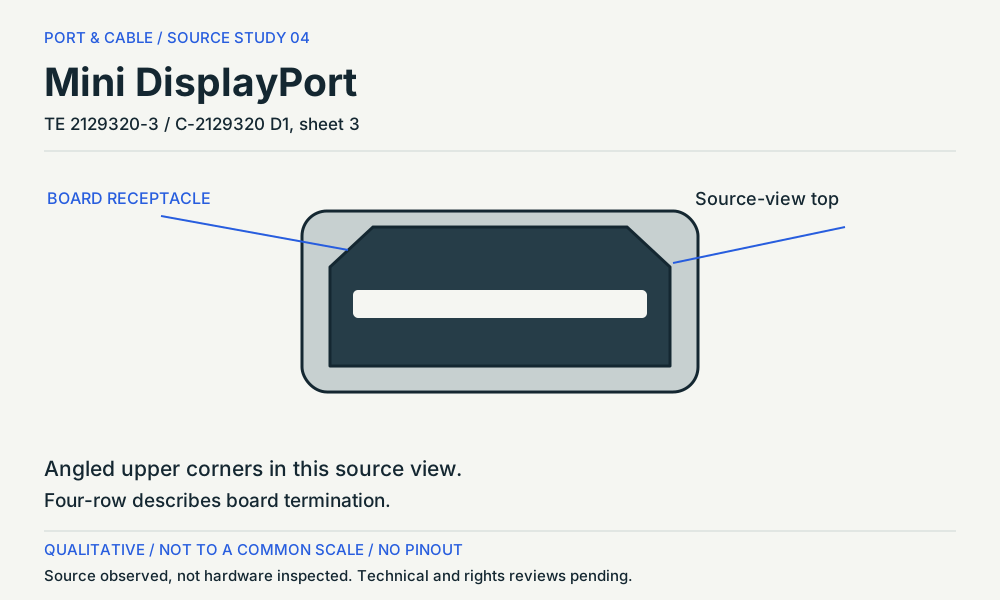
Mini DisplayPort. Mating face / reversed-offset source view. Angled upper corners in this source view. Qualitative source study, not an exact mating drawing or pinout. (private workspace)

P012 / Source-observed physical study

Mini DisplayPort

TE 2129320-3 / C-2129320 D1, sheet 3

Mating face / reversed-offset source view · Device receptacle

Not to scale. Technical and rights review pending.

Inspect view & provenance (private workspace)
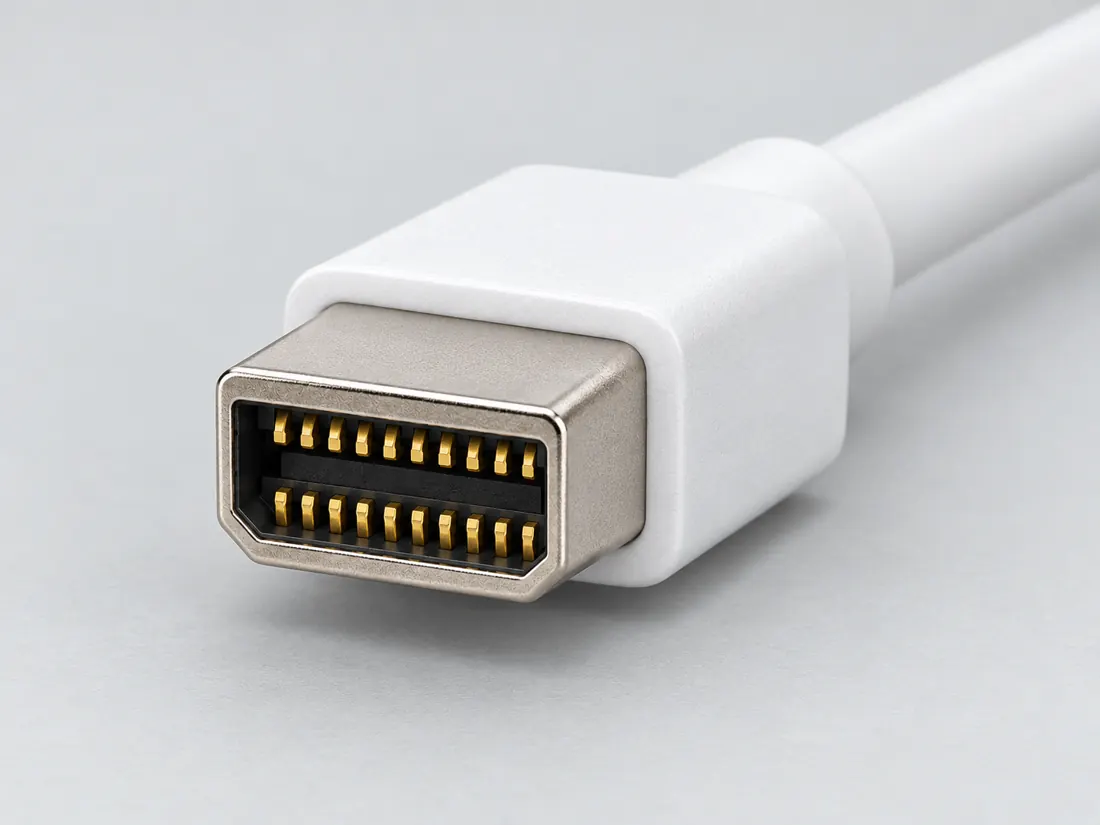
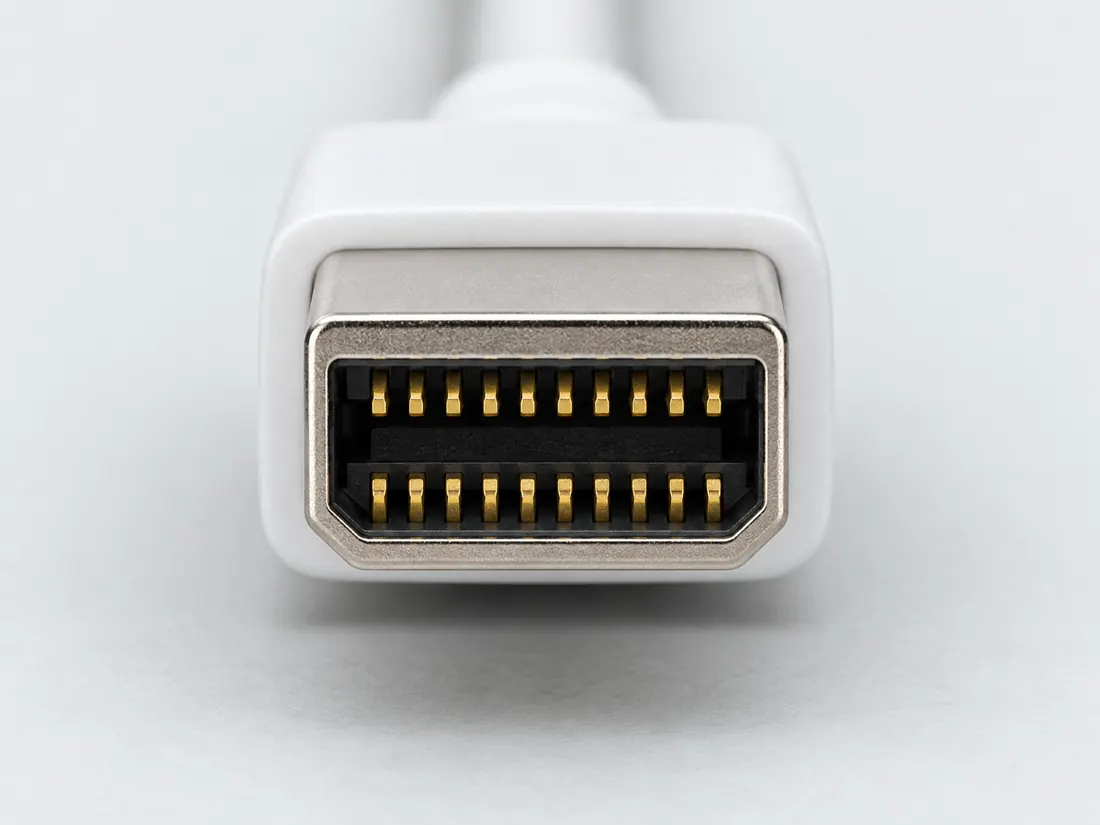
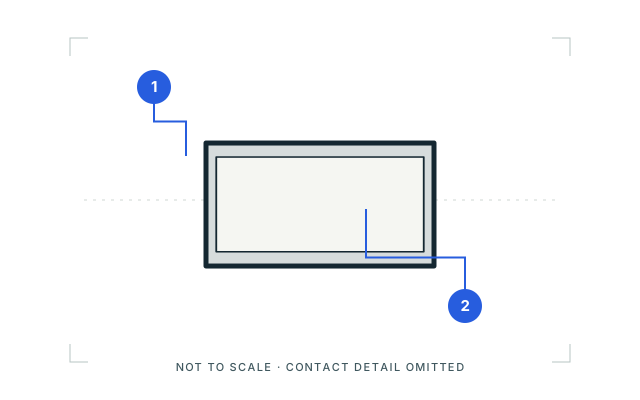
Mini DisplayPort connector: cable-end plug, mating-face outline. Compact near-rectangular plug shell; contact detail omitted. Not to scale; no pinout. (private workspace)

P012 / Inherited recognition study

Mini DisplayPort connector

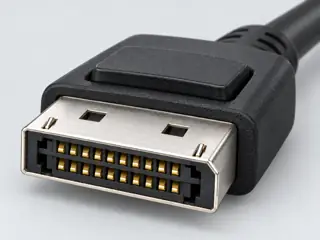
Mini DisplayPort connector / previously depicted manufacturer example

Mating-face outline · Cable plug / cable end

Not to scale. Technical and rights review pending.

Inspect view & provenance (private workspace)
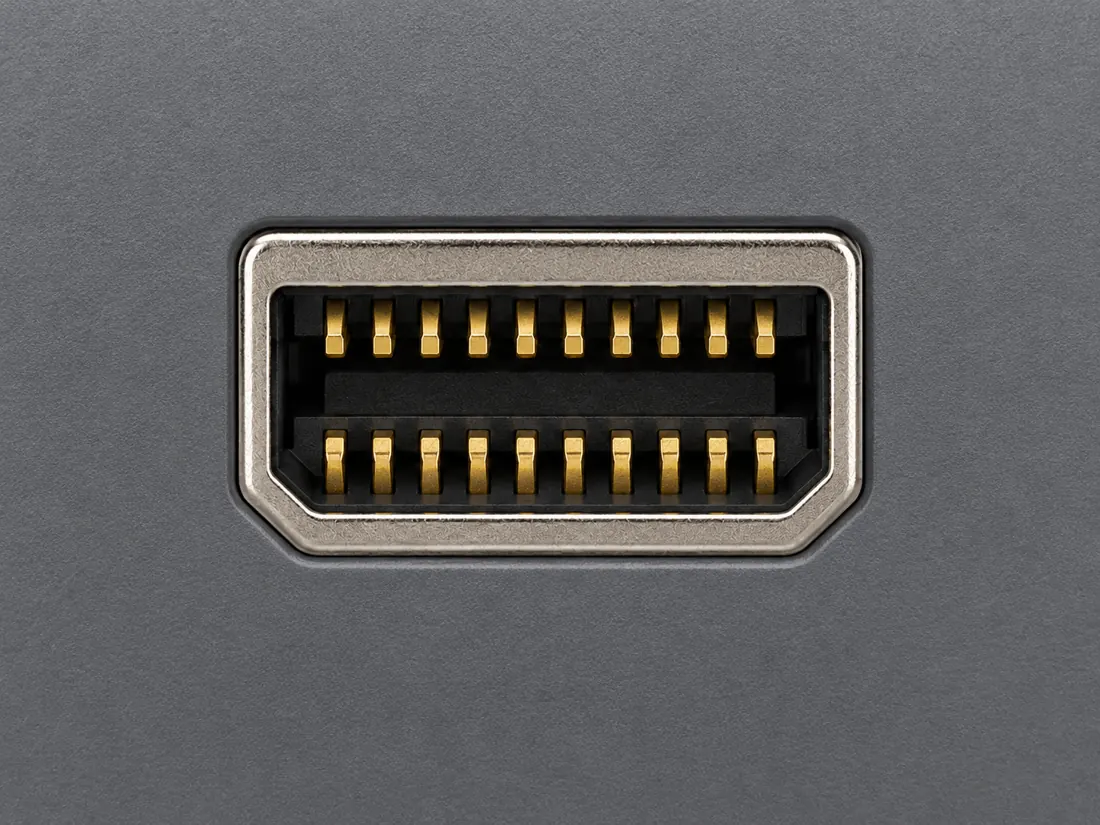
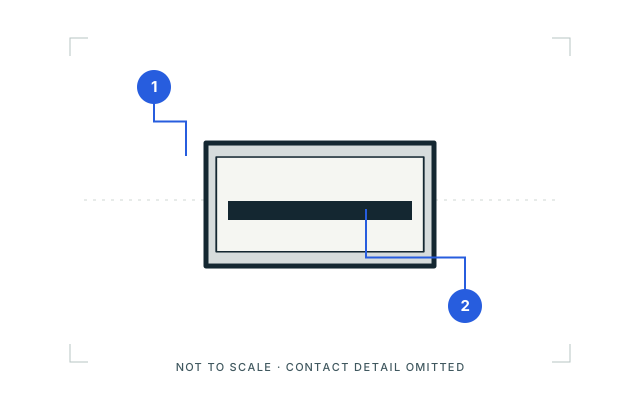
Mini DisplayPort connector: device receptacle, opening outline. Compact near-rectangular device opening and simplified central insert. Not to scale; no pinout. (private workspace)

P012 / Inherited recognition study

Mini DisplayPort connector

Mini DisplayPort connector / previously depicted manufacturer example

Opening outline · Device receptacle

Not to scale. Technical and rights review pending.

Inspect view & provenance (private workspace)

CAPABILITY NOTES / SOURCE REVIEW 11 OCTOBER 2026

Read the capability, not just the name.

Published scope, conditions and what remains unknown. Figures are not measured end-to-end performance.
Name or markSupported reading and conditionsDo not inferAuthority
Apple Thunderbolt adapterDocumented Thunderbolt-to-Thunderbolt pathExact adapter, Mac port and Thunderbolt display/cable.Not a Mini DisplayPort monitor adapter.S521 · AppleChecked 2026-10-11

Apple Thunderbolt adapter

Published scope
Documented Thunderbolt-to-Thunderbolt path
Conditions
Exact adapter, Mac port and Thunderbolt display/cable.
Do not infer
Not a Mini DisplayPort monitor adapter.
Authority
S521 · Apple
Checked 2026-10-11

These are source-qualified distinctions. No complete device pairing, physical fit or operating result is certified here.

Inspect the canonical evidence and scope

C012C

Apple’s Thunderbolt 3 to Thunderbolt 2 Adapter supports the documented Thunderbolt display path but excludes DisplayPort/Mini DisplayPort displays such as Apple LED Cinema Display, despite similar connector shape.

Named Apple adapter and specified Thunderbolt Mac path only; not a statement about all Mini DisplayPort adapters.

S521 · Apple

Visual reference / P012

A familiar shape can carry different signals.

PLUG + PORT

Recognition, not measurement. Each drawing is fitted independently: equal boxes do not mean equal sizes. Contact detail is deliberately omitted.

01 / Cable-end plugMating-face outline
Mini DisplayPort connector: cable-end plug, mating-face outline. Compact near-rectangular plug shell; contact detail omitted. Not to scale; no pinout.

Looking toward the plug opening; not the wire or solder side.

Qualitative recognition study interpreted from the pictured manufacturer example. Inner contacts, exact dimensions and hidden surfaces are omitted.

02 / Device receptacleOpening outline
Mini DisplayPort connector: device receptacle, opening outline. Compact near-rectangular device opening and simplified central insert. Not to scale; no pinout.

Looking into the device opening as pictured; not a rear or board view.

Simplified opening from the cited device-port illustration. Product bezel, contact count and internal construction are not generalized.

Two things to notice

  1. Compact, near-rectangular shell
  2. Receptacle insert; contact detail omitted

What the picture cannot tell you

Mini DisplayPort and Thunderbolt 1/2 can share this physical shape. The port symbol and exact device documentation must distinguish them.

Sources, drawing scope & rights

Visual references checked 2026-10-09. These are new, source-scoped recognition studies, not approved mechanical drawings, pinouts or compatibility verdicts. Independent drawing review remains pending.

Original Port & Cable vector study. Third-party reference photographs are linked, not copied or bundled.

C2G / Legrand — Digital video connector guide
HDMI, HDMI Mini, HDMI Micro, DisplayPort and Mini DisplayPort photographs. Identity and exterior of the pictured cable plugs only. Performance and protocol prose was not adopted.

Apple — Identify the ports on your Mac
USB-A; Thunderbolt / USB-C; HDMI; Mini DisplayPort port illustrations. Illustrated receptacle openings only. A common outline does not establish protocol or model support.

This inspection does not refresh any canonical claim, source-review date or publication approval.

The useful distinction

Recognize it. Then verify it.

Mini DisplayPort shares its connector shape with Thunderbolt 1 and 2, but their functions are not identical. [C012A]

Apple’s Thunderbolt 3 to Thunderbolt 2 Adapter supports the documented Thunderbolt display path but excludes DisplayPort/Mini DisplayPort displays such as Apple LED Cinema Display, despite similar connector shape. [C012C]

TE's cited Mini DisplayPort receptacle is a 20-position connector example; the same physical form can appear in contexts whose protocol capability must be established from the exact device rather than shape alone. [C012B]

TE drawing C-2129320 D1 shows 2129320-3 as a reversed-offset Mini DisplayPort receptacle with four-row through-hole board termination; the mounting-side PCB layout is distinct from the mating face. [C012D]

Identify the documented form

Separate Mini DisplayPort shape from Thunderbolt capability.

  1. Mini DisplayPort shares a connector shape with Thunderbolt 1/2, so an outline match cannot select the protocol. S016
  2. The cited reversed-offset TE receptacle has a mounting-side PCB layout distinct from its mating face. S609
Documented identity facts; exact part and variant scope remains with each value
Nominal contacts20S016 · S369plug and receptacle interface; nominal engineering count, not automatically positions, population or a device wiring map. plug and receptacle interface
Positions / cavity span20 (Claim C012B)S369Recorded source-scoped values; named examples do not describe every family variant or establish compatibility. Mini DisplayPort connector-form contact count only; DisplayPort revision and Thunderbolt capability are not inferred.
Populated contactsNot recordedNot recorded in a normalized source-scoped field. Consult the exact part/revision; no value inferred from illustrations.
Connector roleplug; socket; socket (2129320-3)S016 · S369 · S369Separate exact examples; retain each value’s source, role, axis and part scope. plug and receptacle interface Exact named example 2129320-3: Mini DisplayPort PCB receptacle. Exact example only; no universal geometry, electrical compatibility, fabrication approval or wiring instruction. Existing4-row source value retained; no assertion that every Mini DisplayPort product shares these tail dimensions.
Rows, pitch, dimensions, keying and view limits
Additional scoped facts; not a fabrication drawing or a mating approval
Contact rows2 (DellU2415 Mini DisplayPort connected signal cable)S681Qualified exact source facts only; counterpart, mounting-acceptance, cable, port, termination and assembly context remains separately labelled in variant_notes. Exact DellU2415 manual Mini DisplayPort connected-cable face, not TE2129320-3 four-row PCB termination. Quantity context: Two physical contact rows in source connected-signal-cable face.
Contact pitch0.6 mm manufacturer-reported centerline or mating-interface pitch (2129320-3)S369Separate exact examples; retain each value’s source, role, axis and part scope. Exact named example 2129320-3: Mini DisplayPort PCB receptacle. Exact example only; no universal geometry, electrical compatibility, fabrication approval or wiring instruction. Existing4-row source value retained; no assertion that every Mini DisplayPort product shares these tail dimensions.
Dimensions / axis1.4 mm termination post and tail length (2129320-3)S369Separate exact examples; retain each value’s source, role, axis and part scope. Exact named example 2129320-3: Mini DisplayPort PCB receptacle. Exact example only; no universal geometry, electrical compatibility, fabrication approval or wiring instruction. Existing4-row source value retained; no assertion that every Mini DisplayPort product shares these tail dimensions.
Coupling / latchNot recordedNot recorded in a normalized source-scoped field. Consult the exact part/revision; no value inferred from illustrations.
Keying / polarizationNot recordedNot recorded in a normalized source-scoped field. Consult the exact part/revision; no value inferred from illustrations.
View conventionDellU2415 connected-signal-cable face: labels19/1 across upper contact row and20/2 across lower contact row. (DellU2415 Mini DisplayPort connected signal cable)S681Qualified exact source facts only; counterpart, mounting-acceptance, cable, port, termination and assembly context remains separately labelled in variant_notes. Exact DellU2415 manual cable-face convention only; no PCB/wire-side map, universal orientation, new contact assignments or equipment approval.
Contact gender / arrangementNot recordedNot recorded in a normalized source-scoped field. Consult the exact part/revision; no value inferred from illustrations.
Mountingthrough-hole (Claim C012D); right-angle top-mount through-hole solder with boardlock (2129320-3)S609 · S369Separate exact examples; retain each value’s source, role, axis and part scope. V146: Four-row refers to board termination, not four rows inside the opening. Source orientation only; no Thunderbolt capability or universal device up direction. Exact named example 2129320-3: Mini DisplayPort PCB receptacle. Exact example only; no universal geometry, electrical compatibility, fabrication approval or wiring instruction. Existing4-row source value retained; no assertion that every Mini DisplayPort product shares these tail dimensions.
Shell / formNot recordedNot recorded in a normalized source-scoped field. Consult the exact part/revision; no value inferred from illustrations.
ManufacturerTE Connectivity (2129320-3)S609Recorded source-scoped values; named examples do not describe every family variant or establish compatibility. V146: Four-row refers to board termination, not four rows inside the opening. Source orientation only; no Thunderbolt capability or universal device up direction.
SeriesMini DisplayPort (2129320-3)S609Recorded source-scoped values; named examples do not describe every family variant or establish compatibility. V146: Four-row refers to board termination, not four rows inside the opening. Source orientation only; no Thunderbolt capability or universal device up direction.
Exact part / implementation2129320-3 (2129320-3)S609Recorded source-scoped values; named examples do not describe every family variant or establish compatibility. V146: Four-row refers to board termination, not four rows inside the opening. Source orientation only; no Thunderbolt capability or universal device up direction.
Recorded markingsNot recordedNot recorded in a normalized source-scoped field. Consult the exact part/revision; no value inferred from illustrations.

Keep this limit: Apple’s specified Thunderbolt adapter display path excludes certain Mini DisplayPort displays despite similar connectors; keep its documented scope. S521

Make the next check

Record the exact device/port designation and the display type before selecting an adapter.

Existing source inspection and AI review remain distinct from independent technical review. A matching form does not establish a safe connection.

Recorded variant and source limits
  • The same physical form can appear with different protocol capability; exact-device evidence is required.
  • No universal fabrication dimensions or signal map are published in V54.
  • NXP AN10873 mini-DP source-side connector pin list: Source-side connector; contact numbers only.
  • Wilder Technologies mDP-TPA test adapter plug/receptacle (device-specific, source and sink lane names): Contact numbers only.
  • Source-side Mini DisplayPort connector (VESA mDP 1.0 Table 2-1): Top row odd pins, bottom row even pins.
  • Sink-side Mini DisplayPort connector (VESA mDP 1.0 Table 2-2); e.g., Dell U2415/U2414H Mini DP input: Dell receptacle face: pin 1 top-right, 2 bottom-right, 19 top-left, 20 bottom-left.
  • Prior view context (not a source-view value): Contact count only; no numbered mating-face layout or fabrication geometry is reproduced.
  • Retained rows context (excluded from normalized contact/body field): 4. TE drawing C-2129320 D1 shows 2129320-3 as a reversed-offset Mini DisplayPort receptacle with four-row through-hole board termination; the mounting-side PCB layout is distinct from the mating face. | V146: Four-row refers to board termination, not four rows inside the opening. Source orientation only; no Thunderbolt capability or universal device up direction. Sources: S609: Revision D1; all five sheets visually inspected. Sheet 3 explicitly shows 2129320-3; sheet 5 is the reference PCB layout, mounting-side view. No revision date asserted.
Report a correction to this identification or view →

Bounded facts, visible unknowns

Specifications and limits

Mini DisplayPort connector facts and limitations
LookalikeThunderbolt 1 / 2 connector shape [C012A]
Source-scoped recognitionThe source’s four-row description concerns PCB termination. Separately, Apple excludes Mini DisplayPort displays from its named Thunderbolt 3-to-2 adapter path despite the similar connector shape. [C012B] [C012D] [C012C]
Mechanical dimensionsNo independently reviewed mechanical drawing in this release; do not use this page for fabrication.
Engineering pinoutSource-checked engineering profile available; independent review pending. Open engineering profile →
Verified device listNot included. Check exact device and accessory documentation.
A boundary, not an omission to guess around.

This record is an identification starting point. It does not provide measured mating tolerances, electrical approval, or a list of verified device models. Use the original device and accessory documentation to resolve the remaining requirements.

Before you connect

What to check

  1. Determine whether the port is Mini DisplayPort or an early Thunderbolt port.
  2. Do not assume a Mini DisplayPort source can operate a Thunderbolt accessory.
  3. For a display-only connection, verify the supported mode across the cable and devices.
Trace a supported connection class →

Can I connect…

Common connections for this connector

All connection questions →

Pins & wiring

Pinout

Choose the exact wiring. Pin numbers follow its stated view; a schematic does not establish physical positions. Check your exact device before wiring.

What the status labels mean
Confirmed
Recorded research passes agree within this variant; this is not independent human review or hardware validation.
Single source
Only one underlying document, or one pass, supports this assignment.
Device-specific
Supported for the named equipment or wiring only. Check your device’s manual.
Unverified
Missing or conflicting evidence. Do not wire from this row.
Not connected
The source explicitly says NC, no contact or no pin for this wiring.
Wiring variant

NXP AN10873 mini-DP source-side connector pin list

View and evidence limits

Source-side connector; contact numbers only.

  • P012 Mini DisplayPort — **Agree** on the source side (VESA via B, NXP AN10873 via A) and the sink side (VESA via B, Wilder test adapter via A), including the lane reversal on the sink — B's VESA copy is from a third-party mirror (flagged in its JSON). B recorded that Dell's U2414H/U2415 sink tables contradict themselves, and followed VESA.
  • The VESA mDP standard is available to VESA members/purchasers; it was not obtained from VESA. A copy on a personal website was not used. Rows rely on NXP and Wilder Technologies documents.
  • Neither cited document defines the CONFIG pin functions, DP_PWR voltage/current for mini-DP, or whether cables carry pin 20.
  • Not researched; no Thunderbolt pin assignment is implied.
Mini DisplayPort engineering referenceSource-side connector; contact numbers only.SCHEMATIC · physical positions unconfirmedNot to scale · check the named wiring and device manual1: GND (single_source)12: Hot Plug Detect (single_source)23: ML_Lane 0 (p) (single_source)34: CONFIG1 (single_source)45: ML_Lane 0 (n) (single_source)56: CONFIG2 (single_source)67: GND (single_source)78: GND (single_source)89: ML_Lane 1 (p) (single_source)910: ML_Lane 3 (p) (single_source)1011: ML_Lane 1 (n) (single_source)1112: ML_Lane 3 (n) (single_source)1213: GND (single_source)1314: GND (single_source)1415: ML_Lane 2 (p) (single_source)1516: AUX CH (p) (single_source)1617: ML_Lane 2 (n) (single_source)1718: AUX CH (n) (single_source)1819: GND (single_source)1920: DP_PWR (single_source)20powergrounddataConfigshieldNCUnknown
Schematic only · physical contact positions unconfirmed. Original drawing · not to scale. Scroll sideways if needed.
NXP AN10873 mini-DP source-side connector pin list — source-scoped contact map
PinSignalWhat it doesStatus
1GNDGround reference and return.Single source
Sources
2Hot Plug DetectControl, detection or configuration connection; check the source and device.Single source
Sources
3ML_Lane 0 (p)Signal conductor. Pair, polarity and direction follow this named wiring.Single source
Sources
4CONFIG1Control, detection or configuration connection; check the source and device.Single source
Sources
5ML_Lane 0 (n)Signal conductor. Pair, polarity and direction follow this named wiring.Single source
Sources
6CONFIG2Control, detection or configuration connection; check the source and device.Single source
Sources
7GNDGround reference and return.Single source
Sources
8GNDGround reference and return.Single source
Sources
9ML_Lane 1 (p)Signal conductor. Pair, polarity and direction follow this named wiring.Single source
Sources
10ML_Lane 3 (p)Signal conductor. Pair, polarity and direction follow this named wiring.Single source
Sources
11ML_Lane 1 (n)Signal conductor. Pair, polarity and direction follow this named wiring.Single source
Sources
12ML_Lane 3 (n)Signal conductor. Pair, polarity and direction follow this named wiring.Single source
Sources
13GNDGround reference and return.Single source
Sources
14GNDGround reference and return.Single source
Sources
15ML_Lane 2 (p)Signal conductor. Pair, polarity and direction follow this named wiring.Single source
Sources
16AUX CH (p)Control, detection or configuration connection; check the source and device.Single source
Sources
17ML_Lane 2 (n)Signal conductor. Pair, polarity and direction follow this named wiring.Single source
Sources
18AUX CH (n)Control, detection or configuration connection; check the source and device.Single source
Sources
19GNDGround reference and return.Single source
Sources
20DP_PWRControl, detection or configuration connection; check the source and device.Single source
Sources
Sources (1)

Wilder Technologies mDP-TPA test adapter plug/receptacle (device-specific, source and sink lane names)

Device-specific wiring. Check your device’s manual before connecting or applying power.

View and evidence limits

Contact numbers only.

  • P012 Mini DisplayPort — **Agree** on the source side (VESA via B, NXP AN10873 via A) and the sink side (VESA via B, Wilder test adapter via A), including the lane reversal on the sink — B's VESA copy is from a third-party mirror (flagged in its JSON). B recorded that Dell's U2414H/U2415 sink tables contradict themselves, and followed VESA.
  • Device-specific: pins 4 and 6 are pulled to ground by the adapter; the standard CONFIG1/CONFIG2 names come from the NXP variant.
  • The VESA mDP standard is available to VESA members/purchasers; it was not obtained from VESA. A copy on a personal website was not used. Rows rely on NXP and Wilder Technologies documents.
  • Neither cited document defines the CONFIG pin functions, DP_PWR voltage/current for mini-DP, or whether cables carry pin 20.
  • Not researched; no Thunderbolt pin assignment is implied.
Mini DisplayPort engineering referenceContact numbers only.SCHEMATIC · physical positions unconfirmedNot to scale · check the named wiring and device manual1: Ground (device_specific)12: Hot Plug Detect (device_specific)23: ML Lane 0 (p) - Source / ML Lane 3 (n) - Sink (device_specific)34: Pulled to Ground (device_specific)45: ML Lane 0 (n) - Source / ML Lane 3 (p) - Sink (device_specific)56: Pulled to Ground (device_specific)67: Ground (device_specific)78: Ground (device_specific)89: ML Lane 1 (p) - Source / ML Lane 2 (n) - Sink (device_specific)910: ML Lane 3 (p) - Source / ML Lane 0 (n) - Sink (device_specific)1011: ML Lane 1 (n) - Source / ML Lane 2 (p) - Sink (device_specific)1112: ML Lane 3 (n) - Source / ML Lane 0 (p) - Sink (device_specific)1213: Ground (device_specific)1314: Ground (device_specific)1415: ML Lane 2 (p) - Source / ML Lane 1 (n) - Sink (device_specific)1516: AUX CH (p) (device_specific)1617: ML Lane 2 (n) - Source / ML Lane 1 (p) - Sink (device_specific)1718: AUX CH (n) (device_specific)1819: Ground (device_specific)1920: DP_PWR (device_specific)20powergrounddataConfigshieldNCUnknown
Schematic only · physical contact positions unconfirmed. Original drawing · not to scale. Scroll sideways if needed.
Wilder Technologies mDP-TPA test adapter plug/receptacle (device-specific, source and sink lane names) — source-scoped contact map
PinSignalWhat it doesStatus
1GroundGround reference and return.Device-specific
Sources
2Hot Plug DetectControl, detection or configuration connection; check the source and device.Device-specific
Sources
3ML Lane 0 (p) - Source / ML Lane 3 (n) - SinkSignal conductor. Pair, polarity and direction follow this named wiring.Device-specific
Sources
4Pulled to GroundControl, detection or configuration connection; check the source and device.Device-specific
Sources
5ML Lane 0 (n) - Source / ML Lane 3 (p) - SinkSignal conductor. Pair, polarity and direction follow this named wiring.Device-specific
Sources
6Pulled to GroundControl, detection or configuration connection; check the source and device.Device-specific
Sources
7GroundGround reference and return.Device-specific
Sources
8GroundGround reference and return.Device-specific
Sources
9ML Lane 1 (p) - Source / ML Lane 2 (n) - SinkSignal conductor. Pair, polarity and direction follow this named wiring.Device-specific
Sources
10ML Lane 3 (p) - Source / ML Lane 0 (n) - SinkSignal conductor. Pair, polarity and direction follow this named wiring.Device-specific
Sources
11ML Lane 1 (n) - Source / ML Lane 2 (p) - SinkSignal conductor. Pair, polarity and direction follow this named wiring.Device-specific
Sources
12ML Lane 3 (n) - Source / ML Lane 0 (p) - SinkSignal conductor. Pair, polarity and direction follow this named wiring.Device-specific
Sources
13GroundGround reference and return.Device-specific
Sources
14GroundGround reference and return.Device-specific
Sources
15ML Lane 2 (p) - Source / ML Lane 1 (n) - SinkSignal conductor. Pair, polarity and direction follow this named wiring.Device-specific
Sources
16AUX CH (p)Control, detection or configuration connection; check the source and device.Device-specific
Sources
17ML Lane 2 (n) - Source / ML Lane 1 (p) - SinkSignal conductor. Pair, polarity and direction follow this named wiring.Device-specific
Sources
18AUX CH (n)Control, detection or configuration connection; check the source and device.Device-specific
Sources
19GroundGround reference and return.Device-specific
Sources
20DP_PWRControl, detection or configuration connection; check the source and device.Device-specific
Sources
Sources (1)

Source-side Mini DisplayPort connector (VESA mDP 1.0 Table 2-1)

View and evidence limits

Top row odd pins, bottom row even pins.

  • P012 Mini DisplayPort — **Agree** on the source side (VESA via B, NXP AN10873 via A) and the sink side (VESA via B, Wilder test adapter via A), including the lane reversal on the sink — B's VESA copy is from a third-party mirror (flagged in its JSON). B recorded that Dell's U2414H/U2415 sink tables contradict themselves, and followed VESA.
  • Applies to source devices (e.g., computer outputs).
  • Both Dell guides print the same table. It lists ML3(n) at both pins 3 and 5 and ML0(p) at both pins 10 and 12, which is internally impossible, and GND at 4 and 6. VESA Table 2-2 gives ML_Lane 3 (p) at 5, ML_Lane 0 (n) at 10, and CONFIG1/CONFIG2 (pulled down to ground) at 4/6. Rows follow VESA, and Dell is cited only where it agrees. The two Dell guides share one table, so they are not independent of each other.
  • Source-side rows rest on the VESA standard alone. No manufacturer source-device document (graphics card or computer) was obtained.
  • The VESA PDF came from a third-party mirror (glenwing.github.io), not from VESA. Its SHA-256 is recorded so it can be compared against a member copy.
Mini DisplayPort engineering referenceTop row odd pins, bottom row even pins.SCHEMATIC · physical positions unconfirmedNot to scale · check the named wiring and device manual1: GND (single_source)12: Hot Plug Detect (single_source)23: ML_Lane 0 (p) (single_source)34: CONFIG1 (single_source)45: ML_Lane 0 (n) (single_source)56: CONFIG2 (single_source)67: GND (single_source)78: GND (single_source)89: ML_Lane 1 (p) (single_source)910: ML_Lane 3 (p) (single_source)1011: ML_Lane 1 (n) (single_source)1112: ML_Lane 3 (n) (single_source)1213: GND (single_source)1314: GND (single_source)1415: ML_Lane 2 (p) (single_source)1516: AUX_CH (p) (single_source)1617: ML_Lane 2 (n) (single_source)1718: AUX_CH (n) (single_source)1819: GND (single_source)1920: DP_PWR (single_source)20powergrounddataConfigshieldNCUnknown
Schematic only · physical contact positions unconfirmed. Original drawing · not to scale. Scroll sideways if needed.
Source-side Mini DisplayPort connector (VESA mDP 1.0 Table 2-1) — source-scoped contact map
PinSignalWhat it doesStatus
1GNDGround reference and return.Single source
Sources
2Hot Plug DetectControl, detection or configuration connection; check the source and device.Single source
Sources
3ML_Lane 0 (p)Signal conductor. Pair, polarity and direction follow this named wiring.Single source
Sources
4CONFIG1Control, detection or configuration connection; check the source and device.Single source
Sources
5ML_Lane 0 (n)Signal conductor. Pair, polarity and direction follow this named wiring.Single source
Sources
6CONFIG2Control, detection or configuration connection; check the source and device.Single source
Sources
7GNDGround reference and return.Single source
Sources
8GNDGround reference and return.Single source
Sources
9ML_Lane 1 (p)Signal conductor. Pair, polarity and direction follow this named wiring.Single source
Sources
10ML_Lane 3 (p)Signal conductor. Pair, polarity and direction follow this named wiring.Single source
Sources
11ML_Lane 1 (n)Signal conductor. Pair, polarity and direction follow this named wiring.Single source
Sources
12ML_Lane 3 (n)Signal conductor. Pair, polarity and direction follow this named wiring.Single source
Sources
13GNDGround reference and return.Single source
Sources
14GNDGround reference and return.Single source
Sources
15ML_Lane 2 (p)Signal conductor. Pair, polarity and direction follow this named wiring.Single source
Sources
16AUX_CH (p)Control, detection or configuration connection; check the source and device.Single source
Sources
17ML_Lane 2 (n)Signal conductor. Pair, polarity and direction follow this named wiring.Single source
Sources
18AUX_CH (n)Control, detection or configuration connection; check the source and device.Single source
Sources
19GNDGround reference and return.Single source
Sources
20DP_PWRControl, detection or configuration connection; check the source and device.Single source
Sources
Sources (1)

Sink-side Mini DisplayPort connector (VESA mDP 1.0 Table 2-2); e.g., Dell U2415/U2414H Mini DP input

Device-specific wiring. Check your device’s manual before connecting or applying power.

View and evidence limits

Dell receptacle face: pin 1 top-right, 2 bottom-right, 19 top-left, 20 bottom-left.

  • P012 Mini DisplayPort — **Agree** on the source side (VESA via B, NXP AN10873 via A) and the sink side (VESA via B, Wilder test adapter via A), including the lane reversal on the sink — B's VESA copy is from a third-party mirror (flagged in its JSON). B recorded that Dell's U2414H/U2415 sink tables contradict themselves, and followed VESA.
  • VESA says sinks should preferably use full-size DP. If they use mDP they must use this lane-reversed pinout.
  • Both Dell guides print the same table. It lists ML3(n) at both pins 3 and 5 and ML0(p) at both pins 10 and 12, which is internally impossible, and GND at 4 and 6. VESA Table 2-2 gives ML_Lane 3 (p) at 5, ML_Lane 0 (n) at 10, and CONFIG1/CONFIG2 (pulled down to ground) at 4/6. Rows follow VESA, and Dell is cited only where it agrees. The two Dell guides share one table, so they are not independent of each other.
  • Source-side rows rest on the VESA standard alone. No manufacturer source-device document (graphics card or computer) was obtained.
  • The VESA PDF came from a third-party mirror (glenwing.github.io), not from VESA. Its SHA-256 is recorded so it can be compared against a member copy.
Mini DisplayPort engineering referenceDell receptacle face: pin 1 top-right, 2 bottom-right, 19 top-left, 20 bottom-left.SCHEMATIC · physical positions unconfirmedNot to scale · check the named wiring and device manual1: GND (device_specific)12: Hot Plug Detect (device_specific)23: ML_Lane 3 (n) (device_specific)34: CONFIG1 (device_specific)45: ML_Lane 3 (p) (device_specific)56: CONFIG2 (device_specific)67: GND (device_specific)78: GND (device_specific)89: ML_Lane 2 (n) (device_specific)910: ML_Lane 0 (n) (device_specific)1011: ML_Lane 2 (p) (device_specific)1112: ML_Lane 0 (p) (device_specific)1213: GND (device_specific)1314: GND (device_specific)1415: ML_Lane 1 (n) (device_specific)1516: AUX_CH (p) (device_specific)1617: ML_Lane 1 (p) (device_specific)1718: AUX_CH (n) (device_specific)1819: GND (device_specific)1920: DP_PWR (device_specific)20powergrounddataConfigshieldNCUnknown
Schematic only · physical contact positions unconfirmed. Original drawing · not to scale. Scroll sideways if needed.
Sink-side Mini DisplayPort connector (VESA mDP 1.0 Table 2-2); e.g., Dell U2415/U2414H Mini DP input — source-scoped contact map
PinSignalWhat it doesStatus
1GNDGround reference and return.Device-specific
Sources
2Hot Plug DetectControl, detection or configuration connection; check the source and device.Device-specific
Sources
3ML_Lane 3 (n)Signal conductor. Pair, polarity and direction follow this named wiring.Device-specific
Sources
4CONFIG1Control, detection or configuration connection; check the source and device.Device-specific
Sources
5ML_Lane 3 (p)Signal conductor. Pair, polarity and direction follow this named wiring.Device-specific
Sources
6CONFIG2Control, detection or configuration connection; check the source and device.Device-specific
Sources
7GNDGround reference and return.Device-specific
Sources
8GNDGround reference and return.Device-specific
Sources
9ML_Lane 2 (n)Signal conductor. Pair, polarity and direction follow this named wiring.Device-specific
Sources
10ML_Lane 0 (n)Signal conductor. Pair, polarity and direction follow this named wiring.Device-specific
Sources
11ML_Lane 2 (p)Signal conductor. Pair, polarity and direction follow this named wiring.Device-specific
Sources
12ML_Lane 0 (p)Signal conductor. Pair, polarity and direction follow this named wiring.Device-specific
Sources
13GNDGround reference and return.Device-specific
Sources
14GNDGround reference and return.Device-specific
Sources
15ML_Lane 1 (n)Signal conductor. Pair, polarity and direction follow this named wiring.Device-specific
Sources
16AUX_CH (p)Control, detection or configuration connection; check the source and device.Device-specific
Sources
17ML_Lane 1 (p)Signal conductor. Pair, polarity and direction follow this named wiring.Device-specific
Sources
18AUX_CH (n)Control, detection or configuration connection; check the source and device.Device-specific
Sources
19GNDGround reference and return.Device-specific
Sources
20DP_PWRControl, detection or configuration connection; check the source and device.Device-specific
Sources
Sources (3)

V146 — Same outline does not mean the same adapter.

The source’s four-row description concerns PCB termination. Separately, Apple excludes Mini DisplayPort displays from its named Thunderbolt 3-to-2 adapter path despite the similar connector shape.

Your next step

Move from the form to the requirement.

The source trail

Evidence for this page

AI-assisted inspection is not independent engineering review. Source scope and access limitations are disclosed below. Procedural checklists are editorial requirements, not hardware measurements.

Back to first citation ↑
C012ASource checked · pending review

Mini DisplayPort shares its connector shape with Thunderbolt 1 and 2, but their functions are not identical.

Apple · Identify the ports on your Mac ↗

Locator: Mini DisplayPort and Thunderbolt / Thunderbolt 2 sections
Access: public page.

S016: full source recordInspect review dependencies → (private workspace)

Claim scope: Consumer identification / documented standard or product class only. Next review due 2026-12-30.

Back to first citation ↑
C012CSource checked · pending review

Apple’s Thunderbolt 3 to Thunderbolt 2 Adapter supports the documented Thunderbolt display path but excludes DisplayPort/Mini DisplayPort displays such as Apple LED Cinema Display, despite similar connector shape.

Apple · Apple — Thunderbolt 3 to Thunderbolt 2 Adapter support ↗

Locator: Opening support scope and Video section
Access: public page. Named Apple adapter and documented Mac/Thunderbolt cases only. No extension to arbitrary PCs, USB-C ports or later Thunderbolt generations. Retrieval locators and observations retained; raw acquisition is recorded separately.

S521: full source recordInspect review dependencies → (private workspace)

Claim scope: Named Apple adapter and specified Thunderbolt Mac path only; not a statement about all Mini DisplayPort adapters.. Next review due 2027-01-09.

Back to first citation ↑
C012BSource checked · pending review

TE's cited Mini DisplayPort receptacle is a 20-position connector example; the same physical form can appear in contexts whose protocol capability must be established from the exact device rather than shape alone.

TE Connectivity · TE 2129320-3 Mini DisplayPort connector ↗

Locator: Configuration features: Mini DisplayPort receptacle; 20 positions
Access: public page. The connector form alone does not establish DisplayPort revision or distinguish native Mini DisplayPort use from products that reused the same physical form for Thunderbolt 1/2.

S369: full source recordInspect review dependencies → (private workspace)

Claim scope: Mini DisplayPort connector-form contact count only; DisplayPort revision and Thunderbolt capability are not inferred.. Next review due 2027-01-04.

Back to first citation ↑
C012DSource checked · pending review

TE drawing C-2129320 D1 shows 2129320-3 as a reversed-offset Mini DisplayPort receptacle with four-row through-hole board termination; the mounting-side PCB layout is distinct from the mating face.

TE Connectivity · TE C-2129320 Mini DisplayPort reverse-offset receptacle drawing ↗

Locator: Revision D1; all five sheets visually inspected. Sheet 3 explicitly shows 2129320-3; sheet 5 is the reference PCB layout, mounting-side view. No revision date asserted.
Access: public pdf text. Not a hardware inspection, certification, pinout, dimensional mating check or blanket product-compatibility statement.

S609: full source recordInspect review dependencies → (private workspace)

Claim scope: V146: Four-row refers to board termination, not four rows inside the opening. Source orientation only; no Thunderbolt capability or universal device up direction.. Next review due 2027-01-11.

Suggest a correction to this field note →

Common questions

Questions this record can help resolve

Put this field note to work.

Add to discovery trayRecord an unsaved candidate (private workspace)

Candidate selection does not confirm the identity or capabilities of your physical item.

Use this reference

From identity to the right next question

DISPLAY RECOGNITION / FORM → PATH → INPUT

Match the form. Follow the signal.

Compare source-scoped studies, distinguish the component role and work through the remaining display requirements.

Open the display recognition reference →

Evidence behind this page

Scope first. Source second. Approval separate.

4 linked sources · 4 scoped claims · 0 sources with inspection/access flags.

Page scope: consumer_pilot

Assessment 2026-10-22 · earliest scheduled source review 2026-12-30. This is a recorded-date assessment, not a live source check. Page-level independent review is not established by this panel.

Inspect 4 source scopes, access limits and dates

S016 · Identify the ports on your Mac

Apple · Manufacturer / product-owner domain · inspected 2026-10-01 · due 2026-12-30

Within inspection window

Scoped support: Mini DisplayPort and early Thunderbolt share a connector shape, not identical functionality.

Not established / limitations:

Locator: Mini DisplayPort and Thunderbolt / Thunderbolt 2 sections

S369 · TE 2129320-3 Mini DisplayPort connector

TE Connectivity · Manufacturer / product-owner domain · inspected 2026-10-06 · due 2027-01-04

Within inspection window

Scoped support: Manufacturer example supporting the 20-position contact count for the Mini DisplayPort connector form.

Not established / limitations: The connector form alone does not establish DisplayPort revision or distinguish native Mini DisplayPort use from products that reused the same physical form for Thunderbolt 1/2.

Locator: Configuration features: Mini DisplayPort receptacle; 20 positions

S521 · Apple — Thunderbolt 3 to Thunderbolt 2 Adapter support

Apple · Manufacturer / product-owner domain · inspected 2026-10-11 · due 2027-01-09

Within inspection window

Scoped support: Named Apple adapter and documented Mac/Thunderbolt cases only. No extension to arbitrary PCs, USB-C ports or later Thunderbolt generations.

Not established / limitations: Named Apple adapter and documented Mac/Thunderbolt cases only. No extension to arbitrary PCs, USB-C ports or later Thunderbolt generations. Retrieval locators and observations retained; raw acquisition is recorded separately.

Locator: Opening support scope and Video section

S609 · TE C-2129320 Mini DisplayPort reverse-offset receptacle drawing

TE Connectivity · Manufacturer / product-owner domain · inspected 2026-10-13 · due 2027-01-11

Within inspection window

Scoped support: Four-row through-hole PCB termination is not four rows of mating-face contacts. The reversed-offset source orientation is not a universal up direction on devices.

Not established / limitations: Not a hardware inspection, certification, pinout, dimensional mating check or blanket product-compatibility statement.

Locator: Revision D1; all five sheets visually inspected. Sheet 3 explicitly shows 2129320-3; sheet 5 is the reference PCB layout, mounting-side view. No revision date asserted.

Trace 4 claims to their source records

C012A · P012

Mini DisplayPort shares its connector shape with Thunderbolt 1 and 2, but their functions are not identical.

Claim scope: Consumer identification / documented standard or product class only

Source links: S016 · Evidence trail → (private workspace)

C012B · P012

TE's cited Mini DisplayPort receptacle is a 20-position connector example; the same physical form can appear in contexts whose protocol capability must be established from the exact device rather than shape alone.

Claim scope: Mini DisplayPort connector-form contact count only; DisplayPort revision and Thunderbolt capability are not inferred.

Source links: S369 · Evidence trail → (private workspace)

C012C · P012

Apple’s Thunderbolt 3 to Thunderbolt 2 Adapter supports the documented Thunderbolt display path but excludes DisplayPort/Mini DisplayPort displays such as Apple LED Cinema Display, despite similar connector shape.

Claim scope: Named Apple adapter and specified Thunderbolt Mac path only; not a statement about all Mini DisplayPort adapters.

Source links: S521 · Evidence trail → (private workspace)

C012D · P012

TE drawing C-2129320 D1 shows 2129320-3 as a reversed-offset Mini DisplayPort receptacle with four-row through-hole board termination; the mounting-side PCB layout is distinct from the mating face.

Claim scope: V146: Four-row refers to board termination, not four rows inside the opening. Source orientation only; no Thunderbolt capability or universal device up direction.

Source links: S609 · Evidence trail → (private workspace)

Prepare this page for review → (private workspace)Read the evidence method →

Recorded evidence only. An inspection date, publisher label, source link or generated packet is not independent technical review, hardware testing, fabrication approval or a compatibility verdict.