22 linked sources · 40 scoped claims · 0 sources with inspection/access flags.
Assessment 2026-10-22 · earliest scheduled source review 2026-12-30. This is a recorded-date assessment, not a live source check. Page-level independent review is not established by this panel.
Inspect 22 source scopes, access limits and dates
HDMI Licensing Administrator · Standards-organization domain · inspected 2026-10-01 · due 2026-12-30
Within inspection window
Scoped support: A version number alone does not identify implemented features.
Not established / limitations:
Locator: FAQ about HDMI 2.1 supporting TMDS without FRL
C2G / Legrand · Manufacturer / product-owner domain · inspected 2026-10-01 · due 2026-12-30
Within inspection window
Scoped support: Narrow physical identifiers only, not historical speed or video capability descriptions.
Not established / limitations: The old DisplayPort technology/speed description on this page is not relied on.
Locator: HD15, HDMI, HDMI Mini, HDMI Micro, DVI-D and RCA sections
TE Connectivity · Manufacturer / product-owner domain · inspected 2026-10-06 · due 2027-01-04
Within inspection window
Scoped support: Manufacturer example supporting the 19-position contact count for the standard/full-size HDMI connector form.
Not established / limitations: A manufacturer component example supports connector-form contact count only; it does not establish HDMI version, video mode, cable capability or universal fabrication dimensions.
Locator: Configuration features: Standard HDMI connector; 19 positions; receptacle
Dell Inc. · Manufacturer / product-owner domain · inspected 2026-10-07 · due 2027-01-05
Within inspection window
Scoped support: Exact P2016 manual example: fifteen numbered VGA contact functions and source-view numbering.
Not established / limitations: An exact-device example, not a universal HD15 assignment. Pin 9 wording is retained as a source label, not an instruction to apply a voltage. No PCB footprint or fabrication tolerances.
Locator: Printed page 15 (PDF page 15), VGA port pin assignments and numbered connector view; revision on PDF page 2.
NEC Viewtechnology, Ltd. (Sharp NEC official archive) · Unclassified publisher domain · inspected 2026-10-07 · due 2027-01-05
Within inspection window
Scoped support: Exact VT37 connector role and mode example; contrasts with the Dell P2016 assignment, and documents a component-capable HD15 input with the named adapter.
Not established / limitations: The inspected device has extra modes. Its SCART and component functions do not transfer to another VGA port. No universal conversion, adapter wiring, mode-selection or timing guarantee.
Locator: Printed pages 14, 16 and 55 (PDF pages 21, 23 and 62): separate audio, component-input example and COMPUTER input assignments.
Digital Display Working Group (DDWG) · Unclassified publisher domain · inspected 2026-10-07 · due 2027-01-05
Within inspection window
Scoped support: Primary DDWG specification authored in 1999, read from an explicitly third-party document mirror. Digital-only and combined assignments, interface grouping and numbered receptacle/plug views.
Not established / limitations: Mirror hosting is not an official live DDWG publication channel. No independent authentication, fabrication approval, current product conformance, universal PCB layout or timing guarantee.
Locator: Printed/PDF pp. 43–47; Tables 5-1 and 5-2; Figures 5-1, 5-3 and 5-5.
Molex · Unclassified publisher domain · inspected 2026-10-07 · due 2027-01-05
Within inspection window
Scoped support: Primary manufacturer brochure hosted by Mouser. Numbered DVI-I front view and named cable-family distinctions.
Not established / limitations: Archived brochure, not evidence of current availability. Plug contacts may be partially loaded for a signal set. Do not transfer full receptacle assignments to unspecified cables or PCB terminals.
Locator: PDF p. 2: DVI-I Receptacle Connector Front View and signal roles; p. 3: single/dual-link and analog cable families; partially loaded plug note.
Dell · Manufacturer / product-owner domain · inspected 2026-10-07 · due 2027-01-05
Within inspection window
Scoped support: Exact SE2416HM manual example. Positions 4, 5, 12, 13, 20 and 21 are labeled Floating despite the full numbered grid.
Not established / limitations: Labels belong to this manual. Do not substitute its Self test or supply labels for the DDWG standard; no voltage application, hardware measurement, or universal DVI implementation is established.
Locator: PDF/printed p. 44: numbered DVI-D view and 24-position assignment table.
Dell · Manufacturer / product-owner domain · inspected 2026-10-07 · due 2027-01-05
Within inspection window
Scoped support: Bounded use: 18 versus 24 grid positions; source/cable/display requirements; named E-Port single-link wiring despite accepting dual-link-shaped cables; active versus passive circuitry.
Not established / limitations: General article includes simplified descriptions and a broad conversion chart; those are not adopted as universal compatibility rules. E-Port wording is not an inventory of every dock revision.
Locator: Article 000052929, version 13; modified 17 April 2026. First FAQ on dual link, E-Port dock note, and active/passive adapter definitions.
StarTech.com · Manufacturer / product-owner domain · inspected 2026-10-07 · due 2027-01-05
Within inspection window
Scoped support: Exact StarTech DVIVGAMF product documentation only; no class-wide or inspected-hardware certification.
Not established / limitations: No timing limit, pin-to-pin wiring or cable reach is established; body dimensions are not cable length. No explicit revision date was present in the inspected sheet; the live locator can change.
Locator: Pages 1–2: intended DVI-I source path, DVI-D limitation, passive classification and connector list.
StarTech.com · Manufacturer / product-owner domain · inspected 2026-10-07 · due 2027-01-05
Within inspection window
Scoped support: Exact StarTech DVI2VGAE product documentation only; no class-wide or inspected-hardware certification.
Not established / limitations: The headline/features say 1080p while the performance table lists 1920 × 1200. Refresh rate and the discrepancy are unresolved. Generic connector taxonomy is not USB data capability evidence. No explicit revision date was present in the inspected sheet; the live locator can change.
Locator: Pages 1–3: direction, active conversion, optional USB power, audio field, differing resolution entries, attached and auxiliary cable lengths.
StarTech.com · Manufacturer / product-owner domain · inspected 2026-10-07 · due 2027-01-05
Within inspection window
Scoped support: Exact StarTech HDMIDVIMM6 product documentation only; no class-wide or inspected-hardware certification.
Not established / limitations: No inspected entry establishes an audio mode, maximum video timing, dual-link operation or general HDMI-generation feature set. No explicit revision date was present in the inspected sheet; the live locator can change.
Locator: Pages 1–3: bidirectional digital-video applications, passive hardware, DVI-D single-link connector and 6 ft / 1.8 m cable length.
StarTech.com · Manufacturer / product-owner domain · inspected 2026-10-07 · due 2027-01-05
Within inspection window
Scoped support: Exact StarTech DVI2HD product documentation only; no class-wide or inspected-hardware certification.
Not established / limitations: The AV-input table bounds the broad marketing wording to DVI-D. Reverse use and active/passive classification are not documented. Other listed resolutions do not have separate refresh-rate entries. No explicit revision date was present in the inspected sheet; the live locator can change.
Locator: Pages 1–4: DVI-D input and HDMI output, Windows USB audio, two-channel stereo, video-only use, 1080p at 60 Hz entry, and separate cable/product lengths.
Elgato · Manufacturer / product-owner domain · inspected 2026-10-08 · due 2027-01-06
Within inspection window
Scoped support: USB 3.2 Gen 2 Type-C host link; HDMI input and passthrough output.
Not established / limitations: Page displays September 3, 2024 update. Do not flatten abbreviated maximum capture/HDR bullets into an all-mode promise; use the detailed mode article. Not 4K Pro, 4K S or HD60 X.
Locator: Technical Specifications → Interface
Elgato · Manufacturer / product-owner domain · inspected 2026-10-08 · due 2027-01-06
Within inspection window
Scoped support: One HDMI input, one HDMI output and one USB-C host output; signal direction and reduced capture on USB Gen 1.
Not established / limitations: Page displays June 1, 2026 update. Setup example is not certification of an arbitrary console, cable, host or mode. Selected inventory excludes analog line input.
Locator: Inputs and Outputs; Required Items
Elgato · Manufacturer / product-owner domain · inspected 2026-10-08 · due 2027-01-06
Within inspection window
Scoped support: Passthrough/capture distinction, USB/codec/software conditions and no capture of DSC video.
Not established / limitations: Page displays May 21, 2026 update. No complete matrix copied, no fixed universal capture ceiling, no device firmware or software installation inspected.
Locator: Input/Passthrough versus Capture definitions; Detailed Capture Codec Specifications; DSC
Blackmagic Design · Unclassified publisher domain · inspected 2026-10-08 · due 2027-01-06
Within inspection window
Scoped support: Four HDMI Type A inputs, one HDMI program output, one USB-C interface; no Ultra HD video standards.
Not established / limitations: Exact ATEM Mini Pro ISO, not Pro, Extreme, G2 or sibling products on the combined website. Total outputs is not HDMI-output count. USB mode list alone does not establish simultaneous webcam and external recording.
Locator: Model-specific PDF pages 1–2: Connections, labeled panel diagram, Standards
StarTech.com · Manufacturer / product-owner domain · inspected 2026-10-11 · due 2027-01-09
Within inspection window
Scoped support: Named active DVI-D source to VGA display path. Reverse operation is not established. Conflicting resolution labels are not used.
Not established / limitations: Named example only. No universal compatibility or publication approval. Raw-byte acquisition status is recorded separately.
Locator: PDF pages 1–2: direction, low-powered-port note, Hardware / AV Input / AV Output / Audio; page 2 visually inspected.
StarTech.com · Manufacturer / product-owner domain · inspected 2026-10-11 · due 2027-01-09
Within inspection window
Scoped support: Named DVI-I output to VGA display adapter, not a DVI-D converter. Its illustrated plug is a dual-link DVI-I example.
Not established / limitations: Named example only. No universal compatibility or publication approval. Raw-byte acquisition status is recorded separately.
Locator: PDF pages 1–2: DVI-I use note, DVI-D referral, passive classification and pictured adapter. Visually inspected.
HDMI Licensing Administrator · Standards-organization domain · inspected 2026-10-11 · due 2027-01-09
Within inspection window
Scoped support: Feature-scoped active HDMI cable behavior. Not a universal prescription for all active converters.
Not established / limitations: Feature-scoped active HDMI cable behavior. Not a universal prescription for all active converters. Retrieval locators and observations retained; raw acquisition is recorded separately.
Locator: HDMI Cable Power requirements, direction paragraph and separate power connector
TE Connectivity · Manufacturer / product-owner domain · inspected 2026-10-13 · due 2027-01-11
Within inspection window
Scoped support: 1747981-1 is linked by the sheet 1 table to the without-flange family view. Mouth, mounting features and PCB footprint are different views; no exact installed-device identity.
Not established / limitations: Not a hardware inspection, certification, pinout, dimensional mating check or blanket product-compatibility statement.
Locator: Rev H, 1 September 2022; sheet 1 variant table and sheet 6 without-flange form visually inspected.
Hatteland Technology · Unclassified publisher domain · inspected 2026-10-21 · due 2027-01-19
Within inspection window
Scoped support: The manufacturer distinguishes18/24 digital-interface contacts from24+5 integrated analog/digital arrangements and identifies analog-only additions. Its pictured dual-link connector does not guarantee that a named product implements dual-link.
Not established / limitations: Named manufacturer interface sheet; not current normative conformance or universal device capability. C013A also retains the existing DDWG specification S411. No new electrical contact assignments, dimensions or fabrication map imported. Sheet's pin21 color wording and resolution-specific statement are not generalized or reproduced.
Locator: Page1, title, user-POV note, DVI-I-only C1-C4 note and analog versus digital signal labels.
Trace 40 claims to their source records
C008A · P008
The familiar full-size HDMI connector is Type-A; Mini and Micro HDMI use different physical forms.
Claim scope: Consumer identification / documented standard or product class only
Source links: S018 · Evidence trail → (private workspace)
C008B · P008
HDMI version labeling alone does not identify every optional feature implemented by a product.
Claim scope: Narrowly stated supporting distinction; not an end-to-end device guarantee
Source links: S012 · Evidence trail → (private workspace)
C008C · P008
TE's cited Standard HDMI receptacle is a 19-position connector example, supporting a 19-contact engineering count for the full-size HDMI form without implying HDMI version or video capability.
Claim scope: Connector-form contact count supported by one manufacturer example; protocol/version capability explicitly excluded.
Source links: S365 · Evidence trail → (private workspace)
C008D · P008
Elgato 4K X has one HDMI input for an unencrypted video source and one HDMI passthrough output to a display; captured video reaches a computer through a separate USB-C connection.
Claim scope: 4K X only; input/output direction must not be exchanged and the selected profile is not a full connector inventory.
Source links: S450 · S451 · Evidence trail → (private workspace)
C008E · P008
Elgato separates supported 4K X HDMI passthrough signals from capture formats. Its detailed guidance says DSC video cannot be captured even when a passthrough image is visible.
Claim scope: DSC limitation and mode-selection boundary, not a diagnosis of every black capture frame or a universal HDMI limit.
Source links: S452 · Evidence trail → (private workspace)
C008F · P008
The ATEM Mini Pro ISO specifies four HDMI Type A inputs and one HDMI program output; the separately listed total of two outputs is not a count of HDMI output sockets.
Claim scope: Exact Pro ISO Connections table and labeled panel diagram; not a sibling model’s connection count.
Source links: S453 · Evidence trail → (private workspace)
C008G · P008
The ATEM Mini Pro ISO Standards table lists no Ultra HD video standards. Its description of finishing in Ultra HD via relinked media does not establish an Ultra HD HDMI input or output mode.
Claim scope: Pro ISO live video-interface standards versus post-production description; no new conversion or capture capability inferred.
Source links: S453 · Evidence trail → (private workspace)
C008H · P008
HDMI Cable Power requires support from both the active cable and the HDMI source. HDMI LA specifies source/sink direction for active cables and a separate power connector for sources without Cable Power support.
Claim scope: HDMI Cable Power feature scope; follow the exact cable’s instructions. Not monitor power or a universal converter-power rule.
Source links: S518 · Evidence trail → (private workspace)
C008I · P008
TE drawing C-1747981 H maps 1747981-1 to a without-flange HDMI board-receptacle form and presents its mating face separately from the reference PCB layout.
Claim scope: V146: Named drawing family and suffix table only. The drawing does not establish an installed port’s input/output role or HDMI feature set.
Source links: S606 · Evidence trail → (private workspace)
C013A · P013
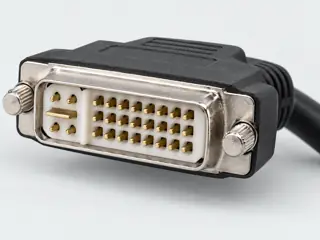
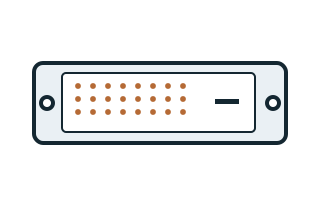
DVI-D single-link uses a digital-only contact layout distinct from dual-link and DVI-I.
Claim scope: Consumer identification / documented standard or product class only
Source links: S411 · S843 · Evidence trail → (private workspace)
C013B · P013
Dell distinguishes 18 grid contacts in single-link DVI cables from 24 in dual-link cables. The flat blade is a separate visual feature and is not included in this numbered-grid count.
Claim scope: Grid-count convention; not the total of all visible metal, connected conductors or PCB terminals.
Source links: S414 · S411 · Evidence trail → (private workspace)
C013C · P013
Molex distinguishes digital single-link, digital dual-link and analog cable families and states that plug contacts may be partially loaded according to the signal set.
Claim scope: Manufacturer cable-family scope. No complete single-link terminal assignment is supplied here.
Source links: S412 · Evidence trail → (private workspace)
C014A · P014
DVI-D dual-link uses a fuller digital contact grid than single-link DVI-D.
Claim scope: Consumer identification / documented standard or product class only
Source links: S018 · Evidence trail → (private workspace)
C014B · P014
DDWG DVI 1.0 Table 5-1 defines 24 numbered digital-only positions. Pin 8 is not connected in that table; positions 4/5, 12/13 and 20/21 carry the additional TMDS data pairs.
Claim scope: Full digital-only interface assignment from the named specification; not a guarantee that an exact device implements every signal.
Source links: S411 · Evidence trail → (private workspace)
C014C · P014
Dell SE2416HM documentation shows a numbered 24-position DVI-D grid but labels positions 4, 5, 12, 13, 20 and 21 Floating. Its implementation must not be substituted into a universal dual-link pinout.
Claim scope: Exact manual table, page 44. Other source-specific labels remain separate from the DDWG table.
Source links: S413 · Evidence trail → (private workspace)
C014D · P014
Dell documents E-Port docks with DVI connectors accepting dual-link-shaped cables but wired for single-link operation. It also identifies the source, cable, display and any adapter as separate dual-link requirements.
Claim scope: Named legacy dock example and documentation checklist, not a universal resolution limit or all-dock inventory.
Source links: S414 · Evidence trail → (private workspace)
C014E · P014
StarTech DVI2VGAE is an active adapter with DVI-D input and VGA output; the hardware table lists no audio.
Claim scope: Named direction and video-only conversion. The pictured DVI connector is a dual-link form; pin loading is not a resolution guarantee.
Source links: S493 · Evidence trail → (private workspace)
C015A · P015
DVI-I distinguishes an integrated analog/digital interface from digital-only DVI-D.
Claim scope: Consumer identification / documented standard or product class only
Source links: S843 · Evidence trail → (private workspace)
C015B · P015
DDWG Table 5-2 defines the combined interface as 24 numbered positions plus C1–C5. Pin 8 carries analog vertical sync, C1/C2/C3 carry analog color channels, C4 horizontal sync and C5 their analog return.
Claim scope: Combined interface assignment; analog and digital paths do not imply simultaneous multiple-display operation or exact source support.
Source links: S411 · Evidence trail → (private workspace)
C015C · P015
Molex labels its numbered illustration as a DVI-I receptacle front view: the 1–8 row is above 9–16 and 17–24, with the analog group on the right. The DDWG plug and receptacle drawings use opposing views.
Claim scope: Read connector type and viewing side before applying numbers. Not a solder-side or PCB drawing.
Source links: S412 · S411 · Evidence trail → (private workspace)
C015D · P015
DDWG distinguishes a digital-only interface from a combined analog/digital interface; the digital-only receptacle lacks sockets for the analog pins. Dell distinguishes active conversion circuitry from passive adapters.
Claim scope: A passive mechanical adaptation cannot establish an analog signal from a digital-only source. Exact direction, supported modes and power remain product-specific.
Source links: S411 · S414 · Evidence trail → (private workspace)
C015E · P015
StarTech DVIVGAMF is a passive DVI-I-to-VGA adapter; its instructions refer DVI-D users to a separate converter.
Claim scope: Named adapter for a DVI-I output and VGA display. The source does not approve arbitrary DVI-I devices, modes or mechanical pairings.
Source links: S494 · Evidence trail → (private workspace)
C016A · P016
The familiar VGA-style HD15 connector has three rows of five contact positions.
Claim scope: Consumer identification / documented standard or product class only
Source links: S018 · Evidence trail → (private workspace)
C016B · P016
Dell P2016 Rev. A02, page 15, assigns its VGA example as follows: 1 red video, 2 green video, 3 blue video, 4 ground, 5 self-test, 6 red return, 7 green return, 8 blue return, 9 computer 5 V / 3.3 V, 10 sync ground, 11 ground, 12 DDC data, 13 horizontal sync, 14 vertical sync, 15 DDC clock.
Claim scope: Exact manual assignment and numbered source view only; not a universal VGA wiring map, supply instruction or authorization to modify a cable.
Source links: S393 · Evidence trail → (private workspace)
C016C · P016
The NEC VT37 manual, page 55, differs from the Dell P2016 example: pin 5 is ground rather than self-test, pin 9 is not connected rather than a computer-supply label, and pin 11 is SCART sync rather than ground.
Claim scope: Comparison of two named device manuals only. Differences are not reconciled into one universal pinout or a manufacturing defect diagnosis.
Source links: S393 · S394 · Evidence trail → (private workspace)
C016D · P016
NEC VT37 page 14 documents separate RGB/VGA and audio cables for its computer connection. Its page-55 COMPUTER connector table contains video, sync and control assignments rather than an audio channel.
Claim scope: Conventional RGB/VGA role illustrated by this exact device; do not infer that a proprietary combined cable has no separate audio conductors.
Source links: S394 · Evidence trail → (private workspace)
C016E · P016
NEC VT37 page 16 documents a component source connected to its COMPUTER input through the ADP-CV1 15-pin-to-three-RCA adapter and a three-RCA component cable. The manual separately identifies composite VIDEO input and audio connections.
Claim scope: Named component-capable input example, not evidence that arbitrary VGA outputs generate component or composite video, or that a connector-only adapter converts signal formats.
Source links: S394 · Evidence trail → (private workspace)
C016F · P016
The DVI2VGAE instructions describe a DVI source feeding a VGA monitor or projector and include USB power support for low-powered DVI ports.
Claim scope: Named conversion direction. VGA-source-to-DVI-display operation and audio carriage are not established.
Source links: S493 · Evidence trail → (private workspace)
C333A · P333
StarTech DVIVGAMF is documented as a passive adapter from a computer DVI-I output to a VGA display, with a male DVI-I interface and female VGA interface. The sheet explicitly distinguishes DVI-D source equipment from this use.
Claim scope: DVIVGAMF intended analog source path, pages 1–2. No reverse-use certification or digital-to-analog capability is inferred.
Source links: S416 · Evidence trail → (private workspace)
C333B · P333
The DVIVGAMF connector table identifies a DVI-I dual-link 29-contact form. That physical description does not certify implemented digital links. The inspected sheet supplies body dimensions, not a cable-reach specification or a supported-timing table.
Claim scope: DVIVGAMF physical form versus operating evidence, page 2; no terminal assignment or fabricated cable length.
Source links: S416 · Evidence trail → (private workspace)
C334A · P334
StarTech DVI2VGAE documents active conversion from DVI-D input to VGA output. Its hardware table explicitly marks audio as unsupported and identifies a DVI-D dual-link contact form; the latter is not evidence of a dual-link video implementation.
Claim scope: DVI2VGAE exact conversion direction, audio boundary and physical form, pages 1–3.
Source links: S417 · Evidence trail → (private workspace)
C334B · P334
DVI2VGAE normally takes power through the DVI connection. The manufacturer provides a USB power option for low-powered DVI ports; the USB lead is described as supplying power, not transporting the video signal.
Claim scope: DVI2VGAE optional auxiliary-power path, pages 1–3. No USB data transport, charging standard or source power budget is inferred.
Source links: S417 · Evidence trail → (private workspace)
C334C · P334
The inspected DVI2VGAE sheet gives 1080p in its headline/features but 1920 × 1200 in the maximum-analog-resolution table. These differing statements are retained as a source conflict; no single maximum or refresh rate is selected.
Claim scope: DVI2VGAE unresolved operating-limit evidence, pages 1–2; confirmation of the exact supported timing remains required.
Source links: S417 · Evidence trail → (private workspace)
C334D · P334
DVI2VGAE lists a 190 mm attached cable and a separate 610 mm USB Type-A to Micro-B power cable. Those two lengths describe different paths and are not added into one video-cable reach.
Claim scope: DVI2VGAE cable and included-power-lead entries, pages 2–3; body dimensions and generic connector taxonomy remain separate.
Source links: S417 · Evidence trail → (private workspace)
C335A · P335
StarTech HDMIDVIMM6 is explicitly documented for bidirectional digital video: DVI output to HDMI display or HDMI output to DVI display. The hardware is classified passive and the DVI connector is specified as single-link.
Claim scope: HDMIDVIMM6 bidirectional digital-video applications and physical connector form, pages 1–3; no analog conversion inferred.
Source links: S418 · Evidence trail → (private workspace)
C335B · P335
HDMIDVIMM6 is the 6 ft / 1.8 m male-HDMI to male-DVI-D cable example. The inspected sheet does not specify an audio mode or a maximum resolution/refresh pair; the named length and bidirectionality do not establish those capabilities.
Claim scope: HDMIDVIMM6 exact cable length and documented-field boundary, pages 1–3; not a manufacturer-series or generic HDMI cable claim.
Source links: S418 · Evidence trail → (private workspace)
C336A · P336
StarTech DVI2HD lists DVI-D input and HDMI output for a computer-to-display path. Its DVI connector is described as a dual-link physical form; reverse operation, analog DVI-A input and implemented dual-link transport are not established by that description.
Claim scope: DVI2HD hardware and connector tables, pages 1–4; the explicit DVI-D AV-input entry bounds broad marketing wording.
Source links: S419 · Evidence trail → (private workspace)
C336B · P336
DVI2HD can add two-channel stereo from native USB audio on a Windows computer to the HDMI output. The sheet describes USB power and allows video-only use through the DVI connection; adding audio requires the separate USB connection.
Claim scope: DVI2HD separate USB audio/power path, pages 1–2. This is not evidence that an ordinary DVI-to-HDMI cable transports USB audio or that every operating system is supported.
Source links: S419 · Evidence trail → (private workspace)
C336C · P336
The DVI2HD performance table documents 1920 × 1080p at 60 Hz. Other listed resolutions have no individually stated refresh rates in the inspected sheet. This product entry is not a full timing or HDMI-feature compatibility guarantee.
Claim scope: DVI2HD performance entries, pages 2–3; named documented timing only, no computed maximum, HDCP or codec guarantee.
Source links: S419 · Evidence trail → (private workspace)
C336D · P336
DVI2HD lists a 17.8 cm cable length separately from a 25.0 cm whole-product length. The document describes audio integration but does not explicitly assign an active/passive classification; that classification remains not established here.
Claim scope: DVI2HD physical measurements and classification boundary, pages 2–4; no cable reach reconstructed from body dimensions.
Source links: S419 · Evidence trail → (private workspace)
Recorded evidence only. An inspection date, publisher label, source link or generated packet is not independent technical review, hardware testing, fabrication approval or a compatibility verdict.