The useful distinction
Understand the requirement.
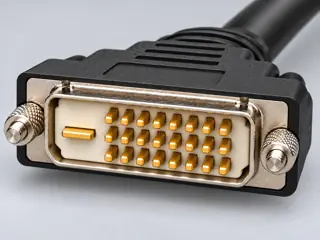
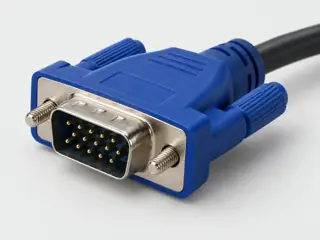
A directional, video-only DVI-D/VGA converter with optional USB power and an explicitly unresolved resolution discrepancy. [C334A]
DVI2VGAE normally takes power through the DVI connection. The manufacturer provides a USB power option for low-powered DVI ports; the USB lead is described as supplying power, not transporting the video signal. [C334B]
The inspected DVI2VGAE sheet gives 1080p in its headline/features but 1920 × 1200 in the maximum-analog-resolution table. These differing statements are retained as a source conflict; no single maximum or refresh rate is selected. [C334C]
DVI2VGAE lists a 190 mm attached cable and a separate 610 mm USB Type-A to Micro-B power cable. Those two lengths describe different paths and are not added into one video-cable reach. [C334D]
Bounded facts, visible unknowns
Specifications and limits
| Evidence scope | Exact-product example; not a recommendation or inspected physical sample. [C334A] |
|---|---|
| Signal-path boundary | DVI-D video input becomes VGA video output. Optional USB supplies power on a separate path; it does not replace DVI as the documented video input. [C334A] |
| Verified device list | Not included. Check exact device and accessory documentation. |
These source-scoped examples do not verify the ports, cables, drivers or timing modes of equipment you own. No compatibility verdict or approval is granted.
Before you connect
What to check
- Read the source and display port documentation.
- Match the exact product model, connector form and direction.
- Check auxiliary connections and operating limits independently.
- Do not force connectors, probe pins or treat these references as wiring instructions.
Your next step
Move from the form to the requirement.
The source trail
Evidence for this page
AI-assisted inspection is not independent engineering review. Source scope and access limitations are disclosed below. Procedural checklists are editorial requirements, not hardware measurements.
StarTech DVI2VGAE documents active conversion from DVI-D input to VGA output. Its hardware table explicitly marks audio as unsupported and identifies a DVI-D dual-link contact form; the latter is not evidence of a dual-link video implementation.
StarTech.com · StarTech DVI2VGAE — Active DVI-D to VGA converter with optional USB power (manufacturer datasheet) ↗S417: full source recordInspect review dependencies → (private workspace)DVI2VGAE normally takes power through the DVI connection. The manufacturer provides a USB power option for low-powered DVI ports; the USB lead is described as supplying power, not transporting the video signal.
StarTech.com · StarTech DVI2VGAE — Active DVI-D to VGA converter with optional USB power (manufacturer datasheet) ↗S417: full source recordInspect review dependencies → (private workspace)The inspected DVI2VGAE sheet gives 1080p in its headline/features but 1920 × 1200 in the maximum-analog-resolution table. These differing statements are retained as a source conflict; no single maximum or refresh rate is selected.
StarTech.com · StarTech DVI2VGAE — Active DVI-D to VGA converter with optional USB power (manufacturer datasheet) ↗S417: full source recordInspect review dependencies → (private workspace)DVI2VGAE lists a 190 mm attached cable and a separate 610 mm USB Type-A to Micro-B power cable. Those two lengths describe different paths and are not added into one video-cable reach.
StarTech.com · StarTech DVI2VGAE — Active DVI-D to VGA converter with optional USB power (manufacturer datasheet) ↗S417: full source recordInspect review dependencies → (private workspace)