FIELD GUIDESource-led reference

P336 / Video / Cable / adapter

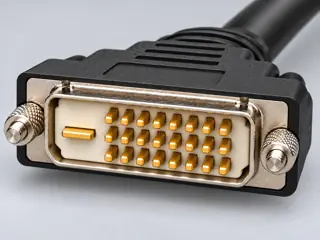
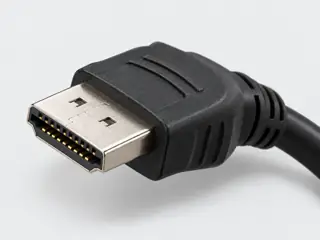
StarTech DVI2HD — DVI-D to HDMI with USB audio

A documented DVI-D-to-HDMI path with a separate Windows USB stereo-audio connection and a stated 1080p/60 Hz entry.

Also called StarTech DVI2HD DVI2HD

The two searchable endpoint forms represent video. The additional USB connection is a distinct audio/power path, not an extra video source or a generic DVI audio capability.

The useful distinction

Match the exact manufacturer model and read its labeled signal path. Connector appearance alone does not identify the product or its capabilities.

Claim inspection dates: 2026-10-07 · Independent review pending

Cable / adapter note · not an individual product specification

The useful distinction

Understand the requirement.

A documented DVI-D-to-HDMI path with a separate Windows USB stereo-audio connection and a stated 1080p/60 Hz entry. [C336A]

DVI2HD can add two-channel stereo from native USB audio on a Windows computer to the HDMI output. The sheet describes USB power and allows video-only use through the DVI connection; adding audio requires the separate USB connection. [C336B]

The DVI2HD performance table documents 1920 × 1080p at 60 Hz. Other listed resolutions have no individually stated refresh rates in the inspected sheet. This product entry is not a full timing or HDMI-feature compatibility guarantee. [C336C]

DVI2HD lists a 17.8 cm cable length separately from a 25.0 cm whole-product length. The document describes audio integration but does not explicitly assign an active/passive classification; that classification remains not established here. [C336D]

Bounded facts, visible unknowns

Specifications and limits

StarTech DVI2HD — DVI-D to HDMI with USB audio facts and limitations
Evidence scopeExact-product example; not a recommendation or inspected physical sample. [C336A]
Signal-path boundaryThe two searchable endpoint forms represent video. The additional USB connection is a distinct audio/power path, not an extra video source or a generic DVI audio capability. [C336A]
Verified device listNot included. Check exact device and accessory documentation.
A boundary, not an omission to guess around.

These source-scoped examples do not verify the ports, cables, drivers or timing modes of equipment you own. No compatibility verdict or approval is granted.

Before you connect

What to check

  1. Read the source and display port documentation.
  2. Match the exact product model, connector form and direction.
  3. Check auxiliary connections and operating limits independently.
  4. Do not force connectors, probe pins or treat these references as wiring instructions.
Trace a supported connection class →

Your next step

Move from the form to the requirement.

The source trail

Evidence for this page

AI-assisted inspection is not independent engineering review. Source scope and access limitations are disclosed below. Procedural checklists are editorial requirements, not hardware measurements.

C336ASource checked · pending review

StarTech DVI2HD lists DVI-D input and HDMI output for a computer-to-display path. Its DVI connector is described as a dual-link physical form; reverse operation, analog DVI-A input and implemented dual-link transport are not established by that description.

StarTech.com · StarTech DVI2HD — DVI-D to HDMI adapter with separate USB audio and power (manufacturer datasheet) ↗

Locator: Pages 1–4: DVI-D input and HDMI output, Windows USB audio, two-channel stereo, video-only use, 1080p at 60 Hz entry, and separate cable/product lengths.
Access: public pdf text. The AV-input table bounds the broad marketing wording to DVI-D. Reverse use and active/passive classification are not documented. Other listed resolutions do not have separate refresh-rate entries. No explicit revision date was present in the inspected sheet; the live locator can change.

S419: full source recordInspect review dependencies → (private workspace)
Claim scope: DVI2HD hardware and connector tables, pages 1–4; the explicit DVI-D AV-input entry bounds broad marketing wording.. Next review due 2027-01-05.

C336BSource checked · pending review

DVI2HD can add two-channel stereo from native USB audio on a Windows computer to the HDMI output. The sheet describes USB power and allows video-only use through the DVI connection; adding audio requires the separate USB connection.

StarTech.com · StarTech DVI2HD — DVI-D to HDMI adapter with separate USB audio and power (manufacturer datasheet) ↗

Locator: Pages 1–4: DVI-D input and HDMI output, Windows USB audio, two-channel stereo, video-only use, 1080p at 60 Hz entry, and separate cable/product lengths.
Access: public pdf text. The AV-input table bounds the broad marketing wording to DVI-D. Reverse use and active/passive classification are not documented. Other listed resolutions do not have separate refresh-rate entries. No explicit revision date was present in the inspected sheet; the live locator can change.

S419: full source recordInspect review dependencies → (private workspace)

Claim scope: DVI2HD separate USB audio/power path, pages 1–2. This is not evidence that an ordinary DVI-to-HDMI cable transports USB audio or that every operating system is supported.. Next review due 2027-01-05.

C336CSource checked · pending review

The DVI2HD performance table documents 1920 × 1080p at 60 Hz. Other listed resolutions have no individually stated refresh rates in the inspected sheet. This product entry is not a full timing or HDMI-feature compatibility guarantee.

StarTech.com · StarTech DVI2HD — DVI-D to HDMI adapter with separate USB audio and power (manufacturer datasheet) ↗

Locator: Pages 1–4: DVI-D input and HDMI output, Windows USB audio, two-channel stereo, video-only use, 1080p at 60 Hz entry, and separate cable/product lengths.
Access: public pdf text. The AV-input table bounds the broad marketing wording to DVI-D. Reverse use and active/passive classification are not documented. Other listed resolutions do not have separate refresh-rate entries. No explicit revision date was present in the inspected sheet; the live locator can change.

S419: full source recordInspect review dependencies → (private workspace)

Claim scope: DVI2HD performance entries, pages 2–3; named documented timing only, no computed maximum, HDCP or codec guarantee.. Next review due 2027-01-05.

C336DSource checked · pending review

DVI2HD lists a 17.8 cm cable length separately from a 25.0 cm whole-product length. The document describes audio integration but does not explicitly assign an active/passive classification; that classification remains not established here.

StarTech.com · StarTech DVI2HD — DVI-D to HDMI adapter with separate USB audio and power (manufacturer datasheet) ↗

Locator: Pages 1–4: DVI-D input and HDMI output, Windows USB audio, two-channel stereo, video-only use, 1080p at 60 Hz entry, and separate cable/product lengths.
Access: public pdf text. The AV-input table bounds the broad marketing wording to DVI-D. Reverse use and active/passive classification are not documented. Other listed resolutions do not have separate refresh-rate entries. No explicit revision date was present in the inspected sheet; the live locator can change.

S419: full source recordInspect review dependencies → (private workspace)

Claim scope: DVI2HD physical measurements and classification boundary, pages 2–4; no cable reach reconstructed from body dimensions.. Next review due 2027-01-05.

Suggest a correction to this field note →

Common questions

Questions this record can help resolve

Evidence behind this page

Scope first. Source second. Approval separate.

1 linked sources · 4 scoped claims · 0 sources with inspection/access flags.

Page scope: dvi_adaptation_v75

Assessment 2026-10-22 · earliest scheduled source review 2027-01-05. This is a recorded-date assessment, not a live source check. Page-level independent review is not established by this panel.

Inspect 1 source scopes, access limits and dates

S419 · StarTech DVI2HD — DVI-D to HDMI adapter with separate USB audio and power (manufacturer datasheet)

StarTech.com · Manufacturer / product-owner domain · inspected 2026-10-07 · due 2027-01-05

Within inspection window

Scoped support: Exact StarTech DVI2HD product documentation only; no class-wide or inspected-hardware certification.

Not established / limitations: The AV-input table bounds the broad marketing wording to DVI-D. Reverse use and active/passive classification are not documented. Other listed resolutions do not have separate refresh-rate entries. No explicit revision date was present in the inspected sheet; the live locator can change.

Locator: Pages 1–4: DVI-D input and HDMI output, Windows USB audio, two-channel stereo, video-only use, 1080p at 60 Hz entry, and separate cable/product lengths.

Trace 4 claims to their source records

C336A · P336

StarTech DVI2HD lists DVI-D input and HDMI output for a computer-to-display path. Its DVI connector is described as a dual-link physical form; reverse operation, analog DVI-A input and implemented dual-link transport are not established by that description.

Claim scope: DVI2HD hardware and connector tables, pages 1–4; the explicit DVI-D AV-input entry bounds broad marketing wording.

Source links: S419 · Evidence trail → (private workspace)

C336B · P336

DVI2HD can add two-channel stereo from native USB audio on a Windows computer to the HDMI output. The sheet describes USB power and allows video-only use through the DVI connection; adding audio requires the separate USB connection.

Claim scope: DVI2HD separate USB audio/power path, pages 1–2. This is not evidence that an ordinary DVI-to-HDMI cable transports USB audio or that every operating system is supported.

Source links: S419 · Evidence trail → (private workspace)

C336C · P336

The DVI2HD performance table documents 1920 × 1080p at 60 Hz. Other listed resolutions have no individually stated refresh rates in the inspected sheet. This product entry is not a full timing or HDMI-feature compatibility guarantee.

Claim scope: DVI2HD performance entries, pages 2–3; named documented timing only, no computed maximum, HDCP or codec guarantee.

Source links: S419 · Evidence trail → (private workspace)

C336D · P336

DVI2HD lists a 17.8 cm cable length separately from a 25.0 cm whole-product length. The document describes audio integration but does not explicitly assign an active/passive classification; that classification remains not established here.

Claim scope: DVI2HD physical measurements and classification boundary, pages 2–4; no cable reach reconstructed from body dimensions.

Source links: S419 · Evidence trail → (private workspace)

Prepare this page for review → (private workspace)Read the evidence method →

Recorded evidence only. An inspection date, publisher label, source link or generated packet is not independent technical review, hardware testing, fabrication approval or a compatibility verdict.