
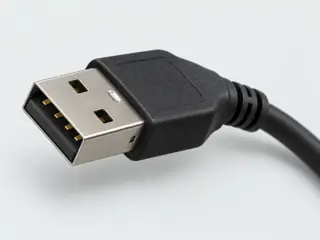
 Computer-generated illustration
P001 / USB / Connector form
USB Type-A
A familiar rectangle does not tell you its data rate.
- Shape label
- rectangular
- Common aliases
- USB-A, Type A, USB type A
- Reference depth
- Engineering profile →
Family reference
Separate the physical USB connector from the USB generation, data mode, video transport and charging behavior implemented by a particular product.
11 forms 9 engineering profiles 9 related comparisons
Recognition & reference
Recognition illustrations are not to scale or fabrication drawings. The label-led symbols below, where present, are not interface geometry. Read the illustration limits in each exact reference; equal image boxes do not establish equal physical sizes.
Computer-generated illustrationP001 / USB / Connector form
A familiar rectangle does not tell you its data rate.
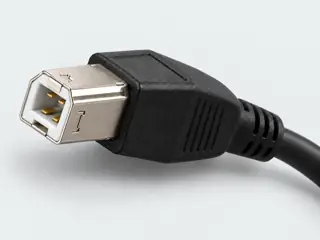 Computer-generated illustration
P002 / USB / Connector form
Identify the device-side socket before ordering a printer cable.
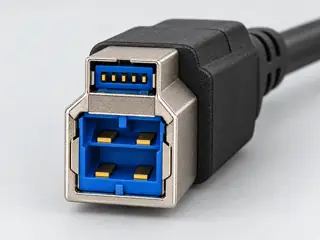 Computer-generated illustration
P003 / USB / Connector form
Backward compatibility has a direction.
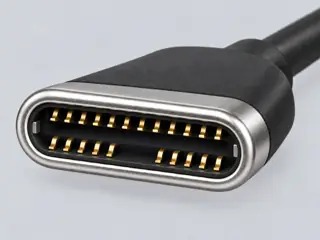 Computer-generated illustration
P004 / USB / Connector form
The shape is the beginning of the answer, not the end.
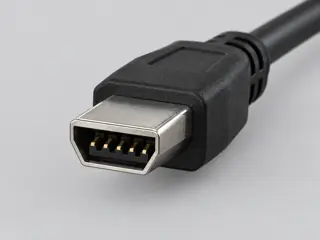 Computer-generated illustration
P005 / USB / Connector form
Mini and Micro are not interchangeable labels.
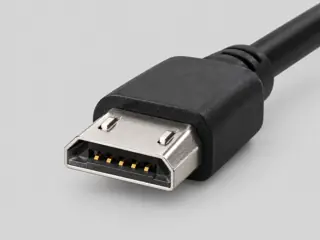 Computer-generated illustration
P006 / USB / Connector form
Check for the extra section before calling a connector Micro-B.
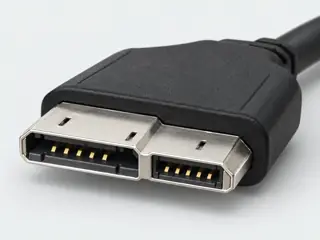 Computer-generated illustration
P007 / USB / Connector form
The full connector is wider than the legacy Micro-B portion.
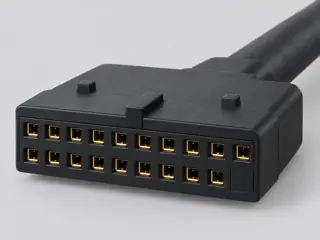 Computer-generated illustration
P263 / USB / Connector form
This legacy internal USB header is not the same physical interface as the newer USB-IF Key-A front-panel connector for USB Type-C/front-panel use.
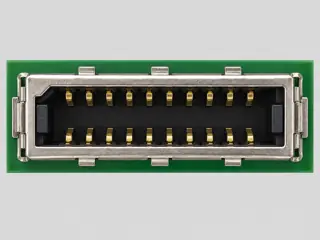 Computer-generated illustration
P264 / USB / Connector form
Key-A is a specific internal mating interface and must not be conflated with the older 19-pin USB 3.0 front-panel header or with external USB Type-A/Type-C connectors.
P370 / USB / Connector form
A historical connector label does not prove the present-day device role or USB behavior.
P371 / USB / Connector form
Receptacle identity, exact part construction and device behavior require separate evidence.
An alternate overview of the same facts shown in the cards. On narrow screens, scroll the table horizontally or read the cards above. Alias lists retain the existing first four entries; the full record has further detail. This is not a dimension, pinout or compatibility table.
| Connector form | Shape | Common aliases | Engineering |
|---|---|---|---|
| USB Type-A | rectangular | USB-A, Type A, USB type A | Engineering profile → |
| USB Type-B | square | USB-B, printer USB, Type B | Engineering profile → |
| SuperSpeed USB Type-B | stacked | USB 3 B, USB 3.0 B, SuperSpeed B | Engineering profile → |
| USB Type-C | oval | USB-C, USBC, Type C, USB type C | Engineering profile → |
| Mini-USB Type-B | trapezoid | Mini USB, Mini-B, Mini USB B | Engineering profile → |
| Micro-USB Type-B | low-profile | Micro USB, Micro-B, Micro USB B | Engineering profile → |
| SuperSpeed Micro-USB Type-B | split | USB 3 Micro B, wide Micro USB, SuperSpeed Micro-B | Engineering profile → |
| USB 3.0 front-panel 19-pin internal connector | internal-header | USB 3.0 19-pin header, USB 3 front panel header, 19-pin USB header, internal USB 3 header | Engineering profile → |
| USB 3.1 front-panel Key-A 20-pin header | internal-header | USB Key-A header, USB 3.1 front panel header, 20-pin Key-A, Type-C front panel header | Engineering profile → |
| USB Mini-A plug | historical-mini | Mini-A, USB Mini A | Identification record only |
| USB Mini-AB receptacle | historical-mini | Mini-AB, USB Mini AB | Identification record only |
Tell them apart
Related pages may include forms from another family. They explain distinctions, not permission to connect.
Similar at first glance
Before choosing a reference
Resolve abbreviations, informal names and legacy labels without treating an alias as an additional connector identity.
Open USB terminology and aliases →Continue with the evidence
A family name is a starting point. Use the exact record and device documentation before choosing cables or planning a connection.