Source scope and unresolved checks stay next to each answer.
01 / UNDERSTAND THE LAYERS
A drive-side socket is not a complete route
Connection
Purpose / identification
Limit before connecting
SATA 7-contact
Serial ATA data path
Power is separate; port identity does not prove boot support
SATA 15-contact
Storage drive power from a qualified PSU assembly
No direct data path; no arbitrary molded adapters
SAS / SFF-8482
Combined drive-side SAS/SATA-family interface in named products
Host controller, backplane and SAS versus SATA capability
Slimline SATA
Compact optical/other device-side form variant
Not automatically compatible with desktop SATA power harness
The table distinguishes visible hardware forms from host wiring and real-world validation. The named standards/vendors are not endorsing a product connection.
02 / CONCEPTUAL CONTRASTS
The physical outline does not tell the whole story
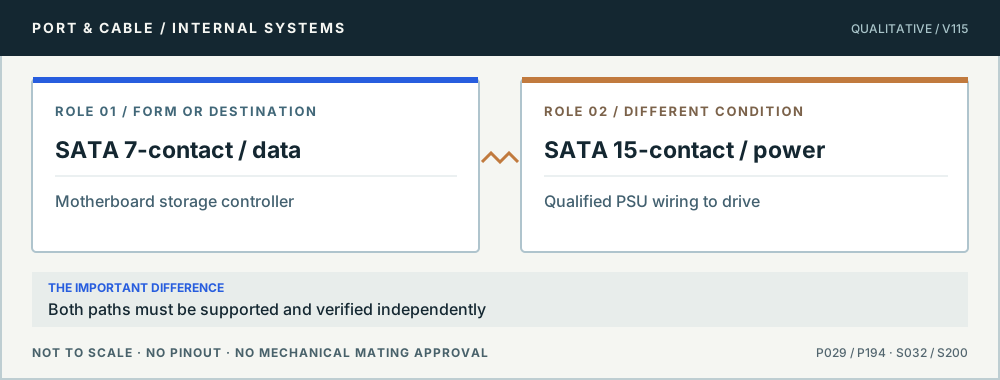
SATA uses two distinct paths. Original qualitative role diagram; not mechanical artwork, not to scale or a wiring map. Source context S032 · S200.
03 / APPLY THE REFERENCE
4 questions, each with a safe next check
P029 · A drive-side socket is not a complete route
A seven-contact SATA lead carries drive data, not drive power
Why does the SATA drive need two different connections?
10
THE ANSWER The documented SATA 7-contact cable/header belongs to the serial data route from controller to drive. A separately sourced supply cable powers the drive through its distinct wider connector or a product-qualified combination. A plugged-in data cable alone is not evidence that the drive is energized, detected or bootable.
01 · Data
Seven-contact keyed data connection to an enabled SATA host.
02 · Power
Separate 15-contact power path on common drives.
03 · Host
SATA controller mode and port sharing are motherboard/model dependent.
Before you connect, check all three
Identify the narrower data and wider power receptacles without forcing either.
Check both original cables, host-port availability and power supply labels.
Use the motherboard service manual to verify active SATA controllers and port-sharing.
Stop this assumption: Confusing SATA data and power, or assuming a passive cable changes an NVMe/M.2 device into SATA.
Evidence, edition and unresolved verification (3 readings)
Existing evidence identifiers link into the preserved source register. Additional first-party URLs were checked 10 October 2026 and are expressly editorial, not silently inserted into canonical claims. No actual device, cable or power circuit was tested.
Selected storage and PCIe slot roles for PRIME B550-PLUS AC-HES only, with CPU, slot population and SATA-sharing conditions.
P194 · A drive-side socket is not a complete route
SATA power is not a second data interface
Can I use any convenient cable or adapter to power a SATA drive?
11
THE ANSWER A Molex family overview identifies the separate SATA power contacts distinct from the signal interface. A drive’s power wiring must match the exact device and power supply. Generic molded adapters, repinning or an unknown modular-PSU cable are not established safe by the L-shaped plug housing.
01 · Role
15-position power interface, separate from 7-contact data.
02 · Device
Drive power requirements vary by exact model and assembly.
03 · Safety
Harness materials, voltage mapping and PSU origin must be verified.
Before you connect, check all three
Read the drive label and the PSU’s approved drive-power harness documentation.
Do not repin or improvise voltage converters; avoid unknown adapters.
Confirm the SATA data and host path separately from drive power.
Stop this assumption: Assuming a SATA-looking adapter guarantees correct supply rails, quality or power budget.
Evidence, edition and unresolved verification (2 readings)
Existing evidence identifiers link into the preserved source register. Additional first-party URLs were checked 10 October 2026 and are expressly editorial, not silently inserted into canonical claims. No actual device, cable or power circuit was tested.
Identifies the ATX main power connector as a 24-pin / 2x12 Mini-Fit Jr.-family interface in the documented ATX design guide.
P196 · A drive-side socket is not a complete route
SAS SFF-8482 drive-side fit is not a SATA host upgrade
Will a SAS drive work in any bay used for SATA?
12
THE ANSWER No. The preserved Molex product reference describes a SAS/SATA drive-side connector example but not a universal controller conversion. A SATA-only motherboard connection does not become a SAS initiator by a cable or bay shape. Host protocol, backplane interposers and exact drive support are distinct.
01 · Drive side
The named product has a combined SAS/SATA-family receptacle form.
02 · Host
SAS drives require a documented SAS-capable controller path.
03 · Backplane
Wiring, power, dual-port and expander capabilities vary by product.
Before you connect, check all three
Identify the full drive model and SAS/SATA protocol.
Inspect the backplane, controller/HBA and qualified drive list.
Check supported cable assemblies and routing; do not force an incompatible connection.
Stop this assumption: Concluding that a SATA host runs a SAS drive because parts of the physical receptacle look familiar.
Evidence, edition and unresolved verification (2 readings)
Existing evidence identifiers link into the preserved source register. Additional first-party URLs were checked 10 October 2026 and are expressly editorial, not silently inserted into canonical claims. No actual device, cable or power circuit was tested.
Identifies Serial ATA signal/power, combo, Micro SATA, Slimline SATA, SAS and SlimSAS connector families.
P195 · A drive-side socket is not a complete route
Slimline SATA is a named compact variant
Can desktop SATA data and power cables be assumed to fit a slimline drive?
13
THE ANSWER No. Molex documents Slimline SATA as a variant within its storage connector ecosystem, not a blanket replacement for a desktop drive’s separate standard data and power connections. Optical-drive or small-device mounting and power arrangements can require a specifically rated matching harness.
01 · Form
Compact drive-side member of the Serial ATA connector family.
02 · Power
Different harness form may be required from common 15-position power.
03 · System
Host SATA controller and exact device power needs still apply.
Before you connect, check all three
Find the device and enclosure manual’s exact slimline connector description.
Use only a purpose-made supported data/power lead.
Check the host SATA port, intended device voltage and drive form factor.
Stop this assumption: Trying to force a full-size SATA power connector into a slimline device or improvising a voltage supply.
Evidence, edition and unresolved verification (2 readings)
Existing evidence identifiers link into the preserved source register. Additional first-party URLs were checked 10 October 2026 and are expressly editorial, not silently inserted into canonical claims. No actual device, cable or power circuit was tested.
Seven-contact SATA data connector, not the separate power connector.
Unknown means stop and verify.
All studies retain their existing canonical source record IDs. Some diagrams are conceptual rather than true mating-face outlines. Device-specific pinouts, modifications, PSU cable interchangeability and live electrical tests are outside scope; consult the exact manufacturer's original manuals.