FIELD GUIDESource-led reference

P116 / Video / Connector

DVI-I single-link connector

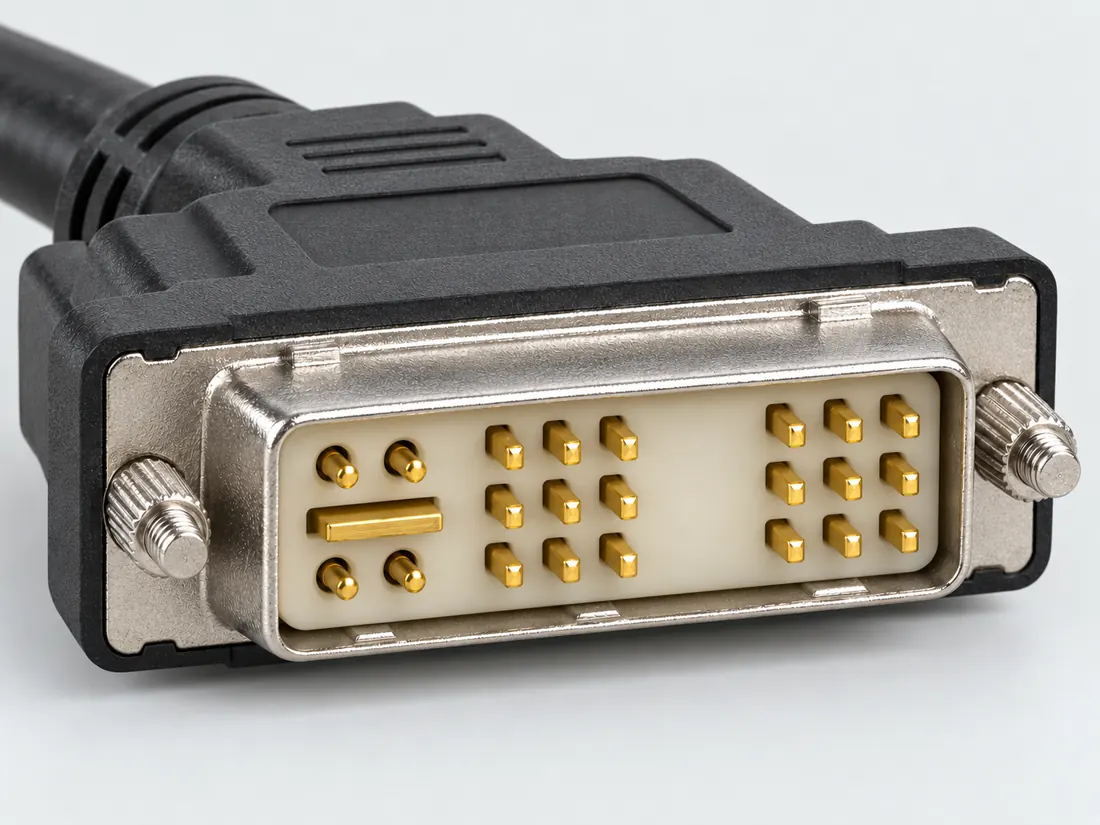
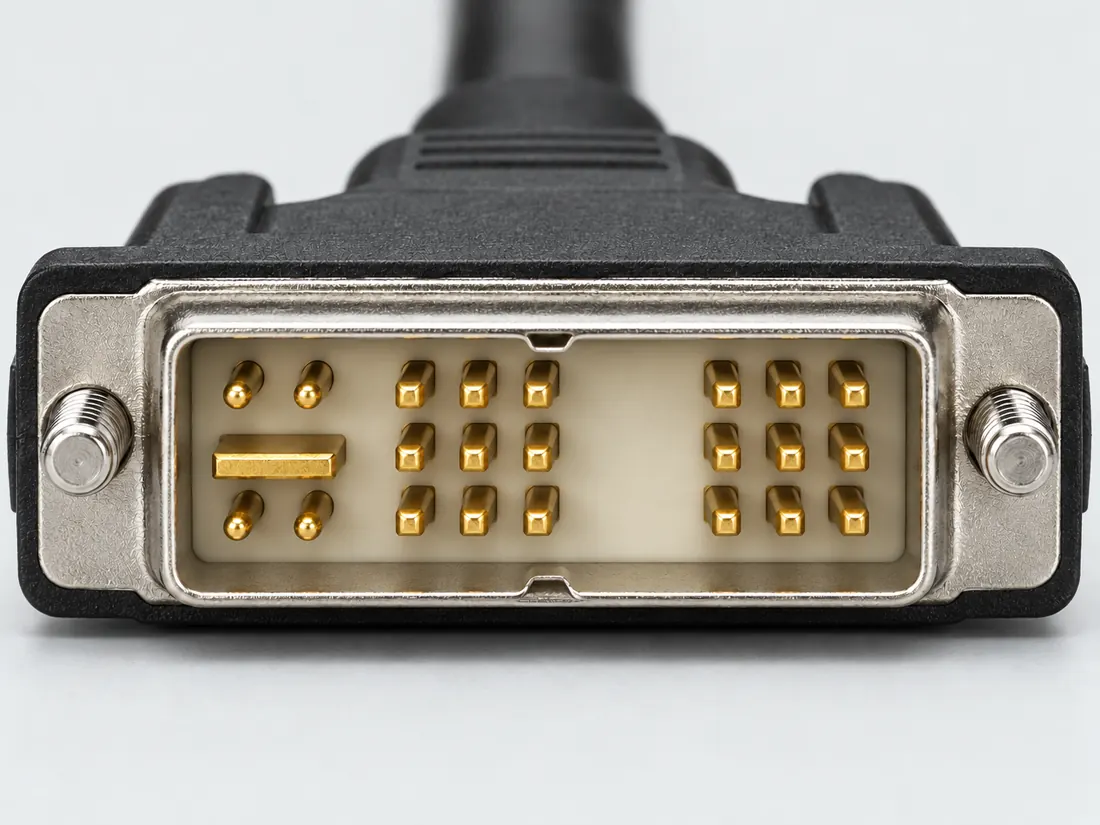
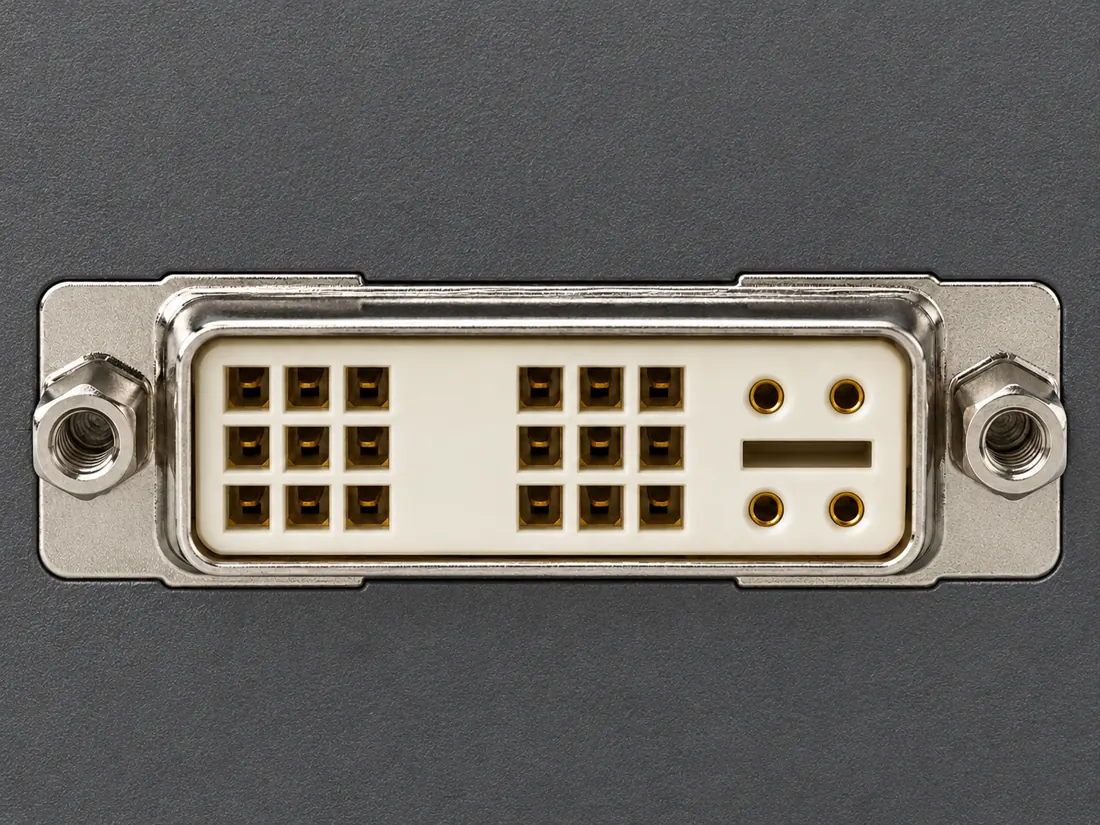
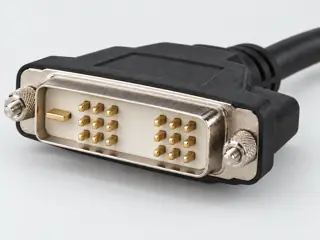
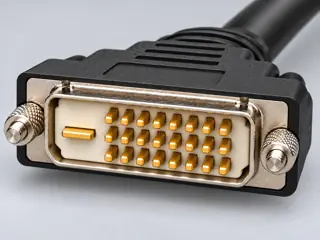
The DVI-I single-link form has the integrated analog/digital contact arrangement, distinct from DVI-D and dual-link forms.

Also called DVI I single link DVI 23 pin 18+5 DVI

Inspect the arrangement; verify the implemented signal.

Look for

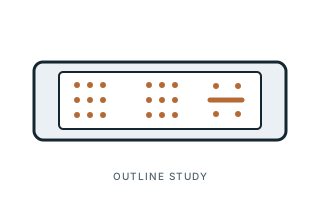
Compare the documented DVI-I single-link layout, including the blade area. The drawing here is not a pin assignment.

Claim inspection dates: 2026-10-03, 2026-10-07 · Independent review pending

The useful distinction

Recognize it. Then verify it.

The DVI-I single-link form has the integrated analog/digital contact arrangement, distinct from DVI-D and dual-link forms. [C116A]

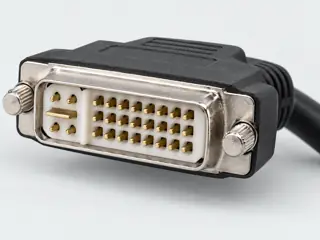
DVI-I can accommodate analog and digital signals, but actual device support must be checked. [C116B]

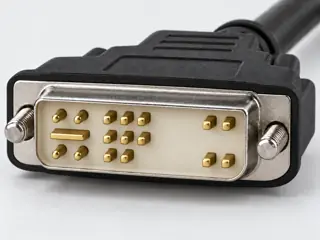
Molex’s 26 June 2015 sheet identifies 0743232031 as a digital/analog single-link DVI component with 23 circuits. [C116C]

Molex separately illustrates a digital/analog single-link cable family and notes that contact loading depends on the signal set. A single-link combined form is distinct from digital-only DVI and from a fully populated dual-link interface. [C116D]

Source-scoped identification facts

Each value retains its exact example, role and measurement axis. Facts from different parts must not be combined into an invented component.

Documented examples; not a mating drawing or compatibility approval
Nominal contacts23S093Source naming counts the blade in the 23-pin total; do not treat the drawing as a pinout.
Positions / cavity span23 (Claim C116C)S415Recorded source-scoped values; named examples do not describe every family variant or establish compatibility. Exact archived component example; not a measured universal connector dimension or electrical capability of an unknown device.
Connector rolesocket (DIS-23PFFP-SL8001)S933Named source examples retain separate role, part, view and axis limits; values are not a universal family specification. DIS-23PFFP-SL8001. Documented role: socket. Manufacturer malformed4inch-40UNC text denotes its published nut-thread vocabulary; no thread dimension derived.; No pitch,contact-row count or outer dimensions transferred from a DVI-I dual-link part.; CatalogPDF access403; exact lineup page successfully read. Cable variants have different -20to80C range; not mixed with receptacle.
Coupling / latchScrew thread retention; front-fastened PCB180degree receptacle; manufacturer labels4inch-40UNC nut thread (DIS-23PFFP-SL8001)S933Named source examples retain separate role, part, view and axis limits; values are not a universal family specification. DIS-23PFFP-SL8001. Documented role: socket. Manufacturer malformed4inch-40UNC text denotes its published nut-thread vocabulary; no thread dimension derived.; No pitch,contact-row count or outer dimensions transferred from a DVI-I dual-link part.; CatalogPDF access403; exact lineup page successfully read. Cable variants have different -20to80C range; not mixed with receptacle.
ManufacturerAmphenol LTW (DIS-23PFFP-SL8001)S933Named source examples retain separate role, part, view and axis limits; values are not a universal family specification. DIS-23PFFP-SL8001. Documented role: socket. Manufacturer malformed4inch-40UNC text denotes its published nut-thread vocabulary; no thread dimension derived.; No pitch,contact-row count or outer dimensions transferred from a DVI-I dual-link part.; CatalogPDF access403; exact lineup page successfully read. Cable variants have different -20to80C range; not mixed with receptacle.
SeriesDIS DVI-I single (DIS-23PFFP-SL8001)S933Named source examples retain separate role, part, view and axis limits; values are not a universal family specification. DIS-23PFFP-SL8001. Documented role: socket. Manufacturer malformed4inch-40UNC text denotes its published nut-thread vocabulary; no thread dimension derived.; No pitch,contact-row count or outer dimensions transferred from a DVI-I dual-link part.; CatalogPDF access403; exact lineup page successfully read. Cable variants have different -20to80C range; not mixed with receptacle.
Exact part / implementationDIS-23PFFP-SL8001 (DIS-23PFFP-SL8001)S933Named source examples retain separate role, part, view and axis limits; values are not a universal family specification. DIS-23PFFP-SL8001. Documented role: socket. Manufacturer malformed4inch-40UNC text denotes its published nut-thread vocabulary; no thread dimension derived.; No pitch,contact-row count or outer dimensions transferred from a DVI-I dual-link part.; CatalogPDF access403; exact lineup page successfully read. Cable variants have different -20to80C range; not mixed with receptacle.

Not recorded: Populated contacts, Contact rows, Contact pitch, Dimensions / axis, Contact gender / arrangement, Mounting, Keying / polarization, Shell / form, Recorded markings, View convention. Unknown fields stay unknown; illustrations supply no measurements or pin assignments.

Recorded variant and source limits
  • The flat digital blade is not an invented numbered signal 25. Different vendor counts can include or exclude it.
  • No housing dimensions, tolerances, insertion depth, PCB layout or fabrication approval is established.
  • Full receptacle contact presence is not evidence that a source, cable or receiver operates both links.
  • Do not apply voltage or modify connector pins based on a reference table. Exact device wiring and operating requirements remain separate.
  • DVI 1.0 combined connector (Table 5-2) used for single-link operation: Receptacle mating face, pin 1 upper left (Figure 5-3).
  • Kontron ADD2-DVI-Dual card DVI-I output, digital-only single link (device-specific): Manufacturer 'Front view' sketch: pin 1 upper left, 8 upper right of array, 24 lower right; C1/C2 top, C3/C4 bottom, C5 centre.
  • DDWG DVI 1.0 combined connector (Table 5-2), used single-link: Receptacle face per DDWG Fig. 5-3 (p. 46); numbering by contact number.
  • Prior view context (not a source-view value): Count the small-contact grid separately from the blade and any surrounding analog contacts. No numbered mating-face, solder-side or PCB assignment is published for this single-link profile.
Report a correction to these facts →

Bounded facts, visible unknowns

Specifications and limits

DVI-I single-link connector facts and limitations
Documented identificationStarTech lists DVI-I single-link as a 23-pin connector form. [C116A]
Important distinctionDVI-I can accommodate analog and digital signals, but actual device support must be checked. [C116B]
Engineering evidenceNamed-source DVI reference; exact device and cable support remain separate [C116C] [C116D]
Mechanical dimensionsNo independently approved mechanical dimensions. Do not use this record for fabrication or fit testing.
Engineering pinoutSource-checked engineering profile available; independent review pending. Open engineering profile →
Verified device listNot included. Check exact device and accessory documentation.
A boundary, not an omission to guess around.

Record the exact device model and the label beside the port. Obtain its manual and the accessory documentation. Keep unknown properties unknown instead of filling them from a visually similar item.

Before you connect

What to check

  1. Distinguish I, D and A types explicitly.
  2. Check single-link versus dual-link documentation.
  3. Verify the actual output signal and display input support.
Trace a supported connection class →

Pins & wiring

Pinout

Choose the exact wiring. Pin numbers follow its stated view; a schematic does not establish physical positions. Check your exact device before wiring.

What the status labels mean
Confirmed
Recorded research passes agree within this variant; this is not independent human review or hardware validation.
Single source
Only one underlying document, or one pass, supports this assignment.
Device-specific
Supported for the named equipment or wiring only. Check your device’s manual.
Unverified
Missing or conflicting evidence. Do not wire from this row.
Not connected
The source explicitly says NC, no contact or no pin for this wiring.
Wiring variant

DVI 1.0 combined connector (Table 5-2) used for single-link operation

View and evidence limits

Receptacle mating face, pin 1 upper left (Figure 5-3).

  • P116 DVI-I single-link — **Agree** on DVI 1.0 Table 5-2 — Same single-link caveat as P013. A adds the Kontron ADD2 output, a digital-only device variant with C1–C5 not connected.
  • DVI 1.0 defines no separate single-link DVI-I contact set; link #1 positions are recorded as unverified.
  • As for P013: DVI 1.0 is silent on whether pins 4, 5, 12, 13, 20, 21 are populated or wired on single-link DVI-I hardware.
  • No named manufacturer document was found that shows a single-link DVI-I port with active analog C1-C5 and N.C. second-link positions. The only device-specific variant found (Kontron) leaves the analog contacts unconnected.
DVI-I single-link connector — scoped DVI referenceReceptacle mating face, pin 1 upper left (Figure 5-3).SCHEMATIC · physical positions unconfirmedNot to scale · check the named wiring and device manual1: T.M.D.S. Data2- (single_source)12: T.M.D.S. Data2+ (single_source)23: T.M.D.S. Data2/4 Shield (single_source)34: Not confirmed (unverified)45: Not confirmed (unverified)56: DDC Clock (single_source)67: DDC Data (single_source)78: Analog Vertical Sync (single_source)89: T.M.D.S. Data1- (single_source)910: T.M.D.S. Data1+ (single_source)1011: T.M.D.S. Data1/3 Shield (single_source)1112: Not confirmed (unverified)1213: Not confirmed (unverified)1314: +5V Power (single_source)1415: Ground (return for +5V, HSync, and VSync) (single_source)1516: Hot Plug Detect (single_source)1617: T.M.D.S. Data0- (single_source)1718: T.M.D.S. Data0+ (single_source)1819: T.M.D.S. Data0/5 Shield (single_source)1920: Not confirmed (unverified)2021: Not confirmed (unverified)2122: T.M.D.S. Clock Shield (single_source)2223: T.M.D.S. Clock+ (single_source)2324: T.M.D.S. Clock- (single_source)24C1: Analog Red (single_source)C1C2: Analog Green (single_source)C2C3: Analog Blue (single_source)C3C4: Analog Horizontal Sync (single_source)C4C5: Analog Ground (single_source)C5powergrounddataConfigshieldNCUnknown
Schematic only · physical contact positions unconfirmed. Original drawing · not to scale. Scroll sideways if needed.
DVI 1.0 combined connector (Table 5-2) used for single-link operation — source-scoped contact map
PinSignalWhat it doesStatus
1T.M.D.S. Data2-Signal conductor. Pair, polarity and direction follow this named wiring.Single source
Sources
2T.M.D.S. Data2+Signal conductor. Pair, polarity and direction follow this named wiring.Single source
Sources
3T.M.D.S. Data2/4 ShieldCable screen or shield connection; check the named equipment.Single source
Sources
4Not confirmedNo settled assignment. Do not wire from this row.Unverified
Sources
5Not confirmedNo settled assignment. Do not wire from this row.Unverified
Sources
6DDC ClockClock or clock-control connection, as named by this source.Single source
Sources
7DDC DataSignal conductor. Pair, polarity and direction follow this named wiring.Single source
Sources
8Analog Vertical SyncControl, detection or configuration connection; check the source and device.Single source
Sources
9T.M.D.S. Data1-Signal conductor. Pair, polarity and direction follow this named wiring.Single source
Sources
10T.M.D.S. Data1+Signal conductor. Pair, polarity and direction follow this named wiring.Single source
Sources
11T.M.D.S. Data1/3 ShieldCable screen or shield connection; check the named equipment.Single source
Sources
12Not confirmedNo settled assignment. Do not wire from this row.Unverified
Sources
13Not confirmedNo settled assignment. Do not wire from this row.Unverified
Sources
14+5V PowerPower connection (+5V Power). Check the specified supply.Single source
Sources
15Ground (return for +5V, HSync, and VSync)Ground reference and return.Single source
Sources
16Hot Plug DetectControl, detection or configuration connection; check the source and device.Single source
Sources
17T.M.D.S. Data0-Signal conductor. Pair, polarity and direction follow this named wiring.Single source
Sources
18T.M.D.S. Data0+Signal conductor. Pair, polarity and direction follow this named wiring.Single source
Sources
19T.M.D.S. Data0/5 ShieldCable screen or shield connection; check the named equipment.Single source
Sources
20Not confirmedNo settled assignment. Do not wire from this row.Unverified
Sources
21Not confirmedNo settled assignment. Do not wire from this row.Unverified
Sources
22T.M.D.S. Clock ShieldCable screen or shield connection; check the named equipment.Single source
Sources
23T.M.D.S. Clock+Clock or clock-control connection, as named by this source.Single source
Sources
24T.M.D.S. Clock-Clock or clock-control connection, as named by this source.Single source
Sources
C1Analog RedControl, detection or configuration connection; check the source and device.Single source
Sources
C2Analog GreenWire colour for this termination: Analog Green.Single source
Sources
C3Analog BlueWire colour for this termination: Analog Blue.Single source
Sources
C4Analog Horizontal SyncControl, detection or configuration connection; check the source and device.Single source
Sources
C5Analog GroundControl, detection or configuration connection; check the source and device.Single source
Sources

Kontron ADD2-DVI-Dual card DVI-I output, digital-only single link (device-specific)

Device-specific wiring. Check your device’s manual before connecting or applying power.

View and evidence limits

Manufacturer 'Front view' sketch: pin 1 upper left, 8 upper right of array, 24 lower right; C1/C2 top, C3/C4 bottom, C5 centre.

  • P116 DVI-I single-link — **Agree** on DVI 1.0 Table 5-2 — Same single-link caveat as P013. A adds the Kontron ADD2 output, a digital-only device variant with C1–C5 not connected.
  • Device-specific: a DVI-I receptacle (Molex 74320-1004 or similar) wired for single-link digital only; C1-C5, pin 8 and second-link positions are N.C.
  • As for P013: DVI 1.0 is silent on whether pins 4, 5, 12, 13, 20, 21 are populated or wired on single-link DVI-I hardware.
  • No named manufacturer document was found that shows a single-link DVI-I port with active analog C1-C5 and N.C. second-link positions. The only device-specific variant found (Kontron) leaves the analog contacts unconnected.
DVI-I single-link connector — scoped DVI referenceManufacturer 'Front view' sketch: pin 1 upper left, 8 upper right of array, 24 lower right; C1/C2 top, C3/C4 bottom, C5 centre.SCHEMATIC · physical positions unconfirmedNot to scale · check the named wiring and device manual1: TMDS Data 2- (device_specific)12: TMDS Data 2+ (device_specific)23: TMDS Data 2/4 Shield (device_specific)34: N.C. (not_connected)45: N.C. (not_connected)56: DDC Clock (device_specific)67: DDC Data (device_specific)78: N.C. (not_connected)89: TMDS Data 1- (device_specific)910: TMDS Data 1+ (device_specific)1011: TMDS Data 1/3 Shield (device_specific)1112: N.C. (not_connected)1213: N.C. (not_connected)1314: +5V (55mA) (device_specific)1415: GND (device_specific)1516: Hot Plug Detect (device_specific)1617: TMDS Data 0- (device_specific)1718: TMDS Data 0+ (device_specific)1819: TMDS Data 0/5 Shield (device_specific)1920: N.C. (not_connected)2021: N.C. (not_connected)2122: TMDS Clock Shield (device_specific)2223: TMDS Clock+ (device_specific)2324: TMDS Clock- (device_specific)24C1: N.C. (not_connected)C1C2: N.C. (not_connected)C2C3: N.C. (not_connected)C3C4: N.C. (not_connected)C4C5: N.C. (not_connected)C5powergrounddataConfigshieldNCUnknown
Schematic only · physical contact positions unconfirmed. Original drawing · not to scale. Scroll sideways if needed.
Kontron ADD2-DVI-Dual card DVI-I output, digital-only single link (device-specific) — source-scoped contact map
PinSignalWhat it doesStatus
1TMDS Data 2-Signal conductor. Pair, polarity and direction follow this named wiring.Device-specific
Sources
2TMDS Data 2+Signal conductor. Pair, polarity and direction follow this named wiring.Device-specific
Sources
3TMDS Data 2/4 ShieldCable screen or shield connection; check the named equipment.Device-specific
Sources
4N.C.Explicitly not connected in this named manufacturer implementation. Do not wire this contact.Not connected
Sources
5N.C.Explicitly not connected in this named manufacturer implementation. Do not wire this contact.Not connected
Sources
6DDC ClockClock or clock-control connection, as named by this source.Device-specific
Sources
7DDC DataSignal conductor. Pair, polarity and direction follow this named wiring.Device-specific
Sources
8N.C.Not connected or absent in this named wiring.Not connected
Sources
9TMDS Data 1-Signal conductor. Pair, polarity and direction follow this named wiring.Device-specific
Sources
10TMDS Data 1+Signal conductor. Pair, polarity and direction follow this named wiring.Device-specific
Sources
11TMDS Data 1/3 ShieldCable screen or shield connection; check the named equipment.Device-specific
Sources
12N.C.Explicitly not connected in this named manufacturer implementation. Do not wire this contact.Not connected
Sources
13N.C.Explicitly not connected in this named manufacturer implementation. Do not wire this contact.Not connected
Sources
14+5V (55mA)Power connection (+5V (55mA)). Check the specified supply.Device-specific
Sources
15GNDGround reference and return.Device-specific
Sources
16Hot Plug DetectControl, detection or configuration connection; check the source and device.Device-specific
Sources
17TMDS Data 0-Signal conductor. Pair, polarity and direction follow this named wiring.Device-specific
Sources
18TMDS Data 0+Signal conductor. Pair, polarity and direction follow this named wiring.Device-specific
Sources
19TMDS Data 0/5 ShieldCable screen or shield connection; check the named equipment.Device-specific
Sources
20N.C.Explicitly not connected in this named manufacturer implementation. Do not wire this contact.Not connected
Sources
21N.C.Explicitly not connected in this named manufacturer implementation. Do not wire this contact.Not connected
Sources
22TMDS Clock ShieldCable screen or shield connection; check the named equipment.Device-specific
Sources
23TMDS Clock+Clock or clock-control connection, as named by this source.Device-specific
Sources
24TMDS Clock-Clock or clock-control connection, as named by this source.Device-specific
Sources
C1N.C.Not connected or absent in this named wiring.Not connected
Sources
C2N.C.Not connected or absent in this named wiring.Not connected
Sources
C3N.C.Not connected or absent in this named wiring.Not connected
Sources
C4N.C.Not connected or absent in this named wiring.Not connected
Sources
C5N.C.Not connected or absent in this named wiring.Not connected
Sources
Sources (1)

DDWG DVI 1.0 combined connector (Table 5-2), used single-link

View and evidence limits

Receptacle face per DDWG Fig. 5-3 (p. 46); numbering by contact number.

  • P116 DVI-I single-link — **Agree** on DVI 1.0 Table 5-2 — Same single-link caveat as P013. A adds the Kontron ADD2 output, a digital-only device variant with C1–C5 not connected.
  • DVI 1.0 has no separate single-link DVI-I connector. The second-link pairs are inactive in single-link operation.
  • No manufacturer drawing or device manual was found that shows a single-link DVI-I connector or cable with contacts 4, 5, 12, 13, 20 and 21 omitted or unconnected. The two DVI-I device documents found (Apple Xserve, Euresys Picolo HD) both list the second-link pairs.
DVI-I single-link connector — scoped DVI referenceReceptacle face per DDWG Fig. 5-3 (p. 46); numbering by contact number.SCHEMATIC · physical positions unconfirmedNot to scale · check the named wiring and device manual1: T.M.D.S. Data2- (single_source)12: T.M.D.S. Data2+ (single_source)23: T.M.D.S. Data2/4 Shield (single_source)34: Not confirmed (unverified)45: Not confirmed (unverified)56: DDC Clock (single_source)67: DDC Data (single_source)78: Analog Vertical Sync (single_source)89: T.M.D.S. Data1- (single_source)910: T.M.D.S. Data1+ (single_source)1011: T.M.D.S. Data1/3 Shield (single_source)1112: Not confirmed (unverified)1213: Not confirmed (unverified)1314: +5V Power (single_source)1415: Ground (return for +5V, HSync and VSync) (single_source)1516: Hot Plug Detect (single_source)1617: T.M.D.S. Data0- (single_source)1718: T.M.D.S. Data0+ (single_source)1819: T.M.D.S. Data0/5 Shield (single_source)1920: Not confirmed (unverified)2021: Not confirmed (unverified)2122: T.M.D.S. Clock Shield (single_source)2223: T.M.D.S. Clock+ (single_source)2324: T.M.D.S. Clock- (single_source)24C1: Analog Red (single_source)C1C2: Analog Green (single_source)C2C3: Analog Blue (single_source)C3C4: Analog Horizontal Sync (single_source)C4C5: Analog Ground (single_source)C5powergrounddataConfigshieldNCUnknown
Schematic only · physical contact positions unconfirmed. Original drawing · not to scale. Scroll sideways if needed.
DDWG DVI 1.0 combined connector (Table 5-2), used single-link — source-scoped contact map
PinSignalWhat it doesStatus
1T.M.D.S. Data2-Signal conductor. Pair, polarity and direction follow this named wiring.Single source
Sources
2T.M.D.S. Data2+Signal conductor. Pair, polarity and direction follow this named wiring.Single source
Sources
3T.M.D.S. Data2/4 ShieldCable screen or shield connection; check the named equipment.Single source
Sources
4Not confirmedNo settled assignment. Do not wire from this row.Unverified
Sources
5Not confirmedNo settled assignment. Do not wire from this row.Unverified
Sources
6DDC ClockClock or clock-control connection, as named by this source.Single source
Sources
7DDC DataSignal conductor. Pair, polarity and direction follow this named wiring.Single source
Sources
8Analog Vertical SyncControl, detection or configuration connection; check the source and device.Single source
Sources
9T.M.D.S. Data1-Signal conductor. Pair, polarity and direction follow this named wiring.Single source
Sources
10T.M.D.S. Data1+Signal conductor. Pair, polarity and direction follow this named wiring.Single source
Sources
11T.M.D.S. Data1/3 ShieldCable screen or shield connection; check the named equipment.Single source
Sources
12Not confirmedNo settled assignment. Do not wire from this row.Unverified
Sources
13Not confirmedNo settled assignment. Do not wire from this row.Unverified
Sources
14+5V PowerPower connection (+5V Power). Check the specified supply.Single source
Sources
15Ground (return for +5V, HSync and VSync)Ground reference and return.Single source
Sources
16Hot Plug DetectControl, detection or configuration connection; check the source and device.Single source
Sources
17T.M.D.S. Data0-Signal conductor. Pair, polarity and direction follow this named wiring.Single source
Sources
18T.M.D.S. Data0+Signal conductor. Pair, polarity and direction follow this named wiring.Single source
Sources
19T.M.D.S. Data0/5 ShieldCable screen or shield connection; check the named equipment.Single source
Sources
20Not confirmedNo settled assignment. Do not wire from this row.Unverified
Sources
21Not confirmedNo settled assignment. Do not wire from this row.Unverified
Sources
22T.M.D.S. Clock ShieldCable screen or shield connection; check the named equipment.Single source
Sources
23T.M.D.S. Clock+Clock or clock-control connection, as named by this source.Single source
Sources
24T.M.D.S. Clock-Clock or clock-control connection, as named by this source.Single source
Sources
C1Analog RedControl, detection or configuration connection; check the source and device.Single source
Sources
C2Analog GreenWire colour for this termination: Analog Green.Single source
Sources
C3Analog BlueWire colour for this termination: Analog Blue.Single source
Sources
C4Analog Horizontal SyncControl, detection or configuration connection; check the source and device.Single source
Sources
C5Analog GroundControl, detection or configuration connection; check the source and device.Single source
Sources

What is not established

This field note does not approve a connection, publish a pinout or provide a measured template. Use the linked source scope and the checklist as a documentation starting point.

DVI count, assignment and implementation

Use the DVI reference guides to distinguish grid positions from the blade/analog group and to keep full standard assignments separate from exact device wiring. Read the source view before applying a number; never remove contacts to force a fit.

Your next step

Move from the form to the requirement.

The source trail

Evidence for this page

AI-assisted inspection is not independent engineering review. Source scope and access limitations are disclosed below. Procedural checklists are editorial requirements, not hardware measurements.

Back to first citation ↑
C116ASource checked · pending review

StarTech lists DVI-I single-link as a 23-pin connector form.

StarTech.com · DVI identification FAQ in DVIVGAMF documentation ↗

Locator: How can I identify which DVI connector type I have or need?
Access: public page. The adapter-specific product claims and typical resolution examples are not generalized to all DVI equipment.

S093: full source recordInspect review dependencies → (private workspace)
Claim scope: Identification and explicitly scoped documentation only; not an end-to-end connection approval. Next review due 2027-01-01.

Back to first citation ↑
C116BSource checked · pending review

DVI-I can accommodate analog and digital signals, but actual device support must be checked.

StarTech.com · DVI identification FAQ in DVIVGAMF documentation ↗

Locator: How can I identify which DVI connector type I have or need?
Access: public page. The adapter-specific product claims and typical resolution examples are not generalized to all DVI equipment.

S093: full source recordInspect review dependencies → (private workspace)
Claim scope: Identification and explicitly scoped documentation only; not an end-to-end connection approval. Next review due 2027-01-01.

Back to first citation ↑
C116CSource checked · pending review

Molex’s 26 June 2015 sheet identifies 0743232031 as a digital/analog single-link DVI component with 23 circuits.

Molex · MicroCross DVI 0743232031 generated part sheet (26 June 2015) ↗

Locator: PDF p. 1: part number, digital/analog single-link description, 23 circuits.
Access: public pdf text. Distributor-hosted primary manufacturer sheet. Not a current lifecycle statement, assembly drawing, universal mating tolerance or evidence of analog output from any chosen computer.

S415: full source recordInspect review dependencies → (private workspace)
Claim scope: Exact archived component example; not a measured universal connector dimension or electrical capability of an unknown device.. Next review due 2027-01-05.

Back to first citation ↑
C116DSource checked · pending review

Molex separately illustrates a digital/analog single-link cable family and notes that contact loading depends on the signal set. A single-link combined form is distinct from digital-only DVI and from a fully populated dual-link interface.

Molex · MicroCross DVI Connector System — signal interface and cable assemblies ↗

Locator: PDF p. 2: DVI-I Receptacle Connector Front View and signal roles; p. 3: single/dual-link and analog cable families; partially loaded plug note.
Access: public pdf text. Archived brochure, not evidence of current availability. Plug contacts may be partially loaded for a signal set. Do not transfer full receptacle assignments to unspecified cables or PCB terminals.

S412: full source recordInspect review dependencies → (private workspace)

Claim scope: Cable-family distinction and partial-loading caveat; no inferred assembly pin mapping.. Next review due 2027-01-05.

Suggest a correction to this field note →

Common questions

Questions this record can help resolve

Put this field note to work.

Add to discovery trayRecord an unsaved candidate (private workspace)

Compare look-alikes: DVI-A, DVI-I single-link and DVI-D

Candidate selection does not confirm the identity or capabilities of your physical item.

Evidence behind this page

Scope first. Source second. Approval separate.

3 linked sources · 4 scoped claims · 0 sources with inspection/access flags.

Page scope: consumer_reference_expansion

Assessment 2026-10-22 · earliest scheduled source review 2027-01-01. This is a recorded-date assessment, not a live source check. Page-level independent review is not established by this panel.

Inspect 3 source scopes, access limits and dates

S093 · DVI identification FAQ in DVIVGAMF documentation

StarTech.com · Manufacturer / product-owner domain · inspected 2026-10-03 · due 2027-01-01

Within inspection window

Scoped support: DVI-I single-link is listed as 23-pin; DVI-A as 17-pin; digital/analog roles differ.

Not established / limitations: The adapter-specific product claims and typical resolution examples are not generalized to all DVI equipment.

Locator: How can I identify which DVI connector type I have or need?

S412 · MicroCross DVI Connector System — signal interface and cable assemblies

Molex · Unclassified publisher domain · inspected 2026-10-07 · due 2027-01-05

Within inspection window

Scoped support: Primary manufacturer brochure hosted by Mouser. Numbered DVI-I front view and named cable-family distinctions.

Not established / limitations: Archived brochure, not evidence of current availability. Plug contacts may be partially loaded for a signal set. Do not transfer full receptacle assignments to unspecified cables or PCB terminals.

Locator: PDF p. 2: DVI-I Receptacle Connector Front View and signal roles; p. 3: single/dual-link and analog cable families; partially loaded plug note.

S415 · MicroCross DVI 0743232031 generated part sheet (26 June 2015)

Molex · Unclassified publisher domain · inspected 2026-10-07 · due 2027-01-05

Within inspection window

Scoped support: Exact archived digital/analog single-link component example with 23 circuits; corroborates the represented DVI-I single-link contact group.

Not established / limitations: Distributor-hosted primary manufacturer sheet. Not a current lifecycle statement, assembly drawing, universal mating tolerance or evidence of analog output from any chosen computer.

Locator: PDF p. 1: part number, digital/analog single-link description, 23 circuits.

Trace 4 claims to their source records

C116A · P116

StarTech lists DVI-I single-link as a 23-pin connector form.

Claim scope: Identification and explicitly scoped documentation only; not an end-to-end connection approval

Source links: S093 · Evidence trail → (private workspace)

C116B · P116

DVI-I can accommodate analog and digital signals, but actual device support must be checked.

Claim scope: Identification and explicitly scoped documentation only; not an end-to-end connection approval

Source links: S093 · Evidence trail → (private workspace)

C116C · P116

Molex’s 26 June 2015 sheet identifies 0743232031 as a digital/analog single-link DVI component with 23 circuits.

Claim scope: Exact archived component example; not a measured universal connector dimension or electrical capability of an unknown device.

Source links: S415 · Evidence trail → (private workspace)

C116D · P116

Molex separately illustrates a digital/analog single-link cable family and notes that contact loading depends on the signal set. A single-link combined form is distinct from digital-only DVI and from a fully populated dual-link interface.

Claim scope: Cable-family distinction and partial-loading caveat; no inferred assembly pin mapping.

Source links: S412 · Evidence trail → (private workspace)

Prepare this page for review → (private workspace)Read the evidence method →

Recorded evidence only. An inspection date, publisher label, source link or generated packet is not independent technical review, hardware testing, fabrication approval or a compatibility verdict.