
Balanced mono ≠ stereo
The 2i2’s rear line outputs and front headphone output use TRS sockets for different roles.
Microphones / interfaces / monitors / headphones
A reference desk for exact analog endpoints, channel allocation and the questions a connector shape cannot answer.
Begin with the connection you are investigating
Separate the physical component from equipment service, optical requirements and the information still needed. These references do not approve an installation.
Decision field guide 06 Optical versus electrical
TOSLINK and Mini-TOSLINK are optical forms. A similar-sized 3.5 mm metal-contact plug is not evidence of optical capability.
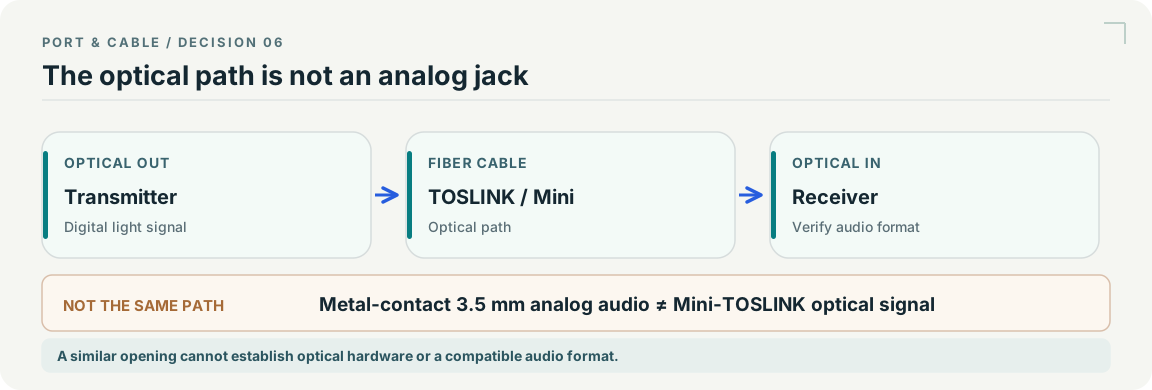
Still unknown: The diagram does not claim that every optical port supports every optical audio format.
Compare the optical connectorsExisting evidence: C024A · C025A · C323A source records S845 · S405 · S380. See each source record for its inspection date and scope; graphic interpretation remains pending independent technical and publication review.
FOLLOW THE AUDIO SIGNAL
Give the signal a role. Give each channel a destination. Keep power, cable evidence and shared inputs in view.
Plan more than one connection
Assign anonymous physical units, reserve shared inputs, and find contradictory observations. Up to twelve explicit paths; no hidden cable or power assumptions.
Find the exact model
Microphones, interfaces, active monitors, headphones and a passive direct box. Inspect source-linked endpoints before opening a worksheet.
Three useful distinctions
The 2i2’s rear line outputs and front headphone output use TRS sockets for different roles.
An HS5’s XLR and TRS inputs are alternatives on one physical speaker, not two independent channels.
The 2i2’s supply covers both XLR inputs. The worksheet never decides a physical switch state for you.
Practical guide / P149
A connector outline does not tell you whether a signal is microphone, line, instrument or stereo headphones.
Practical guide / P150
Keep microphone demand, receiver supply documentation and your observed switch state separate.
Practical guide / P151
A TRS form can describe different circuits; preserve the intended channel layout.
Practical guide / P152
Plan the left and right analog paths without counting alternative inputs twice.
Practical guide / P153
Record the physical channel behind a jack and the scope of a shared control.
Practical guide / P154
Keep conversion roles and unresolved specifications visible in a handoff.
NEW SOURCE-QUALIFIED AUDIO REFERENCE
Seven examples separate plug geometry, switched-jack construction and equipment port roles, with four new physical studies.
Read the illustrated field reference →SOURCE-QUALIFIED OPTICAL REFERENCE
Seven examples separate optical interfaces, kits, shared photographs and panel cutouts. MT-RJ gains its first specimen study.
Read the optical role chart →