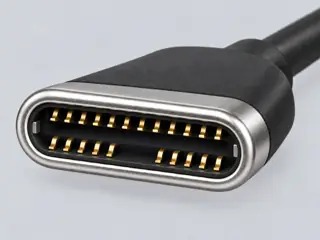
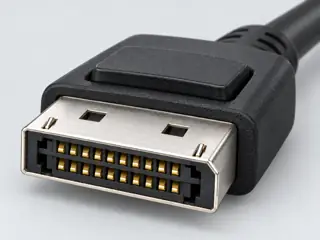
USB-C to DisplayPort video requires supported DisplayPort transport; some specifically documented cables also support the reverse direction.
Also calledUSB-C DPUSBC DisplayPort cable
Direction must come from the exact cable specification.
The useful distinction
A cable with the right ends is only a candidate. The V1 checker covers the explicitly selected source-to-display path, not every bidirectional product or dock.
Not included. Check exact device and accessory documentation.
A boundary, not an omission to guess around.
This is a scoped requirements guide, not an interoperability certification. It does not test hardware, calculate an arbitrary display timing, or replace the exact product documentation. A missing capability stays unknown.
Before you connect
What to check
Verify video support at the USB-C endpoint.
Read the cable’s exact allowed direction or directions.
Check the complete requested mode, including any required compression support.
AI-assisted inspection is not independent engineering review. Source scope and access limitations are disclosed below. Procedural checklists are editorial requirements, not hardware measurements.
C042ASource checked · pending review
USB-C to DisplayPort video requires supported DisplayPort transport; some specifically documented cables also support the reverse direction.
Locator: PDF p. 1: two documented directions; p. 3: active conversion and input/output table, visually inspected. Access: public pdf text. Exact CDP2DP2MBW example, not evidence that every USB-C/DisplayPort cable is bidirectional. Source connector-label shorthand is not adopted as a normative definition. No USB data, USB Power Delivery or universal monitor-power capability is inferred.
Locator: DisplayPort 2.1b certification minimum, DP over USB-C, no-video case, direction and DSC sections Access: public page. Page mixes current and legacy examples. Only identified passages support these observations; legacy numerical examples are not generalized. Retrieval locators and observations retained; raw acquisition is recorded separately.
Computer-generated illustration with prior AI visual review. Not a photograph, measurement or compatibility check. Independent technical and rights review pending.
Assessment 2026-10-22 · earliest scheduled source review 2027-01-05. This is a recorded-date assessment, not a live source check. Page-level independent review is not established by this panel.
Scoped support: A specifically documented bidirectional cable exists; do not generalize either direction to all products.
Not established / limitations: Exact CDP2DP2MBW example, not evidence that every USB-C/DisplayPort cable is bidirectional. Source connector-label shorthand is not adopted as a normative definition. No USB data, USB Power Delivery or universal monitor-power capability is inferred.
Locator: PDF p. 1: two documented directions; p. 3: active conversion and input/output table, visually inspected.
VESA · Standards-organization domain · inspected 2026-10-11 · due 2027-01-09
Within inspection window
Scoped support: Page mixes current and legacy examples. Only identified passages support these observations; legacy numerical examples are not generalized.
Not established / limitations: Page mixes current and legacy examples. Only identified passages support these observations; legacy numerical examples are not generalized. Retrieval locators and observations retained; raw acquisition is recorded separately.
Locator: DisplayPort 2.1b certification minimum, DP over USB-C, no-video case, direction and DSC sections
Trace 2 claims to their source records
C042A · P042
USB-C to DisplayPort video requires supported DisplayPort transport; some specifically documented cables also support the reverse direction.
Claim scope: Consumer identification / documented standard or product class only
Recorded evidence only. An inspection date, publisher label, source link or generated packet is not independent technical review, hardware testing, fabrication approval or a compatibility verdict.