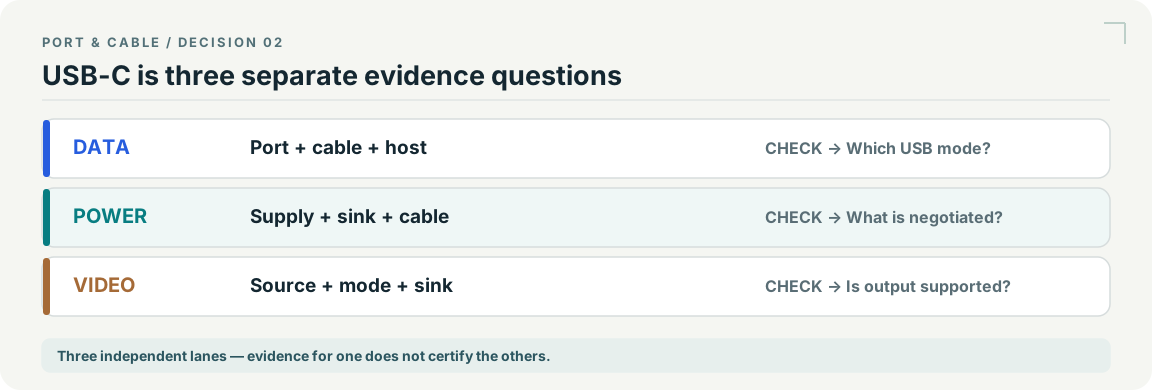
A working charge or data connection is not a video test.
The useful distinction
Find the exact port’s documentation, not just the laptop’s general USB-C description. Then identify whether the proposed adapter expects DisplayPort Alternate Mode. Driver-based USB graphics uses a different mechanism and is outside this checker.
Existing evidence:C004A · C054A/ source records S003 · S014 · S446. See each source record for its inspection date and scope; graphic interpretation remains pending independent technical and publication review.
The useful distinction
Understand the requirement.
DisplayPort video over USB-C requires supported Alternate Mode; the connector shape alone does not establish video output. [C054A]
USB-IF’s March 2023 guidance says a USB 2.0 Type-C to Type-C cable can support USB Power Delivery but does not carry USB 3.2, USB4 or Alt-Mode capability. [C054B]
Bounded facts, visible unknowns
Specifications and limits
Why a USB-C port may not provide video facts and limitations
Driver-based USB graphics and undocumented docks [C054A]
Scoped reference
A charging cable can be the wrong display cable. [C054B]
Verified device list
Not included. Check exact device and accessory documentation.
A boundary, not an omission to guess around.
This is a scoped requirements guide, not an interoperability certification. It does not test hardware, calculate an arbitrary display timing, or replace the exact product documentation. A missing capability stays unknown.
Before you connect
What to check
Confirm the source port’s documented video transport.
Check that the adapter is designed for that source and display direction.
Verify cable and display-mode support.
Keep unknown fields visible rather than trying combinations that appear to fit.
The USB 2.0 Type-C cable class supports neither USB 3.2/USB4 nor Alt Mode. Check a native display path separately from charging. Do not conflate native Alt Mode with a USB graphics adapter, webcam or capture data stream.
AI-assisted inspection is not independent engineering review. Source scope and access limitations are disclosed below. Procedural checklists are editorial requirements, not hardware measurements.
C054ASource checked · pending review
DisplayPort video over USB-C requires supported Alternate Mode; the connector shape alone does not establish video output.
Claim scope: Consumer identification / documented standard or product class only. Next review due 2026-12-30.
C054BSource checked · pending review
USB-IF’s March 2023 guidance says a USB 2.0 Type-C to Type-C cable can support USB Power Delivery but does not carry USB 3.2, USB4 or Alt-Mode capability.
Locator: USB Type-C is not USB performance; USB 2.0 Type-C cables section Access: public pdf text. Not a mechanical specification or permission to use USB logos.
Claim scope: V145: USB 2.0 Type-C cable class, not every USB-C cable. Native Alt-Mode display is distinct from a separate USB graphics or capture solution; no installed display-path verdict.. Next review due 2027-01-11.
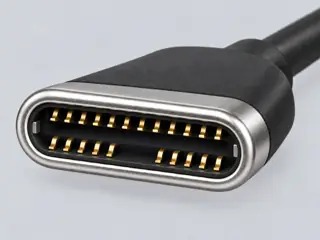
Computer-generated illustration with prior AI visual review. Not a photograph, measurement or compatibility check. Independent technical and rights review pending.
Assessment 2026-10-22 · earliest scheduled source review 2026-12-30. This is a recorded-date assessment, not a live source check. Page-level independent review is not established by this panel.
USB-IF’s March 2023 guidance says a USB 2.0 Type-C to Type-C cable can support USB Power Delivery but does not carry USB 3.2, USB4 or Alt-Mode capability.
Claim scope: V145: USB 2.0 Type-C cable class, not every USB-C cable. Native Alt-Mode display is distinct from a separate USB graphics or capture solution; no installed display-path verdict.
Recorded evidence only. An inspection date, publisher label, source link or generated packet is not independent technical review, hardware testing, fabrication approval or a compatibility verdict.