Specify the pixel dimensions, refresh rate, color depth and chroma, plus HDR or VRR needs. Record the exact output, adapter or dock, cable and display input. Compression support and lane sharing can affect the path; V1 does not calculate these from incomplete inputs.
Guide note · not an individual product specification
The useful distinction
Understand the requirement.
A USB-C connector alone cannot establish a specific high-refresh display mode; supported video transport and device features must be known. [C056A]
Bounded facts, visible unknowns
Specifications and limits
What to check for USB-C 4K 144 Hz facts and limitations
Checker approach
Evidence checklist, not a display bandwidth calculator [C056A]
Unmodeled
Detailed timings, lane allocation, DSC negotiation and shared dock bandwidth [C056A]
Verified device list
Not included. Check exact device and accessory documentation.
A boundary, not an omission to guess around.
This is a scoped requirements guide, not an interoperability certification. It does not test hardware, calculate an arbitrary display timing, or replace the exact product documentation. A missing capability stays unknown.
Before you connect
What to check
Obtain the source’s documented support for the exact chosen mode.
Obtain equivalent support for every cable and converter.
Confirm the display supports that mode on the selected input, not merely another port.
Leave missing evidence unresolved; a headline Gbit/s value is not a valid substitute.
AI-assisted inspection is not independent engineering review. Source scope and access limitations are disclosed below. Procedural checklists are editorial requirements, not hardware measurements.
C056ASource checked · pending review
A USB-C connector alone cannot establish a specific high-refresh display mode; supported video transport and device features must be known.
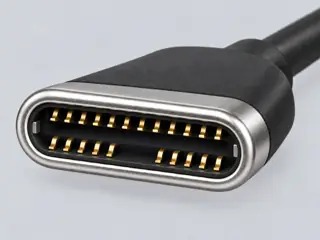
Computer-generated illustration with prior AI visual review. Not a photograph, measurement or compatibility check. Independent technical and rights review pending.
Assessment 2026-10-22 · earliest scheduled source review 2026-12-30. This is a recorded-date assessment, not a live source check. Page-level independent review is not established by this panel.
Recorded evidence only. An inspection date, publisher label, source link or generated packet is not independent technical review, hardware testing, fabrication approval or a compatibility verdict.