FIELD GUIDESource-led reference

P158 / Dock and display connections / Guide

Monitor inputs, physical units and reference modes

Physical outputs, rendering engines, exact models and observed requirements are separate evidence.

The useful distinction

Read the model suffix, labeled output and exact monitor input.

Claim inspection dates: 2026-10-03 · Independent review pending

Guide note · not an individual product specification

The useful distinction

Understand the requirement.

A second input is not a second physical display. [C158A]

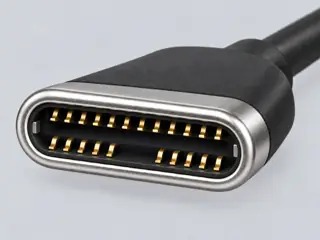
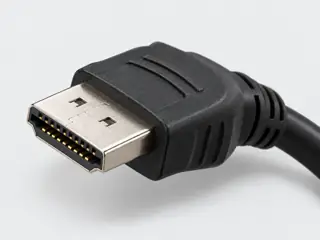
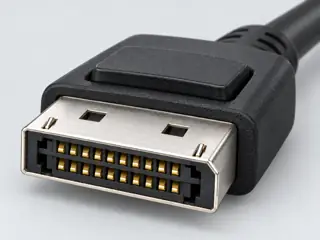
PA279CV lists a 3840 by 2160 panel, maximum 60 Hz, and distinct HDMI, DisplayPort and USB-C video inputs. [C158B]

Bounded facts, visible unknowns

Specifications and limits

Monitor inputs, physical units and reference modes facts and limitations
Workflow boundaryOne host, one dock, direct independent display paths only. [C158A] [C158B]
Verified device listNot included. Check exact device and accessory documentation.
A boundary, not an omission to guess around.

Two identical monitors can be units 1 and 2. Selecting two inputs on unit 1 means the same monitor, and the full-screen allocation model flags the duplication. PBP and PIP are not modeled.

Before you connect

What to check

  1. Identify host, dock and monitor models.
  2. Keep native, software and shared-resource findings separate.
  3. Record the unknowns before preparing a report.
Trace a supported connection class →

Panel mode is reference evidence

A panel resolution and refresh rate do not establish the exact timing accepted on every input. The result separates panel reference, dock-table coverage and cable evidence.

Keep conversion directional

Matching connector families does not validate a cable. Different families require exact directional cable or converter documentation; this release does not synthesize an adapter product.

Your next step

Move from the form to the requirement.

The source trail

Evidence for this page

AI-assisted inspection is not independent engineering review. Source scope and access limitations are disclosed below. Procedural checklists are editorial requirements, not hardware measurements.

C158ASource checked · pending review

U2723QE separates video inputs from DisplayPort output and USB data interfaces.

Dell · U2723QE — panel mode and video inputs ↗

Locator: Tech Specs / Native Resolution / Connectivity
Access: public page. Broader-scope reinspection of S061. Panel mode does not prove every input timing, color format, cable or operating mode. PBP and daisy chains are excluded.

S158: full source recordInspect review dependencies → (private workspace)

Claim scope: Exact-scoped documentary display evidence; no hardware certification or universal compatibility inference.. Next review due 2027-01-01.

C158BSource checked · pending review

PA279CV lists a 3840 by 2160 panel, maximum 60 Hz, and distinct HDMI, DisplayPort and USB-C video inputs.

ASUS · ProArt PA279CV — display and I/O specifications ↗

Locator: Display; I/O Ports; Signal Frequency
Access: public page. Not PA279CRV or PA278CV. Full timing tables, cable tests and picture-by-picture behavior are not normalized.

S159: full source recordInspect review dependencies → (private workspace)

Claim scope: Exact-scoped documentary display evidence; no hardware certification or universal compatibility inference.. Next review due 2027-01-01.

Suggest a correction to this field note →

Display connection desk

Trace the display path beyond the socket

Shared output resources, host native limits and software-rendered paths remain distinct.

Evidence behind this page

Scope first. Source second. Approval separate.

2 linked sources · 2 scoped claims · 0 sources with inspection/access flags.

Page scope: consumer_reference_expansion

Assessment 2026-10-22 · earliest scheduled source review 2027-01-01. This is a recorded-date assessment, not a live source check. Page-level independent review is not established by this panel.

Inspect 2 source scopes, access limits and dates

S158 · U2723QE — panel mode and video inputs

Dell · Manufacturer / product-owner domain · inspected 2026-10-03 · due 2027-01-01

Within inspection window

Scoped support: U2723QE panel reference mode and input/output separation.

Not established / limitations: Broader-scope reinspection of S061. Panel mode does not prove every input timing, color format, cable or operating mode. PBP and daisy chains are excluded.

Locator: Tech Specs / Native Resolution / Connectivity

S159 · ProArt PA279CV — display and I/O specifications

ASUS · Manufacturer / product-owner domain · inspected 2026-10-03 · due 2027-01-01

Within inspection window

Scoped support: PA279CV panel reference and selected video inputs.

Not established / limitations: Not PA279CRV or PA278CV. Full timing tables, cable tests and picture-by-picture behavior are not normalized.

Locator: Display; I/O Ports; Signal Frequency

Trace 2 claims to their source records

C158A · P158

U2723QE separates video inputs from DisplayPort output and USB data interfaces.

Claim scope: Exact-scoped documentary display evidence; no hardware certification or universal compatibility inference.

Source links: S158 · Evidence trail → (private workspace)

C158B · P158

PA279CV lists a 3840 by 2160 panel, maximum 60 Hz, and distinct HDMI, DisplayPort and USB-C video inputs.

Claim scope: Exact-scoped documentary display evidence; no hardware certification or universal compatibility inference.

Source links: S159 · Evidence trail → (private workspace)

Prepare this page for review → (private workspace)Read the evidence method →

Recorded evidence only. An inspection date, publisher label, source link or generated packet is not independent technical review, hardware testing, fabrication approval or a compatibility verdict.