21 linked sources · 23 scoped claims · 0 sources with inspection/access flags.
Assessment 2026-10-22 · earliest scheduled source review 2026-12-30. This is a recorded-date assessment, not a live source check. Page-level independent review is not established by this panel.
Inspect 21 source scopes, access limits and dates
USB-IF · Standards-organization domain · inspected 2026-10-01 · due 2026-12-30
Within inspection window
Scoped support: Shape/performance distinction and absence of high-speed lanes in USB 2.0 Type-C cables.
Not established / limitations: Not a mechanical specification or permission to use USB logos.
Locator: USB Type-C is not USB performance; USB 2.0 Type-C cables section
HDMI Licensing Administrator · Standards-organization domain · inspected 2026-10-01 · due 2026-12-30
Within inspection window
Scoped support: A version number alone does not identify implemented features.
Not established / limitations:
Locator: FAQ about HDMI 2.1 supporting TMDS without FRL
VESA · Standards-organization domain · inspected 2026-10-01 · due 2026-12-30
Within inspection window
Scoped support: Version labels do not require the maximum UHBR rate. Check documented device capabilities.
Not established / limitations:
Locator: DP 2.1b requirements; how to know device features; DisplayPort over USB-C
C2G / Legrand · Manufacturer / product-owner domain · inspected 2026-10-01 · due 2026-12-30
Within inspection window
Scoped support: Narrow physical identifiers only, not historical speed or video capability descriptions.
Not established / limitations: The old DisplayPort technology/speed description on this page is not relied on.
Locator: HD15, HDMI, HDMI Mini, HDMI Micro, DVI-D and RCA sections
CalDigit · Manufacturer / product-owner domain · inspected 2026-10-01 · due 2026-12-30
Within inspection window
Scoped support: TS4 port-group inventory. No current OS compatibility matrix or all-ports simultaneous throughput guarantee.
Not established / limitations: TS4 port-group inventory. No current OS compatibility matrix or all-ports simultaneous throughput guarantee.
Locator: Product Overview / Interface
CalDigit · Manufacturer / product-owner domain · inspected 2026-10-01 · due 2026-12-30
Within inspection window
Scoped support: One upstream host and two downstream Thunderbolt connections in TS4. No blanket display or Ethernet promise.
Not established / limitations: One upstream host and two downstream Thunderbolt connections in TS4. No blanket display or Ethernet promise.
Locator: Thunderbolt 4/USB4 Ports; rear host port; display and host capability caveats
TE Connectivity · Manufacturer / product-owner domain · inspected 2026-10-06 · due 2027-01-04
Within inspection window
Scoped support: Manufacturer example supporting the 19-position contact count for the standard/full-size HDMI connector form.
Not established / limitations: A manufacturer component example supports connector-form contact count only; it does not establish HDMI version, video mode, cable capability or universal fabrication dimensions.
Locator: Configuration features: Standard HDMI connector; 19 positions; receptacle
Nikon · Manufacturer / product-owner domain · inspected 2026-10-08 · due 2027-01-06
Within inspection window
Scoped support: One Type-C USB data connector and one Type-C USB Power Delivery connector on the Z 8.
Not established / limitations: Exact Z 8 body only. No sibling model, accessories, location, firmware coverage or complete inventory inferred.
Locator: Interface → USB
Nikon · Manufacturer / product-owner domain · inspected 2026-10-08 · due 2027-01-06
Within inspection window
Scoped support: Dedicated power connector, battery insertion, operating-power versus battery-charging conditions.
Not established / limitations: Does not qualify an arbitrary charger or cable. Battery type, menu setting and operating state matter; no simultaneous charging guarantee.
Locator: USB Power Delivery; Power Delivery Versus Charging table and footnotes
Nikon · Manufacturer / product-owner domain · inspected 2026-10-08 · due 2027-01-06
Within inspection window
Scoped support: Use the data connector; a computer does not detect a camera connected through its Power Delivery connector.
Not established / limitations: Exact documented USB transfer workflow, not a statement of every protocol or current software requirement.
Locator: Copying Pictures to a Computer Using NX Studio, step 1; connecting cautions
CalDigit · Manufacturer / product-owner domain · inspected 2026-10-08 · due 2027-01-06
Within inspection window
Scoped support: Three ordinary USB-C data ports, 10 Gb/s interface and different power outputs; separate Thunderbolt host/downstream roles.
Not established / limitations: TS4 only; product interface ratings are not measured file speeds or negotiated charging. Manual artwork not redistributed; front/left is kept only in bounded narrative, not invented per-port IDs.
Locator: Printed page 10: USB 3.2 Type-C and Thunderbolt 4; diagrams inspected
Elgato · Manufacturer / product-owner domain · inspected 2026-10-08 · due 2027-01-06
Within inspection window
Scoped support: USB 3.2 Gen 2 Type-C host link; HDMI input and passthrough output.
Not established / limitations: Page displays September 3, 2024 update. Do not flatten abbreviated maximum capture/HDR bullets into an all-mode promise; use the detailed mode article. Not 4K Pro, 4K S or HD60 X.
Locator: Technical Specifications → Interface
Elgato · Manufacturer / product-owner domain · inspected 2026-10-08 · due 2027-01-06
Within inspection window
Scoped support: One HDMI input, one HDMI output and one USB-C host output; signal direction and reduced capture on USB Gen 1.
Not established / limitations: Page displays June 1, 2026 update. Setup example is not certification of an arbitrary console, cable, host or mode. Selected inventory excludes analog line input.
Locator: Inputs and Outputs; Required Items
Elgato · Manufacturer / product-owner domain · inspected 2026-10-08 · due 2027-01-06
Within inspection window
Scoped support: Passthrough/capture distinction, USB/codec/software conditions and no capture of DSC video.
Not established / limitations: Page displays May 21, 2026 update. No complete matrix copied, no fixed universal capture ceiling, no device firmware or software installation inspected.
Locator: Input/Passthrough versus Capture definitions; Detailed Capture Codec Specifications; DSC
Blackmagic Design · Unclassified publisher domain · inspected 2026-10-08 · due 2027-01-06
Within inspection window
Scoped support: Four HDMI Type A inputs, one HDMI program output, one USB-C interface; no Ultra HD video standards.
Not established / limitations: Exact ATEM Mini Pro ISO, not Pro, Extreme, G2 or sibling products on the combined website. Total outputs is not HDMI-output count. USB mode list alone does not establish simultaneous webcam and external recording.
Locator: Model-specific PDF pages 1–2: Connections, labeled panel diagram, Standards
USB-IF · Standards-organization domain · inspected 2026-10-11 · due 2027-01-09
Within inspection window
Scoped support: Compliance-program scope only; a marking alone does not authenticate a cable. PDF pages visually inspected. No logos copied.
Not established / limitations: Compliance-program scope only; a marking alone does not authenticate a cable. PDF pages visually inspected. No logos copied. Retrieval locators and observations retained; raw acquisition is recorded separately.
Locator: PDF pages 2, 4 and 5 (1-based); compliance markings, power/data separation and logo restrictions
HDMI Licensing Administrator · Standards-organization domain · inspected 2026-10-11 · due 2027-01-09
Within inspection window
Scoped support: Feature-scoped active HDMI cable behavior. Not a universal prescription for all active converters.
Not established / limitations: Feature-scoped active HDMI cable behavior. Not a universal prescription for all active converters. Retrieval locators and observations retained; raw acquisition is recorded separately.
Locator: HDMI Cable Power requirements, direction paragraph and separate power connector
USB Implementers Forum · Standards-organization domain · inspected 2026-10-13 · due 2027-01-11
Within inspection window
Scoped support: Landing-page release metadata only, not the specification body or exact connector geometry.
Not established / limitations: No technical revision comparison, certified product lookup, electrical assessment or installed-hardware inference.
Locator: Document-library heading and displayed date 04/08/2026.
TE Connectivity · Manufacturer / product-owner domain · inspected 2026-10-13 · due 2027-01-11
Within inspection window
Scoped support: 1747981-1 is linked by the sheet 1 table to the without-flange family view. Mouth, mounting features and PCB footprint are different views; no exact installed-device identity.
Not established / limitations: Not a hardware inspection, certification, pinout, dimensional mating check or blanket product-compatibility statement.
Locator: Rev H, 1 September 2022; sheet 1 variant table and sheet 6 without-flange form visually inspected.
USB Implementers Forum · Standards-organization domain · inspected 2026-10-15 · due 2027-01-13
Within inspection window
Scoped support: USB-IF cable-program requirements and cable-label limitations; not product verification or permission to reproduce marks
Not established / limitations: All USB-C cables do not have identical functional capability; the web page may change. Compliance language is distinct from a certification for an arbitrary cable.
Locator: Cables and Connectors; introductory certification paragraphs and USB-C to USB-C Cable Logo Requirements
Molex · Manufacturer / product-owner domain · inspected 2026-10-22 · due 2027-01-20
Within inspection window
Scoped support: Exact 1054500101 specification row only.
Not established / limitations: Existing two-bank row field already known. Exact-component row context adds zero distinct row gain. Product detail page says Limited Information Available; chart fields retained without measured/toleranced drawing.
Locator: Full Export Spreadsheet table, exact 1054500101 row: Web Description, Gender, Circuits Loaded, Number of Rows, Pitch - Mating Interface and separate Pitch - Termination Interface columns. Full official chart read; no PDF drawing pixels acquired.
Trace 23 claims to their source records
C004A · P004
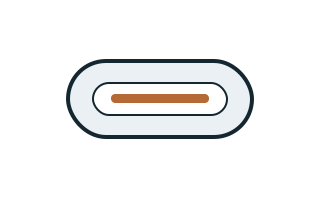
USB Type-C names the reversible connector, not a guaranteed data rate, charging wattage or video capability.
Claim scope: Consumer identification / documented standard or product class only
Source links: S003 · Evidence trail → (private workspace)
C004B · P004
Nikon lists one Type-C data connector and one Type-C Power Delivery connector on the Z 8.
Claim scope: Nikon Z 8 body; count and named connector roles, not a general USB-C rule.
Source links: S446 · Evidence trail → (private workspace)
C004D · P004
Nikon directs computer picture transfer through the Z 8 USB data connector and states that the computer will not detect the camera through its USB Power Delivery connector.
Claim scope: Exact Z 8 computer-transfer instructions; no generic USB-C capability inference.
Source links: S448 · Evidence trail → (private workspace)
C004E · P004
The Z 8 does not take operating power through its USB data connector. Power through its separate Power Delivery connector requires an inserted battery; menu setting and operating state distinguish operating power from battery charging, with EN-EL15c/b charging conditions documented separately.
Claim scope: Z 8 setup-menu table and battery footnotes; not a universal charger, battery or simultaneous-operation qualification.
Source links: S447 · Evidence trail → (private workspace)
C004F · P004
The TS4 manual separates three ordinary 10 Gb/s USB-C data ports: the front-left port is specified for up to 20 W, while the other two are specified for up to 7.5 W each.
Claim scope: CalDigit TS4 only; front-left is the manual’s wording and orientation. Interface ratings do not establish actual charging or transfer speed.
Source links: S449 · Evidence trail → (private workspace)
C004G · P004
CalDigit distinguishes the TS4 Thunderbolt host connection from two downstream Thunderbolt connections; the support page rates host charging up to 98 W and each downstream Thunderbolt port up to 15 W.
Claim scope: TS4 manufacturer host/downstream roles and output ratings; not TS3/TS5 or an arbitrary host negotiation.
Source links: S062 · S064 · S449 · Evidence trail → (private workspace)
C004H · P004
CalDigit describes the ordinary TS4 USB-C ports as data-only while separately specifying their power outputs; its monitor guidance uses the DisplayPort or suitable downstream Thunderbolt connections instead.
Claim scope: Here data-only separates display paths; it must not be paraphrased as no power. Exact host/display limits still require evidence.
Source links: S064 · S449 · Evidence trail → (private workspace)
C004I · P004
Elgato 4K X uses one USB-C USB 3.2 Gen 2 host link for captured video. USB Gen 1 is documented with reduced available capture modes; codec, resolution, frame rate and software remain separate conditions.
Claim scope: Named 4K X model only; a USB link rate or passthrough rating is not an achieved capture-format guarantee.
Source links: S450 · S451 · S452 · Evidence trail → (private workspace)
C004J · P004
The ATEM Mini Pro ISO specification lists one USB Type-C 3.1 Gen 1 interface for external drive recording, webcam output, software control, updates and panel connection.
Claim scope: Exact Pro ISO model; listed uses do not establish simultaneous webcam output and external-drive recording or USB-C camera power input.
Source links: S453 · Evidence trail → (private workspace)
C004K · P004
USB-IF’s January 2026 cable guidance separates data performance from 60W/240W power markings. USB 2.0 Type-C cables can use power-only logos without a displayed data rate.
Claim scope: USB-IF compliance-program markings; not independent authentication or video qualification.
Source links: S511 · Evidence trail → (private workspace)
C004L · P004
USB-IF lists USB Type-C Cable and Connector Specification Release 2.5 with the date 8 April 2026. The listing alone establishes neither a product’s implementation nor its supported functions.
Claim scope: V145: Release landing-page metadata only; the specification body and revision-by-revision technical changes were not inspected in V145.
Source links: S605 · Evidence trail → (private workspace)
C004M · P004
USB-IF states that a certified cable does not improve or add the capabilities of connected USB products. Its USB-C to USB-C cable program requires power-capability marking, with separate data-rate marking requirements for all but USB 2.0 High-Speed cable categories. Cable markings cannot establish a port's video output.
Claim scope: USB-IF cable certification and logo-program requirement; not all sold cables are certified; exact product capabilities unknown
Source links: S643 · Evidence trail → (private workspace)
C004N · P004
VESA says DisplayPort Alt Mode support on a USB-C port may be indicated by a nearby DisplayPort logo, but a connector logo is not guaranteed to appear. Verify the exact port's documented DP Alt Mode support rather than inferring video from USB-C shape or absence of a mark.
Claim scope: VESA FAQ DisplayPort Over USB-C: port labels and manufacturer documentation; not an assertion about any model
Source links: S015 · Evidence trail → (private workspace)
C004W · P004
Molex specifies 1054500101 as a USB-C receptacle, 24 loaded circuits and 2 row(s), with mating-interface pitch 0.50mm.
Claim scope: Exact Molex 1054500101, female right-angle USB-C receptacle; manufacturer mating-interface/row fields only, not a universal family value.
Source links: S972 · Evidence trail → (private workspace)
C008A · P008
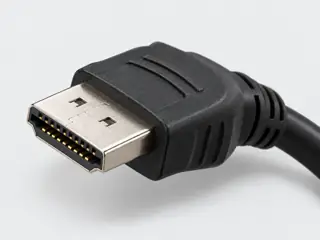
The familiar full-size HDMI connector is Type-A; Mini and Micro HDMI use different physical forms.
Claim scope: Consumer identification / documented standard or product class only
Source links: S018 · Evidence trail → (private workspace)
C008B · P008
HDMI version labeling alone does not identify every optional feature implemented by a product.
Claim scope: Narrowly stated supporting distinction; not an end-to-end device guarantee
Source links: S012 · Evidence trail → (private workspace)
C008C · P008
TE's cited Standard HDMI receptacle is a 19-position connector example, supporting a 19-contact engineering count for the full-size HDMI form without implying HDMI version or video capability.
Claim scope: Connector-form contact count supported by one manufacturer example; protocol/version capability explicitly excluded.
Source links: S365 · Evidence trail → (private workspace)
C008D · P008
Elgato 4K X has one HDMI input for an unencrypted video source and one HDMI passthrough output to a display; captured video reaches a computer through a separate USB-C connection.
Claim scope: 4K X only; input/output direction must not be exchanged and the selected profile is not a full connector inventory.
Source links: S450 · S451 · Evidence trail → (private workspace)
C008E · P008
Elgato separates supported 4K X HDMI passthrough signals from capture formats. Its detailed guidance says DSC video cannot be captured even when a passthrough image is visible.
Claim scope: DSC limitation and mode-selection boundary, not a diagnosis of every black capture frame or a universal HDMI limit.
Source links: S452 · Evidence trail → (private workspace)
C008F · P008
The ATEM Mini Pro ISO specifies four HDMI Type A inputs and one HDMI program output; the separately listed total of two outputs is not a count of HDMI output sockets.
Claim scope: Exact Pro ISO Connections table and labeled panel diagram; not a sibling model’s connection count.
Source links: S453 · Evidence trail → (private workspace)
C008G · P008
The ATEM Mini Pro ISO Standards table lists no Ultra HD video standards. Its description of finishing in Ultra HD via relinked media does not establish an Ultra HD HDMI input or output mode.
Claim scope: Pro ISO live video-interface standards versus post-production description; no new conversion or capture capability inferred.
Source links: S453 · Evidence trail → (private workspace)
C008H · P008
HDMI Cable Power requires support from both the active cable and the HDMI source. HDMI LA specifies source/sink direction for active cables and a separate power connector for sources without Cable Power support.
Claim scope: HDMI Cable Power feature scope; follow the exact cable’s instructions. Not monitor power or a universal converter-power rule.
Source links: S518 · Evidence trail → (private workspace)
C008I · P008
TE drawing C-1747981 H maps 1747981-1 to a without-flange HDMI board-receptacle form and presents its mating face separately from the reference PCB layout.
Claim scope: V146: Named drawing family and suffix table only. The drawing does not establish an installed port’s input/output role or HDMI feature set.
Source links: S606 · Evidence trail → (private workspace)
Recorded evidence only. An inspection date, publisher label, source link or generated packet is not independent technical review, hardware testing, fabrication approval or a compatibility verdict.