
PORT & CABLE / KNOW WHAT CONNECTS.
FIELD SHEET 03 — 03 / COMPUTER EXPANSION / SOURCE-SCOPED REFERENCE
Slot length is not lane count.
Why can a physically x16-sized slot operate a PCIe card with x4 or x1 lanes?
Connector body length describes a mechanical form. Board routing, occupied slots and platform firmware determine available electrical lanes. One documented ASUS motherboard has an x16-length chipset slot with conditions for x4 or x1 operation; that is not a rule for all boards.
Not yet verified. Physical x16 appearance cannot establish active lane count or allocation.
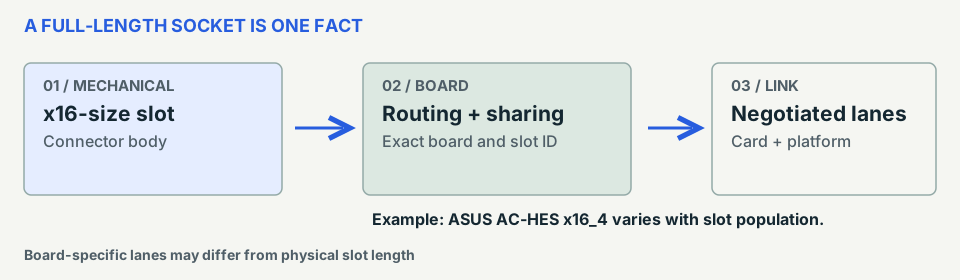
Four evidence layers
- 01 / Mechanical length
- Amphenol identifies a particular 164-position PCIe x16 card-edge connector part.
- 02 / Board wiring
- ASUS PRIME B550-PLUS AC-HES documentation describes its chipset x16_4 slot and lane-sharing conditions.
- 03 / Negotiated operation
- Exact card, processor/chipset, firmware, occupied slots and link negotiation matter separately.
- 04 / Evidence limit
- Neither manufacturer example determines wiring, support or throughput on another board.
Check in order
- Locate the exact motherboard variant and printed slot name in its official manual.
- Read the slot-sharing, CPU/chipset and lane-configuration table with installed cards accounted for.
- Check the card’s requirements and verify actual link status using host documentation or diagnostics.
No universal PCIe slot routing, bifurcation support, BIOS configuration, mechanical clearance or measured card performance is established.
What would resolve this?
Not yet verified. Physical x16 appearance cannot establish active lane count or allocation.
Record these model-specific facts before making a decision:
- Motherboard model and exact slot label
- Manufacturer slot/lane-sharing table
- Occupancy and settings that can change the wired mode
If a required model-specific source is missing, leave compatibility unknown. Never substitute connector appearance, this illustration or the print sheet for product documentation.
Read the source boundaries
Inherited claims: C261A · C261C. Original artwork: editorial diagram / no borrowed photography, contact geometry or rights clearance.
S429 is only PRIME B550-PLUS AC-HES, not every ASUS B550/PCIe board.
Manufacturer references and direct URLs
- S281 / Amphenol Communications Solutions — Part specification detail Source context ↗
- S429 / ASUS — E18712, First Edition, July 2021; specification summary printed vi–vii and layout 1-2. PDF pages 2, 6, 7 and 12 visually inspected. Source context ↗