FIELD GUIDESource-led reference

P248 / Legacy computer / Connector

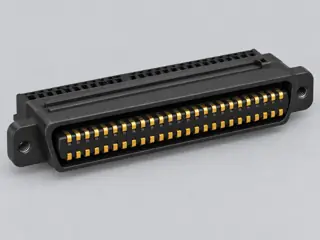
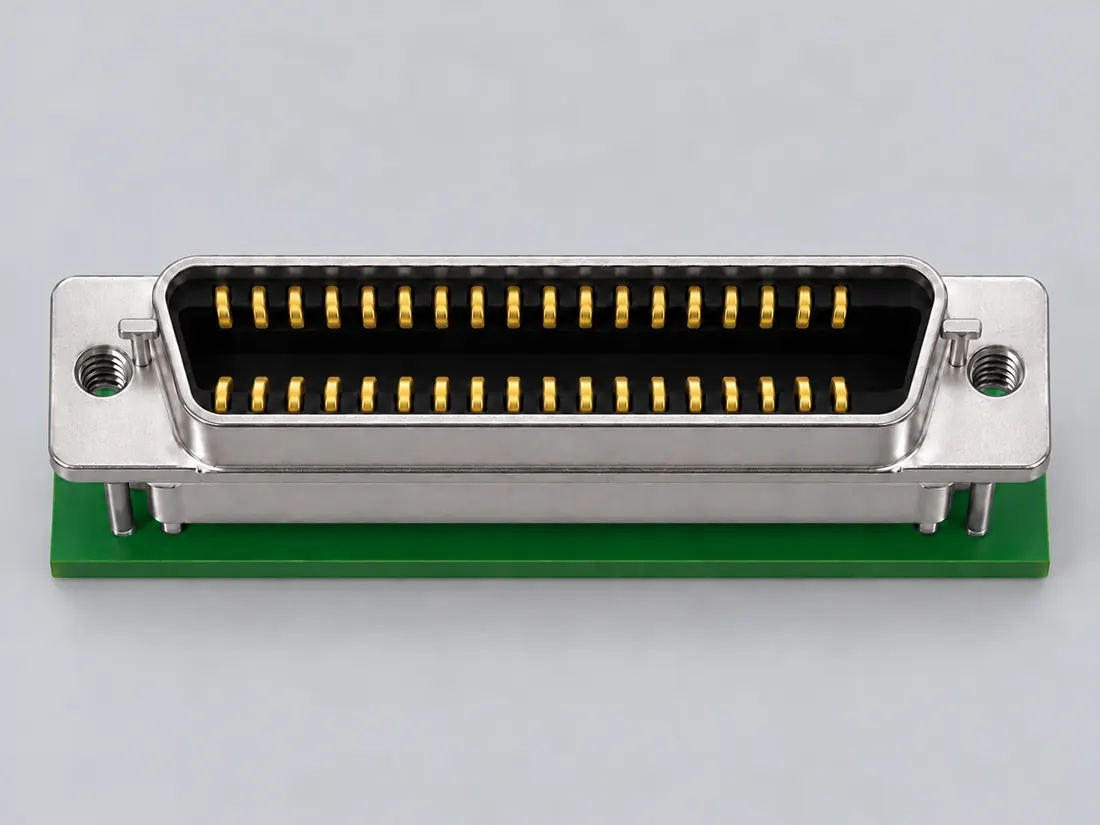
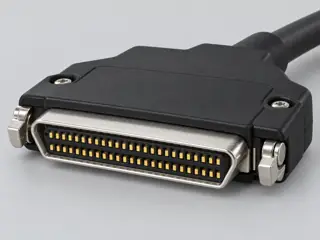
36-contact MDR / IEEE 1284C form

A 36-contact Mini Delta Ribbon implementation is documented by 3M for the IEEE 1284C interface and is physically different from the full-size 36-position CHAMP printer form.

Also called MDR 36 IEEE 1284C connector 36-contact MDR Mini Delta Ribbon 36

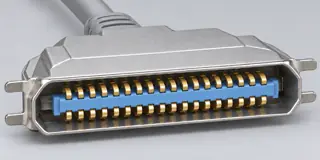
Sharing a 36-contact count does not make MDR/1284C and CHAMP-36 the same connector.

Look for

Distinguish the compact MDR shell from the larger CHAMP-36 outline and confirm the interface designation in the equipment documentation.

Claim inspection dates: 2026-10-06 · Independent review pending

The useful distinction

Recognize it. Then verify it.

A 36-contact Mini Delta Ribbon implementation is documented by 3M for the IEEE 1284C interface and is physically different from the full-size 36-position CHAMP printer form. [C248A]

Source-scoped identification facts

Each value retains its exact example, role and measurement axis. Facts from different parts must not be combined into an invented component.

Documented examples; not a mating drawing or compatibility approval
Nominal contacts36S268Source-backed nominal position/contact count: 36.
Contact pitch1.27 mm 0.050in series pitch (10136-52X2 (normal right-angle ordering family))S904Named source examples retain separate role, part, view and axis limits; values are not a universal family specification. Named series only, not every family part: 10136-52X2 (normal right-angle ordering family). Documented role: plug. Full PDF text read; direct403. Dimension table A-D remains an unmapped drawing axis and is not proposed. Normal and reverse D-interface variants must stay separate.
Connector roleplug (10136-52X2 (normal right-angle ordering family))S904Named source examples retain separate role, part, view and axis limits; values are not a universal family specification. Named series only, not every family part: 10136-52X2 (normal right-angle ordering family). Documented role: plug. Full PDF text read; direct403. Dimension table A-D remains an unmapped drawing axis and is not proposed. Normal and reverse D-interface variants must stay separate.
Manufacturer3M (10136-52X2 (normal right-angle ordering family))S904Named source examples retain separate role, part, view and axis limits; values are not a universal family specification. Named series only, not every family part: 10136-52X2 (normal right-angle ordering family). Documented role: plug. Full PDF text read; direct403. Dimension table A-D remains an unmapped drawing axis and is not proposed. Normal and reverse D-interface variants must stay separate.
Series101 (10136-52X2 (normal right-angle ordering family))S904Named source examples retain separate role, part, view and axis limits; values are not a universal family specification. Named series only, not every family part: 10136-52X2 (normal right-angle ordering family). Documented role: plug. Full PDF text read; direct403. Dimension table A-D remains an unmapped drawing axis and is not proposed. Normal and reverse D-interface variants must stay separate.
Exact part / implementation10136-52X2 (normal ordering family) (10136-52X2 (normal right-angle ordering family))S904Named source examples retain separate role, part, view and axis limits; values are not a universal family specification. Named series only, not every family part: 10136-52X2 (normal right-angle ordering family). Documented role: plug. Full PDF text read; direct403. Dimension table A-D remains an unmapped drawing axis and is not proposed. Normal and reverse D-interface variants must stay separate.
View conventionRecommended board layout: plug viewed from connector side; receptacle viewed from bottom side. (10136-52X2 (normal right-angle ordering family))S904Named source examples retain separate role, part, view and axis limits; values are not a universal family specification. Named series only, not every family part: 10136-52X2 (normal right-angle ordering family). Documented role: plug. Full PDF text read; direct403. Dimension table A-D remains an unmapped drawing axis and is not proposed. Normal and reverse D-interface variants must stay separate.

Not recorded: Positions / cavity span, Populated contacts, Contact rows, Dimensions / axis, Contact gender / arrangement, Mounting, Coupling / latch, Keying / polarization, Shell / form, Recorded markings. Unknown fields stay unknown; illustrations supply no measurements or pin assignments.

Recorded variant and source limits
  • Check the exact device manual before wiring or applying power.
  • Tektronix (Xerox) Phaser 350 parallel port (printer side, 36-pin high-density 1284-C receptacle): Contact numbers from the Xerox table; no face drawing.
  • SGI O2 parallel port (IEEE 1284-C), host side: IEEE 1284-C (36-contact MDR / half-pitch) contact numbers 1-36. No face view transferred.
  • Tektronix/Xerox Phaser 350X printer parallel port: IEEE 1284-C (36-contact MDR / half-pitch) contact numbers 1-36. No face view transferred.
Report a correction to these facts →

Bounded facts, visible unknowns

Specifications and limits

36-contact MDR / IEEE 1284C form facts and limitations
Documented identification36-position/contact recognition fact in the cited implementation. [C248A]
Mechanical dimensionsNo independently reviewed mechanical drawing in V43; do not use this page for fabrication, fit testing or tolerance work.
Engineering pinoutSource-checked engineering profile available; independent review pending. Open engineering profile →
Verified device listNot included. Check exact device and accessory documentation.
A boundary, not an omission to guess around.

Use the source-backed form or position count only for identification. Resolve ratings, protocol, direction, wiring, cable construction and exact device support from the relevant equipment and component documentation.

Before you connect

What to check

  1. Identify the exact connector family and variant from the equipment or cable documentation.
  2. Keep shape, contact count, protocol, electrical rating and device support as separate facts.
  3. Do not force, rewire or adapt a connector from this recognition record; resolve the remaining requirements first.
Trace a supported connection class →

Pins & wiring

Pinout

Choose the exact wiring. Pin numbers follow its stated view; a schematic does not establish physical positions. Check your exact device before wiring.

What the status labels mean
Confirmed
Recorded research passes agree within this variant; this is not independent human review or hardware validation.
Single source
Only one underlying document, or one pass, supports this assignment.
Device-specific
Supported for the named equipment or wiring only. Check your device’s manual.
Unverified
Missing or conflicting evidence. Do not wire from this row.
Not connected
The source explicitly says NC, no contact or no pin for this wiring.
Wiring variant

Tektronix (Xerox) Phaser 350 parallel port (printer side, 36-pin high-density 1284-C receptacle)

Device-specific wiring. Check your device’s manual before connecting or applying power.

View and evidence limits

Contact numbers from the Xerox table; no face drawing.

  • P248 IEEE 1284-C (MDR36) — **Agree** on all 36: Tektronix/Xerox Phaser 350 (A) vs SGI O2 (B) — 1 Busy, 2 Select, 3 nAck, 4 nFault, 5 PError, 6–13 data 1–8, 14 nInit, 15 nStrobe, 16 nSelectIn, 17 nAutoFd, 18 Host Logic High, 19–35 returns for pins 1–17, 36 Peripheral Logic High. B's Xerox rows are unverified only because that page doesn't name the connector type.
  • Connector identity (1284-C high density) comes from the Phaser 350 cables-and-adapters page; the pin table page does not itself name the connector.
  • The table caption says 'other pins are not connected', yet every pin 1-36 appears as a signal or return pin.
  • IEEE 1284 is paywalled and was not accessed; the only verified variant is the Phaser 350.
  • No HP or other manufacturer 1284-C table was retrieved.
  • The Xerox table gives pins 19-35 only as return pins for pins 1-17; whether they are individually grounded in the printer is not stated.
36-contact MDR / IEEE 1284-C engineering referenceContact numbers from the Xerox table; no face drawing.SCHEMATIC · physical positions unconfirmedNot to scale · check the named wiring and device manual1: Busy / PtrBusy (device_specific)12: Select / Xflag (device_specific)23: nAck / PtrClk (device_specific)34: nFault / nDataAvail (device_specific)45: PError / AckDataReq (device_specific)56: Data 1 (device_specific)67: Data 2 (device_specific)78: Data 3 (device_specific)89: Data 4 (device_specific)910: Data 5 (device_specific)1011: Data 6 (device_specific)1112: Data 7 (device_specific)1213: Data 8 (device_specific)1314: nInit / nHostRTS (device_specific)1415: nStrobe / HostClk (device_specific)1516: nSelectIn / 1284 Active (device_specific)1617: nAutoFd / HostBusy (device_specific)1718: Host Logic High (device_specific)1819: Return for pin 1 (device_specific)1920: Return for pin 2 (device_specific)2021: Return for pin 3 (device_specific)2122: Return for pin 4 (device_specific)2223: Return for pin 5 (device_specific)2324: Return for pin 6 (device_specific)2425: Return for pin 7 (device_specific)2526: Return for pin 8 (device_specific)2627: Return for pin 9 (device_specific)2728: Return for pin 10 (device_specific)2829: Return for pin 11 (device_specific)2930: Return for pin 12 (device_specific)3031: Return for pin 13 (device_specific)3132: Return for pin 14 (device_specific)3233: Return for pin 15 (device_specific)3334: Return for pin 16 (device_specific)3435: Return for pin 17 (device_specific)3536: Peripheral Logic High (device_specific)36powergrounddataConfigshieldNCUnknown
Schematic only · physical contact positions unconfirmed. Original drawing · not to scale. Scroll sideways if needed.
Tektronix (Xerox) Phaser 350 parallel port (printer side, 36-pin high-density 1284-C receptacle) — source-scoped contact map
PinSignalWhat it doesStatus
1Busy / PtrBusyControl, detection or configuration connection; check the source and device.Device-specific
Sources
2Select / XflagControl, detection or configuration connection; check the source and device.Device-specific
Sources
3nAck / PtrClkClock or clock-control connection, as named by this source.Device-specific
Sources
4nFault / nDataAvailSignal conductor. Pair, polarity and direction follow this named wiring.Device-specific
Sources
5PError / AckDataReqSignal conductor. Pair, polarity and direction follow this named wiring.Device-specific
Sources
6Data 1Signal conductor. Pair, polarity and direction follow this named wiring.Device-specific
Sources
7Data 2Signal conductor. Pair, polarity and direction follow this named wiring.Device-specific
Sources
8Data 3Signal conductor. Pair, polarity and direction follow this named wiring.Device-specific
Sources
9Data 4Signal conductor. Pair, polarity and direction follow this named wiring.Device-specific
Sources
10Data 5Signal conductor. Pair, polarity and direction follow this named wiring.Device-specific
Sources
11Data 6Signal conductor. Pair, polarity and direction follow this named wiring.Device-specific
Sources
12Data 7Signal conductor. Pair, polarity and direction follow this named wiring.Device-specific
Sources
13Data 8Signal conductor. Pair, polarity and direction follow this named wiring.Device-specific
Sources
14nInit / nHostRTSRequests permission to send serial data.Device-specific
Sources
15nStrobe / HostClkClock or clock-control connection, as named by this source.Device-specific
Sources
16nSelectIn / 1284 ActiveControl, detection or configuration connection; check the source and device.Device-specific
Sources
17nAutoFd / HostBusyControl, detection or configuration connection; check the source and device.Device-specific
Sources
18Host Logic HighControl, detection or configuration connection; check the source and device.Device-specific
Sources
19Return for pin 1Control, detection or configuration connection; check the source and device.Device-specific
Sources
20Return for pin 2Control, detection or configuration connection; check the source and device.Device-specific
Sources
21Return for pin 3Control, detection or configuration connection; check the source and device.Device-specific
Sources
22Return for pin 4Control, detection or configuration connection; check the source and device.Device-specific
Sources
23Return for pin 5Control, detection or configuration connection; check the source and device.Device-specific
Sources
24Return for pin 6Control, detection or configuration connection; check the source and device.Device-specific
Sources
25Return for pin 7Control, detection or configuration connection; check the source and device.Device-specific
Sources
26Return for pin 8Control, detection or configuration connection; check the source and device.Device-specific
Sources
27Return for pin 9Control, detection or configuration connection; check the source and device.Device-specific
Sources
28Return for pin 10Control, detection or configuration connection; check the source and device.Device-specific
Sources
29Return for pin 11Control, detection or configuration connection; check the source and device.Device-specific
Sources
30Return for pin 12Control, detection or configuration connection; check the source and device.Device-specific
Sources
31Return for pin 13Control, detection or configuration connection; check the source and device.Device-specific
Sources
32Return for pin 14Control, detection or configuration connection; check the source and device.Device-specific
Sources
33Return for pin 15Control, detection or configuration connection; check the source and device.Device-specific
Sources
34Return for pin 16Control, detection or configuration connection; check the source and device.Device-specific
Sources
35Return for pin 17Control, detection or configuration connection; check the source and device.Device-specific
Sources
36Peripheral Logic HighControl, detection or configuration connection; check the source and device.Device-specific
Sources
Sources (1)

SGI O2 parallel port (IEEE 1284-C), host side

View and evidence limits

IEEE 1284-C (36-contact MDR / half-pitch) contact numbers 1-36. No face view transferred.

  • P248 IEEE 1284-C (MDR36) — **Agree** on all 36: Tektronix/Xerox Phaser 350 (A) vs SGI O2 (B) — 1 Busy, 2 Select, 3 nAck, 4 nFault, 5 PError, 6–13 data 1–8, 14 nInit, 15 nStrobe, 16 nSelectIn, 17 nAutoFd, 18 Host Logic High, 19–35 returns for pins 1–17, 36 Peripheral Logic High. B's Xerox rows are unverified only because that page doesn't name the connector type.
  • IEEE 1284 is paywalled and was not read.
  • Not stated in the Phaser 350X pages read (paralle1-5.htm, parallel.htm); Xerox pages for later Phaser models mention 1284-C cables but were not used as evidence for the 350X.
  • Only SGI explicitly ties this table to IEEE 1284-C in this pass.
36-contact MDR / IEEE 1284-C engineering referenceIEEE 1284-C (36-contact MDR / half-pitch) contact numbers 1-36. No face view transferred.SCHEMATIC · physical positions unconfirmedNot to scale · check the named wiring and device manual1: BUSY (single_source)12: SELECT (single_source)23: nACK (single_source)34: nFAULT (single_source)45: pERROR (single_source)56: DATA 1 (confirmed)67: DATA 2 (confirmed)78: DATA 3 (confirmed)89: DATA 4 (confirmed)910: DATA 5 (confirmed)1011: DATA 6 (confirmed)1112: DATA 7 (confirmed)1213: DATA 8 (confirmed)1314: nINIT (single_source)1415: nSTROBE (single_source)1516: nSELECTIN (single_source)1617: nAUTOFD (single_source)1718: HOST LOGIC HIGH (confirmed)1819: SIGNAL GROUND (BUSY) (single_source)1920: SIGNAL GROUND (SELECT) (single_source)2021: SIGNAL GROUND (nACK) (single_source)2122: SIGNAL GROUND (nFAULT) (single_source)2223: SIGNAL GROUND (pERROR) (single_source)2324: SIGNAL GROUND (DATA 1) (single_source)2425: SIGNAL GROUND (DATA 2) (single_source)2526: SIGNAL GROUND (DATA 3) (single_source)2627: SIGNAL GROUND (DATA 4) (single_source)2728: SIGNAL GROUND (DATA 5) (single_source)2829: SIGNAL GROUND (DATA 6) (single_source)2930: SIGNAL GROUND (DATA 7) (single_source)3031: SIGNAL GROUND (DATA 8) (single_source)3132: SIGNAL GROUND (nINIT) (single_source)3233: SIGNAL GROUND (nSTROBE) (single_source)3334: SIGNAL GROUND (nSELECTIN) (single_source)3435: SIGNAL GROUND (nAUTOFD) (single_source)3536: PERIPHERAL LOGIC HIGH (confirmed)36powergrounddataConfigshieldNCUnknown
Schematic only · physical contact positions unconfirmed. Original drawing · not to scale. Scroll sideways if needed.
SGI O2 parallel port (IEEE 1284-C), host side — source-scoped contact map
PinSignalWhat it doesStatus
1BUSYControl, detection or configuration connection; check the source and device.Single source
Sources
2SELECTControl, detection or configuration connection; check the source and device.Single source
Sources
3nACKControl, detection or configuration connection; check the source and device.Single source
Sources
4nFAULTControl, detection or configuration connection; check the source and device.Single source
Sources
5pERRORControl, detection or configuration connection; check the source and device.Single source
Sources
6DATA 1Signal conductor. Pair, polarity and direction follow this named wiring.Confirmed
Sources
7DATA 2Signal conductor. Pair, polarity and direction follow this named wiring.Confirmed
Sources
8DATA 3Signal conductor. Pair, polarity and direction follow this named wiring.Confirmed
Sources
9DATA 4Signal conductor. Pair, polarity and direction follow this named wiring.Confirmed
Sources
10DATA 5Signal conductor. Pair, polarity and direction follow this named wiring.Confirmed
Sources
11DATA 6Signal conductor. Pair, polarity and direction follow this named wiring.Confirmed
Sources
12DATA 7Signal conductor. Pair, polarity and direction follow this named wiring.Confirmed
Sources
13DATA 8Signal conductor. Pair, polarity and direction follow this named wiring.Confirmed
Sources
14nINITControl, detection or configuration connection; check the source and device.Single source
Sources
15nSTROBEControl, detection or configuration connection; check the source and device.Single source
Sources
16nSELECTINControl, detection or configuration connection; check the source and device.Single source
Sources
17nAUTOFDControl, detection or configuration connection; check the source and device.Single source
Sources
18HOST LOGIC HIGHControl, detection or configuration connection; check the source and device.Confirmed
Sources
19SIGNAL GROUND (BUSY)Control, detection or configuration connection; check the source and device.Single source
Sources
20SIGNAL GROUND (SELECT)Control, detection or configuration connection; check the source and device.Single source
Sources
21SIGNAL GROUND (nACK)Control, detection or configuration connection; check the source and device.Single source
Sources
22SIGNAL GROUND (nFAULT)Control, detection or configuration connection; check the source and device.Single source
Sources
23SIGNAL GROUND (pERROR)Control, detection or configuration connection; check the source and device.Single source
Sources
24SIGNAL GROUND (DATA 1)Signal conductor. Pair, polarity and direction follow this named wiring.Single source
Sources
25SIGNAL GROUND (DATA 2)Signal conductor. Pair, polarity and direction follow this named wiring.Single source
Sources
26SIGNAL GROUND (DATA 3)Signal conductor. Pair, polarity and direction follow this named wiring.Single source
Sources
27SIGNAL GROUND (DATA 4)Signal conductor. Pair, polarity and direction follow this named wiring.Single source
Sources
28SIGNAL GROUND (DATA 5)Signal conductor. Pair, polarity and direction follow this named wiring.Single source
Sources
29SIGNAL GROUND (DATA 6)Signal conductor. Pair, polarity and direction follow this named wiring.Single source
Sources
30SIGNAL GROUND (DATA 7)Signal conductor. Pair, polarity and direction follow this named wiring.Single source
Sources
31SIGNAL GROUND (DATA 8)Signal conductor. Pair, polarity and direction follow this named wiring.Single source
Sources
32SIGNAL GROUND (nINIT)Control, detection or configuration connection; check the source and device.Single source
Sources
33SIGNAL GROUND (nSTROBE)Control, detection or configuration connection; check the source and device.Single source
Sources
34SIGNAL GROUND (nSELECTIN)Control, detection or configuration connection; check the source and device.Single source
Sources
35SIGNAL GROUND (nAUTOFD)Control, detection or configuration connection; check the source and device.Single source
Sources
36PERIPHERAL LOGIC HIGHControl, detection or configuration connection; check the source and device.Confirmed
Sources
Sources (2)

Tektronix/Xerox Phaser 350X printer parallel port

Device-specific wiring. Check your device’s manual before connecting or applying power.

View and evidence limits

IEEE 1284-C (36-contact MDR / half-pitch) contact numbers 1-36. No face view transferred.

  • ExactPhaser350/350X documentation branch. Full manufacturer cable page identifies1284-C; numbered pinout has no physical face drawing.
  • These rows reproduce the same manufacturer implementation already represented by passA; no independent confirmation or universalIEEE1284-C map is claimed.
  • Pins19-35 are specified only as returns for1-17. An individual ground connection and current rating are not established.
  • IEEE1284 normative text was not obtained. Other printers, modes and spatial mating/termination orientation remain outside scope.
36-contact MDR / IEEE 1284-C engineering referenceIEEE 1284-C (36-contact MDR / half-pitch) contact numbers 1-36. No face view transferred.SCHEMATIC · physical positions unconfirmedNot to scale · check the named wiring and device manual1: Busy/PtrBusy (device_specific)12: Select/Xflag (device_specific)23: nAck/PtrClk (device_specific)34: nFault/nDataAvail (device_specific)45: PError/AckDataReq (device_specific)56: Data 1 (device_specific)67: Data 2 (device_specific)78: Data 3 (device_specific)89: Data 4 (device_specific)910: Data 5 (device_specific)1011: Data 6 (device_specific)1112: Data 7 (device_specific)1213: Data 8 (device_specific)1314: nInit/nHostRTS (device_specific)1415: nStrobe/HostClk (device_specific)1516: nSelectIn/1284 Active (device_specific)1617: nAutoFd/HostBusy (device_specific)1718: Host Logic High (device_specific)1819: Return for pin 1 (device_specific)1920: Return for pin 2 (device_specific)2021: Return for pin 3 (device_specific)2122: Return for pin 4 (device_specific)2223: Return for pin 5 (device_specific)2324: Return for pin 6 (device_specific)2425: Return for pin 7 (device_specific)2526: Return for pin 8 (device_specific)2627: Return for pin 9 (device_specific)2728: Return for pin 10 (device_specific)2829: Return for pin 11 (device_specific)2930: Return for pin 12 (device_specific)3031: Return for pin 13 (device_specific)3132: Return for pin 14 (device_specific)3233: Return for pin 15 (device_specific)3334: Return for pin 16 (device_specific)3435: Return for pin 17 (device_specific)3536: Peripheral Logic High (device_specific)36powergrounddataConfigshieldNCUnknown
Schematic only · physical contact positions unconfirmed. Original drawing · not to scale. Scroll sideways if needed.
Tektronix/Xerox Phaser 350X printer parallel port — source-scoped contact map
PinSignalWhat it doesStatus
1Busy/PtrBusyPrinter status to host; Compatibility mode busy/not ready, Nibble mode data3 then7 then busy status.Device-specific
Sources
2Select/XflagPrinter status to host; Compatibility mode online, Nibble mode data1 then5.Device-specific
Sources
3nAck/PtrClkPrinter acknowledgment to host; Compatibility mode low acknowledges transfer, Nibble mode data qualifier.Device-specific
Sources
4nFault/nDataAvailPrinter status to host; Compatibility mode active-low fault, Nibble mode active-low data-ready then data0/4.Device-specific
Sources
5PError/AckDataReqPrinter status to host; Compatibility mode printer/media error, Nibble mode data2 then6.Device-specific
Sources
6Data 1Host to printer positive-true data input in Compatibility mode; not used in Nibble mode.Device-specific
Sources
7Data 2Host to printer positive-true data input in Compatibility mode; not used in Nibble mode.Device-specific
Sources
8Data 3Host to printer positive-true data input in Compatibility mode; not used in Nibble mode.Device-specific
Sources
9Data 4Host to printer positive-true data input in Compatibility mode; not used in Nibble mode.Device-specific
Sources
10Data 5Host to printer positive-true data input in Compatibility mode; not used in Nibble mode.Device-specific
Sources
11Data 6Host to printer positive-true data input in Compatibility mode; not used in Nibble mode.Device-specific
Sources
12Data 7Host to printer positive-true data input in Compatibility mode; not used in Nibble mode.Device-specific
Sources
13Data 8Host to printer positive-true data input in Compatibility mode; not used in Nibble mode.Device-specific
Sources
14nInit/nHostRTSHost to printer active-low interface reset in Compatibility mode; positive in Nibble mode.Device-specific
Sources
15nStrobe/HostClkHost to printer transfer strobe; printer input latch uses rising edge as described by the manufacturer.Device-specific
Sources
16nSelectIn/1284 ActiveHost to printer select in Compatibility mode; Nibble-mode hardware handshaking with HostBusy.Device-specific
Sources
17nAutoFd/HostBusyHost to printer; unused in Compatibility mode, Nibble-mode hardware handshaking with1284Active.Device-specific
Sources
18Host Logic HighHost status to printer: high indicates host signals valid, low indicates invalid. No supply-current rating is established.Device-specific
Sources
19Return for pin 1Manufacturer identifies the return contact for pin 1. An individual ground bond or current rating is not established.Device-specific
Sources
20Return for pin 2Manufacturer identifies the return contact for pin 2. An individual ground bond or current rating is not established.Device-specific
Sources
21Return for pin 3Manufacturer identifies the return contact for pin 3. An individual ground bond or current rating is not established.Device-specific
Sources
22Return for pin 4Manufacturer identifies the return contact for pin 4. An individual ground bond or current rating is not established.Device-specific
Sources
23Return for pin 5Manufacturer identifies the return contact for pin 5. An individual ground bond or current rating is not established.Device-specific
Sources
24Return for pin 6Manufacturer identifies the return contact for pin 6. An individual ground bond or current rating is not established.Device-specific
Sources
25Return for pin 7Manufacturer identifies the return contact for pin 7. An individual ground bond or current rating is not established.Device-specific
Sources
26Return for pin 8Manufacturer identifies the return contact for pin 8. An individual ground bond or current rating is not established.Device-specific
Sources
27Return for pin 9Manufacturer identifies the return contact for pin 9. An individual ground bond or current rating is not established.Device-specific
Sources
28Return for pin 10Manufacturer identifies the return contact for pin 10. An individual ground bond or current rating is not established.Device-specific
Sources
29Return for pin 11Manufacturer identifies the return contact for pin 11. An individual ground bond or current rating is not established.Device-specific
Sources
30Return for pin 12Manufacturer identifies the return contact for pin 12. An individual ground bond or current rating is not established.Device-specific
Sources
31Return for pin 13Manufacturer identifies the return contact for pin 13. An individual ground bond or current rating is not established.Device-specific
Sources
32Return for pin 14Manufacturer identifies the return contact for pin 14. An individual ground bond or current rating is not established.Device-specific
Sources
33Return for pin 15Manufacturer identifies the return contact for pin 15. An individual ground bond or current rating is not established.Device-specific
Sources
34Return for pin 16Manufacturer identifies the return contact for pin 16. An individual ground bond or current rating is not established.Device-specific
Sources
35Return for pin 17Manufacturer identifies the return contact for pin 17. An individual ground bond or current rating is not established.Device-specific
Sources
36Peripheral Logic HighPrinter status to host: high indicates printer on, low printer off. No supply-current rating is established.Device-specific
Sources
Sources (3)

What is not established

This field note does not approve a connection, adapter, cable assembly, rewiring scheme or fabricated part. It intentionally omits unsupported pin assignments and mechanical tolerances.

Your next step

Move from the form to the requirement.

The source trail

Evidence for this page

AI-assisted inspection is not independent engineering review. Source scope and access limitations are disclosed below. Procedural checklists are editorial requirements, not hardware measurements.

Back to first citation ↑
C248ASource checked · pending review

3M identifies the 36-contact configuration of its Mini Delta Ribbon boardmount plug as an IEEE 1284C interface.

3M · 3M Mini Delta Ribbon 101XX-X2X2XC series ↗

Locator: Product highlights
Access: public page. Identification/reference scope only. V43 does not convert this source into a universal pinout, fabrication drawing, electrical approval, protocol guarantee or end-to-end compatibility verdict.

S268: full source recordInspect review dependencies → (private workspace)
Claim scope: V43 catalogue-expansion identification fact only; not independent technical approval, fabrication data, wiring instruction, protocol guarantee or end-to-end compatibility proof.. Next review due 2027-01-04.

Suggest a correction to this field note →

Put this field note to work.

Add to discovery trayRecord an unsaved candidate (private workspace)

Compare look-alikes: MDR 36 versus 50 versus 68

Candidate selection does not confirm the identity or capabilities of your physical item.

Evidence behind this page

Scope first. Source second. Approval separate.

1 linked sources · 1 scoped claims · 0 sources with inspection/access flags.

Page scope: catalogue_expansion_v43

Assessment 2026-10-22 · earliest scheduled source review 2027-01-04. This is a recorded-date assessment, not a live source check. Page-level independent review is not established by this panel.

Inspect 1 source scopes, access limits and dates

S268 · 3M Mini Delta Ribbon 101XX-X2X2XC series

3M · Manufacturer / product-owner domain · inspected 2026-10-06 · due 2027-01-04

Within inspection window

Scoped support: Identifies a 36-contact MDR implementation for IEEE 1284C; V43 uses only family, interface label and count.

Not established / limitations: Identification/reference scope only. V43 does not convert this source into a universal pinout, fabrication drawing, electrical approval, protocol guarantee or end-to-end compatibility verdict.

Locator: Product highlights

Trace 1 claims to their source records

C248A · P248

3M identifies the 36-contact configuration of its Mini Delta Ribbon boardmount plug as an IEEE 1284C interface.

Claim scope: V43 catalogue-expansion identification fact only; not independent technical approval, fabrication data, wiring instruction, protocol guarantee or end-to-end compatibility proof.

Source links: S268 · Evidence trail → (private workspace)

Prepare this page for review → (private workspace)Read the evidence method →

Recorded evidence only. An inspection date, publisher label, source link or generated packet is not independent technical review, hardware testing, fabrication approval or a compatibility verdict.