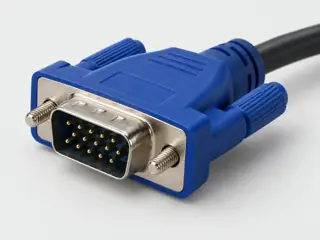
Compare named device manuals instead of combining their assignments into a universal HD15 wiring map.
The answer
Short answer Some pins (5, 9 and 11) are used differently by different devices, so check your device’s manual.
The fifteen-position shape does not make every device’s table identical. Dell P2016 and NEC VT37 manuals document different functions for pins 5, 9 and 11.
The engineering table here follows the Dell P2016 Rev. A02 example only. The NEC entries are a comparison, not corrections silently applied to Dell’s table.
2Reasoning step
Keep the view and side of the connector attached to the assignment. Both cited source views show the top row running 5 to 1 from left to right; that does not identify the view of a loose connector you are holding.
3Reasoning step
A source label such as “Computer 5 V / 3.3 V” is not permission to inject a supply. Likewise, an unconnected position on one projector does not establish that another cable may omit it.
4Reasoning step
Use the exact device revision and accessory documentation for an unknown port. The unresolved result is preferable to splicing together incompatible tables or declaring a device faulty.
Selected differences between two exact manuals — not a wiring recipe
Scroll horizontally on narrow screens. Source views: Dell printed page 15; NEC printed page 55. These are device-specific assignments, not interchangeable voltage or wiring instructions.
What to check next
Read the precise device model and manual revision.
Check whether the numbered source view is the same face you are inspecting.
Separate documented signal labels from actions such as wiring or applying power.
Compare the cable and both endpoints; leave undocumented positions unresolved.
Question pages do not create compatibility verdicts.
They reorganize facts and uncertainty already represented in the atlas. Exact-device, cable, protocol, power, safety and performance requirements remain separate where the evidence says they are separate.
Page scope: Evidence attached to records and cable profiles referenced by this guide; not a sentence-by-sentence editorial approval.
Assessment 2026-10-22 · earliest scheduled source review 2026-12-30. This is a recorded-date assessment, not a live source check. Page-level independent review is not established by this panel.
Not established / limitations: An exact-device example, not a universal HD15 assignment. Pin 9 wording is retained as a source label, not an instruction to apply a voltage. No PCB footprint or fabrication tolerances.
Locator: Printed page 15 (PDF page 15), VGA port pin assignments and numbered connector view; revision on PDF page 2.
NEC Viewtechnology, Ltd. (Sharp NEC official archive) · Unclassified publisher domain · inspected 2026-10-07 · due 2027-01-05
Within inspection window
Scoped support: Exact VT37 connector role and mode example; contrasts with the Dell P2016 assignment, and documents a component-capable HD15 input with the named adapter.
Not established / limitations: The inspected device has extra modes. Its SCART and component functions do not transfer to another VGA port. No universal conversion, adapter wiring, mode-selection or timing guarantee.
Locator: Printed pages 14, 16 and 55 (PDF pages 21, 23 and 62): separate audio, component-input example and COMPUTER input assignments.
Scoped support: Named active DVI-D source to VGA display path. Reverse operation is not established. Conflicting resolution labels are not used.
Not established / limitations: Named example only. No universal compatibility or publication approval. Raw-byte acquisition status is recorded separately.
Locator: PDF pages 1–2: direction, low-powered-port note, Hardware / AV Input / AV Output / Audio; page 2 visually inspected.
Trace 6 claims to their source records
C016A · P016
The familiar VGA-style HD15 connector has three rows of five contact positions.
Claim scope: Consumer identification / documented standard or product class only
Dell P2016 Rev. A02, page 15, assigns its VGA example as follows: 1 red video, 2 green video, 3 blue video, 4 ground, 5 self-test, 6 red return, 7 green return, 8 blue return, 9 computer 5 V / 3.3 V, 10 sync ground, 11 ground, 12 DDC data, 13 horizontal sync, 14 vertical sync, 15 DDC clock.
Claim scope: Exact manual assignment and numbered source view only; not a universal VGA wiring map, supply instruction or authorization to modify a cable.
The NEC VT37 manual, page 55, differs from the Dell P2016 example: pin 5 is ground rather than self-test, pin 9 is not connected rather than a computer-supply label, and pin 11 is SCART sync rather than ground.
Claim scope: Comparison of two named device manuals only. Differences are not reconciled into one universal pinout or a manufacturing defect diagnosis.
NEC VT37 page 14 documents separate RGB/VGA and audio cables for its computer connection. Its page-55 COMPUTER connector table contains video, sync and control assignments rather than an audio channel.
Claim scope: Conventional RGB/VGA role illustrated by this exact device; do not infer that a proprietary combined cable has no separate audio conductors.
NEC VT37 page 16 documents a component source connected to its COMPUTER input through the ADP-CV1 15-pin-to-three-RCA adapter and a three-RCA component cable. The manual separately identifies composite VIDEO input and audio connections.
Claim scope: Named component-capable input example, not evidence that arbitrary VGA outputs generate component or composite video, or that a connector-only adapter converts signal formats.
Recorded evidence only. An inspection date, publisher label, source link or generated packet is not independent technical review, hardware testing, fabrication approval or a compatibility verdict.